

- How the Internet Works by Connecting Networks and Moving Packets
- From a Simple Network to a Network of Networks
- The Physical Infrastructure Behind Internet Connections
- How Data Travels Across the Internet
- TCP/IP and the Protocols That Keep Data Moving
- How Names, Servers, and Browsers Turn Traffic Into Websites
- A Website Request Step by Step
- Why the Internet Is Distributed and Resilient
- Security, Privacy, and Reliability Limits
- FAQ
- How 1Byte Supports Your Internet Presence
- Conclusion
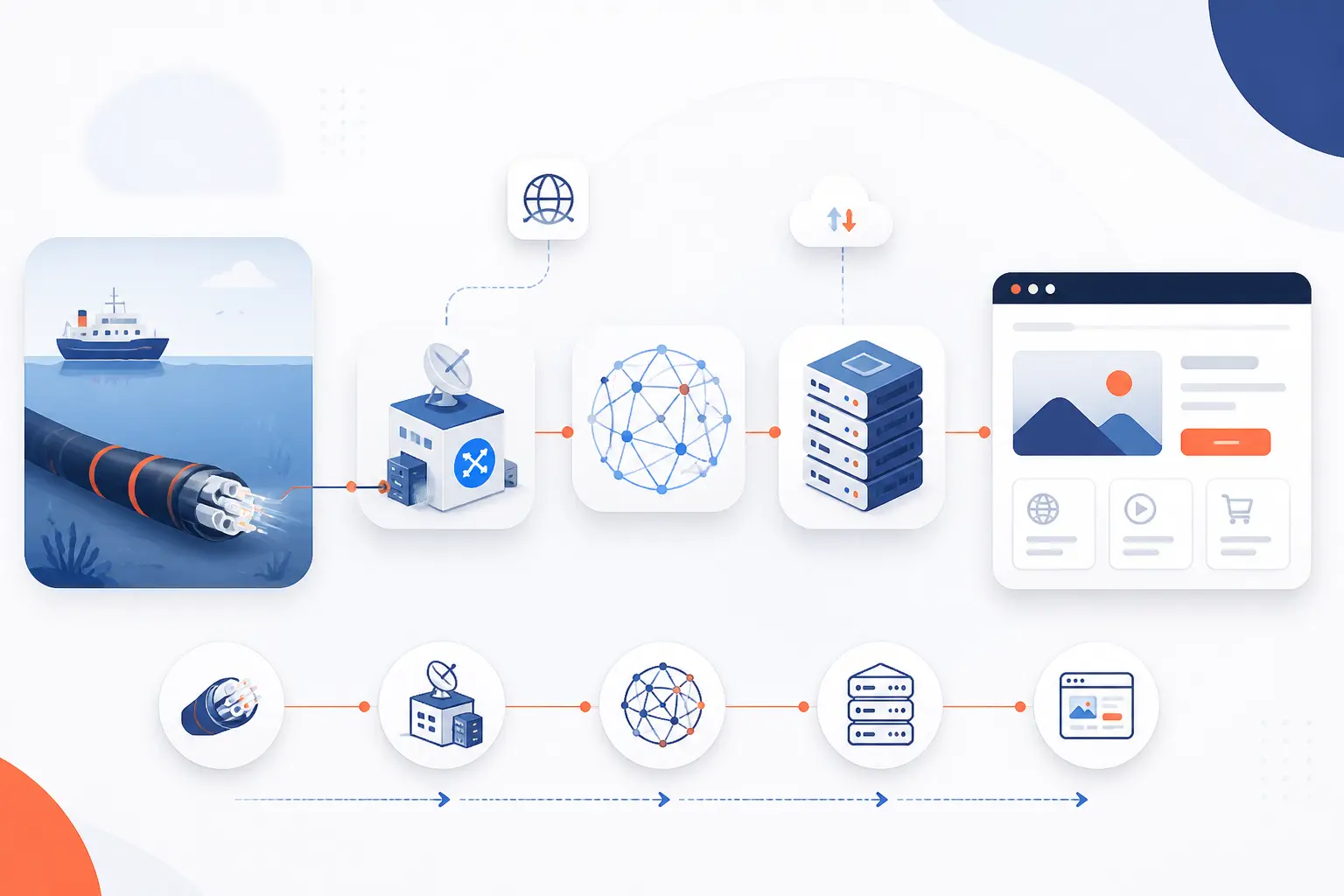
How the internet works is simpler than it first appears. We can define it as a global system of connected networks that moves small pieces of data between devices using shared rules. When we open a website, send a message, or stream a video, our device breaks data into packets, hands them to nearby network equipment, and those packets travel across many networks until they reach the right destination. The destination then rebuilds the data into the page, file, call, or video we asked for.
We think the best mental model is this: the internet is not one giant machine. It is a cooperative traffic system made of cables, radios, routers, servers, and standards. The web is only one service running on top of that system. Email, video calls, cloud apps, and game traffic use the same underlying roads, even if they behave a little differently once they are on them.
How the Internet Works by Connecting Networks and Moving Packets
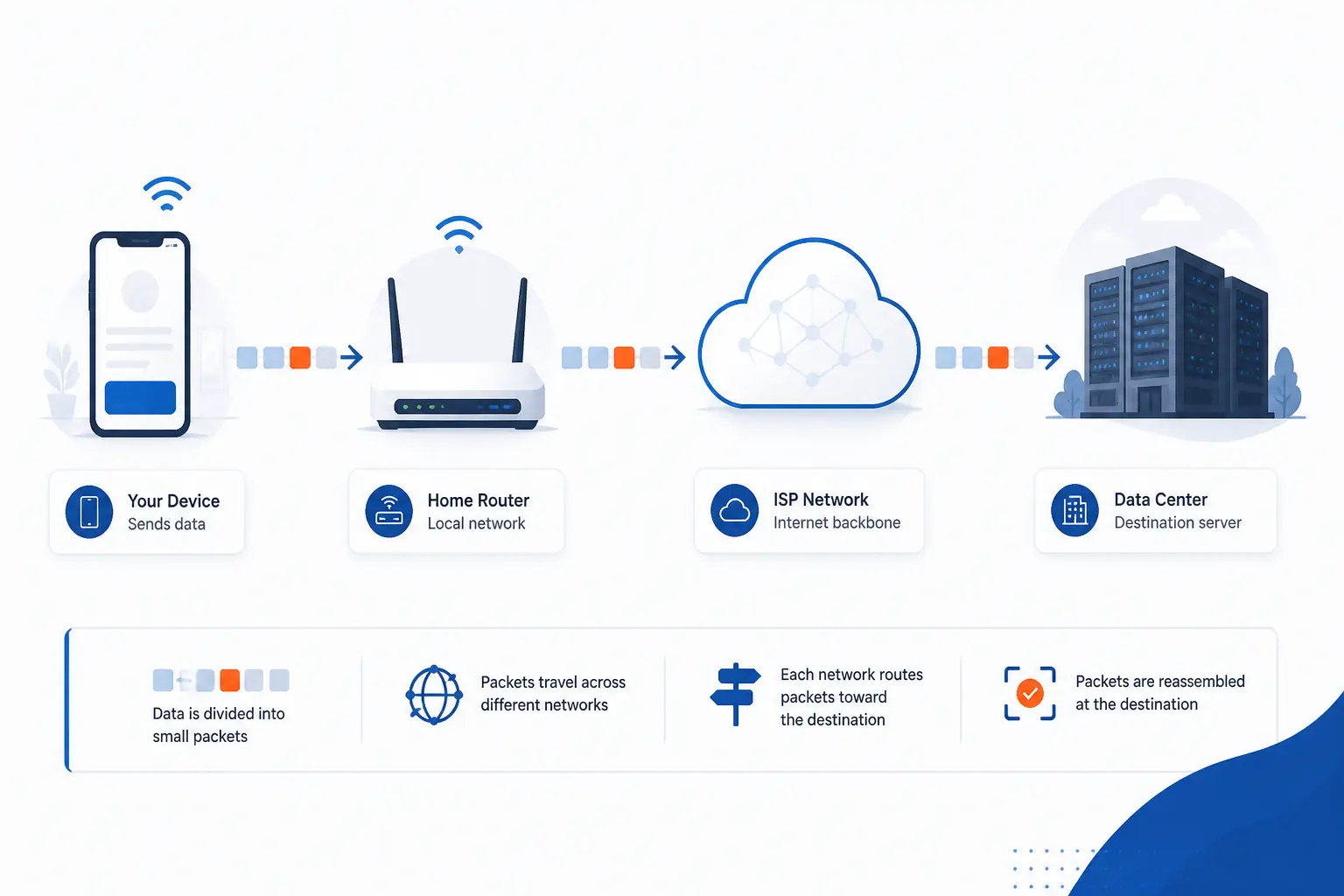
The internet works by connecting many independent networks and moving packets between them. Each packet carries addressing information, so routers can decide where to send it next, and the receiving device can tell where it belongs. In practice, this means your phone, your home router, your ISP, and distant data centers all cooperate for a single page load. We like this definition because it gets straight to the point: the internet is a delivery system for data, not just a place where websites live.
FURTHER READING: |
| 1. What Is Virtual Networking and Why It Matters |
| 2. Understanding DNS Hierarchy: From Root Servers to Your Website |
| 3. What Is a Proxy Server and How Does It Work |
From a Simple Network to a Network of Networks
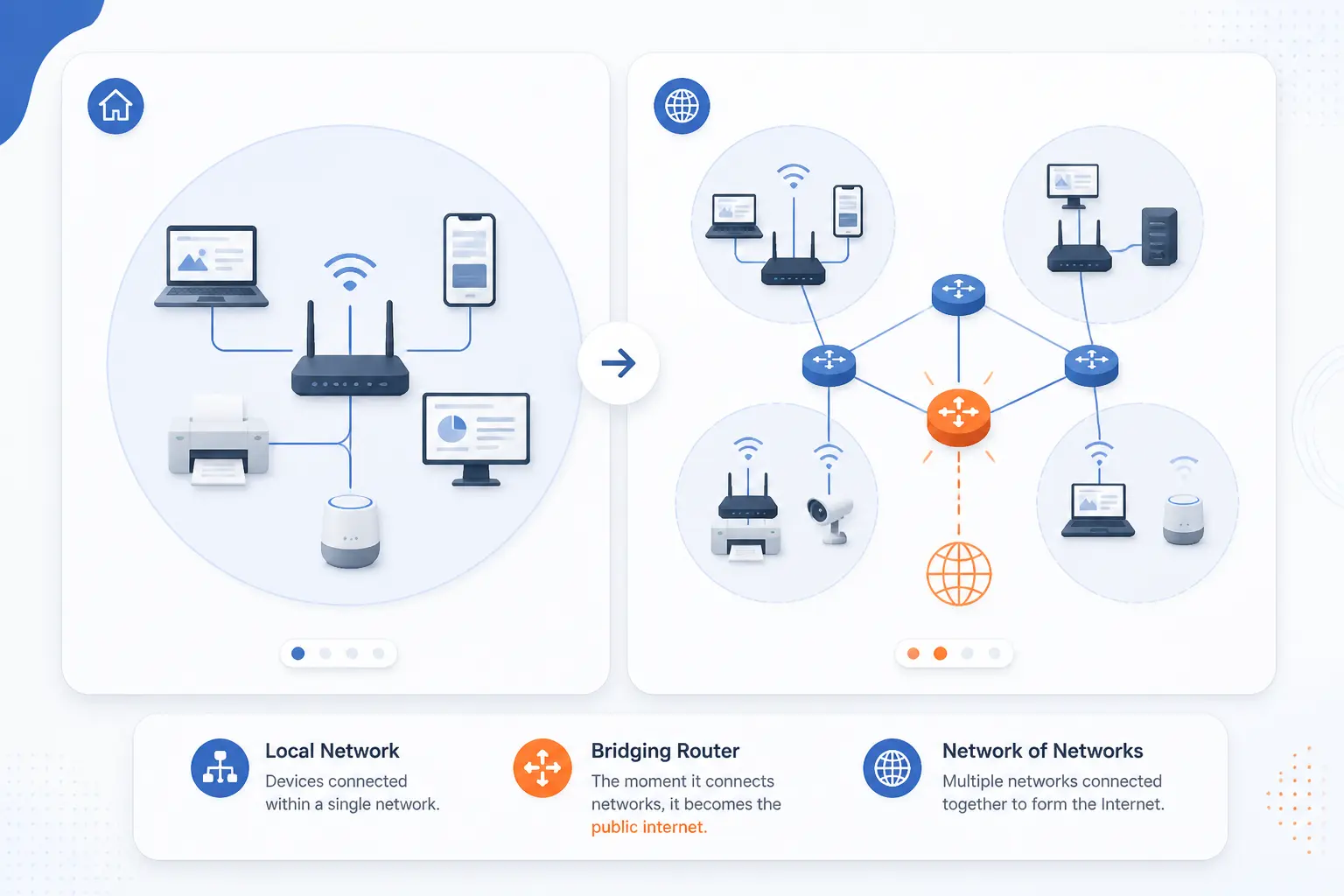
A simple network becomes part of the internet when it can reach other networks through routers and providers. Devices in one room can talk to each other without touching the public internet, but the public internet begins once traffic can leave that local segment and cross outside organizations. That is why people call it a network of networks. One network is useful, but interconnection is what turns private communication into global reach.
Devices on One Local Network
A local network lets nearby devices exchange data directly on the same segment. Your laptop, phone, printer, and smart TV may all sit on the same home or office network and use local addressing to find one another. In that setting, traffic often stays inside the building, which is why printing a document or streaming from a local media box can work even if the ISP connection drops. We usually tell beginners to picture this as one neighborhood street before thinking about the whole highway system.
Routers That Join Separate Networks
Routers join separate networks and decide the next hop for traffic leaving the local one. A home router sits between your devices and your ISP, while larger routers connect offices, provider networks, and data centers. The core idea in RFC 791 is still the right beginner model: data is wrapped, addressed, forwarded across networks, and then unwrapped at the far end. Without routers, every network would stay isolated, which means the internet would collapse into many private islands.
ISPs, Backbone Links, and Exchange Points
ISPs connect customer networks to the wider internet, backbone links carry large volumes over long distances, and exchange points let different networks hand traffic to one another efficiently. Your ISP may carry some traffic itself, buy transit from larger providers, or peer directly with other networks at shared facilities. Packet Clearing House tracks 1327 IXPs, which gives a good sense of how much of the internet depends on neutral meeting points rather than one central switch. In real life, that means a request for a site in another city may pass through several organizations before it reaches the server.
The Physical Infrastructure Behind Internet Connections
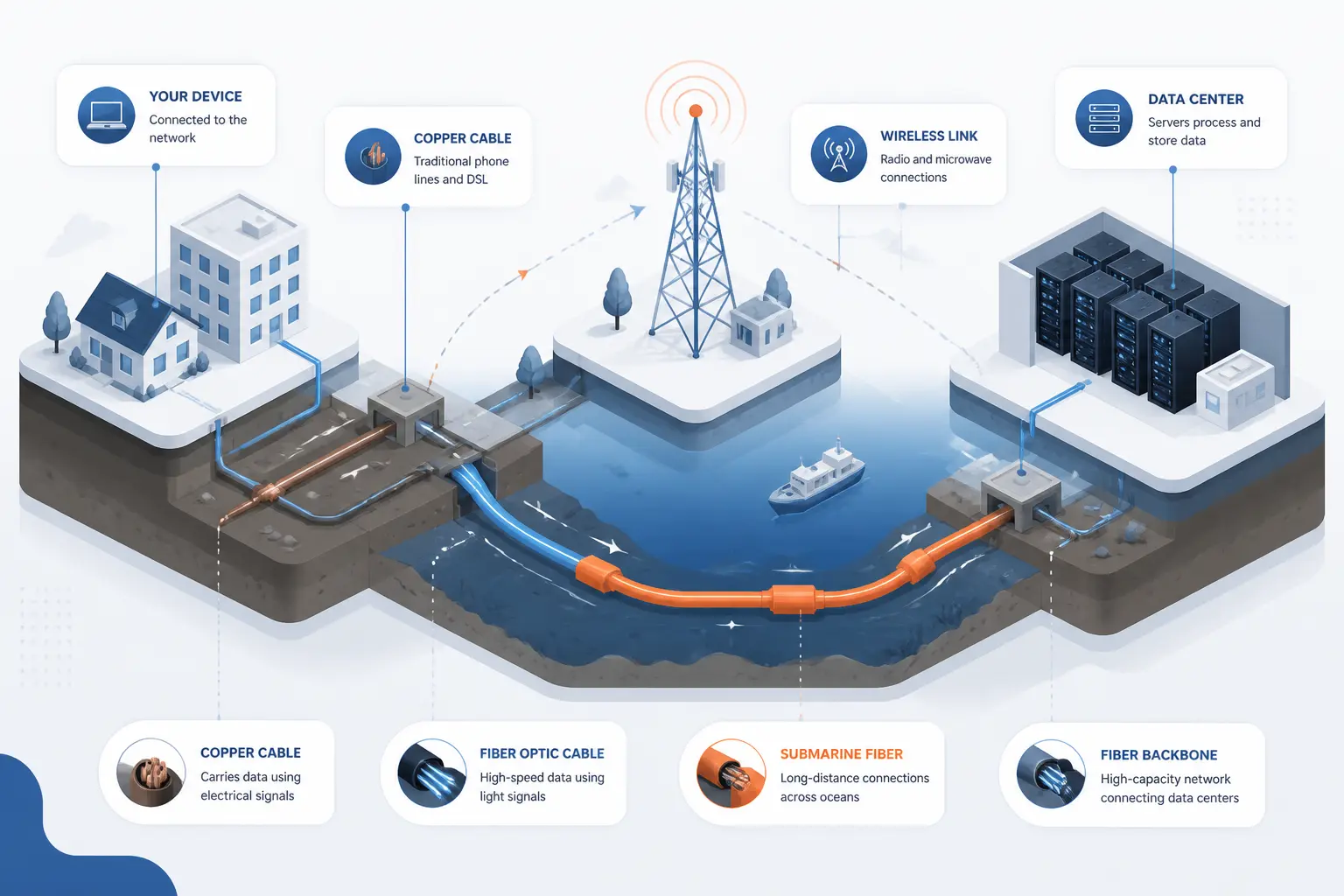
The internet is physical infrastructure first, even if it feels invisible on a screen. Data moves through fiber, copper, radio links, switching gear, routers, and server hardware spread across buildings, campuses, towers, and landing stations. TeleGeography’s 694 cable systems and 1,893 landings are a reminder that global connectivity depends on very real paths under streets and oceans. When we explain the internet to customers, this is the point that usually makes it click: every cloud service still rests on metal, glass, power, and geography.
Cables, Fiber, and Radio Links
Most internet traffic rides on cables for as long as possible, and fiber is the star because it carries large amounts of data over long distances. Copper still appears in some last-mile connections and older building networks, while radio links handle Wi-Fi, cellular, and fixed wireless access. Submarine cables do the heavy lifting between continents, and cellular towers or satellites fill gaps where running cable is harder. We think this mix matters because it explains why a fast home Wi-Fi signal does not guarantee a fast path to a distant service.
Modems, Switches, and Routers
Modems adapt signals for the access line, switches move traffic inside a local network, and routers send traffic between networks. In a home setup, the modem talks to the provider’s access technology, the switch function connects local devices, and the router decides what stays local and what leaves. Many consumer boxes combine all three roles, which hides the distinction. That convenience is useful, but it can also confuse troubleshooting, because a Wi-Fi issue, a local switching issue, and an ISP issue are not the same problem.
Servers, Data Centers, and Access Methods
Servers store content and run applications, data centers house those servers, and access methods determine how users reach them. A website might live on a shared host, a virtual machine, or a cluster of cloud servers inside a data center with redundant power and network connections. Users, meanwhile, reach that site over fiber broadband, cable, DSL, 4G, 5G, or fixed wireless. From our perspective, this is where internet theory becomes business reality, because the way a site is hosted changes how quickly and consistently it can answer requests.
How Data Travels Across the Internet
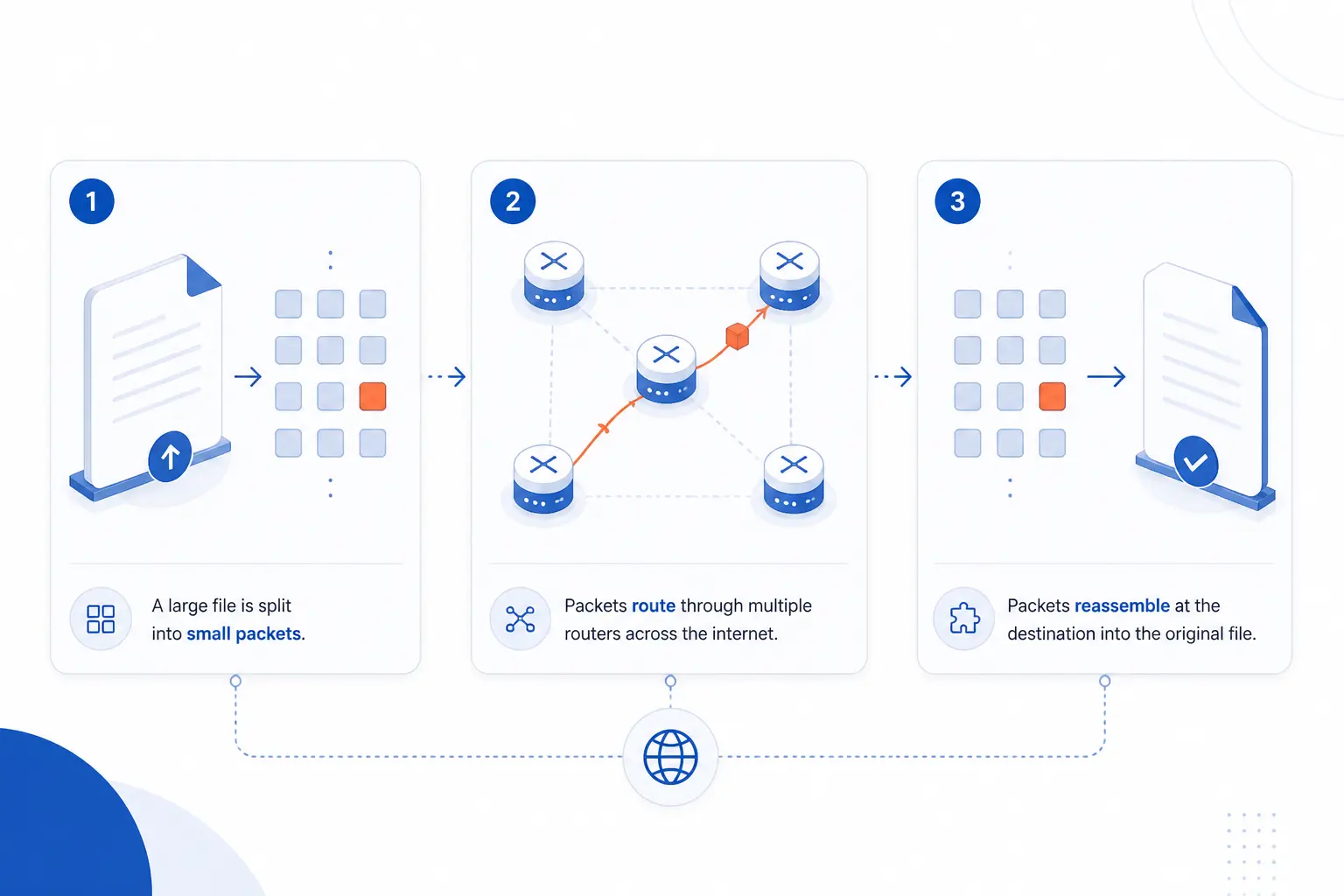
Data travels across the internet by being split into packets, forwarded hop by hop, and reconstructed at the destination. That design is why networks can share capacity instead of reserving a full end-to-end circuit for every conversation. It also explains why different packets from the same page load may not take exactly the same path. We find that once readers understand packets, the rest of the system stops feeling mysterious.
Packets and Packet Switching
Packets are small units of data, and packet switching means the network forwards those units independently instead of holding open one dedicated path. A large image, for example, is not shipped as one giant object. It is broken into many pieces that can move through the network alongside other people’s email, video, and app traffic. This shared-road design is efficient, but it also means delay and congestion can appear if too many packets compete for the same links.
IP Addresses and Routing Tables
IP addresses identify where packets should go, and routing tables help routers choose the next hop. A router does not need to know the entire journey in one magical moment. It usually needs to know the best next step based on what destinations it has learned about. That is why routing feels less like following one printed map and more like passing a parcel from station to station, with each station making a fresh decision.
How Devices Reassemble Data at the Destination
Devices reassemble data by reading packet headers, grouping related traffic, and restoring the original stream or message in the right order when the protocol requires it. If you request a web page, the receiving software has to tell which packets belong to that page, which belong to an image, and which belong to another open tab. TCP handles ordered delivery for many common tasks, while applications built on UDP may tolerate missing pieces or manage ordering themselves. That is why a video call can survive a tiny glitch while a file download usually insists on completeness.
TCP/IP and the Protocols That Keep Data Moving
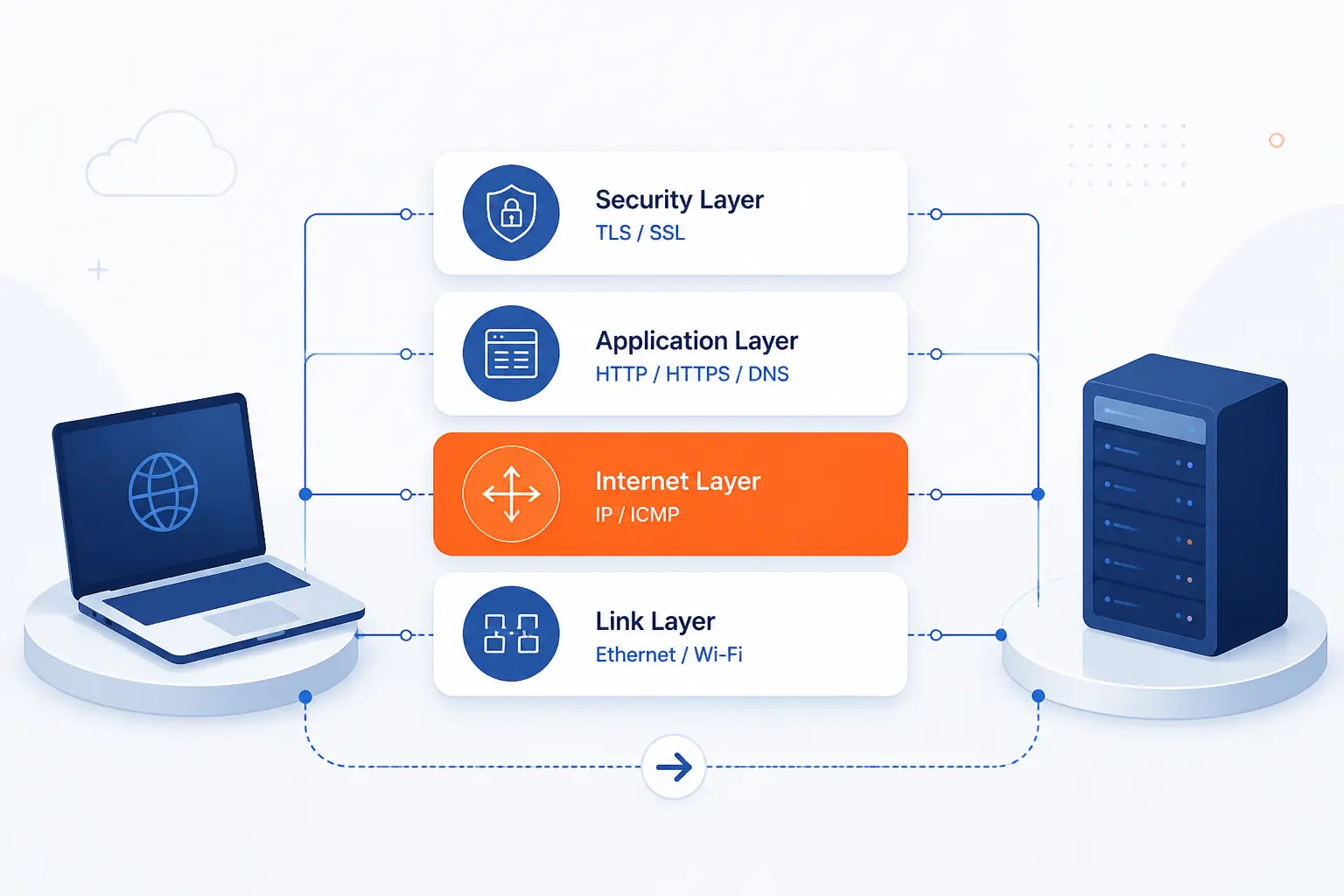
TCP/IP is the family of rules that lets unlike devices communicate predictably across many networks. Different protocols handle different jobs, from moving frames on a local link to addressing packets, delivering application data, and securing traffic. The internet works because these layers divide responsibility instead of forcing one protocol to do everything. We think that layered design is one of engineering’s great practical compromises, because it is messy in places but incredibly durable.
Link and Local Network Protocols
Link and local network protocols move data across a single physical or wireless segment. Ethernet and Wi-Fi are familiar examples, and they focus on delivery inside the local environment rather than across the whole world. Their job is to get data from one device to the next reachable network point. Once the data needs to leave that segment, IP and routing take over.
IP for Addressing and Routing
IP exists to address packets and make inter-network routing possible. It carries source and destination information so routers can forward traffic toward the right place. In simple terms, link protocols move data on the current road, while IP tells the wider system which city the parcel is trying to reach. That separation is one reason the internet can combine home Wi-Fi, enterprise Ethernet, mobile networks, and submarine fiber in one working system.
TCP vs UDP for Delivery
TCP favors reliable, ordered delivery, while UDP favors low overhead and message-oriented delivery. The IETF’s RFC 8095 describes this difference well, with TCP providing reliability features and UDP preserving datagram boundaries without connection setup. In practice, web pages and file transfers often want TCP’s caution, while voice, gaming, and streaming features may prefer the timelier behavior of UDP. We would not call one better than the other. They solve different transport problems.
HTTP, HTTPS, and TLS for Web Traffic
HTTP defines how browsers and servers ask for and return web content, while HTTPS means that same traffic is protected with TLS. A browser sends a request, the server sends back a response, and the contents may include HTML, images, style sheets, scripts, or application data. The model in RFC 9110 is a request-and-response conversation, which is exactly why a web page is really a series of fetches rather than one magic file. When TLS is added, the exchange gains encryption and server authentication, which is why the lock icon matters.
How Names, Servers, and Browsers Turn Traffic Into Websites
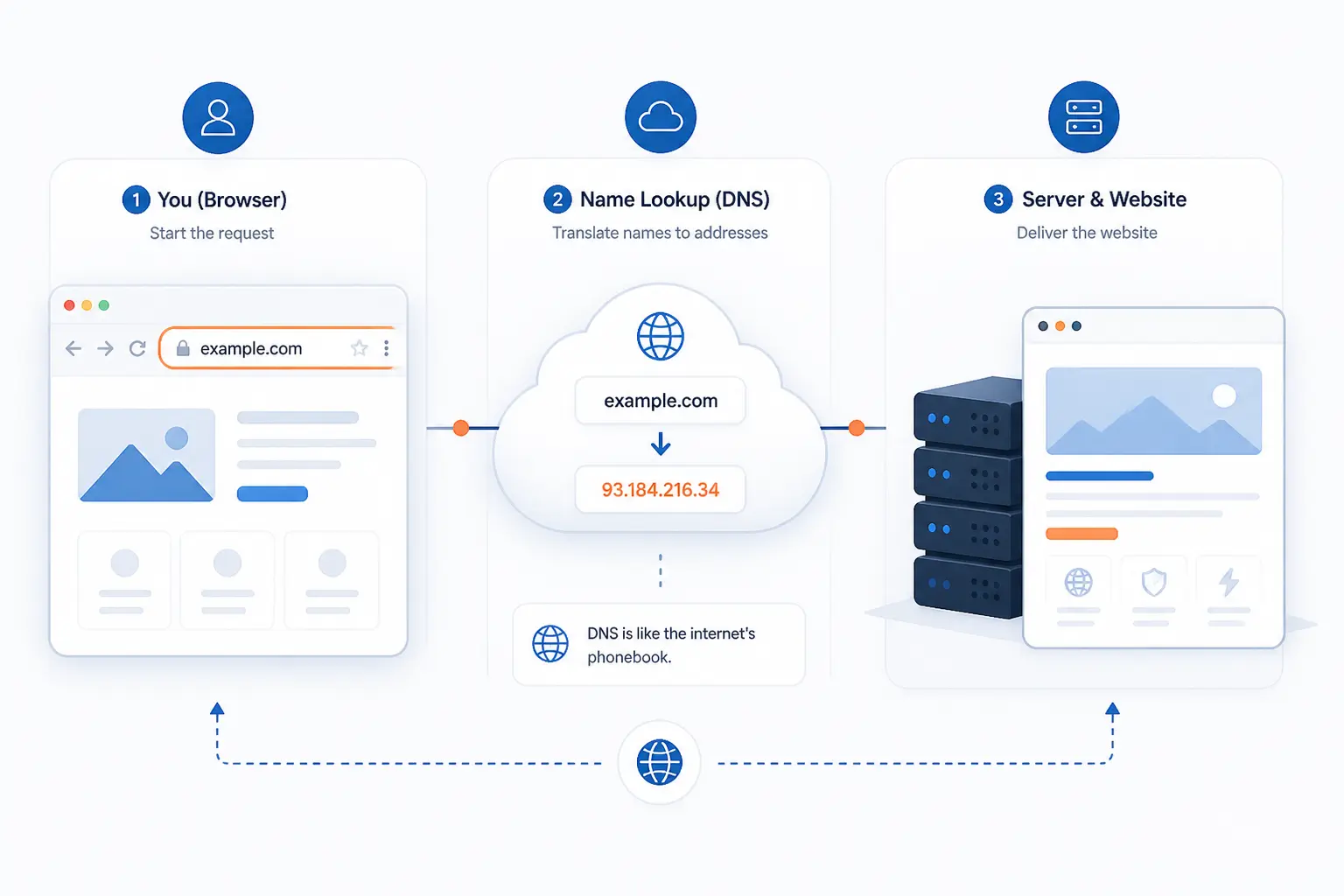
Websites appear when naming, hosting, and browser rendering work together. Humans prefer names, servers prefer addresses, and browsers need specific files and responses to paint a usable page. That is why the journey from typing a domain to seeing a homepage involves more than one system. We think this is the most useful section for non-engineers, because it connects network plumbing to the moment a page actually appears.
DNS Resolves Domain Names to IP Addresses
DNS turns a human-friendly domain name into the IP address a network can route to. The naming model in RFC 1034 exists so users can remember names while computers still forward traffic by address. Without DNS, we would need to type raw numeric addresses and keep track of changes by hand. That would be miserable at any real scale, and the early internet learned that lesson quickly.
Web Servers Return Files and Application Data
Web servers answer requests by returning files, generated content, or both. A basic site may serve static HTML, CSS, and images directly from disk, while a dynamic application may build the response after talking to a database or another service. Either way, the browser does not receive a finished visual page from the server. It receives resources and instructions that still need client-side assembly.
Browsers Request, Assemble, and Render Pages
Browsers turn server responses into visible pages by requesting resources, parsing them, and rendering the result on screen. That means the browser may fetch HTML first, then discover CSS, JavaScript, images, fonts, and other assets that are needed before the page looks complete. We see this every day in MDN’s rendering guide, which matches real page behavior surprisingly well for such a complex process. This is also why one slow script or stylesheet can make a page feel sluggish even when the server responded fast.
A Website Request Step by Step
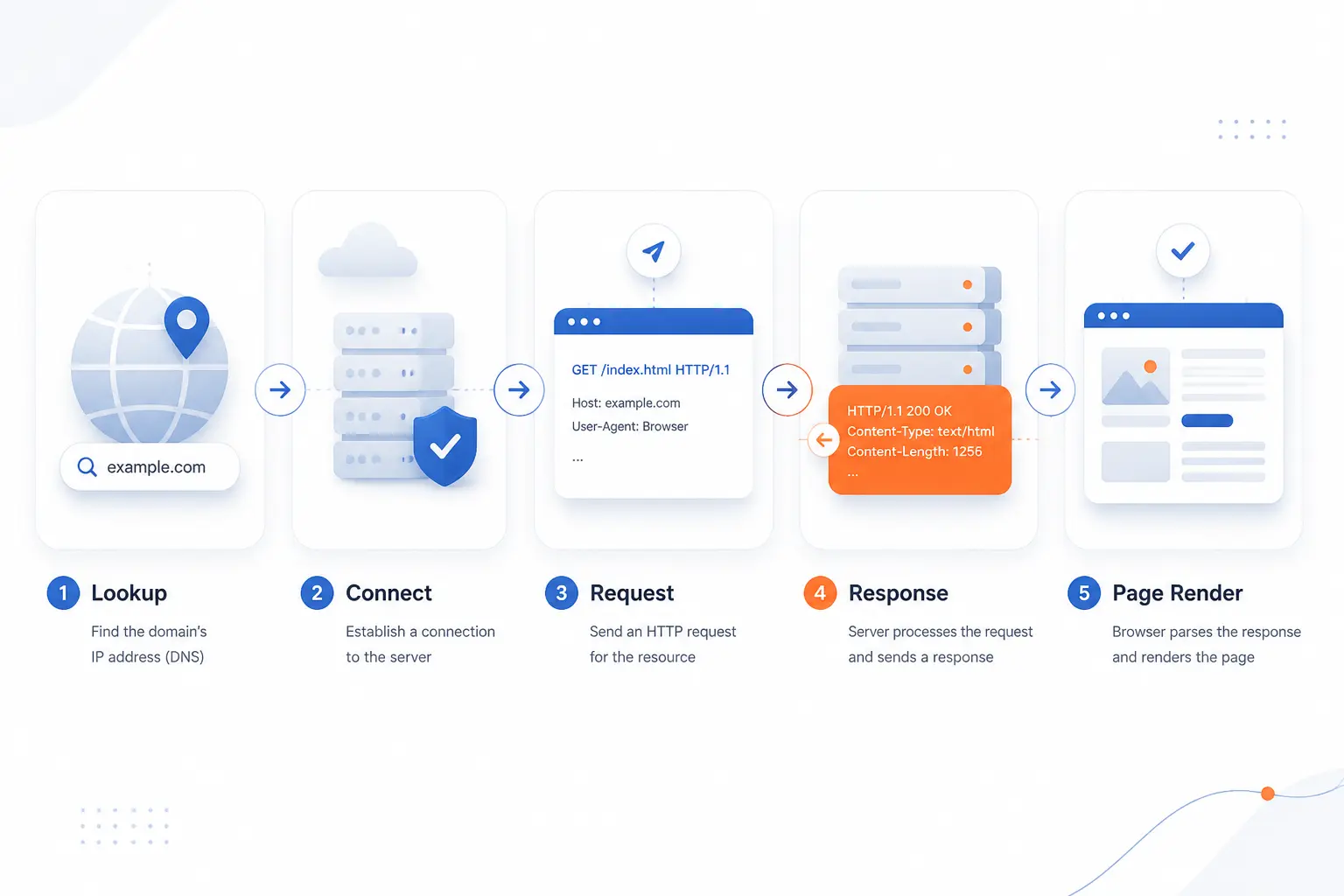
A website request usually starts with a name lookup, continues with a network connection, and ends with a series of HTTP responses the browser renders. The whole process can feel instant, but several systems cooperate in sequence. Once we lay out those steps plainly, most readers stop treating page loads as black magic. They start seeing them as fast, repeated acts of coordinated delivery.
Starting With a DNS Lookup
A website request starts by resolving the domain name to an address. If your device or local resolver does not already have the answer cached, the lookup can walk the hierarchy beginning with the root name servers, then the top-level domain, and finally the site’s authoritative DNS records. In practice, caching makes many lookups much faster than that. Still, DNS is the first gate, and when it fails, the site can be healthy while users still cannot reach it.
Opening the Connection and Encryption Handshake
The browser next opens a transport connection and, for HTTPS, performs an encryption handshake. In the common case, that means establishing TCP and then negotiating TLS settings, certificates, and session keys before sending the actual web request. We think this step is easy to overlook because users rarely notice it unless there is a certificate error or a slow handshake. Yet this is the moment trust and privacy are established for the session.
Sending HTTP Requests and Receiving Responses
The browser then sends HTTP requests, and the server returns responses with status codes, headers, and content. A single click might fetch a document with GET, receive a redirect, request a login resource, and then pull API data for the visible page. That request-response pattern is the heart of the web, and it scales because each exchange is usually small and well defined. When something breaks here, you see symptoms like 404 pages, 500 errors, or endless loading.
Loading Additional Files Until the Page Appears
The page appears only after the browser fetches the extra files the initial document references. One HTML response can trigger requests for stylesheets, scripts, images, icons, fonts, analytics beacons, and embedded media, which is why a site is often a bundle of many network trips rather than one. This is also why performance work so often comes down to cutting requests, shrinking assets, and delaying non-essential code. A site that looks simple at first glance can still make dozens of fetches behind the curtain.
Why the Internet Is Distributed and Resilient
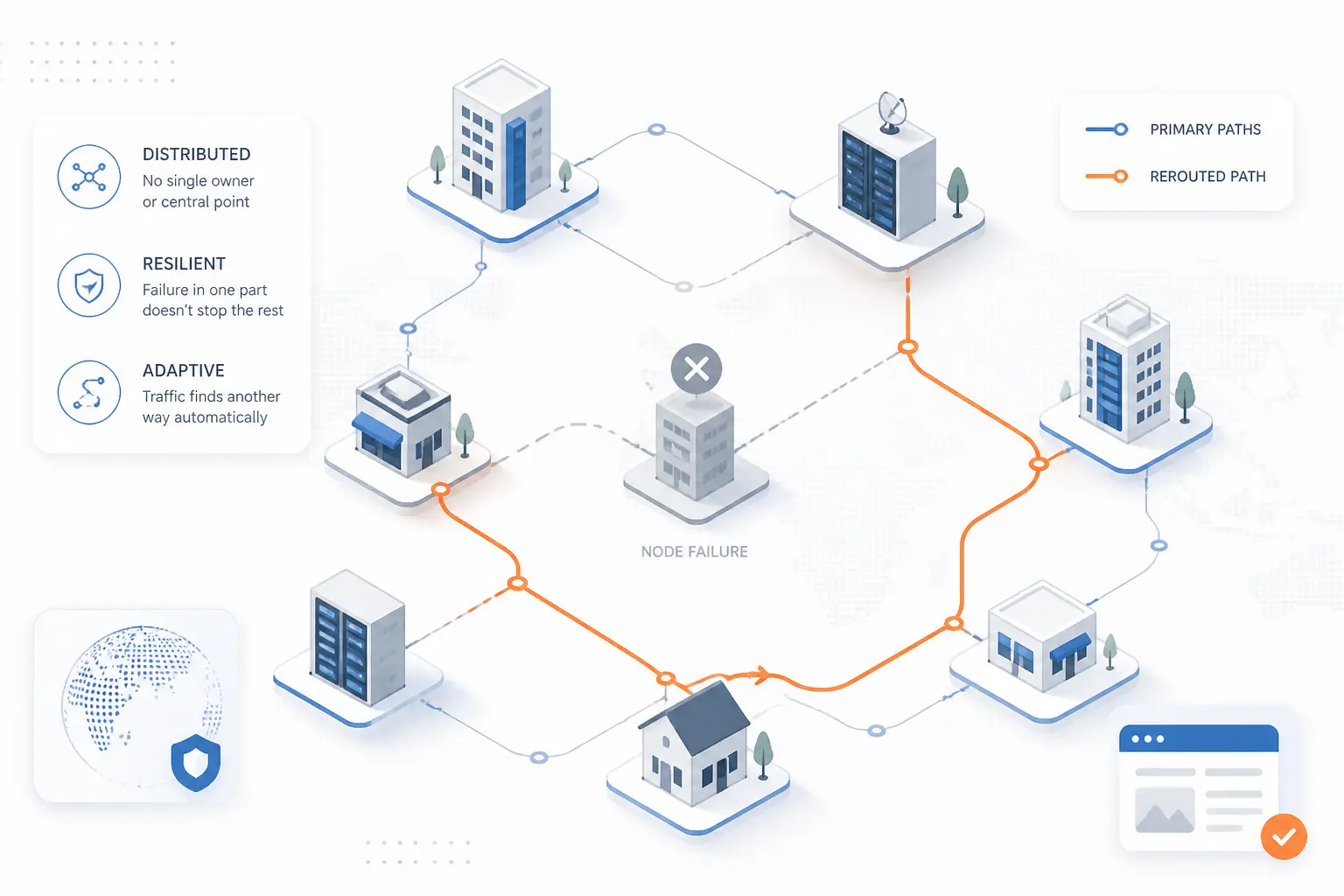
The internet is distributed because no single operator owns or controls the entire system, and that same distribution makes it resilient. Independent networks agree to common protocols, but they still run their own equipment, policies, and paths. That creates complexity, yet it also prevents one local failure from automatically becoming a global failure. We would argue that this loose coordination is one of the internet’s biggest strengths.
No Single Control Center
The internet has no single control center that routes every packet everywhere. Standards bodies define protocols, regional groups allocate resources, and network operators make local decisions, but the whole system is still decentralized in operation. That is why one company cannot simply flip the internet off like a room light. It can disrupt its own network, or a large piece of traffic, but not the entire global system at once.
Multiple Paths Keep Traffic Moving
Multiple paths keep traffic moving when one link fails or becomes congested. If a fiber route is cut, or one provider has trouble, traffic may be shifted through alternate paths, sometimes with only a brief delay. The tradeoff is that alternate paths can be longer or busier, which is why a service may stay up while still feeling slower. Resilience does not mean perfect performance. It means the system has options.
Routing Changes as Networks Connect and Disconnect
Routing changes constantly as networks learn, withdraw, and replace reachability information. At the inter-network edge, RFC 4271 defines BGP as the protocol used to exchange that reachability between autonomous systems. So when providers add a path, lose a path, or change policy, the map of usable routes changes too. That dynamic behavior is a big reason the internet can adapt, and a big reason routing mistakes can spread fast when operators misconfigure something.
Security, Privacy, and Reliability Limits
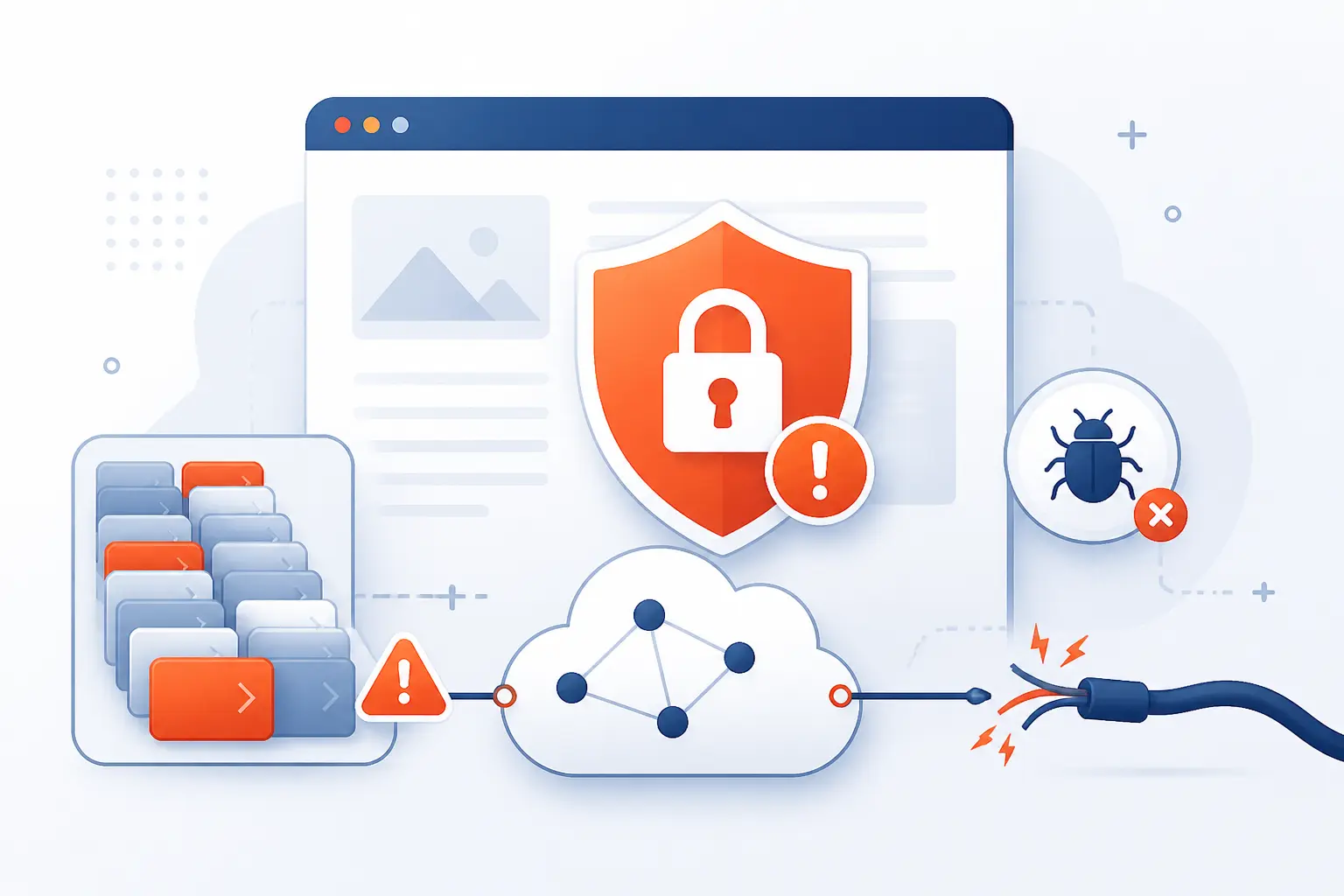
The internet is powerful, but it is not automatically private, safe, or flawless. Encryption protects many sessions, yet traffic still depends on fallible hardware, imperfect software, and human decisions. Congestion, outages, malware, and abuse exist because the internet is an open system with many moving parts. In our view, understanding those limits is part of understanding how the internet works at all.
Where Encryption Helps
Encryption helps by protecting data in transit and by verifying the identity of the server you are talking to. TLS 1.3 in RFC 8446 is built to provide authentication, confidentiality, and integrity for traffic sent after the handshake. That means someone on the path should not be able to read or silently alter the protected contents. It does not mean every detail disappears, though, because metadata, endpoints, and some surrounding signals can still reveal plenty.
Why Congestion and Outages Still Happen
Congestion and outages still happen because capacity is finite and systems fail. A busy access link, a broken fiber, a misconfigured router, a DNS outage, or a power event in a data center can all disrupt service. Sometimes the internet is not down at all, but one important dependency is. That distinction matters, because fixing a local Wi-Fi bottleneck is a very different job from fixing a regional routing incident.
Risks Such as Malware, Surveillance, and Abuse
Risks such as malware, surveillance, phishing, spam, and botnet abuse exist because the internet transports both legitimate and malicious traffic. Attackers can trick users, exploit software flaws, steal credentials, or run compromised machines at scale. Meanwhile, governments, providers, or platforms may collect or inspect some kinds of data depending on law, policy, and architecture. The internet is a transport and service ecosystem, not a moral filter, which is why security always needs active defenses.
FAQ
This section answers the most common beginner questions directly. The short version is that Wi-Fi is not the internet, the web is only one part of it, and DNS is the naming layer that helps browsers find websites. If the rest of the article felt broad, these answers narrow the ideas into practical everyday terms.
Do I Need Both Internet and Wi-Fi
No, you do not always need both internet and Wi-Fi. Internet access is the connection to outside networks, while Wi-Fi is only one way devices connect locally. You can have internet over an Ethernet cable without Wi-Fi, and you can have Wi-Fi inside a building even if that Wi-Fi has no outside internet access.
How Does the Web Work Step by Step
The web works by resolving a domain name, opening a connection, sending HTTP requests, and rendering the server’s responses in the browser. First, DNS finds the address. Next, the browser connects and usually negotiates TLS for HTTPS. Then the browser requests the page and all its supporting files until the final layout appears on screen.
Is the Web the Same as the Internet
No, the web is not the same as the internet. The internet is the underlying network system that moves data between devices and networks. The web is one application layer service that uses that system, alongside email, messaging, gaming, and many other services.
What Does DNS Do Before a Website Loads
DNS finds the IP address for the domain name you typed. Your browser cannot route to a name by itself, so it asks a resolver for the matching address first. If that answer is cached, the step is fast. If not, the resolver may need to query the DNS hierarchy before the site can begin loading.
How 1Byte Supports Your Internet Presence
Your internet presence depends on clear naming, secure transport, and hosting that matches how your site or app actually behaves. At 1Byte, we think those basics matter more than buzzwords, because a domain, DNS, HTTPS, and the right hosting model determine whether people can find, trust, and reach what you publish. As an AWS Partner, we also see how infrastructure choices shape day-to-day delivery, from a simple brochure site to a custom application.
| Service | Best fit | Practical role |
|---|---|---|
| Domain registration | Any site or app | Gives users a memorable name |
| SSL certificates | Any public site | Enables trusted HTTPS sessions |
| WordPress hosting | WordPress sites | Fits a CMS-based web presence |
| Shared hosting | Smaller sites | Handles basic publishing needs |
| Cloud hosting | Growing applications | Supports flexible deployment patterns |
| Cloud servers | Custom environments | Gives direct control over server setup |
Domain Registration and DNS Setup
Domain registration and DNS setup give your site a usable public identity. The domain is what people type, share, remember, and trust, while DNS records tell browsers and resolvers where the traffic should go. If those records are wrong, users may never reach the correct server, no matter how well the site itself is built. That is why we see domain and DNS work as the first practical layer of being reachable on the internet.
SSL Certificates for Secure HTTPS Connections
SSL certificates make HTTPS possible by helping browsers verify the server they are connecting to. Once the certificate is in place and trusted, browsers can establish an encrypted session and show users that the connection is protected. This matters for logins, forms, checkouts, and everyday browsing, because visitors should not have to guess whether a page is safe to use. From our standpoint, secure transport is the baseline, not a premium extra.
AWS-Partner WordPress Hosting, Shared Hosting, Cloud Hosting, and Cloud Servers
Hosting choice affects how reliably your server can answer the requests the internet sends your way. WordPress hosting suits WordPress-driven publishing, shared hosting fits simpler sites, cloud hosting fits applications that need a more flexible environment, and cloud servers fit custom stacks that need direct control. As an AWS Partner, we think in terms of matching the workload to the right home instead of forcing every project into one model. That practical match is what turns network theory into a site that people can actually reach and use.







Conclusion
The internet works because many networks agree to move packets using shared protocols across real infrastructure. Domains make names usable, DNS turns those names into addresses, routers forward traffic, servers answer requests, and browsers assemble the result into pages people can use. Once we see those pieces clearly, the mystery fades and the logic holds together.
If you are building a site or application, the next useful question is simple: which part of this chain is yours to control, the domain, the DNS, the hosting, the HTTPS setup, or all of them?