

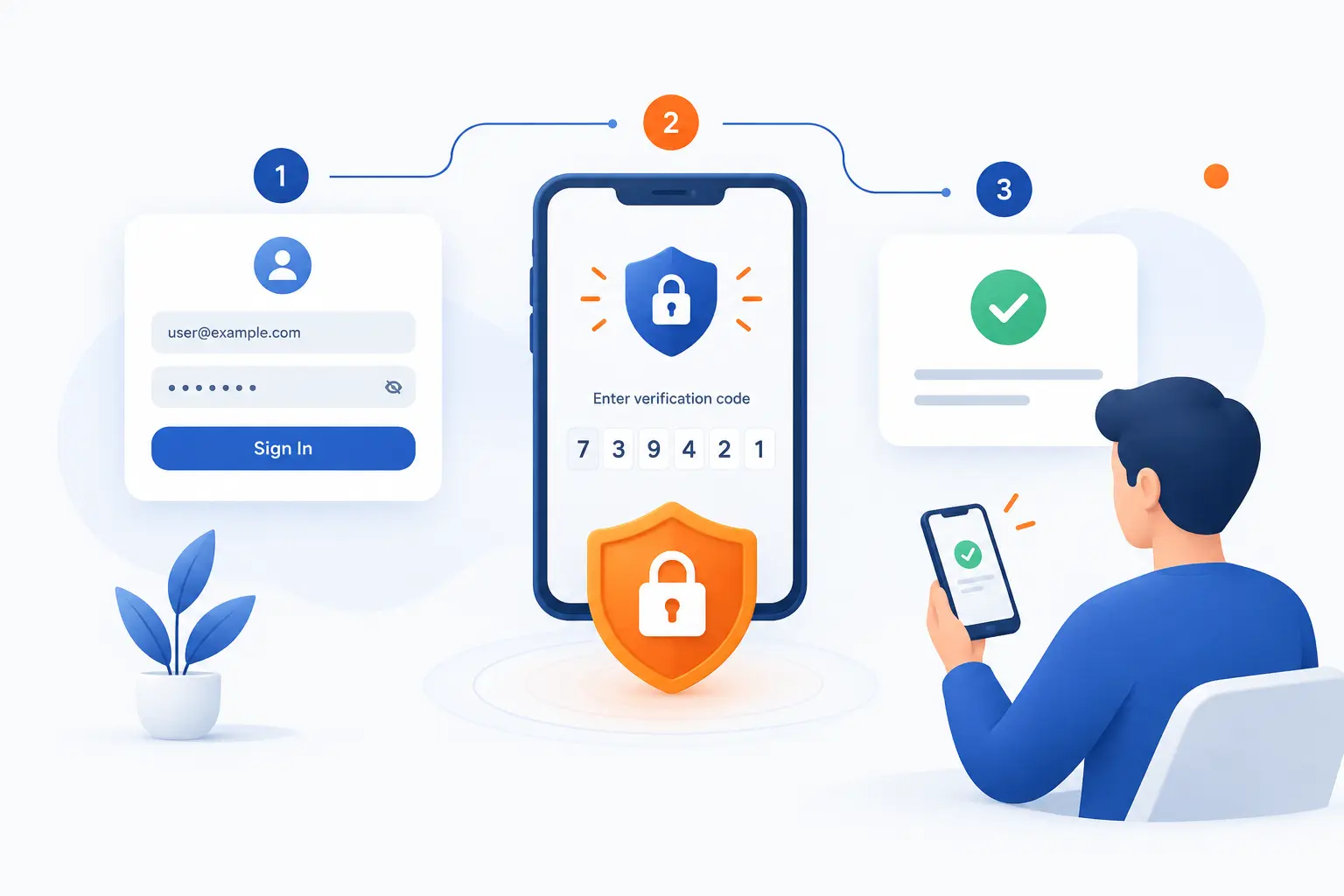
- 2FA Works by Checking Your Password and a Second Proof
- The Authentication Factors Behind 2FA
- What Happens During a 2FA Login
- Common Ways to Receive the Second Factor
- Why Passwords Alone Are Not Enough
- 2FA vs MFA and Two-Step Verification
- Where to Turn On 2FA First
- What to Do If You Lose Access to Your 2FA Device
- How to Use 2FA More Safely
- FAQ
- How 1Byte Supports Safer Website and Account Access
- Conclusion
How does 2FA work? It checks your password first, then asks for a second proof that is harder for a thief to steal. That second proof might be a code, a phone prompt, a security key, or your fingerprint. We think of 2FA as a lock with two different bolts: one can fail, yet the door still should not open. For beginners, the main idea is simple: a password says what you know, while 2FA asks for one more sign that the person logging in is really you.
At 1Byte, we like 2FA because it makes account security less fragile. Passwords get reused, phished, leaked, and guessed. A second check gives you breathing room when a password slips out. It is not magic, and it is not equal across every method, but it is one of the most practical security habits a website owner, developer, or everyday user can adopt.
2FA Works by Checking Your Password and a Second Proof

2FA works by requiring two different proofs before an account lets you in. The first proof is usually your username and password. The second proof comes from another source, such as your phone, an authenticator app, a physical key, or a biometric check. If an attacker only has your password, 2FA should stop the login because the attacker still lacks the second proof. That is the whole value of 2FA in one sentence: stolen passwords become less useful.
A useful way to understand it is to separate “knowing” from “possessing.” Your password lives in your memory or password manager. Your second factor usually lives somewhere else, such as a device or physical key. An attacker now has to compromise both paths, which raises the cost and complexity of the attack.
This is why 2FA matters most on accounts that control other accounts. Email is the obvious example. If someone takes over your email, they can often reset passwords for banking, cloud storage, social media, and work tools. We see this chain reaction all the time in security planning, and it is why we rarely treat email as “just another login.”
Still, 2FA does not make careless behavior safe. If you approve a fake push prompt, type a code into a phishing page, or keep backup codes in the same stolen inbox, you can still lose access. Good 2FA reduces risk, but good habits decide how much protection you really get.
FURTHER READING: |
| 1. What Is Business Email Compromise and How It Works |
| 2. Cloud Mail Security Guide for Safer Business Email |
| 3. What Is API Security and How Do You Protect It |
The Authentication Factors Behind 2FA

The factors behind 2FA are categories of proof: something you know, something you have, and something you are. A true two-factor login combines two different categories, not just two passwords. A password plus a PIN is usually still one category because both are things you know. A password plus a security key is stronger because the attacker must steal or trick two very different forms of proof. Federal identity guidance also describes digital access as proving control of valid items tied to a user, a model we consider useful because it keeps the discussion grounded in evidence, not vibes federal identity rules.
| Factor category | Common examples | Main risk |
|---|---|---|
| Something you know | Password, passphrase, PIN | Can be guessed, reused, phished, or leaked |
| Something you have | Phone, app, security key, smart card | Can be lost, stolen, swapped, or tricked |
| Something you are | Fingerprint, face, iris, voice | Depends on device quality and recovery design |
Something You Know
Something you know is a secret you can remember or store, usually a password, passphrase, or PIN. This is the oldest login pattern on the web. It works because the service compares what you enter with what it expects. The problem is that knowledge can be copied without you noticing.
That copy problem is why passwords alone are brittle. A password can appear in a breach, be reused across sites, or be captured by a fake login form. Even a strong password can fail if you type it into the wrong page. We still recommend strong, unique passwords, ideally stored in a password manager, but we do not like treating them as the whole defense.
Something You Have
Something you have is a physical or digital item you control, such as a phone, authenticator app, smart card, or hardware security key. This factor works because the account expects proof from an item already registered to you. A thief who knows your password still needs that item or a way to trick it. That is a much harder job.
This category includes many 2FA methods, from SMS codes to security keys. The security level varies a lot. A text message code is convenient, but it depends on the phone network and your mobile number. A hardware security key is usually stronger because it uses cryptography tied to the real website.
Something You Are
Something you are is a biometric trait, such as your fingerprint, face, or iris. In consumer systems, biometrics often unlock a device or authorize a stored credential. The website may not receive your fingerprint itself. Instead, your device confirms that you passed the local check.
Biometrics are convenient, but we prefer not to treat them as perfect. You can change a password after a breach, but you cannot change your face in the same practical way. Good systems protect biometric data locally and use it to release a cryptographic proof. Poor systems turn biometrics into a risky recovery shortcut.
What Happens During a 2FA Login

During a 2FA login, the service verifies your password, challenges you for a second proof, and grants access only if both checks pass. The flow is usually fast, but several checks happen behind the scenes. The site must know which second methods are registered to your account. It also must decide whether the code, prompt, key, or biometric signal is valid. We like this layered flow because it turns one stolen secret into an incomplete attack.
Enter Your Username and Password First
The first step is entering your username and password so the service can identify the account and verify the first proof. If the password is wrong, the second step usually never appears. This prevents attackers from testing second-factor prompts against random accounts. It also keeps the login process cleaner for normal users.
Behind the scenes, the service should compare your password safely against a stored password hash, not store your password as readable text. That detail matters, although most users never see it. If the password passes, the service moves to the second check tied to your account settings.
Complete a Second Check on a Trusted Device
The second step is proving control of a trusted method, such as a registered phone, app, key, or biometric-capable device. The service may ask for a code, display a push prompt, or challenge a hardware key. The important part is that this proof should come from something separate from the password. Separation is the point.
Some systems also consider risk signals. For example, a login from a new country, browser, or device may trigger a stronger challenge. We like that approach when it is transparent and fair. It helps stop unusual access without punishing every normal login.
Get Access Only After Both Checks Match
Access is granted only when the password and the second proof both match what the service expects. If either check fails, the login should fail. This is why 2FA can stop many password-based attacks. The attacker’s stolen password is no longer enough by itself.
After success, the service usually creates a session in your browser or app. That session keeps you logged in for a period of time. Some services let you “remember this device,” which reduces repeated prompts. We suggest using that only on devices you control and lock.
Common Ways to Receive the Second Factor

The second factor can arrive through SMS, a voice call, an authenticator app, a push prompt, a hardware key, or a biometric check. These methods all add friction for attackers, but they are not equally strong. We usually prefer authenticator apps or hardware security keys over SMS when the account supports them. Convenience matters, but for critical accounts, phishing resistance matters more.
| Method | Best for | Watch out for |
|---|---|---|
| SMS or voice code | Easy setup and broad availability | SIM swaps, number porting, interception |
| Authenticator app | General personal and business accounts | Phishing pages that ask for the code |
| Push approval | Fast daily logins | Accidental approvals and prompt spam |
| Hardware key | High-value accounts | Loss of the key without a backup |
| Biometric check | Device-based access and passkeys | Weak recovery flows |
One-Time Passcodes by SMS or Voice
SMS and voice 2FA send a temporary code to your phone number. You type that code into the login page after your password. This is better than no second check because the attacker needs access to your number. It is also easy for beginners, which is why many services still offer it.
The downside is that phone numbers are movable. Attackers can use social engineering, account takeover at the mobile carrier, or number porting to receive your messages. NIST guidance treats phone-network delivery as restricted and tells verifiers to consider device swap, SIM change, and number porting risks before using it phone-network risk notes. Our view is simple: use SMS if it is the only choice, but upgrade when you can.
Authenticator Apps and Time-Based Codes
Authenticator apps generate short-lived codes on your device without waiting for a text message. When you scan the setup QR code, the app and the service share a secret. After that, both sides calculate matching codes based on time. The common TOTP design uses a 30-second default time step.
This method is stronger than SMS in many everyday cases because it does not depend on your phone number. It also works offline. The catch is that a phishing site can still ask you for the current code and use it quickly. So we like authenticator apps, but we do not call them phishing-proof.
Push Approvals on a Mobile Device
Push approvals ask you to approve or deny a login from an app on your device. The best versions show details, such as location, device, or a number you must match. The worst versions just ask “Approve?” and train people to tap without thinking. That is dangerous.
Push is convenient for teams because it avoids manual code entry. Yet attackers sometimes exploit that convenience by sending repeated prompts until a tired user taps approve. We call this push fatigue, and we treat it as a human problem as much as a technical one. If your app supports number matching, turn it on.
Hardware Security Keys
Hardware security keys are physical devices that prove possession using cryptography instead of typed codes. You plug one in, tap it, or use it over NFC or Bluetooth. The key signs a challenge from the real site. A fake site should not be able to reuse that proof for the real one.
This is why security keys are our favorite choice for high-value accounts. They reduce the risk of both password theft and code phishing. Modern web standards create credentials scoped to a relying party, which means the proof is tied to the intended site rather than a random lookalike page public-key web standard. The tradeoff is practical: buy at least two keys, because losing your only key can lock you out.
Biometric Verification
Biometric verification uses a body trait, such as your fingerprint or face, to approve access. On many devices, the biometric check unlocks a local credential rather than sending your biometric data to every website. That is a good design. It keeps sensitive proof closer to the device.
Biometrics are helpful because they reduce typing and discourage password reuse. They can also make passkeys easier for regular users. Still, recovery matters. If the recovery path falls back to a weak email reset, the whole system inherits that weakness.
Why Passwords Alone Are Not Enough

Passwords alone are not enough because they are easy to copy, reuse, phish, and sell. A password is just a shared secret. Once someone else knows it, the service may not be able to tell the difference between you and the thief. The risk is not theoretical: Verizon’s 2026 breach reporting says vulnerability exploitation reached 31% as a top entry point, while stolen credentials still remain a major path into systems. In other words, attackers do not need movie-style hacking when a working login gets them through the front door.
People also manage too many accounts to create and remember perfect passwords manually. Reuse is common because it feels practical. Attackers know that. They test leaked passwords from one site against many others, especially email, cloud storage, social platforms, and admin panels.
Phishing makes the problem worse. A fake login page can steal a password even if the real service stored it correctly. The FBI’s 2025 IC3 reporting lists phishing and spoofing among the most frequent complaint categories in federal complaint data. We do not read that as a reason to panic. We read it as a reason to avoid single-point failure.
2FA gives you another checkpoint. If your password leaks, the attacker still needs the second proof. If the second proof is a hardware key or a well-designed passkey, phishing becomes much harder. That is the kind of boring security we like, because boring defenses are the ones people actually keep using.
2FA vs MFA and Two-Step Verification

2FA means two factors, MFA means two or more factors, and two-step verification means two checks that may or may not use different factor categories. In everyday speech, people often use these terms loosely. Technically, the difference matters. A password plus an SMS code is two-factor because it mixes knowledge and possession. A password plus a second password is two steps, but it is not strong two-factor security.
| Term | What it means | Simple example |
|---|---|---|
| 2FA | Two different factor categories | Password plus hardware key |
| MFA | Two or more factor categories | Password plus app code plus biometric approval |
| Two-step verification | Two checks, not always different factors | Password plus emailed code |
Here is the practical takeaway. If you are choosing a setting in an app, do not worry too much about the label. Look at the method. A security key, passkey, or authenticator app usually gives stronger protection than an emailed code or SMS fallback.
We also watch for recovery loopholes. Some services let you enable a strong second factor, then allow account recovery through a weaker path. That is like installing a deadbolt and leaving the back window open. Strong login security should include strong recovery security.
Where to Turn On 2FA First

Turn on 2FA first for accounts that can reset, spend, publish, or store sensitive data. Start with email and your password manager. Then protect banking, shopping, cloud storage, social media, and work accounts. We recommend this order because some accounts control the recovery path for many others. If you only have time for a short security sprint, protect the accounts that would hurt most if stolen.
| Account type | Why it matters | Preferred method |
|---|---|---|
| Email and password manager | They unlock other accounts | Security key or authenticator app |
| Banking, shopping, cloud storage | They hold money, files, or identity data | App, key, or biometric-backed option |
| Social media and work | They affect reputation and business access | Security key for admins, app for users |
Email and Password Manager Accounts
Email and password manager accounts should get 2FA before almost anything else. Email is often the recovery hub for your digital life. A password manager contains the keys to many services. Losing either one can turn a small incident into a full account takeover chain.
For these accounts, we prefer hardware keys or authenticator apps. If the service supports multiple security keys, register two. Keep one with you and store one safely. That small habit can save a very long recovery fight.
Banking, Shopping, and Cloud Storage Accounts
Banking, shopping, and cloud storage accounts need 2FA because they connect to money, purchases, files, and personal records. A stolen shopping account may expose addresses and saved payment methods. A stolen cloud account may expose tax forms, contracts, or private photos. The damage is rarely limited to one login.
Use the strongest method each service supports. Some banks still lean on SMS, while others support app prompts or hardware-backed options. If SMS is the only available method, use it, then make your mobile carrier account harder to hijack with a strong PIN or account lock.
Social Media and Work Accounts
Social media and work accounts need 2FA because they affect trust, reputation, and business operations. A stolen social account can scam friends or customers. A stolen work account can expose email, files, source code, billing panels, or customer data. Admin accounts deserve special attention.
For teams, we like setting a baseline policy. Require 2FA for everyone, then require stronger methods for administrators. Verizon’s 2026 reporting also notes mobile-focused social engineering success running 40% higher than traditional email phishing, which is a good reminder that work security must cover phones too.
What to Do If You Lose Access to Your 2FA Device

If you lose access to your 2FA device, use backup codes, restore the registered method, or recover the account through the provider’s official process. Do not wait until you are locked out to think about recovery. The safest 2FA setup includes at least one backup path that an attacker cannot easily abuse. We recommend treating recovery like spare keys to a building: protected, limited, and known before the emergency.
Use Backup Codes
Backup codes are one-time recovery codes you save when setting up 2FA. They exist for exactly this moment. If your phone breaks or your app is unavailable, a backup code can get you back in. Use one code once, then mark it as spent.
Store backup codes somewhere safer than your inbox. A printed copy in a locked place works for many individuals. A password manager can also store them, as long as the password manager itself has strong protection. Do not take a casual screenshot and forget about it.
Restore Access to Your Phone Number or Authenticator App
Restoring access means getting control of the registered phone number, app backup, or device account tied to your second factor. If you lost a phone, start with the mobile carrier, device backup, or authenticator app recovery option. Some apps support encrypted cloud backup. Others require you to rescan setup codes from each service.
Be careful during restoration. Attackers often target recovery flows because they are softer than normal login flows. Use official websites and apps only. If a support agent asks for sensitive details, verify the channel before sharing anything.
Add a Second Method Before You Need It
The best recovery move is adding a second 2FA method while you still have access. Register a spare security key, a backup authenticator app, or another approved method. This keeps a broken phone from becoming a locked account. It also reduces pressure during a stressful moment.
For business accounts, document who owns backup methods. We prefer clear ownership over improvisation. If an employee leaves, rotate or remove their registered methods. Recovery should help legitimate users, not preserve ghost access.
How to Use 2FA More Safely

Use 2FA more safely by choosing stronger methods, resisting suspicious prompts, and keeping recovery details current. The method matters, but behavior matters too. An authenticator app is weaker if you type codes into fake pages. A hardware key is weaker if your only recovery option is an exposed email account. We like 2FA best when it is paired with password managers, device locks, and clean recovery planning.
Choose Authenticator Apps or Security Keys When Possible
Choose authenticator apps or security keys when possible because they usually beat SMS for important accounts. Authenticator apps avoid phone-number takeover. Security keys go further by using site-bound cryptographic proof. For high-value accounts, that difference is worth the extra setup.
Microsoft has reported that stronger extra checks can block 99% of unauthorized access attempts in its identity context. We do not treat that number as a universal promise for every app. Still, it supports what we see in practice: adding a second barrier changes the attacker’s math.
Watch for Phishing, SIM Swaps, and Push Fatigue
Watch for phishing, SIM swaps, and push fatigue because attackers try to trick the second factor rather than defeat it technically. A fake page can capture a code. A SIM swap can redirect SMS messages. Repeated push requests can wear people down until they approve the wrong login.
Slow down when a prompt appears. Ask yourself whether you just tried to log in. If the answer is no, deny the prompt and change your password from a trusted device. For SMS-heavy accounts, protect your mobile carrier account with its own PIN or lock if available.
Keep Recovery Details Current
Keep recovery details current so you can regain access without opening a weak door for attackers. Update backup email addresses, phone numbers, recovery codes, and spare keys after major life or business changes. Old recovery details are a hidden risk. They often outlive the people, devices, or vendors they were meant to support.
We suggest reviewing critical accounts on a simple schedule. Do it after changing phones, changing jobs, moving teams, or losing a device. A five-minute check can prevent a week of support tickets. Security is often less dramatic than people think.
FAQ
This FAQ answers the most common beginner questions about 2FA in direct terms. The short version is that 2FA adds a second proof to your login. The better version is that the quality of the second proof matters. If you are deciding what to enable, choose the strongest method your service supports and save recovery codes safely.
What Is the Meaning of Two-Factor Authentication
Two-factor authentication means a login requires two different kinds of proof before access is granted. Usually, that means a password plus something you have, such as a phone, app, or hardware key. The goal is to make a stolen password insufficient.
What Happens If You Enable 2FA
If you enable 2FA, your account will ask for a second check after your password. Depending on the service, that check may be a code, prompt, key tap, or biometric approval. You should also receive backup codes or a recovery option during setup.
Is 2FA the Same as 2-Step Verification
No, 2FA is not always the same as two-step verification. 2FA requires two different factor categories, while two-step verification may simply mean two checks. A password plus another remembered secret is two steps, but it is not strong 2FA.
What Is Multi-Factor Authentication
Multi-factor authentication means using two or more different categories of proof for access. 2FA is a type of multi-factor authentication with exactly two factors. In practice, many companies say “MFA” even when they require only two factors.
Which 2FA Method Is the Most Secure
Hardware security keys and phishing-resistant passkeys are usually the most secure common options. They use cryptography tied to the real site, which makes fake login pages less useful. For most users, an authenticator app is a strong second choice when security keys are not available.
How 1Byte Supports Safer Website and Account Access
1Byte supports safer website and account access by helping customers build on a cleaner foundation for domains, certificates, hosting, and cloud infrastructure. 2FA protects logins, but it works best as part of a broader setup. A secure website also needs the right domain controls, encrypted connections, and appropriate hosting choices. As a cloud computing and web hosting provider, we see these pieces as connected, not separate chores.
Domain Registration and SSL Certificates for a More Secure Starting Point
Domain registration and SSL certificates support 2FA by making the real website easier to identify and safer to reach. Your domain is the address customers trust. Your SSL certificate helps browsers establish encrypted connections to that address. Together, they reduce confusion and protect data in transit.
That does not replace 2FA. It complements it. A user still needs a secure login flow, and administrators still need strong account protection. We see domains and certificates as the front gate, while 2FA protects the keys used to manage that gate.
WordPress Hosting and Shared Hosting With Stronger Account Protection
WordPress hosting and shared hosting benefit from stronger account protection because admin panels are common targets. If an attacker gets into a WordPress administrator account, they may change content, add malicious scripts, or create new users. If a hosting account is compromised, the damage can spread further. That is why we encourage customers to treat hosting logins as high-value accounts.
For WordPress, 2FA should protect administrator accounts first. Then it should cover editors, developers, and anyone who can install plugins or change code. On shared hosting, the control panel, billing account, and primary email deserve the same care. A small login habit can protect a large amount of work.
Cloud Hosting and Cloud Servers Backed by an AWS Partner
Cloud hosting and cloud servers need strong login protection because they often control production systems, databases, and application settings. As an AWS Partner, 1Byte understands that cloud access is powerful access. A single compromised admin account can create servers, expose data, or change configurations. That is why 2FA belongs near the top of any cloud access checklist.
We recommend using stronger methods for cloud administrators whenever possible. Security keys are a good fit for people who manage critical infrastructure. Authenticator apps are a practical baseline for many teams. The real goal is simple: make sure one leaked password cannot become a server incident.







Conclusion
2FA protects you by requiring a second proof after your password. That extra proof may be a code, app prompt, security key, or biometric approval. The best methods make stolen passwords far less useful and make phishing harder to pull off. The weakest methods still help, but they need careful use.
Our practical advice is to start where the impact is highest. Protect email, password managers, banking, cloud storage, hosting panels, and administrator accounts first. Use authenticator apps or security keys when available. Save backup codes before you need them.
If you manage a website or cloud account, ask one direct question next: which login would cause the most damage if it were stolen? Turn on the strongest 2FA method there first, then work outward.