

- DNS Filtering Is a DNS-Layer Control for Blocking Harmful or Unwanted Sites
- How DNS Filtering Works Before Content Loads
- What a DNS Filter Can Stop
- Why Teams Use DNS Filtering
- What Makes a Secure DNS Service More Useful
- DNS Filtering vs Web Filtering
- Limits, Risks, and Common Misunderstandings
- FAQ
- How 1Byte Supports Safer DNS and Hosting Setups
- Conclusion
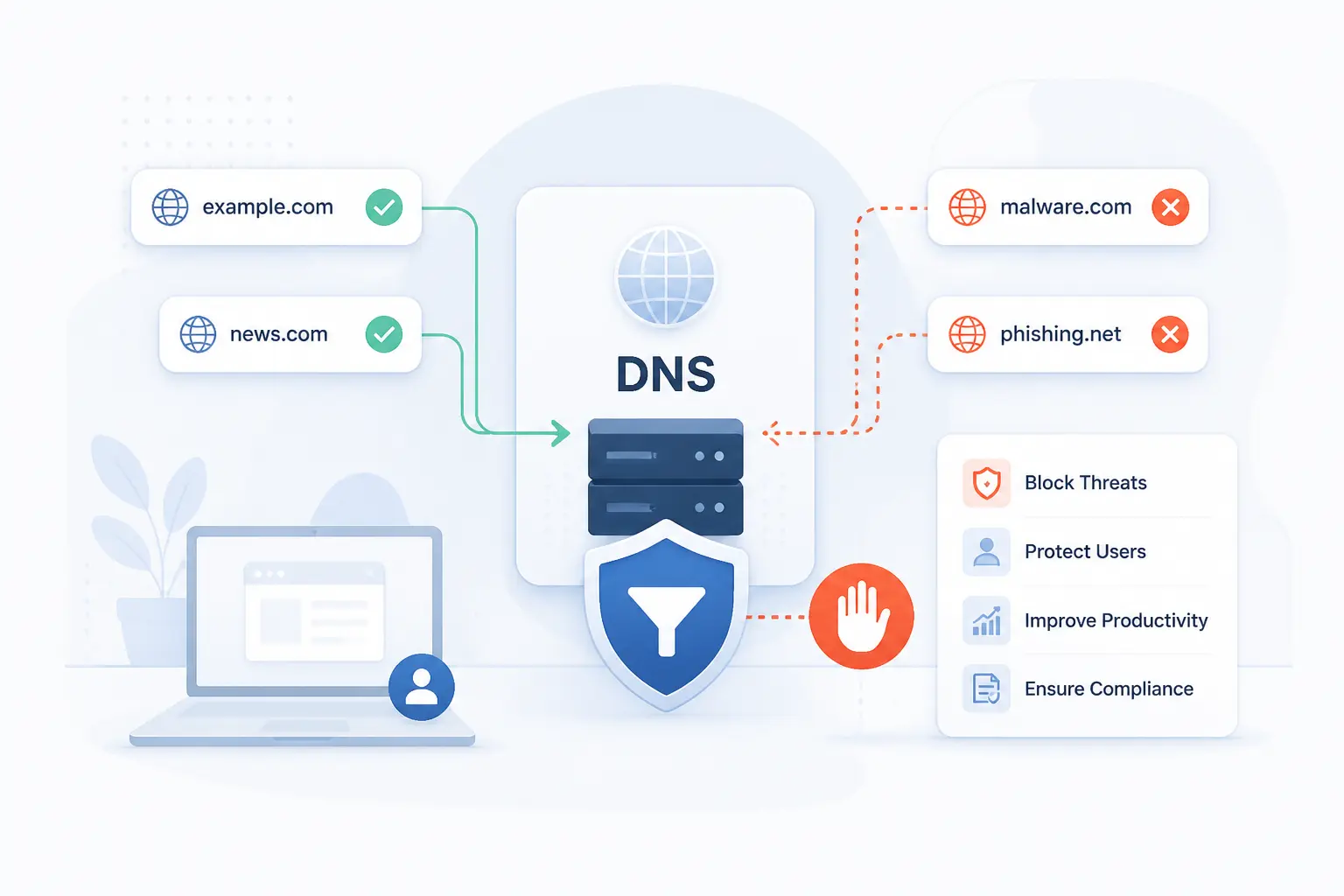
DNS filtering is a security control that checks domain lookups and blocks access to harmful, risky, or unwanted destinations before a browser or app connects. It works at the DNS layer, where human-readable names like example.com are translated into IP addresses. If the requested domain breaks a policy, the resolver refuses the lookup, redirects the user to a block page, or returns a safe response. At 1Byte, we see DNS filtering as one of the simplest early defenses a team can add because it acts before the page, file, ad, or phishing form loads.
That early timing is the whole point. Many attacks begin with a link, a hidden script, a malware callback, or a domain created for fraud. DNS filtering cannot replace firewalls, endpoint protection, or careful application security, but it can stop many bad journeys at the first turn. For small teams, schools, shops, and growing cloud workloads, that makes it practical, affordable, and worth understanding.
DNS Filtering Is a DNS-Layer Control for Blocking Harmful or Unwanted Sites

DNS filtering is the practice of allowing or blocking DNS lookups based on security rules, content rules, or business policies. A DNS filter sits between the user’s device and the internet’s naming system, then decides whether a requested domain should resolve. If the domain is known for phishing, malware, adult content, gambling, ad tracking, or another blocked category, the filter stops the lookup. This matters because DNS is often the first network step before a website, app service, or command-and-control server can be reached.
DNS itself is old, boring, and absolutely essential. The core protocol is described as a standard query-and-response system in the original specification, and that basic pattern still underpins daily internet use. We like DNS filtering because it uses that normal flow as a control point. Instead of waiting until a browser downloads a dangerous page, the resolver can say, “No, we are not going there.”
A simple example helps. An employee clicks a fake invoice link in an email. Before the phishing site opens, the laptop asks a resolver for the site’s IP address. If the resolver recognizes the domain as risky, it blocks the answer. The click still happened, but the connection did not.
FURTHER READING: |
| 1. What Is a Local Area Network and How It Works |
| 2. How to Use a Proxy Server on Windows Mac and Mobile |
| 3. What Is File Transfer Protocol and How Does It Work |
How DNS Filtering Works Before Content Loads

DNS filtering works by inspecting DNS queries before the requested site or service is reached. The device asks a DNS resolver for an address, the resolver checks policy and threat data, then it either returns the real address or blocks the request. This happens quickly enough that most users only see a block page or a failed connection. The mechanics are simple, but the policy behind them can be as light or strict as a team needs.
A DNS Request Is Checked Before a Connection Starts
A DNS request is checked before the device opens the actual connection to the destination. That is why DNS filtering is often described as an early control. The browser may know the domain name from a link, but it usually needs a DNS answer before it can connect to the web server.
The flow usually looks like this:
- A user, app, or background process requests a domain.
- The device sends the lookup to a configured resolver.
- The resolver checks rules, categories, reputation, and threat data.
- The resolver returns the correct address, a block response, or no usable answer.
That means the page content, login form, malicious payload, or tracking script may never reach the user. We see this as the biggest strength of DNS filtering. It acts early, often silently, and with little friction.
Blocklists and Allowlists Decide What Can Resolve
Blocklists and allowlists are the rule sets that decide whether a domain is denied or permitted. A blocklist contains domains, IP addresses, or categories that should not resolve. An allowlist contains approved destinations that should remain reachable, even when broad rules might otherwise block them.
Security vendors and internal IT teams use blocklists for known malware hosts, phishing kits, suspicious newly registered domains, and command-and-control infrastructure. Content policies can also block categories such as adult content, gambling, weapons, streaming media, or social media. Allowlists are useful when a business tool gets misclassified, or when a team wants to make sure key services stay available.
We recommend treating allowlists carefully. They are powerful exceptions. Too many exceptions slowly turn a useful policy into Swiss cheese.
Requests Can Be Blocked by Domain Name or IP Address
DNS filtering can block destinations by domain name, and some services can also use IP-based intelligence. Domain-based blocking is the natural fit because DNS queries ask for names. If a user requests bad-example.com, the resolver can block that name before returning an address.
IP-based blocking is a different layer of judgment. It can help when many malicious domains point to the same infrastructure, or when reputation data shows abuse tied to an address range. Still, IP blocking can be blunt. Shared hosting, content delivery networks, and cloud services may place many unrelated websites behind the same address.
Our view is practical: use domain-based blocking as the core, then treat IP reputation as helpful context. It should not be your only signal.
What a DNS Filter Can Stop

A DNS filter can stop many connections to malicious, inappropriate, or non-work destinations before content loads. It is strongest when the risk is tied to a domain lookup, such as a phishing site, malware host, command-and-control server, ad network, or restricted web category. It is weaker when threats arrive through already-approved services or direct IP connections. So we should think of DNS filtering as a gate at the naming layer, not as a full inspection engine.
| Blocked destination type | Typical purpose | Common action |
|---|---|---|
| Malicious sites | Reduce phishing, malware, and fraud exposure | Block or show warning page |
| Restricted categories | Enforce school, workplace, or guest Wi-Fi rules | Block by category |
| Unwanted services | Limit ads, distractions, or risky apps | Block by domain group |
Malicious Websites, Phishing Pages, and Malware Hosts
DNS filtering is especially useful against malicious websites because many attacks still depend on users or devices reaching attacker-controlled domains. Phishing is a clear example. APWG reported 425,808 attacks in June 2026, which shows why blocking known fraudulent destinations is not just a nice extra.
Real-world phishing is messy. Attackers register lookalike domains, compromise legitimate sites, and rotate infrastructure. Google has also described Safe Browsing lists containing 1.8 million phishing sites, a reminder that malicious web destinations exist at huge scale.
DNS filtering helps by cutting off known bad domains before a login page or file download appears. It can also block malware callbacks, where infected devices try to contact a remote server for instructions. That is useful because the best malware infection is the one that never gets its next command.
Inappropriate Content and Other Restricted Categories
DNS filtering can block inappropriate or restricted content by category. Schools often use it for adult content, gambling, and violent material. Offices may block risky file-sharing sites, illegal streaming, or categories that create legal and HR concerns.
Category blocking is not magic. It depends on classification databases, and classification can be wrong. A health site may discuss sensitive topics for valid reasons. A forum may contain both useful technical answers and harmful content.
That is why we prefer policies with a human review path. If a legitimate site is blocked, users should know how to request access. Good policy should protect people without making normal work feel like a maze.
Unwanted Apps, Ads, and Non-Work Destinations
DNS filtering can reduce access to unwanted apps, ad networks, trackers, and non-work destinations. This is not only about stopping employees from wasting time. It can also reduce exposure to malvertising, shady browser redirects, and domains used by unwanted software.
Some teams block social media during working hours. Others block crypto mining pools, proxy services, or peer-to-peer networks. Guest Wi-Fi networks may block bandwidth-heavy streaming to keep the connection usable for everyone.
We are cautious about overblocking here. A marketing team may need social platforms. A developer may need package repositories that look odd to a generic filter. The best DNS filtering policies match job roles, device groups, and network segments instead of using one blanket rule for everyone.
Why Teams Use DNS Filtering

Teams use DNS filtering to stop threats earlier, enforce acceptable-use rules, improve visibility, and protect networks that are hard to monitor one device at a time. It gives administrators a central way to shape internet access without installing a full inspection stack everywhere. The value is practical: fewer risky clicks become live connections, fewer restricted sites load, and more DNS activity becomes visible. In our opinion, DNS filtering earns its place because it is simple enough for small teams and still useful in larger defense programs.
Earlier Threat Prevention at the DNS Layer
Earlier threat prevention is the main security reason to use DNS filtering. If a malicious domain cannot resolve, the browser or malware process has a harder time reaching it. This can break phishing visits, exploit redirects, and malware command channels before heavier tools get involved.
CISA recommends protective resolvers or similar filters to block known malicious sites and use reputation scoring for new suspicious sites in its counter-phishing guidance. We agree with the spirit of that advice. DNS is not glamorous, but it is a sensible place to catch bad traffic early.
This is especially helpful for smaller organizations. They may not have a full security operations center. A managed DNS-layer control gives them a defensive choke point without months of engineering work.
Stronger Security and Content Policies
DNS filtering strengthens policy enforcement by applying rules at a shared resolver instead of relying only on user judgment. Users make mistakes. People click fast, work under pressure, and trust familiar-looking pages. A resolver policy gives the organization a safety net.
Security policies often block malware, phishing, suspicious newly registered domains, anonymizers, and command-and-control destinations. Content policies may block adult material, gambling, hate content, or illegal downloads. Different groups can have different rules.
We like role-based policy for this reason. Finance teams face invoice fraud. Developers need access to technical resources. Guest users should not touch internal systems. DNS filtering becomes more useful when it reflects those real differences.
Better Productivity, Compliance, and Bandwidth Control
DNS filtering can support productivity, compliance, and bandwidth control by limiting categories that create distraction, legal risk, or excessive traffic. A school may need student-safe browsing. A clinic may need stricter controls on public terminals. A retail shop may want guest Wi-Fi that avoids adult content and piracy sites.
Bandwidth control is more modest. DNS filtering does not shape packets like a traffic management system. Still, blocking high-traffic categories can reduce avoidable load on smaller office or guest networks. That can matter when a site has one internet line and many phones on Wi-Fi.
Compliance is similar. DNS filtering does not make an organization compliant by itself. It can, however, help show that reasonable access controls exist and that the team can review attempted visits to risky categories.
Protection for Offices, Guest Wi-Fi, and Remote Devices
DNS filtering can protect offices, guest Wi-Fi, and remote devices when DNS settings are centrally controlled. On an office network, administrators can point DHCP clients to a filtered resolver. On guest Wi-Fi, the router or access point can send visitors through a restricted policy.
Remote devices need more care. A laptop at home, in a hotel, or on mobile data may bypass office DNS unless it uses an endpoint agent, VPN, secure client, or managed operating system profile. This is where planning matters.
We think remote coverage is now essential. Work does not happen only behind an office firewall. If policy disappears the moment a laptop leaves the building, the protection is only half-built.
What Makes a Secure DNS Service More Useful

A secure DNS service is more useful when it combines reliable resolution, filtering, threat intelligence, useful logs, policy controls, and privacy protections. Basic blocking is only one part of the job. Teams also need to understand what was blocked, tune policies, protect user data, and avoid breaking legitimate work. NIST describes DNS as part of enterprise security architecture and notes that it can provide an additional layer of security in a defense-in-depth approach.
| Capability | Why it matters | What to check |
|---|---|---|
| Filtering and intelligence | Blocks known and emerging threats | Update frequency and category quality |
| Logs and policy tools | Shows what happened and who was affected | Retention, export, and group controls |
| Privacy and validation | Protects query data and response integrity | DNSSEC, DoH, DoT, and data handling |
Resolver-Based Filtering and Real-Time Threat Intelligence
Resolver-based filtering is most useful when the resolver is backed by current threat intelligence. A static list grows stale fast. Attackers register domains, abandon them, and move to new infrastructure with annoying speed.
A good filtering service should update categories and threat lists continuously. It should also distinguish between malicious, suspicious, newly seen, and merely unpopular destinations. Those distinctions matter. A brand-new domain for a product launch should not be treated the same as a domain tied to credential theft.
We prefer services that explain the reason for a block. “Malware” is useful. “Blocked” is vague. Clear labels help administrators tune rules without guessing in the dark.
Logs, Reporting, and Policy Management
Logs and policy management turn DNS filtering from a blind blocker into an operational tool. Logs show which domains were requested, which were blocked, and which devices or users made the requests. That helps with troubleshooting and incident review.
The NSA’s protective DNS guidance says historical DNS logs can be useful for finding earlier intrusion activity after new indicators become known through retrospective searches. We have seen this pattern often in practice. A domain that looks harmless on Monday may become meaningful on Friday after a threat report lands.
Policy management matters just as much. Teams need separate rules for staff, administrators, students, guests, servers, and remote devices. Without grouping, DNS filtering becomes either too strict or too weak.
Privacy Features, DNSSEC, DoH, and DoT
Privacy and integrity features make DNS filtering safer to operate. DNS queries can reveal a lot about behavior, so query data should be handled carefully. Encryption and validation help, though they solve different problems.
DNSSEC helps resolvers verify that DNS data has not been altered, and ICANN explains that validation can confirm the authenticity and integrity of signed DNS data through cryptographic checks. DoH and DoT protect DNS traffic between the client and resolver. The DoH standard maps DNS queries into HTTPS exchanges in RFC 8484, while DoT uses TLS for DNS privacy as specified in RFC 7858.
There is a trade-off. Encrypted DNS improves privacy, but unmanaged encrypted DNS can bypass company policy. The answer is not to reject encryption. The better answer is to manage trusted resolvers and devices deliberately.
DNS Filtering vs Web Filtering

DNS filtering blocks or allows destinations during name resolution, while web filtering inspects web traffic and content after a connection begins. DNS filtering is faster and simpler because it works before pages load. Web filtering can be more detailed because it can evaluate URLs, file types, page content, users, and sessions. We see them as partners, not rivals.
| Control | Where it acts | Best for | Main limit |
|---|---|---|---|
| DNS filtering | Before domain resolution completes | Blocking risky domains early | Limited page-level detail |
| Web filtering | During web access | Granular URL and content rules | More setup and inspection overhead |
Where DNS-Based Blocking Happens First
DNS-based blocking happens before the browser or app connects to the destination server. This makes it quick, broad, and easy to apply across many devices. It is especially good for stopping known bad domains, blocked categories, and unwanted services.
The downside is granularity. DNS filtering usually sees the domain, not the full page path. It can block example.com, but it may not distinguish example.com/safe-page from example.com/bad-page unless the service uses additional inspection or browser integration.
That is why DNS filtering works well as a first pass. It answers the question, “Should this domain be reachable at all?” For many threats, that is enough.
Where Web Filtering Offers More Granular Inspection
Web filtering offers more granular inspection because it can evaluate URLs, content, file downloads, and user sessions. It can allow one page on a site and block another. It can also enforce rules based on file type, application behavior, or page classification.
This is useful for large platforms. A team may want to allow a video site for training but block entertainment channels. A web filter may support that nuance better than a DNS-only rule.
There is a cost. Web filtering can require agents, proxies, certificates, browser controls, or more complex network routing. We usually suggest starting with the simplest control that solves the real problem, then adding deeper inspection when the risk calls for it.
How Firewalls, Antivirus, Email Filtering, and Endpoint Tools Complement Both
Firewalls, antivirus, email filtering, and endpoint tools complement DNS and web filtering by covering different stages of an attack. Email filters catch malicious messages before users click. DNS filtering blocks many dangerous destinations after a click. Endpoint protection can stop suspicious files, scripts, or behavior on the device.
Firewalls add network-level control. They can block ports, inspect traffic, segment systems, and enforce rules beyond DNS. Endpoint detection tools add visibility into what processes actually do after execution.
Security works best when these layers overlap. If a phishing email gets through, DNS filtering may block the link. If the link resolves anyway, web filtering may inspect it. If a file runs, endpoint tools still have a chance to stop it.
Limits, Risks, and Common Misunderstandings

DNS filtering has limits because it controls name resolution, not every connection or every piece of content. It can be bypassed through unmanaged encrypted DNS, direct IP connections, VPNs, proxies, hardcoded resolvers, or compromised trusted services. It can also misclassify sites or miss brand-new threats. We trust DNS filtering, but we do not pretend it is a silver bullet.
Why DNS Filtering Can Be Bypassed
DNS filtering can be bypassed when a device uses a different resolver or avoids DNS lookups that the filter can see. A user may switch to a public resolver, install a VPN, use a proxy, or enable unmanaged encrypted DNS in a browser. Malware can also use hardcoded IP addresses or its own resolution methods.
Organizations reduce bypass risk by controlling device settings, blocking direct outbound DNS except to approved resolvers, managing DoH and DoT policies, and monitoring for unusual traffic. Network controls matter here. So does endpoint management.
We do not view bypass risk as a reason to skip DNS filtering. Seat belts can be misused too. The right response is good deployment, not giving up on the control.
What It Can Miss Without Other Security Layers
DNS filtering can miss threats that use approved domains, direct IP addresses, encrypted tunnels, or legitimate cloud platforms. Attackers often abuse trusted services because those services are hard to block wholesale. If malware downloads from a file-sharing platform your business uses, DNS alone may not know the difference.
It can also miss threats already present on a device. If a malicious document runs local code, DNS filtering may only help when that code tries to contact an external domain. It does not inspect memory, processes, or files.
This is why layered security matters. Use DNS filtering to reduce exposure, then add email protection, endpoint security, patching, identity controls, backups, and monitoring. Boring layers save real businesses.
Common Myths About Speed, Precision, and Enterprise-Only Use
The biggest myths are that DNS filtering always slows the internet, blocks perfectly, or only belongs in enterprises. A well-run resolver can be fast. A poor resolver can be slow. The difference is implementation, network path, and reliability.
Precision is also misunderstood. DNS filtering is good at domain-level decisions, but it is not a mind reader. False positives and false negatives happen. That is why reporting, exception handling, and regular policy review matter.
Finally, DNS filtering is not just for large companies. Home offices, schools, agencies, cafés, clinics, and small eCommerce teams can all benefit. In fact, smaller teams often gain the most because they need simple controls that do not require a large security staff.
FAQ
DNS filtering answers a simple need: it helps decide which internet destinations should resolve and which should be blocked. The questions below cover what readers usually ask first. We keep the answers short because this is where clarity beats theory. If you are setting up a real policy, treat these as starting points, not final architecture.
What Does DNS Filtering Do
DNS filtering blocks or allows domain lookups based on security, content, or business rules. If a requested domain is on a blocked list or category, the resolver refuses to return the normal address. This can stop phishing pages, malware hosts, adult content, ads, or other unwanted destinations before they load.
Should I Enable DNS Filtering
Yes, most organizations should enable DNS filtering if they want a simple early layer of protection. It is especially useful for blocking known malicious domains, enforcing acceptable-use rules, and protecting guest Wi-Fi. Pair it with endpoint protection and email security so it does not carry the whole security burden alone.
How Do I Enable DNS Filtering
You enable DNS filtering by sending devices or networks to a filtering resolver and applying the right policies. In an office, this often means changing router, firewall, or DHCP DNS settings. For remote devices, use managed device profiles, a VPN, or a security client that keeps DNS policy active outside the office.
Is DNS Filtering the Same as Web Filtering
No, DNS filtering is not the same as web filtering. DNS filtering works at the domain lookup stage, while web filtering usually inspects web requests, URLs, content, or files after a connection starts. Many teams use both because DNS filtering is early and web filtering is more granular.
Can DNS Filtering Be Bypassed
Yes, DNS filtering can be bypassed if users or malware route DNS traffic around the approved resolver. Common bypass methods include VPNs, proxies, unmanaged DoH, direct IP connections, and alternate DNS settings. Reduce the risk by managing endpoints, blocking unauthorized outbound DNS, and monitoring resolver use.
How 1Byte Supports Safer DNS and Hosting Setups
1Byte supports safer DNS and hosting setups by helping customers build from the right foundations: domain registration, SSL certificates, WordPress hosting, shared hosting, cloud hosting, and cloud servers. DNS filtering protects the path before a connection starts, while hosting and certificate choices affect what happens after the user reaches a legitimate site. We are also an AWS Partner, which matters when teams want hosting and cloud infrastructure decisions to fit broader cloud plans. We will keep this practical and avoid pretending any single service replaces a real security policy.
| 1Byte service | Connection to DNS filtering | Practical use |
|---|---|---|
| Domain registration | Controls the DNS foundation | Manage records and ownership carefully |
| SSL certificates | Protects traffic after resolution | Encrypt legitimate website sessions |
| Hosting and cloud services | Places applications on managed infrastructure choices | Deploy sites and workloads with clearer boundaries |
Domain Registration That Gives You Better Control Over DNS Foundations
Domain registration gives website owners control over the name that users and DNS resolvers depend on. If the domain account is poorly managed, every later control becomes weaker. The registrar account, DNS records, renewal status, and administrative access all matter.
DNS filtering helps users avoid bad destinations, but your own domain must also be trustworthy. That starts with clean ownership and careful record management. We tell customers to treat domain control like a front-door key, not like a marketing detail.
For businesses launching a site, domain registration is the first DNS decision. Choose the domain, protect the account, and keep records tidy. A neat DNS foundation makes every future security conversation easier.
SSL Certificates That Help Protect Website Traffic After DNS Resolution
SSL certificates help protect website traffic after DNS resolution has sent the user to the right server. DNS filtering decides whether a domain should be reached. SSL protects the session that follows by enabling encrypted HTTPS communication for the legitimate site.
These controls solve different problems. DNS filtering can block a known phishing domain. An SSL certificate helps protect traffic to your real domain from casual interception and tampering. Both matter because users need to reach the right place and communicate with it safely.
At 1Byte, we see SSL certificates as part of basic website hygiene. They do not prove every site is honest, since attackers can use certificates too. Still, for your own site, HTTPS is table stakes.
WordPress Hosting, Shared Hosting, Cloud Hosting, and Cloud Servers for Flexible Deployment
WordPress hosting, shared hosting, cloud hosting, and cloud servers give teams different ways to deploy websites and applications that DNS will point to. DNS filtering helps protect users from bad destinations. Hosting choices determine where your legitimate destination lives and how much control you have over the environment.
Shared hosting can fit simple websites. WordPress hosting fits teams building on WordPress. Cloud hosting and cloud servers give more room for application-specific architecture. As an AWS Partner, 1Byte can also be part of cloud planning where AWS fits the customer’s direction.
Our practical view is this: choose hosting based on workload, skills, and risk. Then pair it with clean DNS records, SSL certificates, and sensible access controls. DNS filtering protects the route, but your hosting setup still has to carry the site responsibly.


Conclusion
DNS filtering is a DNS-layer control that blocks harmful or unwanted destinations before users and devices connect to them. It is useful because many attacks begin with a domain lookup, from phishing links to malware callbacks. It also helps enforce content rules, protect guest Wi-Fi, and add visibility into internet use.
Still, DNS filtering is not a complete security program. It can be bypassed, it can misclassify sites, and it cannot inspect every file, process, or web page. We believe it works best as an early, low-friction layer alongside email filtering, endpoint protection, web filtering, firewall rules, identity controls, patching, and backups.
If you are just starting, begin with a filtered resolver, block clearly malicious categories, review logs, and create an exception process. Then extend coverage to remote devices and guest networks. The next good question is simple: which users, devices, and domains should your DNS policy protect first?