

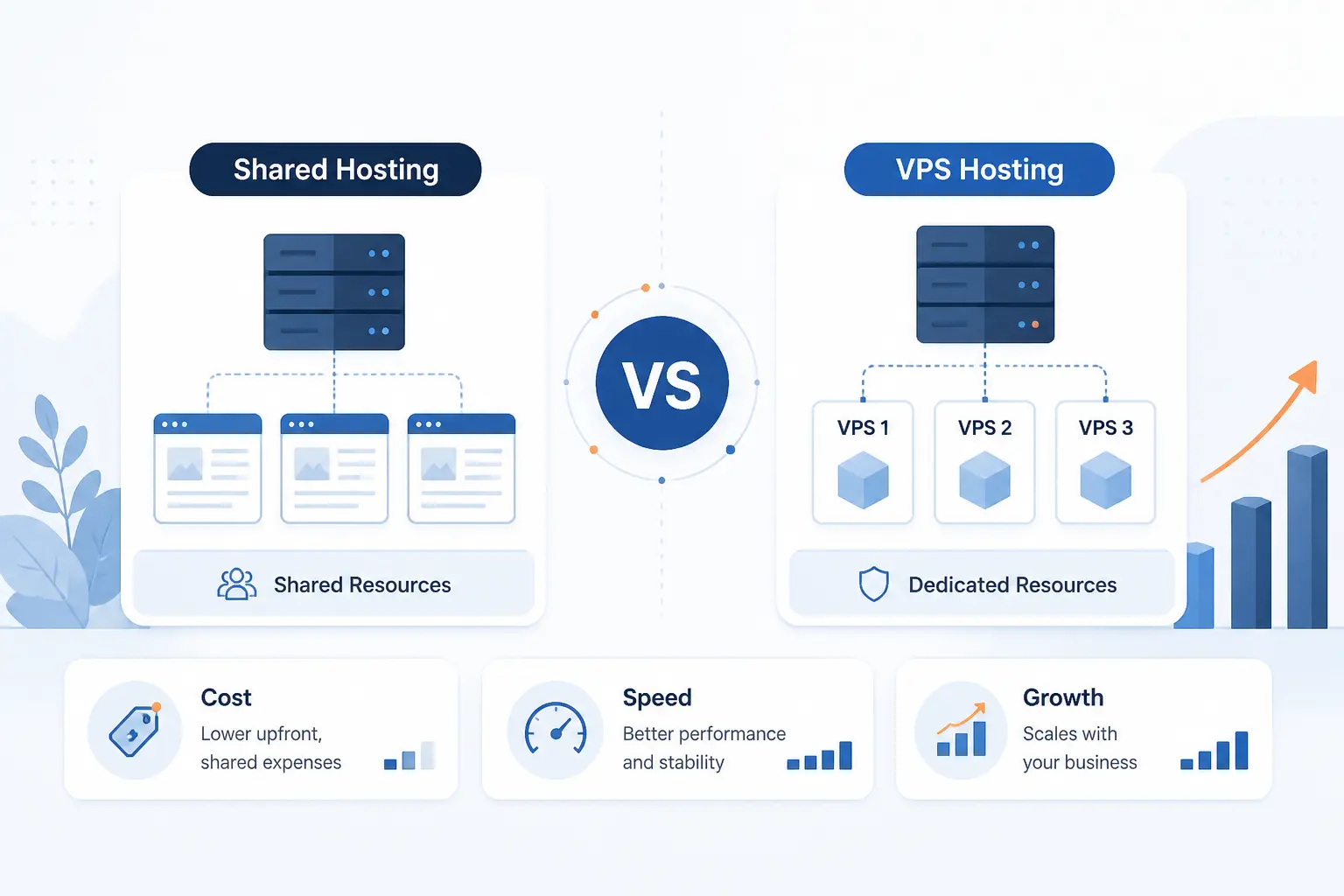
At 1Byte, we think the vps vs shared hosting decision is usually simpler than it looks. Shared hosting is the better fit when your site is small, your stack is standard, and your budget matters more than deep server control. VPS hosting is the better fit when traffic is growing, background jobs are piling up, or you need settings that cheap shared plans will not let you touch. Shared wins on cost and ease. VPS wins on isolation, control, and headroom.
We would not call one option universally better. We would call them better at different stages. If you are launching a brochure site, portfolio, or early blog, shared hosting is often the sensible answer. If you are running a store, membership site, or custom app, VPS usually becomes the safer long-term call.
What Is Shared Hosting

Shared hosting is a hosting model where many accounts live on the same server and the provider manages most of the underlying stack for you. That is why it is usually the cheapest place to start. In practice, you get enough environment to run common website software, but you trade away root access and a large part of server-level control. Modern shared platforms are also designed to isolate tenants and enforce per-account limits so one site does not consume everything on the machine.
Benefits of Shared Hosting
The biggest advantage of shared hosting is that it gets a normal website online for the lowest cost and the least operational work. For many small sites, that is enough, because WordPress itself only asks for a host that supports PHP 8.3+, MariaDB 10.11+, MySQL 8.0+, and HTTPS, which is a modest baseline for a standard CMS site.
We often recommend shared hosting when the site mainly serves cached pages, blog posts, product pages, or a contact form. In that stage, saving money and avoiding server administration usually matters more than owning every tuning knob. Shared hosting is not glamorous, but for a lot of first websites, it is the right tool.
Limitations of Shared Hosting
The main drawback of shared hosting is that your account lives inside host-defined limits. In CloudLinux, a common shared-hosting control layer, providers can cap CPU, memory, I/O, processes, and entry processes, and when those ceilings are hit the result can be slower responses, error 508 pages, or 500 and 503 application failures.
Security is better than many beginners assume, but control is still narrow. Tools like CageFS create an isolated file system per user, restrict visibility into other users’ files, and hide other users’ processes, yet you are still inside a shared environment where the provider decides much of the stack and policy.
Who Shared Hosting Fits Best
Shared hosting fits small sites with predictable traffic and ordinary software needs. We mean brochure sites, portfolios, local business websites, early WordPress blogs, and lightweight landing pages that do not need custom services, background workers, or unusual server modules.
A local accountant site with twenty pages and a contact form is a classic example. So is a new company blog that publishes once or twice a week. We would keep those projects on shared hosting until traffic, plugin load, or admin tasks start rubbing against the limits.
What Is VPS Hosting

VPS hosting gives you a virtual server with its own allocated resources inside a physical host. That makes it much closer to having your own server than to renting a slice of a generic shared account. You gain stronger isolation, operating system control, and room for custom configuration. In exchange, you take on more cost and at least some level of system responsibility.
Benefits of VPS Hosting
The main benefit of VPS hosting is that you get isolated CPU, memory, network, and storage rather than a generic account box inside a crowded shared plan. That matters because you can tune the web stack, install the packages your app needs, run scheduled jobs more predictably, and separate website traffic from background work.
We see this pay off fastest on growing websites. Once you need object caching, queue workers, custom PHP settings, or tighter firewall rules, a VPS stops being a luxury and starts being operationally cleaner. Troubleshooting is usually easier too, because your limits and your software are clearer.
Limitations of VPS Hosting
The trade-off with VPS hosting is that more power usually means more responsibility. On infrastructure-style services, the customer is responsible for guest OS updates and firewall rules, along with application software and security patching, so an unmanaged VPS can quickly become a burden if nobody on the team actually knows server administration.
We do not think beginners should buy unmanaged VPS just because it sounds more serious. One missed patching cycle or one sloppy firewall change can cause more pain than the limits of a decent shared account. Managed VPS narrows that risk, but it does so by adding cost.
Who VPS Hosting Fits Best
VPS hosting fits websites that are already growing or already demanding. A good real-world marker comes from WooCommerce, whose own scaling guidance starts new self-hosted stores at 1vCPU with at least 2GB RAM and also recommends OPcache, a CDN, and persistent cache support, which is a more concrete resource profile than many entry shared plans expose to end users.
We start leaning VPS for busy stores, membership sites, learning platforms, API backends, and custom apps that need workers or shell access. A WooCommerce site with imports, search, and checkout spikes is a typical example. So is a Laravel or Node application that needs packages or processes a shared host will not allow.
Managed Vs Unmanaged VPS Hosting
Managed VPS is the better choice for most beginners, while unmanaged VPS is best left to teams that can operate a server confidently. If you are the one responsible for updates, hardening, firewall rules, and troubleshooting, you are effectively accepting the same kind of operating system responsibility that infrastructure platforms place on their customers.
We would choose managed VPS when the site matters but the team is thin. We would choose unmanaged VPS only when someone on the team is comfortable with patching, backups, logs, and rollback plans. Lower sticker price does not help if the first incident eats your weekend.
How to Choose Between VPS Vs Shared Hosting
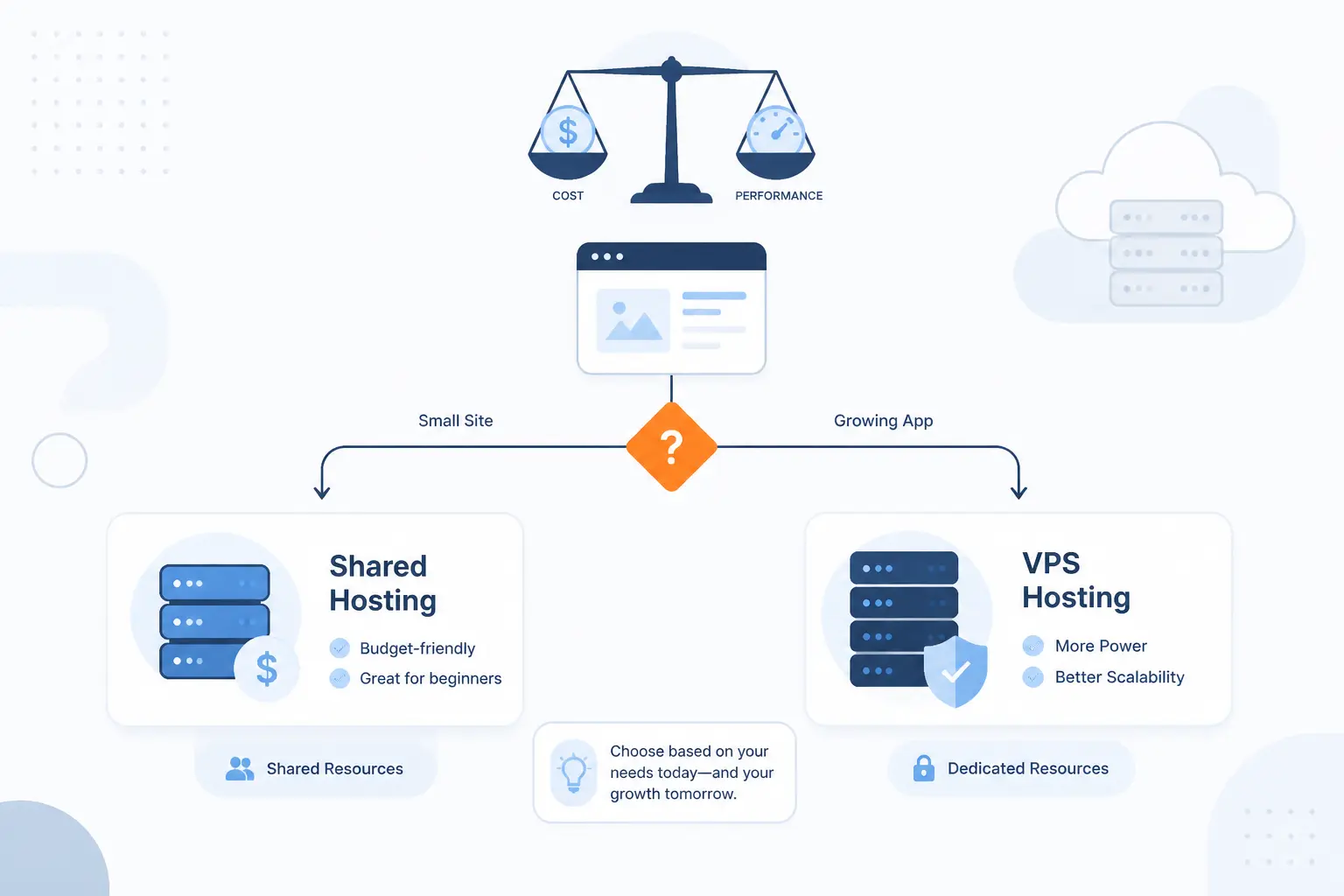
For most readers, the answer is straightforward. Choose shared hosting when your site is small, standard, and cost-sensitive. Choose VPS hosting when your growth, software, or uptime expectations need isolated resources and deeper control. The real decision is not just price. It is whether your next twelve months look simple or operationally heavy.
| Option | Best when | Main trade-off |
|---|---|---|
| Shared hosting | Small sites, standard CMS stacks, tight budgets | Lower control and tighter account limits |
| VPS hosting | Growing stores, custom stacks, heavier background work | Higher cost and more admin responsibility |
We prefer to choose based on what is most likely to break next. If the next pain point is budget, shared hosting usually wins. If the next pain point is deployments, workers, traffic spikes, or custom configuration, VPS is usually the wiser move.
Choose Shared Hosting for Smaller Sites and Lower Budgets
Choose shared hosting if your site is small, your stack is standard, and every dollar matters more than root access. That is the right call for portfolios, local service sites, simple blogs, and early WordPress projects that do not need background workers, unusual runtime settings, or aggressive scaling.
Our rule of thumb is blunt. If you cannot name a server setting you need to change, you probably do not need a VPS yet. Shared hosting is often the sensible first answer, not the cheap mistake.
Choose VPS Hosting for Growth, Control, and Higher Traffic
Choose VPS hosting if growth is already visible or your app needs things shared plans usually hide. That includes operating system access, custom packages, predictable resource ceilings, separate workers, stronger isolation, or more room for performance tuning.
We would also choose VPS earlier for revenue-generating sites. If a slow admin panel delays publishing, a timeout breaks checkout, or a queue backlog delays email and order processing, the monthly savings from shared hosting stop looking smart. WooCommerce-style workloads are a classic case.
Upgrade Before Performance and Security Become Bottlenecks
Upgrade before visitors feel the pain. Repeated resource-limit errors, slower dynamic pages, failing background jobs, and pressure to run newer software are all signs that shared hosting is turning from economical to restrictive.
We would rather migrate a month early than spend that month chasing timeouts. The same logic applies to security. If your project now needs tighter patch discipline, stricter firewall control, or a custom runtime path, waiting usually creates more risk than value.
How to Move From Shared Hosting to VPS Hosting
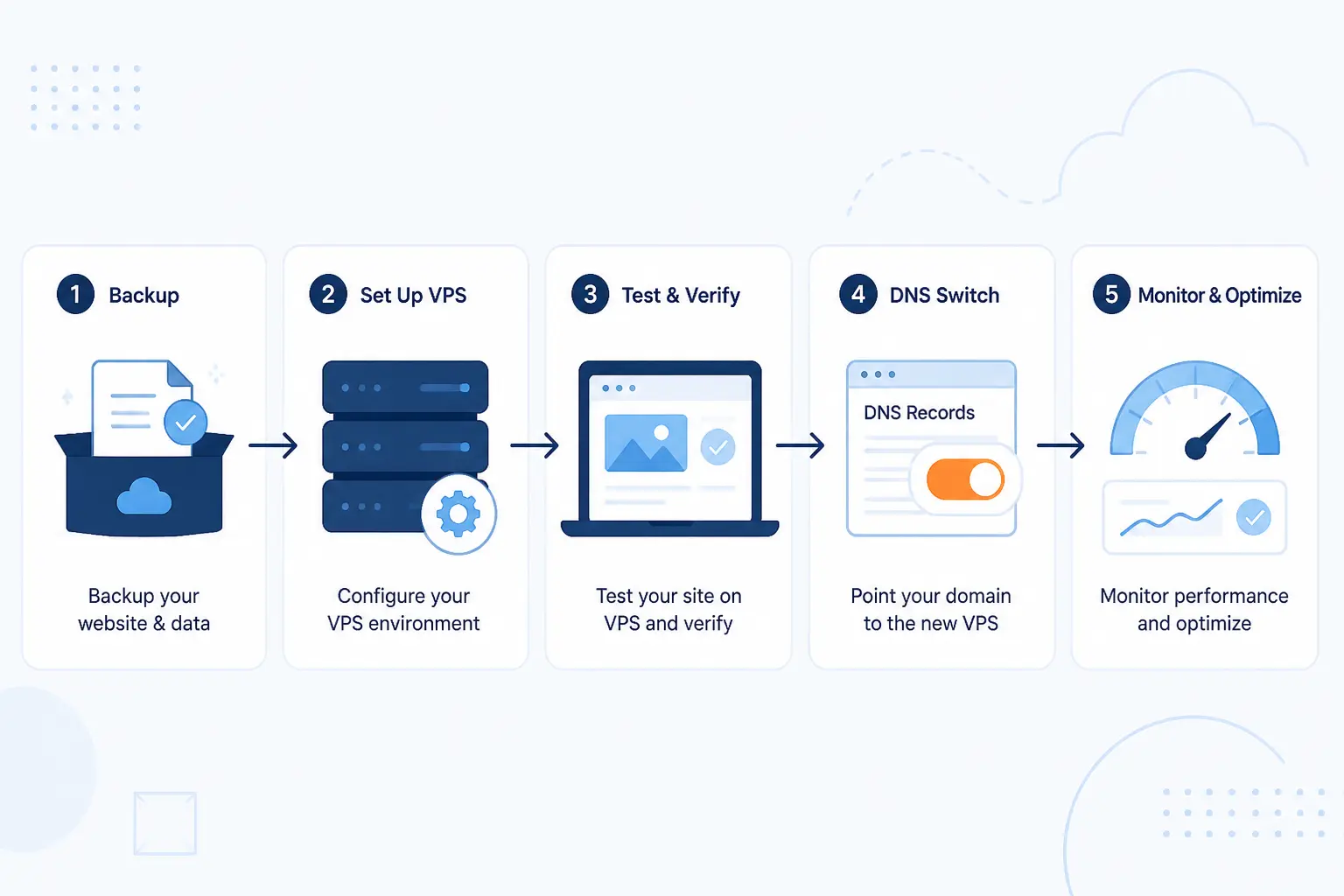
The safest migration path is simple: back up everything, build the VPS first, test it, switch DNS, and then monitor. When teams rush straight to cutover, small omissions like mail settings, SSL files, cron jobs, or PHP mismatches create the mess. When they prepare in order, the move is usually routine.
We have seen the smoothest migrations happen when the new environment is treated like a launch, not a copy job. That means checking the app, the database, the mail flow, and the DNS plan before anyone flips traffic.
Back Up Website Files, Databases, and Email First
Back up files, databases, and email before you touch anything else. In cPanel, a full or partial backup can include public_html, databases, and account email, which is exactly why we tell clients not to think only about website files when they migrate.
We also recommend downloading the backup and confirming you can actually restore from it. A backup that only exists as a checkbox in a control panel is not a plan. It is hope.
Set Up and Test the VPS Environment Before Switching
Set up the VPS and test it before you switch traffic. If you are moving between cPanel servers, cPanel recommends transferring service configurations first, then accounts, and its live transfer feature is specifically designed to reduce downtime during the move.
We would match PHP versions, database settings, cron schedules, SSL handling, and mail behavior before cutover. Then we would test the admin area, forms, checkout, search, and any scheduled tasks. If something is going to fail, it is better to catch it on a staging hostname than in front of customers.
Update DNS and Check Site Performance After Migration
Update DNS only after the new server is ready, and lower the TTL before cutover if you can. Amazon Route 53 notes a 60 to 172,800 second TTL range for DNS records, which is a useful reminder that resolvers cache old answers and changes do not become visible everywhere at the same instant.
After the switch, we would watch page speed, error logs, background jobs, and mail delivery before calling the migration done. If you have the option, keep the old environment available briefly so you have a short rollback window while DNS caches clear.
FAQ
These are the short answers we give most often when people compare shared hosting with VPS. The pattern is consistent. Shared hosting is usually the right starting point, and VPS is the right next step once limits or server responsibilities become part of the job.
When Should I Upgrade From Shared Hosting to VPS Hosting
You should upgrade when shared-hosting limits start affecting users or operations. The clear triggers are recurring resource-limit errors, slow dynamic pages, heavier background jobs, or growth that now needs more predictable resources and tuning room.
What Are the Disadvantages of VPS Hosting
The disadvantages of VPS hosting are higher cost and more responsibility. On unmanaged setups, you are responsible for the guest operating system, patches, and firewall configuration, so mistakes are easier to make and harder to ignore.
What Is the Main Disadvantage of Shared Hosting
The main disadvantage of shared hosting is limited control inside fixed account limits. Even on well-isolated platforms, you still depend on host-defined ceilings for CPU, memory, and concurrent requests, and that can turn into slowdowns or limit errors as the site grows.
Is Managed VPS Hosting Better for Beginners
Yes, managed VPS hosting is usually better for beginners. It reduces the amount of operating system and security work your team must own directly, which is important because infrastructure-style services place those responsibilities on the customer side.
Can I Move From Shared Hosting to VPS Hosting Without Major Downtime
Yes, you usually can move without major downtime if you prepare properly. Backups, testing the new server first, lowering DNS TTL where practical, and using migration tools like cPanel live transfer all reduce the chance of a messy cutover.
How 1Byte Supports Your Hosting Growth

At 1Byte, we support hosting growth by matching the service to the stage instead of forcing every site into one box. A new site usually needs a domain, SSL, and a clean hosting start. A growing site needs a clearer upgrade path. And when architecture gets more serious, our role as an AWS Select Tier Services Partner gives us a practical bridge into broader cloud conversations when the project calls for it.
| Service | Practical role | Typical fit |
|---|---|---|
| Domain registration | Controls your web address and future DNS changes | Every site |
| SSL certificates | Protects traffic with HTTPS | Every site that handles visitors |
| WordPress hosting | Focused home for standard WordPress projects | Blogs, company sites, content sites |
| Shared hosting | Low-cost starting point | Smaller and simpler sites |
| Cloud hosting | Next-stage platform for broader growth needs | Sites moving beyond basic entry plans |
| Cloud servers | More isolated compute and control | Growing or custom workloads |
We think growth works best when the pieces are chosen together, not one by one. That is why we look at domain ownership, HTTPS, application fit, and upgrade path as part of the same decision.
Domain Registration, SSL Certificates, and WordPress Hosting Setup
The first growth step is clean setup. Domain registration gives you control over the name, SSL certificates cover the HTTPS layer your site needs, and WordPress hosting makes sense when the project is a standard WordPress build that should start simple instead of over-engineered. WordPress itself treats HTTPS as required, so getting that piece right early is not optional.
We like this foundation because it keeps later moves cleaner. When ownership of the domain and certificate path is clear, migrations are less chaotic and DNS changes are easier to manage.
Shared Hosting and Cloud Hosting for Different Growth Stages
Shared hosting and cloud hosting fit different stages, and we do not see them as rivals. Shared hosting is the sensible launch point for smaller sites, while cloud hosting becomes more attractive once traffic patterns, operational needs, or deployment expectations stop being simple.
That matters in the vps vs shared hosting discussion because many teams are really deciding on a path, not a single purchase. Start small when the site is small. Move up when the workload starts acting bigger than the plan.
Cloud Servers and Upgrade Paths for Growing Websites
Cloud servers are the right conversation once your site needs more isolation, more configuration freedom, or a more deliberate step beyond entry-level hosting. That is where the logic of VPS starts to overlap with broader cloud planning, and it is why our AWS Partner status is practically relevant rather than decorative.
We would rather map an upgrade path early than squeeze one more busy season out of a cramped environment. If your website is already growing into a platform, cloud servers give that growth somewhere more appropriate to go.







Conclusion
Our verdict is simple. Choose shared hosting if your site is small, standard, and price-sensitive. Choose VPS hosting if your site needs isolated resources, server-level control, or room for heavier traffic and background work. Shared hosting is not lesser. It is earlier. VPS is not always necessary. It is necessary when growth and control start carrying real business weight.
If you are still on the fence, ask one practical question: what is most likely to stress your site in the next year, budget or workload? If you can answer that honestly, your hosting choice usually becomes obvious.