

- What Is a Proxy Server
- How a Proxy Server Works
- Types of Proxy Servers Explained
- What Is a Proxy Server Used For
- Proxy Server Risks and Limitations
- Proxy Server Versus VPN and Firewall
- Frequently Asked Questions About Proxy Servers
- How 1Byte Supports Secure Websites and Cloud Infrastructure
- Conclusion
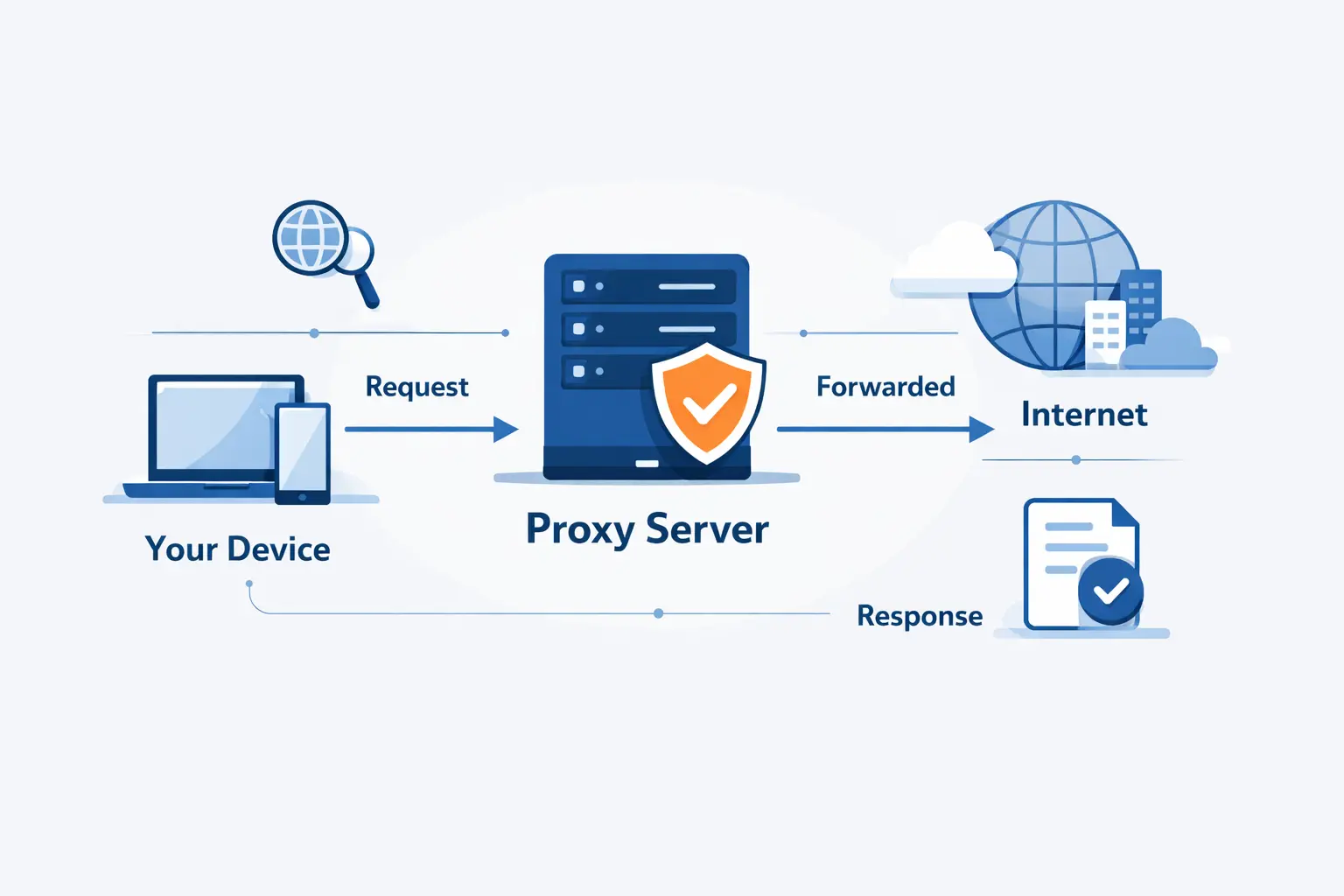
If you are asking what is a proxy server, the short answer is this: it is an intermediary that sits between a user and the internet, receives requests, and then forwards, blocks, filters, or answers them on the user’s behalf. In practice, that means a proxy can hide an IP address, enforce access rules, cache content, and stand in front of websites or apps to manage traffic.
We at 1Byte think proxy servers are often explained with too much fog around them. They are not magic privacy tools, and they are not always security tools. They are traffic middlemen, and once we see them that way, the rest starts to click.
What Is a Proxy Server

A proxy server stands between a user and a destination, which gives it power over how requests and responses move. That middle position is its defining trait, whether the goal is privacy, filtering, caching, or traffic control.
FURTHER READING: |
| 1. How to Change an IP Address |
| 2. What Is ISP in Computer and How Internet Service Providers Work |
| 3. What Is IPTV Complete Guide to Internet Protocol Television |
1. Proxy Server Definition and Core Purpose
A proxy server is an intermediary that receives a request and decides what to do with it. We like the plainness of the HTTP Semantics standard, which describes a proxy as a client-chosen message-forwarding agent, because that wording strips away the hype and leaves the real job in view. A proxy can forward a request, reject it, rewrite parts of it, or answer from a cache if it already has a usable response.
Its core purpose is control. Sometimes that control is about privacy, such as showing the proxy’s public IP instead of the user’s. Sometimes it is about policy, such as blocking sites, requiring authentication, or logging outbound traffic. Sometimes it is about efficiency, such as reusing cached files instead of fetching the same content over and over again.
2. Why a Proxy Server Sits Between Users and the Internet
A proxy server sits between users and the internet because that position creates a checkpoint for traffic. Once requests pass through one place, an organization can apply rules, record activity, cache files, or route traffic differently without changing every destination site.
That is why schools, offices, and hosting environments have used proxies for years. On the client side, a forward proxy can regulate what users reach. On the server side, a reverse proxy can protect application servers from direct exposure and decide which backend should receive each request. We see this as the difference between one lane of traffic and a managed intersection.
3. How a Proxy Server Hides or Replaces an IP Address
A proxy server hides or replaces an IP address by making the destination see the intermediary’s address instead of the client’s direct address. That does not always mean the original address disappears, though, because the Forwarded header standard allows intermediaries to pass along details about earlier hops for debugging, routing, or policy reasons. In other words, a proxy can mask your IP from one observer while still preserving trace information for another.
This is why we are careful with claims about anonymity. A site may only see the proxy’s public IP, but the proxy operator may still know the user’s source IP, and some systems intentionally preserve client details in headers. Hiding an IP address is real. Total invisibility is another story.
How a Proxy Server Works

A proxy server works by receiving a request first, applying whatever rules it has been given, and then either forwarding that request or answering it directly. The response then returns through the same middle layer, where it can be logged, filtered, modified, or cached before the browser sees it.
1. How Requests Move From the User to the Proxy Server
Requests move from the user to the proxy server because the browser, app, or operating system is configured to send traffic there first. That configuration may be manual, automatic through a setup script, or pushed by an organization through device policy.
When a user enters a URL, the browser opens a connection to the proxy rather than straight to the destination. For plain HTTP traffic, the request can be sent in a form the intermediary understands and forwards. For HTTPS traffic, the client often asks the intermediary to open a tunnel to the destination, or the connection is terminated and re-established if the design calls for inspection. Either way, the proxy becomes part of the trip before the origin server ever sees the request.
2. How the Proxy Server Forwards Responses Back to the Browser
The proxy server forwards responses back to the browser by taking the upstream server’s reply and relaying it to the client. That sounds simple, but this is where much of the real value and risk appears.
The intermediary may pass the response through untouched, strip or add headers, block dangerous content, compress files, or store the result for later reuse. A reverse proxy may also choose a backend server, normalize headers, and protect the origin from direct client connections. To the browser, the exchange can look almost ordinary, even though a separate system is shaping it in the middle.
3. How Filtering, Caching, and Logging Fit Into the Process
Filtering, caching, and logging fit into the process because the proxy sees both sides of the exchange. The caching part follows shared-cache rules, which define when a stored response can be reused and when it must be validated again, so a proxy can reduce repeat trips to the origin without guessing blindly. Filtering and logging sit beside that logic, letting an operator block categories, scan patterns, and record metadata about requests and responses as they pass.
We think this is where many newcomers finally see the point. A proxy is not only a relay. It is a decision point. The exact decisions depend on policy, software, and trust.
Types of Proxy Servers Explained

Proxy servers can be classified in more than one way, which is why the terminology can feel messy. Some labels describe where the proxy sits, some describe how visible it is, some describe the protocol it handles, and some describe where its IP addresses come from.
1. Forward Proxy and Reverse Proxy
A forward proxy acts for the client, while a reverse proxy acts for the server. The forward version usually handles outbound requests from users, and the reverse version usually handles inbound requests headed toward websites, APIs, or applications.
In a business network, a forward proxy may enforce browsing policy for employees. In a hosting setup, a reverse proxy may terminate HTTPS, distribute traffic, or shield backend services from direct access. In the real world, NGINX upstream groups show how one public entry point can route requests across several application servers, which is a classic reverse-proxy pattern. We see reverse proxies constantly in web infrastructure because they simplify the public edge.
2. Transparent, Anonymous, Distorting, and High Anonymity Proxies
These labels describe how much identity information the intermediary exposes. A transparent setup usually does little to hide the client and may even be inserted by the network without the user choosing it. An anonymous setup hides the client’s address but still reveals that an intermediary is involved.
A distorting setup sends false client identity details, which can confuse sites and logs. A high-anonymity setup tries to avoid revealing both the client’s original address and the fact that an intermediary is being used. We would treat these names as rough market language, not hard technical guarantees, because different products use them loosely.
3. HTTP, SOCKS, and DNS Proxies
HTTP, SOCKS, and DNS intermediaries differ mainly in what kind of traffic they understand and relay. HTTP-aware systems work with web requests and headers. DNS-focused systems handle name lookups. SOCKS is more general-purpose and can relay different kinds of traffic at a lower level.
That is why many developers reach for SOCKS v5 when they need a simpler relay for applications beyond ordinary web browsing, since the standard supports authentication and UDP association in addition to typical TCP flows. HTTP-aware setups are better when headers, caching, or web-specific filtering matter. DNS intermediaries are useful when the goal is to control or observe name resolution.
4. Residential, Datacenter, and Rotating Proxies
Residential, datacenter, and rotating proxies are industry sourcing terms, not protocol standards. Residential addresses usually come from consumer internet connections assigned by an ISP. Datacenter addresses usually come from cloud or hosting providers. Rotating services swap exit addresses over time or per request.
These categories matter because websites judge traffic partly by IP reputation. Residential addresses may look more like ordinary household traffic. Datacenter addresses are easier to obtain and manage, but they are also easier for sites to flag. Rotating pools change the apparent source often, which can help with distribution but can also trigger compliance, ethics, and abuse concerns if used recklessly.
What Is a Proxy Server Used For

Proxy servers are used for privacy, access control, performance, and operational safety. One deployment may serve several of those goals at once, which is why proxies appear in both office networks and modern web stacks.
1. Privacy and IP Masking
Privacy and IP masking are common reasons to use a proxy server. The destination often sees the intermediary’s public IP instead of the user’s, which can reduce direct exposure of the client address.
Still, we think this is the most oversold use case. Cookies, browser fingerprints, account logins, forwarded headers, and the proxy operator’s own logs can all narrow the gap between “masked” and “identified.” A proxy can change what one server sees. It does not automatically erase the rest of your trail.
2. Content Filtering and Access Control
Content filtering and access control are classic proxy jobs. A network can require users to authenticate, block categories of sites, restrict downloads, or allow only approved destinations through a central rule set.
This is why proxies remain practical in schools, enterprises, and managed hosting. A reverse proxy can also enforce access before traffic reaches the app itself, which is useful for protecting admin paths, staging environments, or internal dashboards that should not be open to everyone.
3. Caching, Bandwidth Savings, and Faster Performance
Caching can reduce bandwidth use and improve repeat-load performance when many users request the same content. Instead of asking the origin server for the same image, script, or package every time, the intermediary may serve a stored copy if the response is eligible.
The gain is most obvious with public, reusable assets. Personalized pages, authenticated dashboards, and highly dynamic API responses are less likely to benefit. In our view, caching works best when teams treat it as a rules-driven optimization rather than a blanket speed button.
4. Load Balancing, Monitoring, and Security
Load balancing, monitoring, and security are major reasons reverse proxies sit at the edge of websites and applications. One entry point can distribute traffic across backend servers, centralize TLS handling, add logs, apply rate limits, and shield internal services from direct exposure.
That said, a proxy is not a full security strategy on its own. It can help inspect, route, and reduce noise, but it still depends on sound application design, patching, authentication, and network controls behind it. We see the proxy as a useful gatekeeper, not a superhero.
Proxy Server Risks and Limitations

Proxy servers can help, but they also create a chokepoint where mistakes become expensive. The biggest misunderstandings are assuming every proxy encrypts traffic, every operator respects privacy, and every deployment scales without friction.
1. Why Some Proxy Servers Do Not Encrypt Traffic
Some proxy servers do not encrypt traffic because encryption depends on the protocol and the design, not on the mere presence of an intermediary. A plain HTTP setup can be readable in transit. An HTTPS tunnel can protect end-to-end data between client and destination. A TLS-terminating reverse proxy can decrypt at the edge and then re-encrypt or forward internally, depending on configuration.
That difference matters. If the proxy terminates encryption, it can inspect traffic, which is useful for policy and troubleshooting. It also becomes a highly trusted point that must be secured carefully. We always urge readers to ask where encryption starts, where it ends, and who can see the clear text in between.
2. Logging, Data Resale, and Free Proxy Server Risks
Free proxy server risks are real because the operator can often see valuable metadata, and sometimes much more than metadata. Risk is not theoretical. In a 30-month study across 640,600 endpoints found only 34.5% were active at least once, which tells us that “free” often means unstable even before we ask whether it is honest. If a service costs nothing, we should ask what it is really collecting, storing, or selling.
Logging is not automatically bad. Managed environments need logs for security and operations. The trouble starts when logs capture more than expected, are retained carelessly, or are handled by an operator you do not trust. Our rule of thumb is simple. If you would not hand the operator your browsing history directly, do not hand it over indirectly either.
3. Latency, Compatibility, and Scalability Challenges
Latency, compatibility, and scalability are common proxy pain points because every request now takes an extra hop through another system. Even a well-run intermediary adds processing time, and a busy one can become the bottleneck for an entire service.
Compatibility can also bite. Some applications do not behave well behind header rewriting, TLS interception, or unusual connection handling. WebSockets, streaming, large uploads, and mixed protocols need careful testing. As traffic grows, the proxy layer needs enough capacity, health checks, and failover planning to avoid becoming the weakest link.
4. Misconfiguration, Poor Maintenance, and Security Gaps
Misconfiguration and poor maintenance create some of the worst proxy failures. Trusting unverified client IP headers, exposing an open relay, leaving stale access rules in place, or failing to patch the software can turn a helpful intermediary into an attack surface.
We have seen teams focus on the brand name of the software and ignore the setup details that actually decide safety. Bad timeout values can break apps. Loose header trust can spoil logs and rate limits. Forgotten admin routes can leak sensitive tools. In practice, disciplined maintenance matters more than marketing language.
Proxy Server Versus VPN and Firewall

Proxy servers, VPNs, and firewalls overlap in conversation because all three sit somewhere in the traffic path. They are still different tools, with different layers of control and different design goals.
1. Proxy Server Versus VPN
A proxy server and a VPN are not the same thing. A proxy usually handles traffic for a specific app, browser, or protocol, while a VPN usually tunnels a broader share of device traffic through an encrypted connection.
That makes proxies lighter and more targeted in many cases. It also means they are often narrower in protection. If we only want browser traffic to pass through a middle layer, a proxy can be enough. If we want most device traffic protected from the local network, a VPN is usually the closer fit.
2. Proxy Server Versus Firewall
A proxy server relays application traffic, while a firewall decides what traffic may pass between networks based on policy. The NIST firewall definition describes a firewall as a gateway that limits access according to security policy, which captures the broader filtering role well. A proxy often becomes part of the conversation itself, whereas a firewall may block, allow, or inspect without pretending to be the other endpoint.
The two can work together. A firewall may restrict the paths that traffic can take. A proxy may then handle the allowed web traffic in detail. We think of the firewall as the perimeter rulebook and the proxy as the traffic desk inside the gate.
3. Business Proxy and Consumer Proxy Differences
Business proxies and consumer proxies differ mainly in purpose and governance. Business deployments usually exist to enforce policy, protect services, log events, and support internal operations. Consumer services usually focus on location switching, IP masking, or simple browser-level routing.
That difference changes expectations. A business team usually wants authentication, audit trails, change control, and predictable behavior. A consumer wants convenience. When those expectations get mixed together, people either overtrust the consumer tool or underestimate the business system.
Frequently Asked Questions About Proxy Servers
Most proxy questions come down to visibility, safety, and overlap with other tools. Here are the short answers we would give a beginner before they start changing settings.
1. How Do I Know If I Have a Proxy Server?
Yes, you can usually tell by checking your operating system, browser, or device management settings. Look for manual proxy settings, an auto-configuration script, or organization-managed network policies. If one app behaves differently from the rest of your device, that app may be using its own settings.
2. Is a VPN the Same as a Proxy Server?
No, a VPN is not the same as a proxy server. A proxy usually handles selected application traffic, while a VPN usually tunnels a wider share of your device traffic and commonly adds stronger transport protection. If you need system-wide coverage, a VPN is usually closer to the mark.
3. Can My IP Be Tracked If I Use a Proxy Server?
Yes, your IP can still be tracked in some situations even if you use a proxy server. The destination may only see the intermediary’s public IP, but the operator, your accounts, browser fingerprints, cookies, and forwarded headers can still connect activity back to you. A proxy changes visibility. It does not end attribution by itself.
4. Is a Proxy Server Safe?
Yes, a proxy server can be safe if it is well managed and correctly configured. No, it is not automatically safe just because it hides an IP address or is easy to enable. We trust managed systems with clear security practices far more than random free services with vague terms.
How 1Byte Supports Secure Websites and Cloud Infrastructure

At 1Byte, we do not think most readers need mystery tools or buzzwords. They need secure websites, clean traffic paths, valid certificates, dependable hosting layers, and room to build sensible infrastructure. That is where our services fit the conversation around proxies.
1. Domain Registration and SSL Certificates for Secure Access
Domain registration and SSL certificates are the foundation of secure access. A domain gives users a stable public identity to reach, and SSL certificates enable HTTPS so browsers can verify they are talking to the right site over an encrypted connection.
That matters whether you use a reverse proxy or not. If you place a proxy or load balancer in front of your application, clear DNS records and valid certificates are still the first bricks in the wall. We at 1Byte offer domain registration and SSL certificates, and we are also an AWS Partner, which matters when readers want cloud-aligned infrastructure decisions without guesswork.
2. WordPress Hosting and Shared Hosting for Everyday Website Needs
WordPress hosting and shared hosting fit everyday website needs where the goal is secure publishing, not complicated traffic engineering. Many sites do not need a layered proxy design on day one. They need HTTPS, a reachable domain, and a hosting setup that is easy to manage.
For blogs, company sites, landing pages, and smaller web projects, that simplicity is often the right call. We at 1Byte see plenty of cases where getting the basics right beats adding extra network layers too early.
3. Cloud Hosting and Cloud Servers for Scalable Deployments
Cloud hosting and cloud servers make more sense when a project needs separate application tiers, private backends, traffic distribution, or room to add reverse proxies later. This is where infrastructure layout starts to matter more than checkbox marketing.
If a team wants public entry points in front of internal services, cloud hosting and cloud servers provide the space to structure that cleanly. In our view, the healthy order is simple: secure domain first, valid certificate next, then hosting architecture that matches the actual traffic and risk profile.







Conclusion
A proxy server is an intermediary that receives and forwards traffic, and that middle position lets it hide IP addresses, enforce rules, cache content, and protect backend services. How it works is not mysterious once we see the sequence clearly: request in, policy applied, request forwarded or answered, response sent back.
We at 1Byte think the right question is not whether a proxy server is good or bad. The real question is what problem you want it to solve. If you are planning a site or application, the next step is worth asking plainly: do you need simple secure hosting, or are you ready for a reverse-proxy layer in front of your infrastructure?