

- An SPF Record Is a DNS TXT Record for Authorized Mail Senders
- How SPF Works When a Server Receives a Message
- What Goes Inside an SPF Record
- What Is SPF Record Used for in Email Security
- Limits, Pitfalls, and Misconceptions to Know
- How to Check, Update, and Maintain an SPF Record
- Frequently Asked Questions
- How 1Byte Helps With Domains, Hosting, and SPF Readiness
- Conclusion
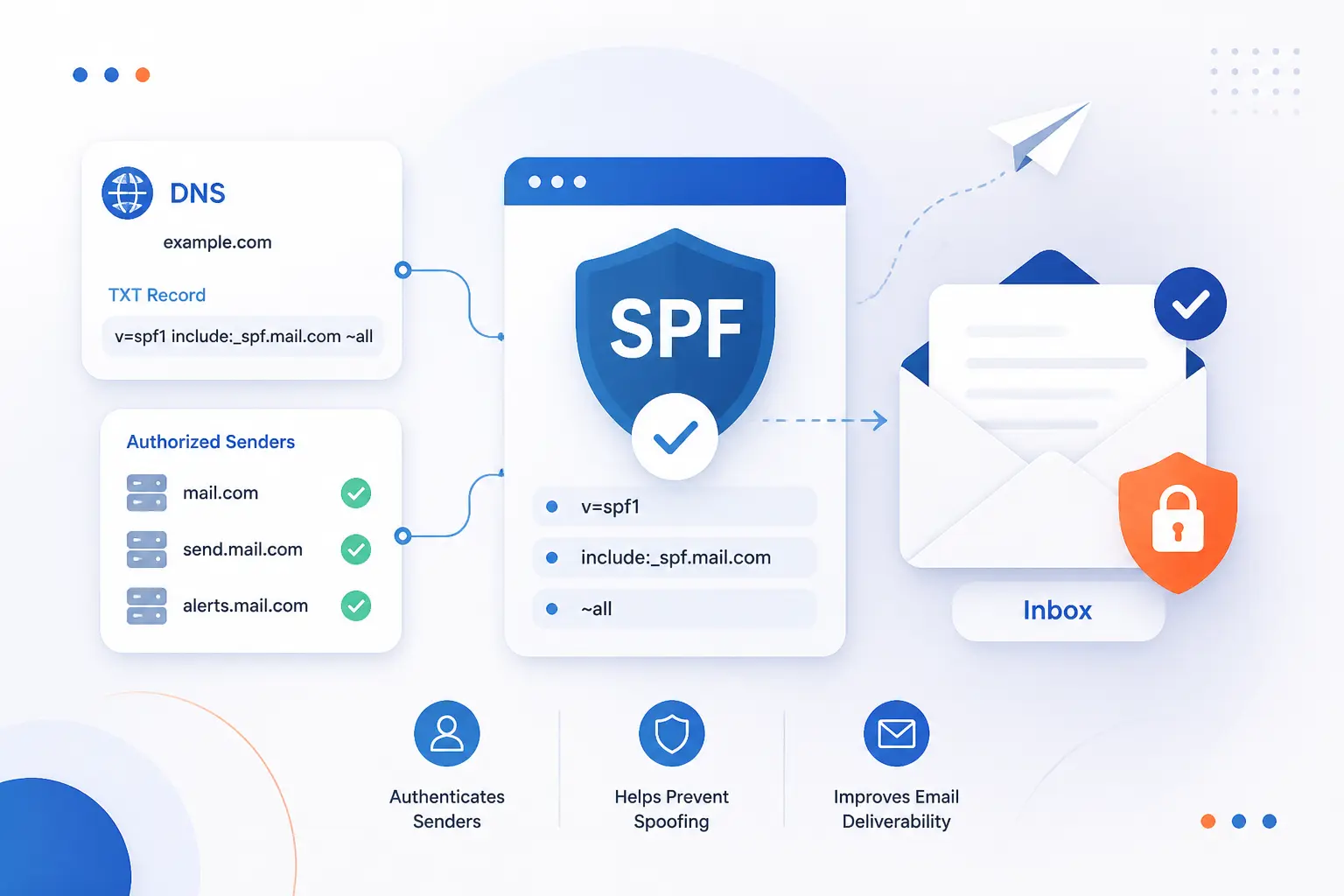
What is SPF record? It is a DNS TXT record that tells other mail servers which systems are allowed to send email for your domain. When a receiving server gets a message, it can compare the sender’s IP address with that published list and decide whether the mail looks legitimate. We think of SPF as a gatekeeper for the mail envelope, not a magic shield for the whole message. That distinction matters, because SPF is useful, but it works best when it is paired with DKIM and DMARC.
If you run a business website, a store, or even a simple contact form, SPF matters sooner than many people expect. Password resets, order confirmations, invoices, newsletters, and support replies can all depend on it. Get the record wrong, and mail can fail checks or land in spam. Get it right, and you give receivers a clearer signal that your domain is being used on purpose.
An SPF Record Is a DNS TXT Record for Authorized Mail Senders
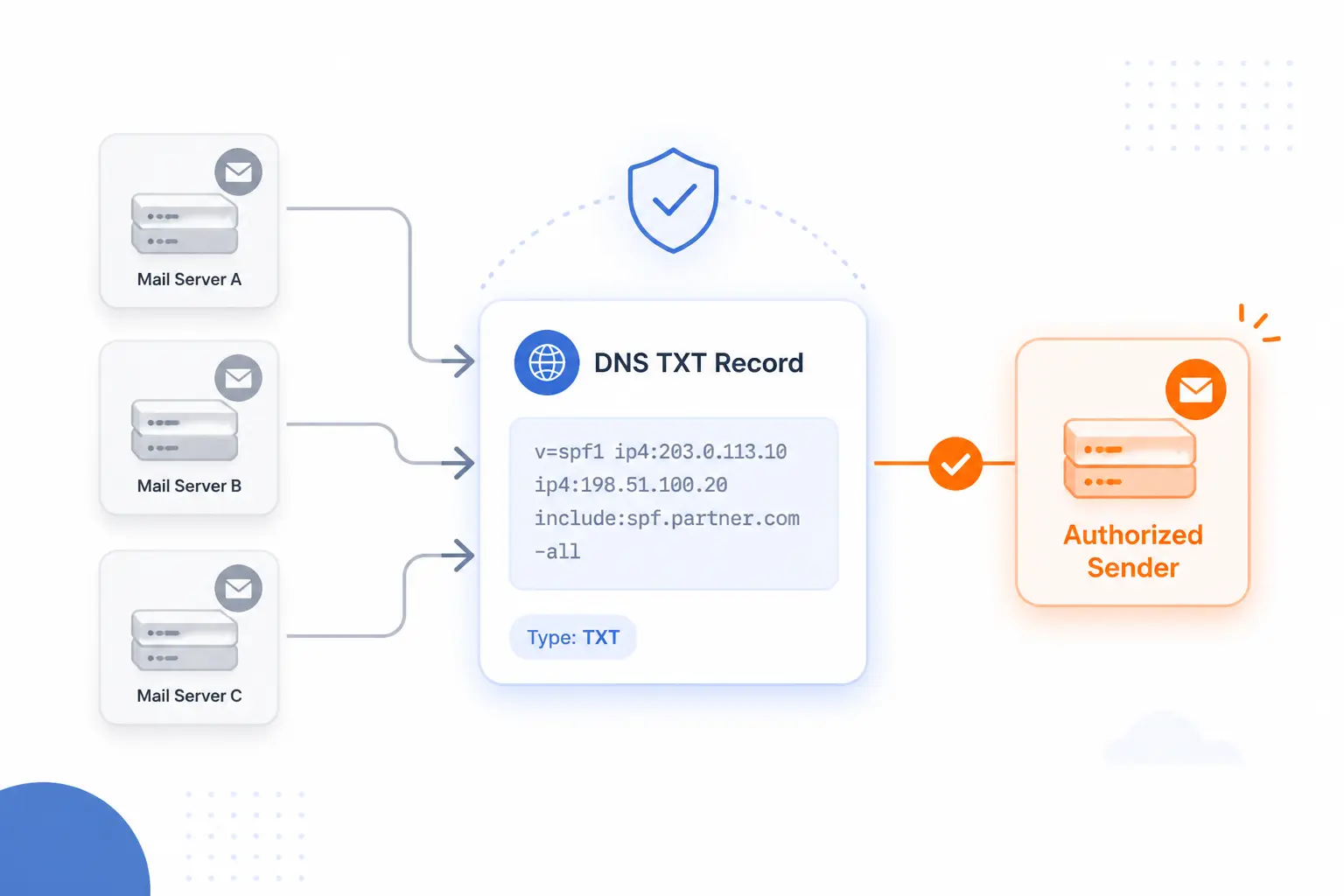
An SPF record is a DNS TXT record that lists the servers and services allowed to send mail for a domain. In practice, it usually starts with v=spf1 and then names approved sources such as IP addresses, hostnames, or third-party mail platforms. We like this definition because it stays honest. SPF does not prove who wrote the message, and it does not encrypt email. It simply tells receivers which sending infrastructure is authorized to use a domain in the SMTP envelope.
That authorization model comes from RFC 7208, which defines how domains publish policy and how receiving servers evaluate it. In everyday administration, the record is usually published at the root of the sending domain, though subdomains can publish their own policies when different systems send different kinds of mail.
FURTHER READING: |
| 1. How to Detect Malware With Clear Warning Signs |
| 2. Security Management in the Cloud Guide for Safer Data |
| 3. DDoS Mitigation: How to Detect, Defend, and Recover From Modern Attacks |
How SPF Works When a Server Receives a Message
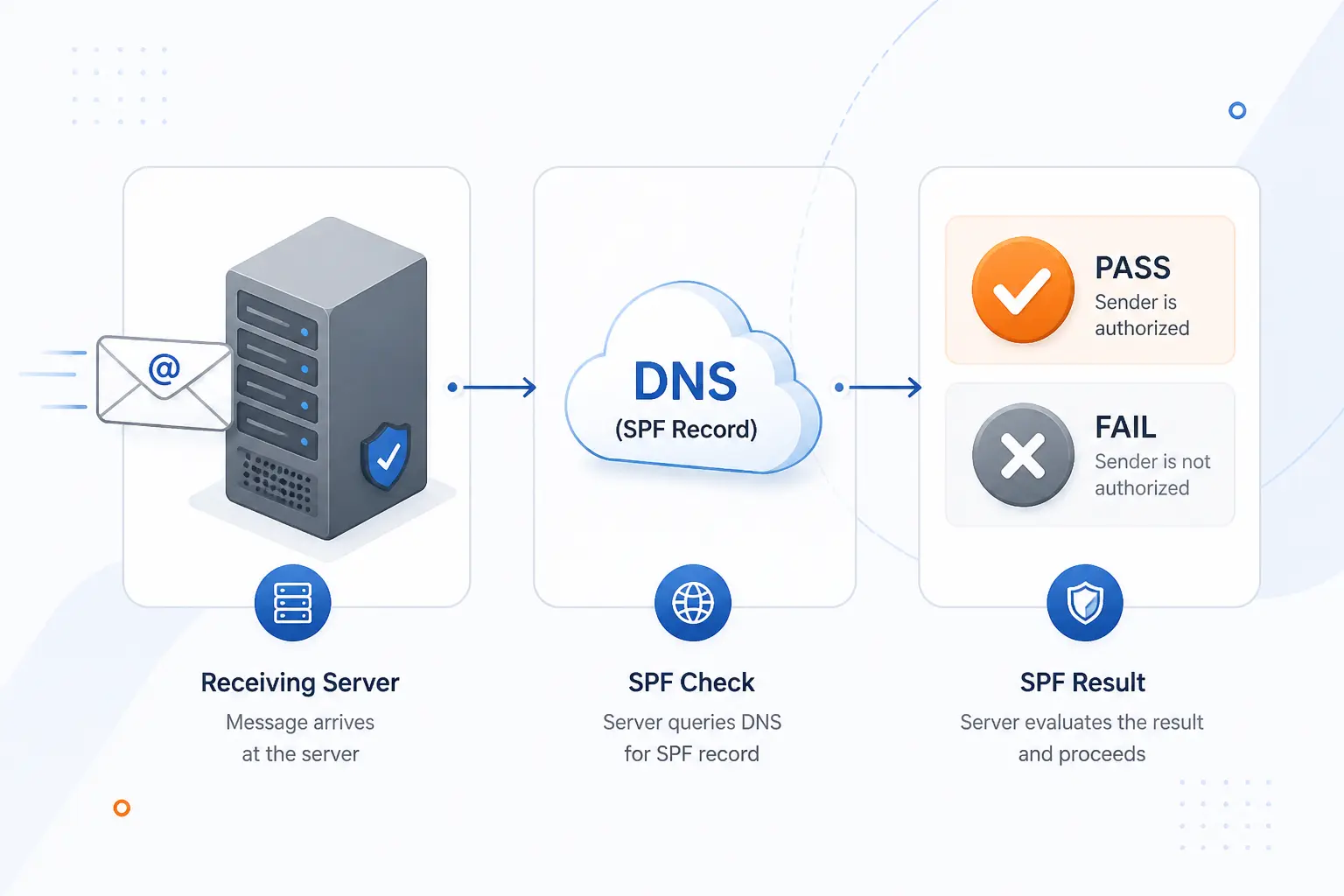
SPF works by checking whether the server that connected to deliver mail is allowed to send on behalf of the domain used in the SMTP envelope. The receiver does not guess. It reads the relevant domain, looks up DNS, evaluates the published rules, and assigns a result. Once we see that flow clearly, most SPF behavior stops looking mysterious.
The Check Starts With the Return-Path Domain
SPF starts with the envelope sender, which is usually the Return-Path domain, not the From address people see in their inbox. That is the key idea many beginners miss. A message might display From: [email protected], while the SMTP envelope uses another domain for bounce handling. SPF evaluates that envelope identity because it is part of the mail transaction itself, so it is available to the receiving server before final delivery.
We often explain this with a shipping label analogy. The visible From line is like the brand printed on the box. The envelope sender is more like the return address used by the delivery network. SPF checks the return address.
The Receiving Server Looks Up the DNS TXT Record
The receiving server queries DNS for a TXT record that begins with v=spf1. If it finds one valid record, it parses each mechanism in order. If it finds none, SPF usually returns none. If it finds more than one valid SPF record for the same domain, evaluation becomes a permanent error, which is one reason administrators should keep the policy in a single record.
This lookup happens during SMTP handling, not as a vague afterthought. That is why DNS accuracy matters so much. A typo in a hostname, an old include rule, or a second conflicting record can change the result immediately.
The Sending IP Is Matched Against Allowed Sources
The receiver compares the connecting IP address with the sources allowed by the domain’s policy. Those sources can be explicit IPs like ip4:198.51.100.10, host-based rules such as a and mx, or third-party policies referenced with include. The server walks through the record from left to right until one mechanism matches or the policy reaches its default rule.
That means SPF is really an authorization list for sending infrastructure. If your website sends password resets through one platform and marketing mail through another, both platforms must be represented correctly. Otherwise, one mail stream may pass while the other fails.
The Message Can Pass, Soft Fail, or Fail
The message can return pass, soft fail, fail, or another result based on the matching rule. A pass means the sending IP matched an authorized source. A soft fail usually means the record says the source is probably unauthorized, but the domain owner has not asked for a hard rejection. A fail means the policy explicitly says the source is not allowed.
We advise readers not to confuse an SPF result with final delivery. A receiving system can still accept, quarantine, or reject mail based on local policy, spam signals, DKIM, and DMARC. SPF is one signal in a larger verdict.
What Goes Inside an SPF Record
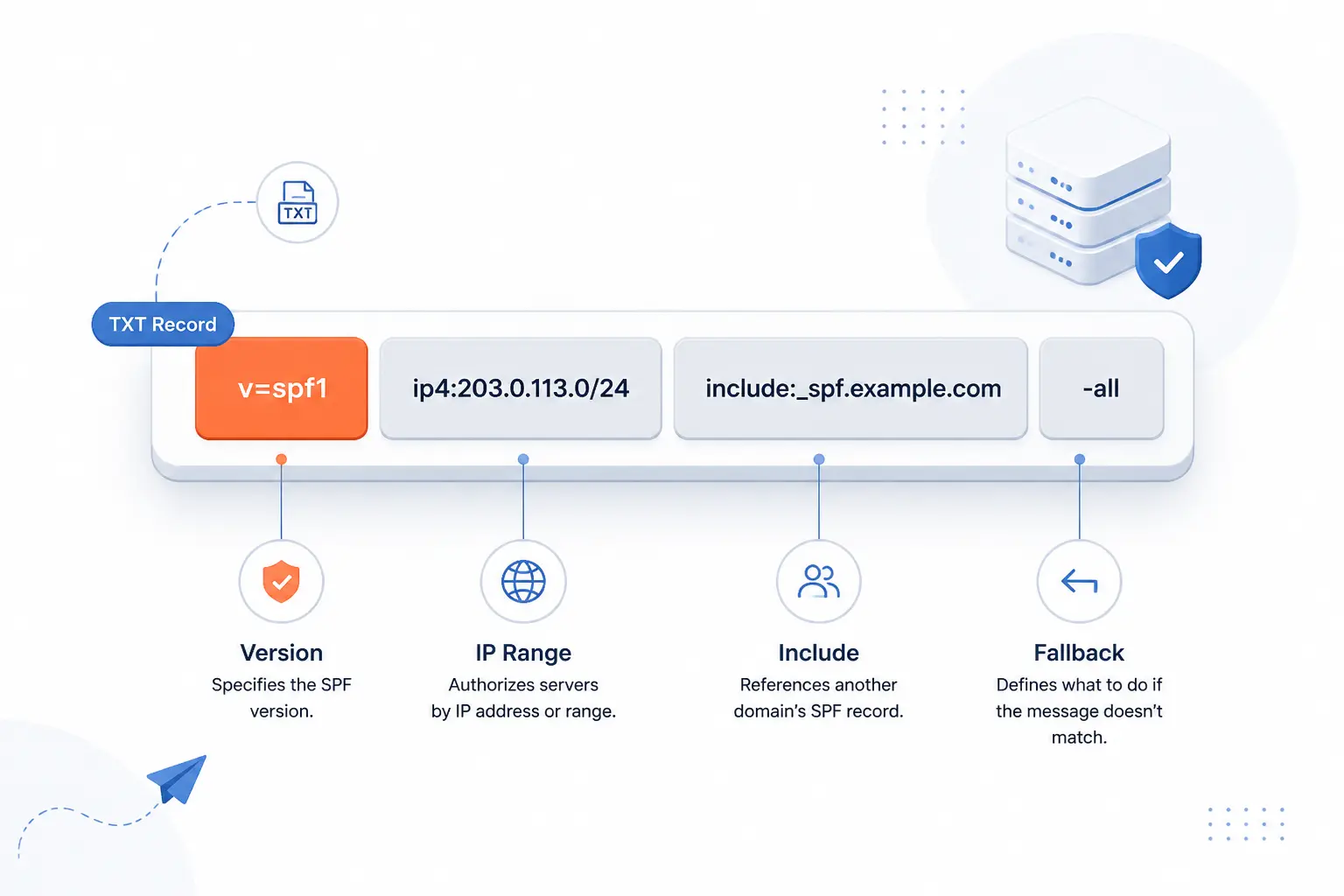
An SPF policy is a short rule language packed into one DNS TXT record. Each part has a job. Some parts name exact IP ranges, some defer to other domains, and one part usually acts as the fallback rule. Good SPF records are boring on purpose. They are small, readable, and limited to systems that truly send mail.
The Required Version Tag
The required opening tag is v=spf1. Without it, receivers will not treat the TXT value as an SPF policy. That tag does not authorize anything by itself. It simply tells the receiver, “interpret the rest of this string as SPF syntax.”
If we see a record that starts differently, or if the domain publishes more than one valid SPF policy, we expect trouble. SPF is strict about the opening tag because receivers need a clear way to identify the rule set they should evaluate.
IP Addresses, A, and MX Mechanisms
ip4 and ip6 are the most direct ways to authorize sending servers. They name exact addresses or networks, which makes the intent clear. The a mechanism authorizes the IPs behind a domain’s A or AAAA records. The mx mechanism authorizes the IPs used by the domain’s mail exchangers.
We generally prefer direct IP entries when the sender list is stable and small. They are easier to reason about. By contrast, a and mx are convenient, but they can add DNS lookups and can authorize more systems than you intended if your DNS changes later.
Include, Exists, and Redirect for Other Domains
include is the common way to trust a third-party sender’s published policy. If you use a mail platform to send newsletters or transactional messages, that provider often tells you to add an include rule. The receiver then checks the provider’s policy as part of your policy evaluation.
exists is more specialized and usually unnecessary for ordinary business mail. It can build a DNS query dynamically and is powerful enough to support custom logic, but that power cuts both ways. We rarely recommend it unless there is a clear technical reason. redirect is different again. It says, in effect, “if nothing matched here, evaluate another domain’s policy as the final policy,” which is handy when several related domains share the same mail system.
The All Mechanism and Its Qualifiers
The all mechanism is the default rule at the end of the record. It always matches, so its qualifier tells the receiver what to do when no earlier rule matched. -all means fail, ~all means soft fail, and ?all means neutral. A plain all without a qualifier acts like pass, which is almost never what you want.
Our view is simple here. If you know every legitimate sender, -all is cleaner. If you are still discovering old systems or shadow tools, ~all can be a safer starting point while you audit the estate.
A Sample SPF Record and What Each Part Means
A sample policy such as v=spf1 ip4:198.51.100.10 include:_spf.example-mail.net -all means three things. First, the record is SPF version 1. Second, the server at 198.51.100.10 is allowed. Third, any server authorized by _spf.example-mail.net is also allowed, and everything else should fail.
Real-world services use the same pattern. One common setup in the mail setup guide uses include:_spf.google.com for mail sent through that platform.
Another common setup in the custom domain guide uses include:spf.protection.outlook.com when mail is sent through Microsoft 365. We like these examples because they show what SPF is really for: naming the exact services that may send on your behalf, then ending with a clear default.
What Is SPF Record Used for in Email Security
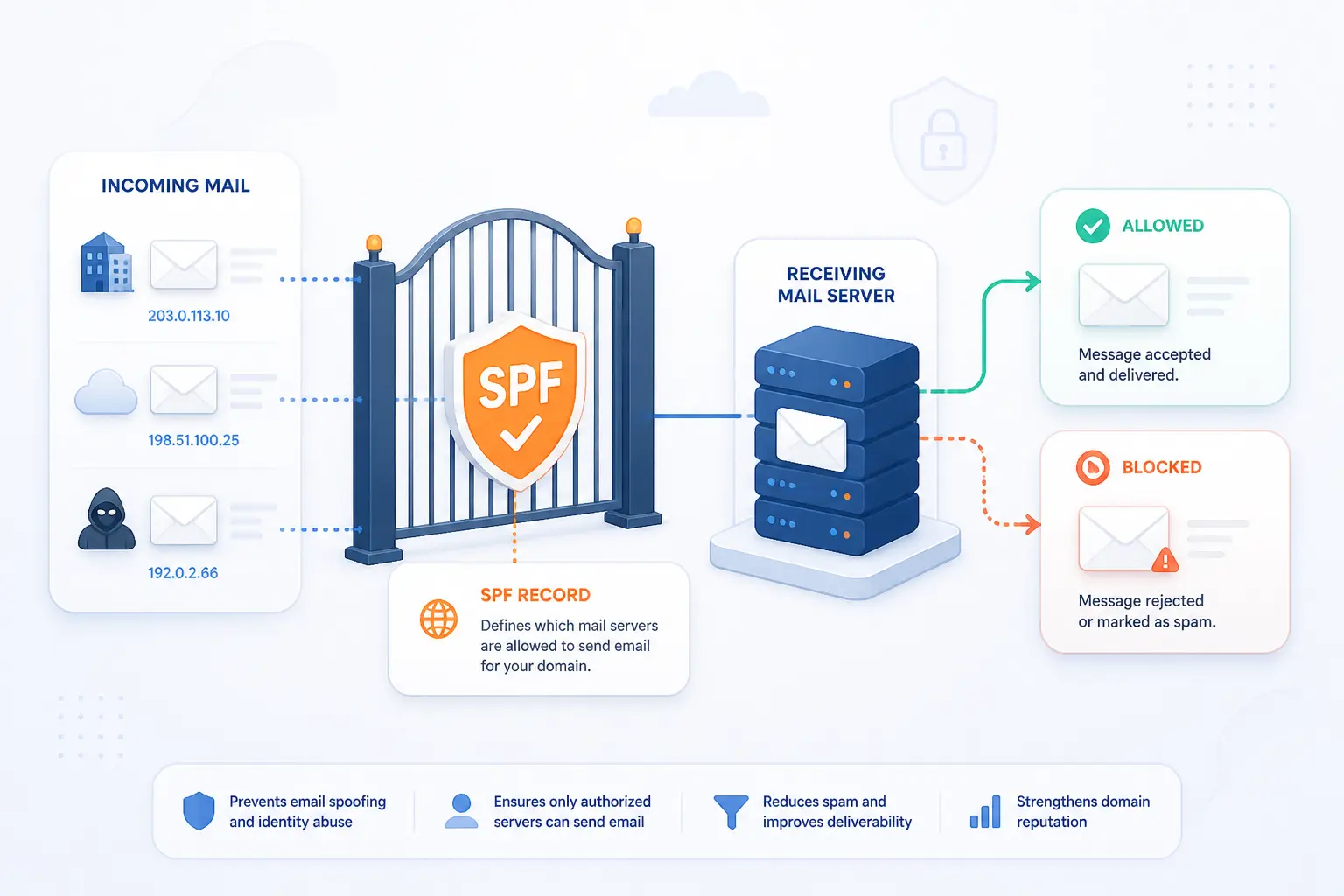
SPF is used to help receiving servers spot whether incoming mail came from infrastructure your domain actually authorized. That makes it a practical anti-abuse control. It is not a full trust system on its own, but it does reduce the room attackers have to impersonate your domain through the SMTP envelope. In our experience, SPF earns its keep when it is treated as basic hygiene, not optional polish.
Reducing Spoofing, Phishing, and Brand Abuse
SPF helps reduce spoofing by letting receivers reject or distrust mail that claims your domain in the envelope but comes from an unauthorized server. That matters because email fraud is still a very real business problem. In 2024, consumers reported $12.5 billion in fraud losses, and the same FTC release says email was the most common contact method used by scammers.
A fake invoice from your brand does not need a perfect website clone to do damage. Sometimes all it needs is a believable sender identity. SPF cannot stop every impersonation tactic, but it does make simple domain abuse harder.
Improving Deliverability and Sender Reputation
SPF can improve deliverability because it gives mailbox providers a cleaner signal about whether your sending infrastructure is expected. That does not guarantee inbox placement. Content, bounce behavior, complaint rates, and overall domain reputation still matter. Still, when a legitimate sender has no SPF or a broken one, we often see unnecessary suspicion from receiving systems.
Think of SPF as proof that your sending path is intentional. It tells receivers that your website, your CRM, your support desk, and your newsletter tool are not random strangers pretending to be you.
Supporting DKIM and DMARC
SPF supports a stronger stack by working alongside DKIM and DMARC. DKIM, defined in RFC 6376, adds a cryptographic signature to parts of the message so a receiver can verify that the signed content and signing domain are valid.
DMARC then ties those results back to the visible From domain. Under RFC 9989, an SPF pass only helps DMARC if the authenticated MAIL FROM domain aligns with the domain in the visible From address. That is why SPF alone is not enough. A message can pass SPF and still fail DMARC if the domains do not line up.
Limits, Pitfalls, and Misconceptions to Know
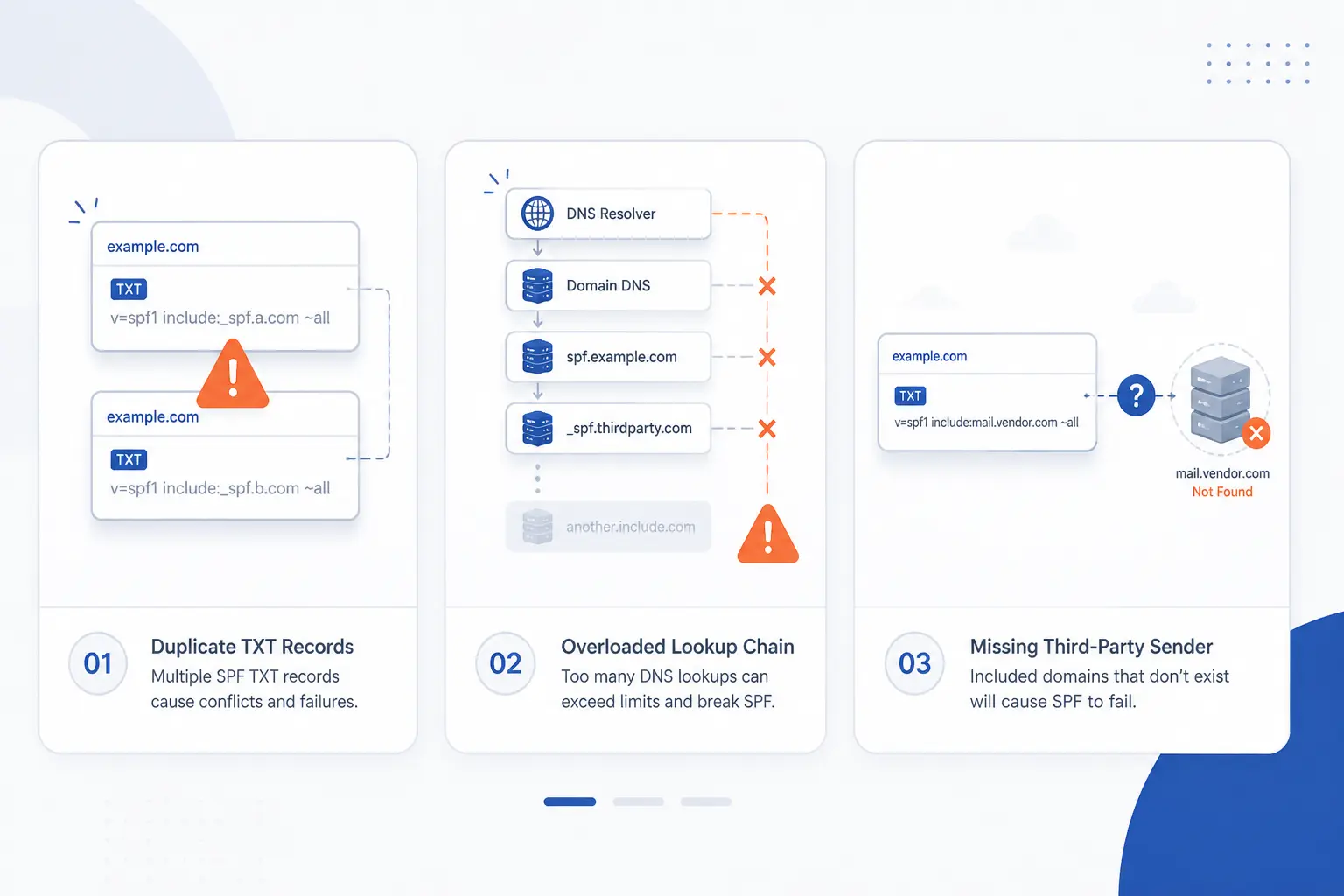
SPF has sharp edges, and most operational problems come from a handful of repeat mistakes. The biggest ones are duplicate records, too many DNS lookups, forgotten third-party senders, and confusion about which domain SPF actually checks. We would rather say this plainly than prettify it: SPF is simple until a business has five tools sending email and nobody owns the list.
Why You Should Publish Only One SPF Record
You should publish only one SPF record because multiple valid policies for the same domain break evaluation. Receivers need a single policy to parse. If you add one record for your website host and another for your newsletter tool, you have not created extra safety. You have created ambiguity.
This mistake shows up constantly after companies add Microsoft 365, Google Workspace, a help desk, and a marketing platform in different months. The fix is to merge all authorized senders into one TXT record.
Why SPF Checks the Envelope Sender Instead of the Visible From Address
SPF checks the envelope sender because that identity is part of the SMTP transaction and is directly tied to the server that is delivering the message. The visible From header is a message field, which means it can point somewhere else entirely. This design is useful for bounce handling, but it is also why SPF does not fully solve human-facing impersonation on its own.
We think this is the single most important SPF misconception to clear up. If you want policy around the visible From domain, that is DMARC’s territory.
Forwarding and Other Cases Where SPF Can Break
Forwarding can break SPF because the final receiving server often sees the forwarder’s IP, not the original sender’s IP. If the forwarder keeps the original envelope sender, SPF may fail even though the original message was legitimate. Mailing lists and some intermediaries can create similar headaches.
This is one reason DKIM matters so much. A valid DKIM signature can survive forwarding better than SPF, and DMARC can still pass if the DKIM domain aligns with the visible From domain.
DNS Lookup Limits and Bloated Records
Bloated policies are risky because SPF allows only 10 DNS-triggering terms during evaluation for mechanisms such as include, a, mx, exists, and redirect. Go past that, and the result can become a permanent error instead of a pass.
We have a blunt opinion here. If an SPF record needs a spreadsheet to explain it, it probably needs redesign. Split mail streams by subdomain, remove dead vendors, and avoid piling on include rules “just in case.” That habit creates a trap for future you.
How to Check, Update, and Maintain an SPF Record
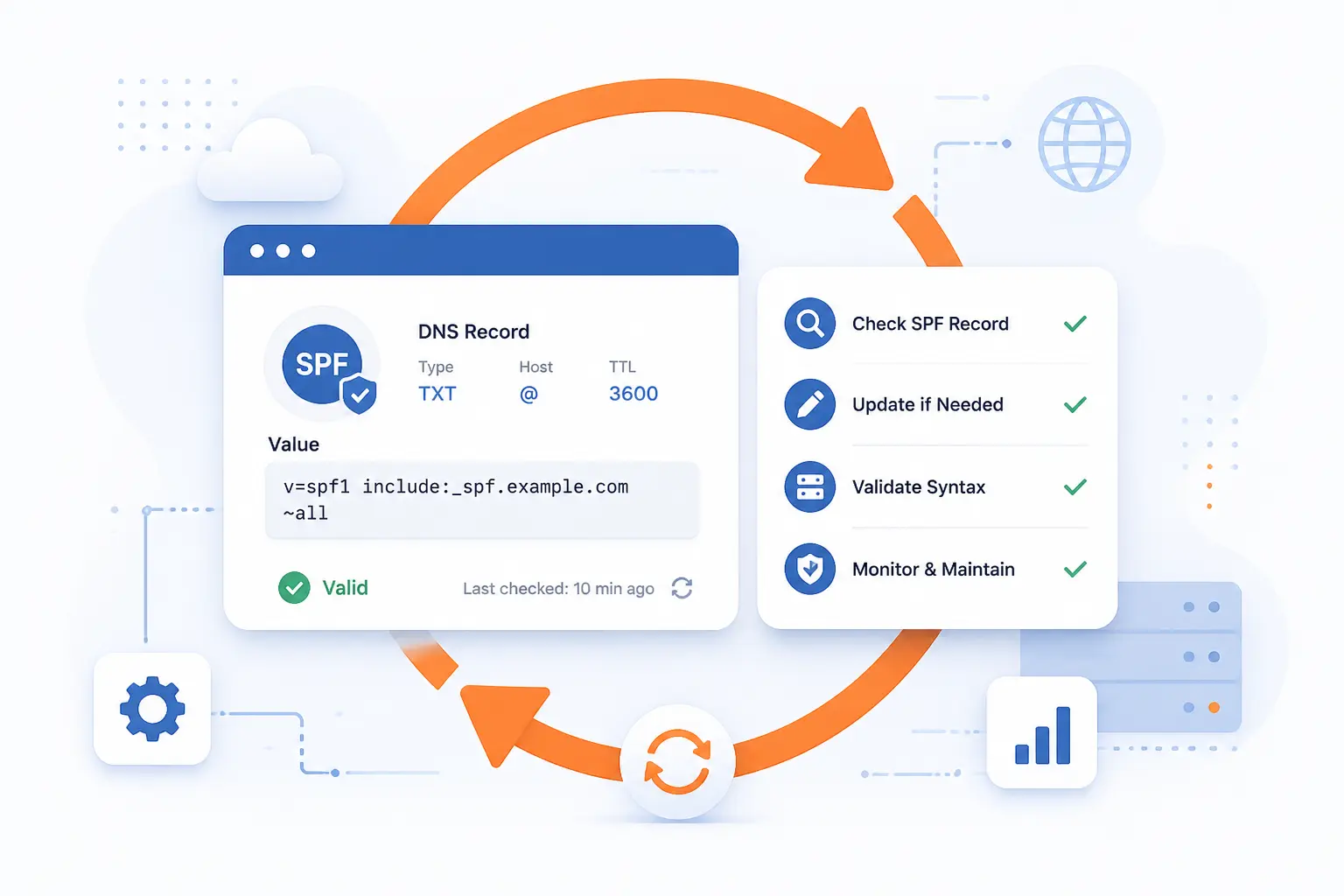
Checking and maintaining SPF is mostly disciplined housekeeping. You find the current TXT record, confirm that the syntax is valid, verify every sender it authorizes, and remove what you no longer use. We recommend treating SPF like an inventory, not a one-time setup task. Businesses change tools faster than DNS records change themselves.
Find the Record in DNS
Find the record by querying the domain’s TXT records at the exact sending domain, often the root domain such as example.com. Command-line tools like dig or nslookup work well, and most DNS control panels show TXT records clearly. You are looking for one value that begins with v=spf1.
If you use different subdomains for different mail streams, check those too. A billing subdomain, a marketing subdomain, and the main domain can all have different needs.
Validate Syntax, Lookups, and Authorized Sources
Validate the record by checking three things: syntax, DNS lookup count, and whether each source still sends mail for you. A syntactically valid record can still be operationally wrong if it authorizes a retired vendor or exceeds lookup limits through nested includes.
Our practical routine is simple. First, read the record left to right. Next, count lookup-causing mechanisms. Then test real messages from each business system that sends mail, such as your website, CRM, support platform, and marketing tool.
Review Third-Party Senders Before You Add Include Rules
Review third-party senders before you add an include rule because every include expands your trust boundary. If a service sends only from its own subdomain or through a custom return-path it manages, you may not need to add it to your main domain at all. If the vendor does send on behalf of your primary domain, make sure that is intentional and documented.
We prefer to keep marketing, transactional, and internal mail streams clearly separated where possible. Cleaner boundaries make SPF easier to maintain and DMARC easier to reason about.
Frequently Asked Questions
Most SPF questions come down to scope, count, and content. Readers usually want to know how SPF differs from DKIM, how many records are allowed, and what a sensible starting policy looks like. Here are the short answers we give most often.
What Is the Difference Between SPF and DKIM
SPF authorizes sending servers, while DKIM signs message content and headers. SPF checks whether the sending infrastructure is allowed for the envelope sender domain. DKIM checks whether a cryptographic signature validates and ties back to a signing domain. We use both because they solve different problems.
How Many SPF Records Should You Have
You should have one SPF record per sending domain. That one record can contain many mechanisms, includes, and qualifiers if needed. If you need different policies for different mail streams, use different subdomains rather than multiple SPF records on the same domain.
What Should My SPF Record Be
Your SPF record should list every legitimate service that sends mail for that domain and no one else. A common starting point is v=spf1, followed by your approved IPs or provider includes, and then -all or ~all at the end. If you are unsure which systems send mail today, audit first and publish second. Guessing here is how good mail disappears.
How 1Byte Helps With Domains, Hosting, and SPF Readiness
We help with SPF readiness by covering the practical layers SPF depends on: the domain, the DNS zone, the site or app that triggers mail, and the infrastructure that sends it. From our side at 1Byte, SPF is rarely an isolated email setting. It sits inside a wider domain and hosting picture. That is why domain registration, SSL certificates, WordPress hosting, shared hosting, cloud hosting, cloud servers, and our role as an AWS Partner all connect to the same outcome: controlled, intentional sending.
Domain Registration and DNS Control for SPF Publishing
Domain registration and DNS control are the foundation for publishing SPF at all. If you control the domain’s DNS, you can publish the TXT record, update it when you add a sender, and separate mail streams by subdomain when that makes sense. We see this as the first gate. No DNS control, no reliable SPF management.
SSL Certificates, WordPress Hosting, and Shared Hosting Guidance
SSL certificates, WordPress hosting, and shared hosting matter because websites often generate the email people forget about. Contact forms, order notices, comment alerts, and password resets all need a sane sender setup. SSL certificates protect the site sessions and forms that trigger those messages, while WordPress hosting and shared hosting setups should be reviewed so the site sends mail through approved paths that align with the domain’s SPF, DKIM, and DMARC plan.
Cloud Hosting and Cloud Servers for Scalable Email Infrastructure
Cloud hosting and cloud servers matter when applications, APIs, or custom services send mail at scale or across multiple environments. Those systems need clear DNS ownership, clear sender authorization, and a plan for separating production, staging, and bulk mail identities. As an AWS Partner, we view that planning as part of sound infrastructure design, not a last-minute DNS patch.







Conclusion
SPF is a DNS TXT record that tells the world which servers may send mail for your domain, and that simple idea carries real weight. It helps reduce spoofing, supports deliverability, and gives DKIM and DMARC a stronger foundation. Just do not ask it to be something it is not. SPF checks the envelope sender, not the whole truth of the message.
If you have not reviewed your mail senders lately, this is a good place to start. Pull your current record, list every service that sends on your behalf, and ask one hard question: would we still approve every source in that policy today?