

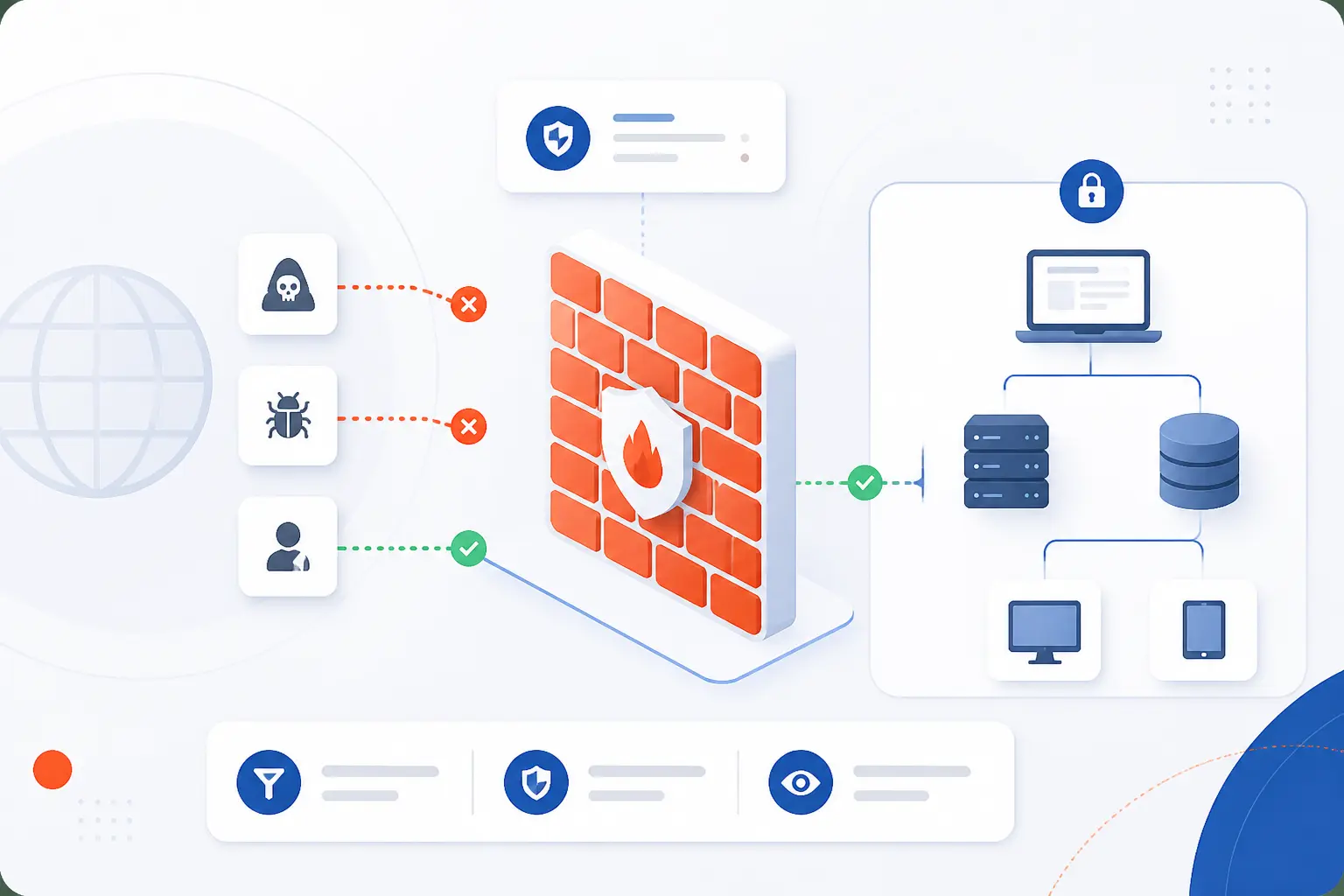
A firewall is a security barrier that checks network traffic and decides what may pass, based on rules. We like to think of it as a careful gatekeeper between systems that should talk and systems that should not. It can protect a home laptop, a company office, a web server, a cloud network, or a public website. At 1Byte, we see the firewall as one of the first practical controls a beginner should understand, because it turns vague “security” into concrete decisions: allow this, block that, log the rest.
The idea is simple, but the practice has layers. A rule might allow visitors to reach a website over HTTPS, while blocking direct access to the database behind it. A more advanced setup may inspect application requests, track active connections, or apply different rules to different parts of a cloud environment. The key lesson is this: a firewall reduces exposure, but it works best as part of a broader security plan.
What Is a Firewall in Network Security

A firewall in network security is a device, software program, or cloud service that controls traffic between networks or hosts with different trust levels. It reads traffic details, compares them with policy, and then allows, denies, rejects, logs, or inspects that traffic. In beginner terms, it helps decide who gets in, who gets out, and which conversations should never happen. This is close to the long-standing definition used in federal guidance, which describes these controls as devices or programs that manage traffic flow between networks or hosts with different security postures.
That definition matters because a firewall is not magic. It does not “make a network secure” by existing. It must be placed correctly, configured carefully, reviewed often, and backed by identity controls, patching, monitoring, backups, and sound application design. In our view, the best setup is boring in the best possible way: only the right traffic reaches the right service, and every exception has a reason.
FURTHER READING: |
| 1. What Is Personally Identifiable Information in Practice |
| 2. What Is Least Privilege and Why Does It Matter |
| 3. What Are DDoS Attacks and How Do They Disrupt Sites |
How It Monitors Traffic and Enforces Rules

A firewall monitors traffic by examining network data, comparing it with rules, and applying an action. The rules can be simple, such as allowing HTTPS traffic to a web server, or more advanced, such as blocking suspicious request patterns. Good enforcement depends on context: source, destination, port, protocol, connection state, application behavior, and sometimes user identity. The result is a controlled path through the network, rather than an open door.
Watching Inbound and Outbound Network Traffic
A firewall watches both traffic entering a protected environment and traffic leaving it. Inbound control helps stop unwanted access from the internet, another office, or an untrusted segment. Outbound control helps reduce damage if a system is compromised, because malware often tries to call out to command-and-control servers or send stolen data away.
Many beginners focus only on inbound rules. We understand why, since incoming attacks feel obvious. Still, outbound rules deserve equal respect. If a web server only needs to reach a database and a software update source, it should not be free to connect anywhere. That is how small configuration choices become real containment.
Matching Packets to IP Addresses, Ports, and Protocols
A firewall often makes its first decision by matching traffic against IP addresses, port numbers, and transport protocols. An IP address identifies a source or destination, a port points to a service, and a protocol describes how the data is carried. For example, a rule may allow TCP traffic to port 443 for a public website, while denying direct database access from the internet.
Ports are standardized enough to make these rules readable. The official registry notes that service names and port numbers distinguish services over TCP, UDP, SCTP, and other transport protocols, and it separates port ranges such as 0-1023 for system ports. A common example is allowing HTTPS while blocking a database port from public sources. The rule is not judging the business value of the traffic. It is matching facts in the packet against the policy we wrote.
Using Connection State and Deep Inspection for Better Decisions
A more capable firewall can track connection state and inspect application content before making a decision. State tracking means it understands whether traffic belongs to an existing conversation or looks like an unexpected packet. For TCP traffic, this matters because the protocol itself has connection states, and the transport standard describes how TCP moves through those states during communication.
Deep inspection goes further. It can examine parts of the request, not just the address and port. For instance, web-focused inspection may look at HTTP headers, request paths, methods, or patterns that resemble injection attempts. We see deep inspection as useful, but never as a substitute for secure code. It can catch bad traffic at the edge, yet the application still needs validation, authentication, and patching.
The Main Firewall Categories

The main firewall categories differ by how much traffic context they inspect and where they make decisions. Some only check packet headers. Others track sessions, inspect applications, combine multiple security functions, or specialize in web traffic. No single category is “best” in every case. The right choice depends on what you are protecting, what traffic must be allowed, and how much visibility you need.
| Category | Best fit | Main decision style |
|---|---|---|
| Packet-filtering | Basic access control | Headers, addresses, ports, protocols |
| Stateful inspection | General network boundaries | Packets plus connection state |
| Proxy and application-layer | Traffic that needs content awareness | Application requests and responses |
| Next-generation and UTM | Consolidated inspection | Multiple security checks in one platform |
| Web application | HTTP and HTTPS applications | Web request patterns |
Packet-Filtering Firewalls
Packet-filtering firewalls make decisions mainly from packet header details. They check values such as source IP, destination IP, protocol, and port. If the packet matches an allow rule, it passes. If it matches a block rule, it does not.
This category is fast and conceptually simple. It is also limited. A packet filter might know that traffic is going to port 443, but it may not understand whether the HTTPS request contains a malicious payload. We still value packet filtering because it cuts away obvious exposure. If a database should never accept public traffic, a basic deny rule is already doing meaningful work.
Stateful Inspection Firewalls
Stateful inspection firewalls decide based on both packet details and the state of the connection. They track whether a packet belongs to a valid, established session. That allows them to treat reply traffic differently from unsolicited traffic.
For example, if an internal server starts an allowed outbound connection, the returning packets can be recognized as part of that same conversation. Without state awareness, administrators often need broader return-path rules, which can create clutter and risk. Stateful inspection became popular for good reason: it mirrors how real network conversations behave.
Proxy and Application-Layer Firewalls
Proxy and application-layer firewalls sit closer to the application conversation and can inspect requests in more detail. A proxy may receive a client request, evaluate it, and then make a separate request to the destination service. This breaks direct communication and gives the control point more room to enforce policy.
The tradeoff is complexity. Proxies can improve visibility, authentication, filtering, and logging, but they must be sized and configured well. We tend to like them for sensitive paths where the added control is worth the operational cost. Public web access, administrative portals, and controlled outbound browsing are common examples.
Next-Generation and Unified Threat Management Firewalls
Next-generation and unified threat management firewalls combine traditional traffic control with added security functions. These may include intrusion prevention, application awareness, identity-based policy, malware inspection, URL filtering, and centralized reporting. The purpose is to give teams more context from one enforcement point.
There is a catch, of course. More features can mean more tuning. If every option is enabled without a plan, false positives and performance issues can follow. Our practical view is to start with the traffic you truly need to control, then add inspection features where they reduce a specific risk.
Web Application Firewalls
Web application firewalls focus on HTTP and HTTPS traffic to web applications. They inspect web requests and can block patterns associated with attacks such as SQL injection, cross-site scripting, suspicious paths, abusive bots, or abnormal request rates. A cloud example is a managed service that lets teams inspect web requests and apply actions such as allow, block, count, or challenge through cloud documentation.
This category is especially useful when a public application must remain reachable. We often see it as a shield in front of code that still needs secure development and patching. OWASP describes virtual patching as a policy enforcement layer that can prevent and report exploitation attempts before the underlying application is fixed, which is useful when teams need breathing room during remediation through practical guidance.
Where It Runs and What It Protects

A firewall can run at the network edge, on a server, inside a cloud network, or as a managed service. The location changes what it sees and what it protects. Network-level controls guard traffic between environments, while host-level controls protect one machine or workload. Cloud and virtual options add flexibility because policy can move closer to applications.
| Deployment option | Protects | Common use |
|---|---|---|
| Network-based | Segments, offices, data centers | Boundary and internal traffic control |
| Host-based | One server, VM, or endpoint | Workload-specific rules |
| Hardware appliance | Physical network paths | Branch or data center perimeter |
| Software | Operating systems and virtual machines | Server-level protection |
| Cloud-native or service-based | Cloud resources and applications | Dynamic infrastructure control |
Network-Based vs Host-Based Protection
Network-based protection controls traffic between networks, while host-based protection controls traffic to and from a specific machine. A network-based control may sit between the internet and a private subnet. A host-based control may run on a Linux server, Windows server, or endpoint.
We prefer both in many real environments. A network rule can block broad unwanted access, while a host rule can protect a workload if another layer is misconfigured. Think of it like a building with a front gate and locked office doors. The front gate matters, but the office doors still matter when someone gets inside.
Hardware Appliances vs Software Firewalls
Hardware appliances are dedicated physical devices, while software firewalls run on general-purpose systems or virtualized environments. Appliances are common where traffic flows through fixed physical paths. Software options fit servers, endpoints, VMs, and cloud workloads.
The difference is less about “strong versus weak” and more about placement, management, and scale. A hardware appliance may be ideal for a branch office edge. A software rule set may be better for an individual web server. In hosting and cloud work, we usually care most about clarity: which asset is protected, which rule applies, and who owns the change?
Virtual, Cloud-Native, and Firewall-as-a-Service Options
Virtual, cloud-native, and service-based options protect resources that do not sit behind one fixed physical box. In cloud environments, rules often attach to workloads, subnets, load balancers, or managed services. For example, cloud security groups commonly control allowed inbound and outbound traffic for associated resources, as shown in an infrastructure guide.
This model fits modern hosting because servers can be created, resized, replaced, or isolated without rewiring a rack. It also creates a new duty: rule hygiene. Old rules can linger after a test project ends. We see that often. Good cloud protection needs naming, ownership, review, and a habit of removing access that no longer serves a purpose.
What It Helps Stop and Where It Falls Short

A firewall helps stop unwanted traffic, unauthorized access attempts, risky services, and some common attack patterns. It can also support segmentation, content rules, NAT, and VPN access. But it cannot fix weak passwords, unpatched software, unsafe code, stolen credentials, or users approving fraudulent requests. We consider it a core layer, not the whole castle.
Blocking Unauthorized Access, Malicious Traffic, and Common Attacks
A firewall blocks unauthorized access by refusing traffic that does not match approved rules. This can stop public access to admin ports, block traffic from known bad sources, limit exposure to private databases, and reduce scanning noise. A web-focused setup can also block suspicious HTTP requests before they reach an application.
Real-world attack patterns make this control worth the effort. Verizon’s breach research says 31% of breaches now start with software vulnerabilities, which reminds us that exposed and unpatched systems are costly targets. A rule cannot patch the vulnerable service. Still, it can reduce who can reach that service while the proper fix is applied.
Supporting Content Filtering, Segmentation, NAT, and VPN Access
A firewall can support extra functions such as content filtering, segmentation, NAT, and VPN access. Content filtering can restrict categories of web traffic or known risky destinations. Segmentation divides systems into zones, so a public web server does not have open access to payroll, backups, or database systems.
NAT changes address information as traffic crosses a boundary, often so private internal addresses can communicate externally through shared public addressing. VPN access can create encrypted paths for remote users or site-to-site connections, then pass that traffic through rules. CISA and partner agencies recommend strict default-deny access control and strong segmentation in hardening guidance for communications infrastructure, including the use of DMZ designs and stateful inspection through agency guidance.
Why a Firewall Alone Is Not a Complete Security Strategy
A firewall alone is not complete security because many attacks do not depend on open network ports. Phishing, stolen credentials, vulnerable plugins, weak admin passwords, unsafe code, and excessive user permissions can bypass or outmaneuver traffic rules. If an attacker logs in as a valid user, the traffic may look allowed.
This is why we dislike “set it and forget it” thinking. A firewall should work beside identity management, multifactor authentication, patching, endpoint protection, backups, monitoring, secure coding, and incident response. The best strategy assumes some control will fail. Then it asks a better question: what limits the blast radius?
Rules, Policies, and Configuration Basics

Firewall rules and policies define what traffic is allowed, denied, rejected, inspected, and logged. A good policy starts from business need, not guesswork. It should say which source can reach which destination, over which port and protocol, and why that access exists. The cleanest rule set is usually the one with fewer exceptions and better documentation.
How Rule Sets Decide What to Allow, Deny, or Reject
Rule sets decide traffic actions by checking each packet or session against ordered policy conditions. Many systems evaluate rules from top to bottom, then apply the first matching rule. That makes order important. A broad allow rule above a specific block rule can quietly undo the intended protection.
Allow means the traffic may pass. Deny or drop usually means the traffic is silently discarded. Reject means the sender receives a response that the connection is refused. Logging records what happened. We recommend logging meaningful denies and sensitive allows, but not blindly logging everything. Too much noise makes real signals harder to see.
Least-Privilege Setup and Explicit Inbound and Outbound Controls
Least-privilege setup means allowing only the traffic required for a system to do its job. A public web server may need inbound HTTPS from visitors, outbound updates to trusted repositories, and private database access to a specific database host. It does not need every port open to every destination.
NIST’s zero trust work frames modern access around protecting resources and making more precise access decisions, rather than trusting a network location by default through an access model. We agree with that direction. Even if a business is not building a full zero trust architecture, the habit is useful: write narrow rules, name the reason, and remove access when the reason disappears.
Updates, Logging, Documentation, and Ongoing Review
Firewall management requires updates, useful logs, clear documentation, and regular review. Threats change, applications move, staff rotate, and old projects leave stale rules behind. A rule that made sense six months ago may be needless exposure now.
We suggest a simple rhythm. Review public-facing rules first, then administrative access, then outbound rules, then unused objects. Document the business owner and purpose for each risky exception. Test changes before applying them to production where possible. The goal is not paperwork for its own sake. It is to make the next security decision faster and less risky.
FAQ
These answers clear up the most common beginner questions about firewalls, VPNs, and antivirus tools. The short version is that these tools overlap in security conversations, but they do different jobs. A firewall controls traffic. A VPN encrypts a path. Antivirus looks for malicious software on systems.
Is a VPN a Firewall
No, a VPN is not a firewall. A VPN creates an encrypted connection between a user, device, or network and another network. A firewall decides which traffic is allowed through that connection. In practice, many businesses use both, because encrypted access still needs rules.
Are Firewalls Hardware-Based or Software-Based
Firewalls can be hardware-based, software-based, virtual, cloud-native, or delivered as a service. A hardware appliance is a physical device, while software runs on a server, endpoint, virtual machine, or cloud platform. The right form depends on what you are protecting and where the traffic flows.
What Is the Difference Between a Firewall and Antivirus
A firewall controls network traffic, while antivirus detects and responds to malicious files or behavior on a device. The firewall may stop an unwanted connection before it reaches a server. Antivirus may catch malware that arrives through email, downloads, removable media, or an already allowed connection. We see them as complementary layers, not replacements for each other.
How 1Byte Helps Secure Websites and Servers
1Byte helps customers build safer web and server foundations through domain registration, SSL certificates, WordPress hosting, shared hosting, cloud hosting, and cloud servers. We are also an AWS Partner, which matters when customers want cloud-based environments designed with practical traffic control in mind. These services do not replace a firewall, but they sit close to the assets that firewall rules are meant to protect. Our viewpoint is simple: security works best when domain, encryption, hosting, and server access decisions are planned together.
Domain Registration and SSL Certificates for a Safer Web Presence
Domain registration and SSL certificates support the trusted front door of a website. A domain gives visitors a consistent address, and an SSL certificate enables encrypted HTTPS connections. A firewall can then be configured around that public web path, usually allowing HTTPS while keeping private services closed.
This pairing matters because users see the website name and browser security indicators before they ever think about ports or rules. We see domain registration and SSL certificates as basic building blocks. They help define where legitimate traffic should go, while firewall policy helps decide what should never reach the server.
WordPress Hosting and Shared Hosting With Practical Security Foundations
WordPress hosting and shared hosting benefit from practical security foundations because public websites receive constant automated traffic. A firewall can help reduce unwanted requests, block unnecessary access paths, and limit exposure around the hosting environment. For WordPress, that matters because themes, plugins, login pages, and admin areas all need careful handling.
We do not treat hosting security as one switch. It is a stack of choices. Use HTTPS, keep software updated, avoid weak passwords, limit administrative access, and place sensible traffic rules around the website. That may sound plain, but plain security habits are the ones teams actually keep.
Cloud Hosting and Cloud Servers for Flexible Network Protection
Cloud hosting and cloud servers allow network protection to be shaped around each workload. A web tier can accept public HTTPS traffic, an application tier can stay private, and a database tier can accept requests only from approved sources. Firewall rules and cloud access controls are how that design becomes real.
As an AWS Partner, 1Byte understands why cloud environments need disciplined rule design. Cloud servers make it easy to add resources, but that convenience can create sprawl if access rules are not reviewed. Our practical advice is to start narrow, open only what the workload needs, and revisit rules whenever an application changes.







Conclusion
A firewall is a traffic control point that helps protect networks, servers, and applications by enforcing clear rules. It can block unwanted access, reduce exposed services, support segmentation, and inspect suspicious traffic. Yet it cannot carry the whole security load by itself. Strong security also needs patching, identity controls, backups, monitoring, secure application practices, and ongoing review.
Our position at 1Byte is that the firewall is still one of the most useful security ideas because it forces clarity. What should be reachable? From where? Over which service? By whom? If you can answer those questions, your website or server is already on firmer ground. The next step is simple: review your public-facing services and close anything that does not have a clear business reason to be open.