

- Internet Control Message Protocol (ICMP) Is the Network Feedback Protocol for IP Errors and Diagnostics
- How ICMP Fits Into IP Packet Delivery
- How ICMP Messages Are Organized
- Core ICMP Messages to Know
- What Destination Unreachable Messages Reveal
- How ICMP Powers Network Troubleshooting
- ICMPv4 vs ICMPv6
- Security Risks and Monitoring Tradeoffs
- FAQ
- How 1Byte Supports Reliable Networking and Hosting
- Conclusion
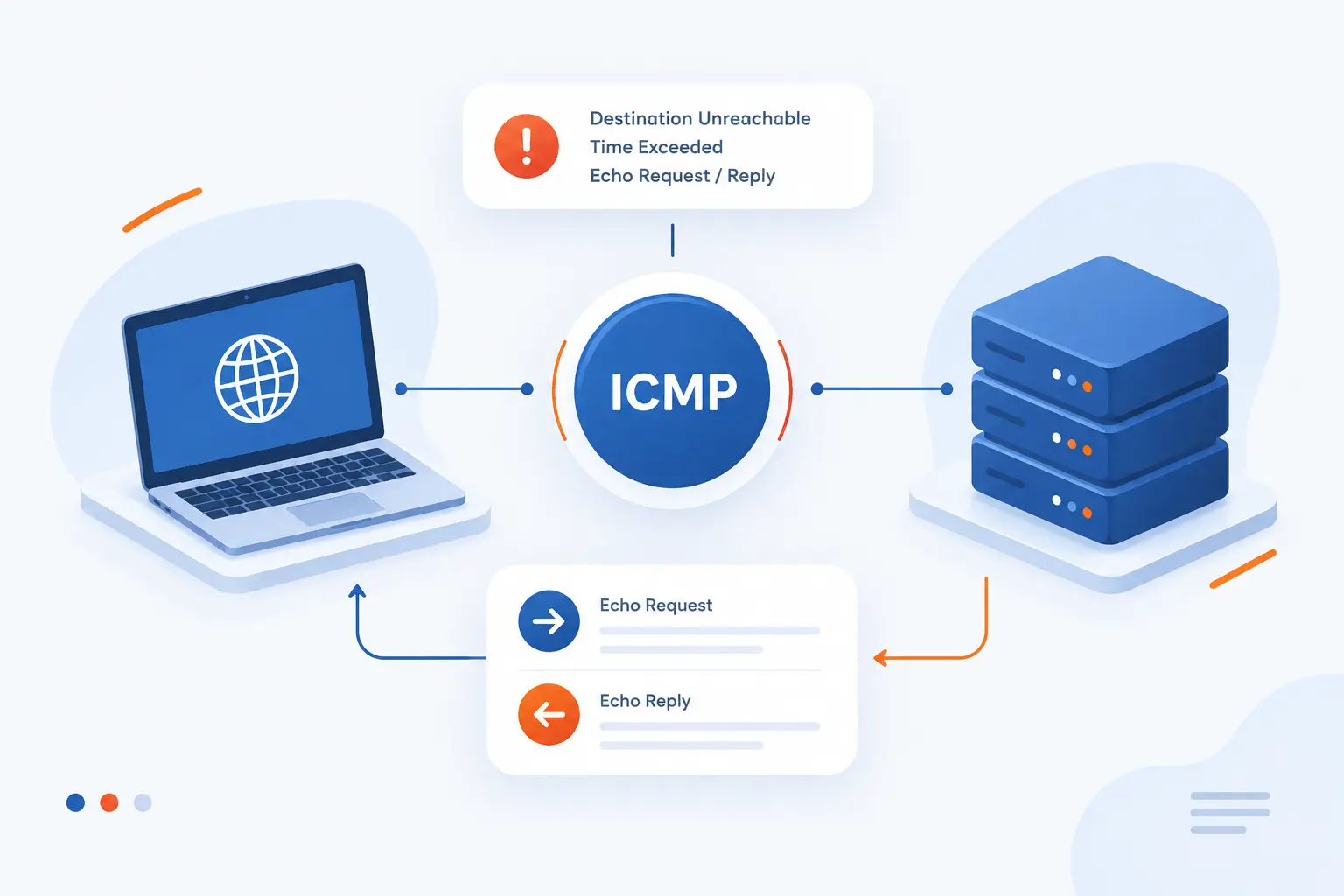
The internet control message protocol (icmp) is the feedback system used by IP networks to report delivery problems and support basic diagnostics. It does not carry web pages, emails, files, or application data. Instead, it sends short control messages such as “that host cannot be reached,” “this packet took too long,” or “this destination answered.” We think of ICMP as the network’s way of tapping the sender on the shoulder when IP delivery needs correction or explanation.
For beginners, the easiest real-world example is ping. When we ping a server, our computer sends an ICMP Echo Request, then waits for an Echo Reply. If the reply comes back, we know the remote system is reachable at the IP layer. If not, ICMP clues can help us tell whether the trouble is routing, filtering, service availability, or packet size.
Internet Control Message Protocol (ICMP) Is the Network Feedback Protocol for IP Errors and Diagnostics
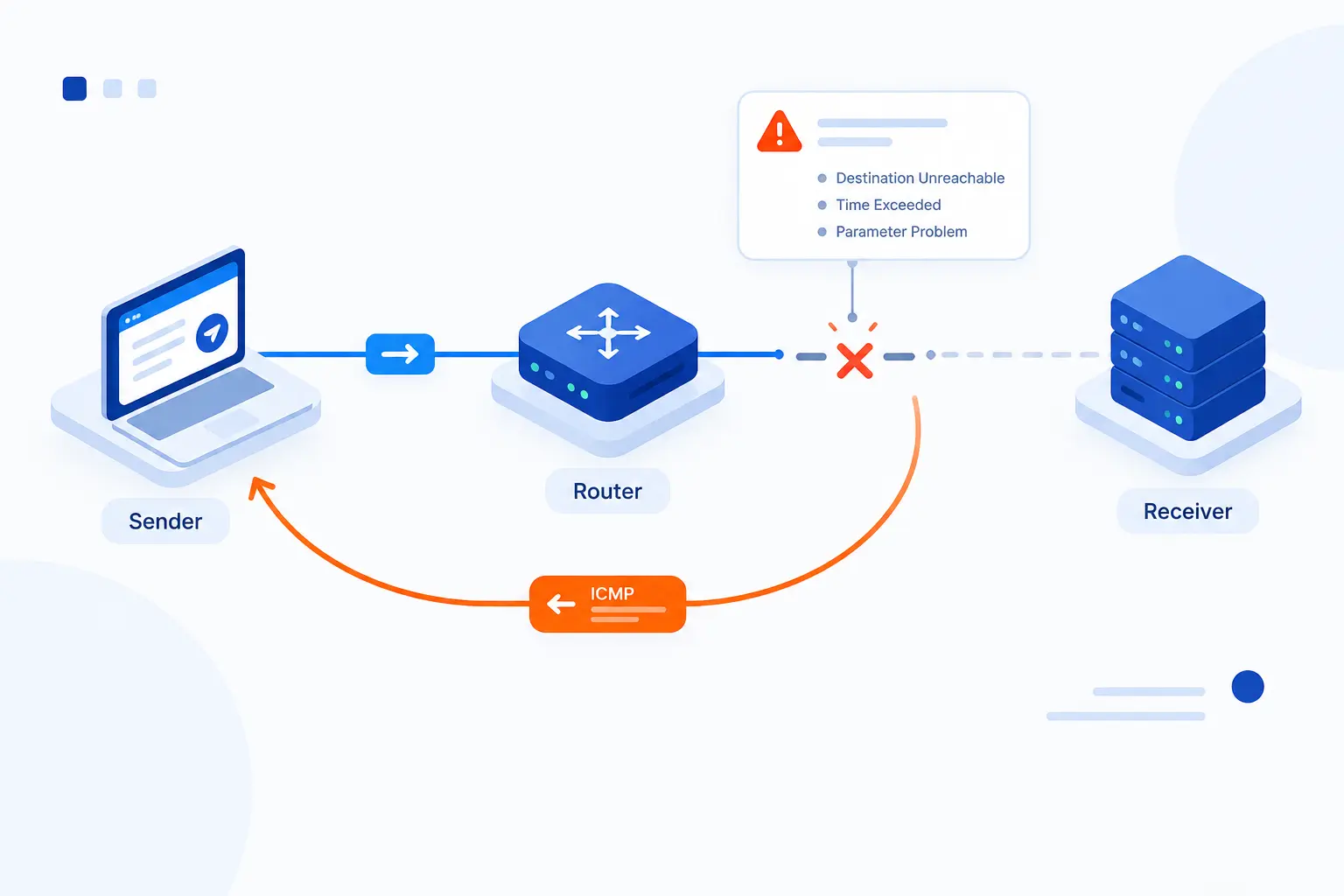
ICMP is a companion protocol to IP that reports errors and diagnostic results between hosts and routers. It exists because IP itself is a best-effort delivery system. IP tries to move packets, but it does not guarantee delivery, ordering, or recovery. ICMP fills part of that gap by sending structured feedback when a packet cannot be delivered, expires in transit, reaches the wrong gateway, or needs a diagnostic reply.
The classic IPv4 behavior was defined in the original specification, which describes ICMP as using the basic support of IP while acting as a control and error-reporting layer for gateways and hosts. That matters in hosting because servers live inside many layers: customer devices, access networks, transit providers, firewalls, load balancers, routers, and virtual networks. When something breaks, ICMP often gives us the first honest clue.
We like ICMP because it is small, blunt, and practical. It rarely tells the whole story, but it often tells us where to start. A failed website might be a DNS issue, an HTTPS issue, a firewall rule, a routing problem, or a server outage. A few ICMP tests can quickly separate “the server is not reachable” from “the web service is reachable but the application is failing.” That difference saves real troubleshooting time.
FURTHER READING: |
| 1. What Is IPsec VPN? How It Works and Main Uses |
| 2. What Is an Internet Exchange Point and How It Works |
| 3. What Is DNS Filtering and Why Does It Matter |
How ICMP Fits Into IP Packet Delivery
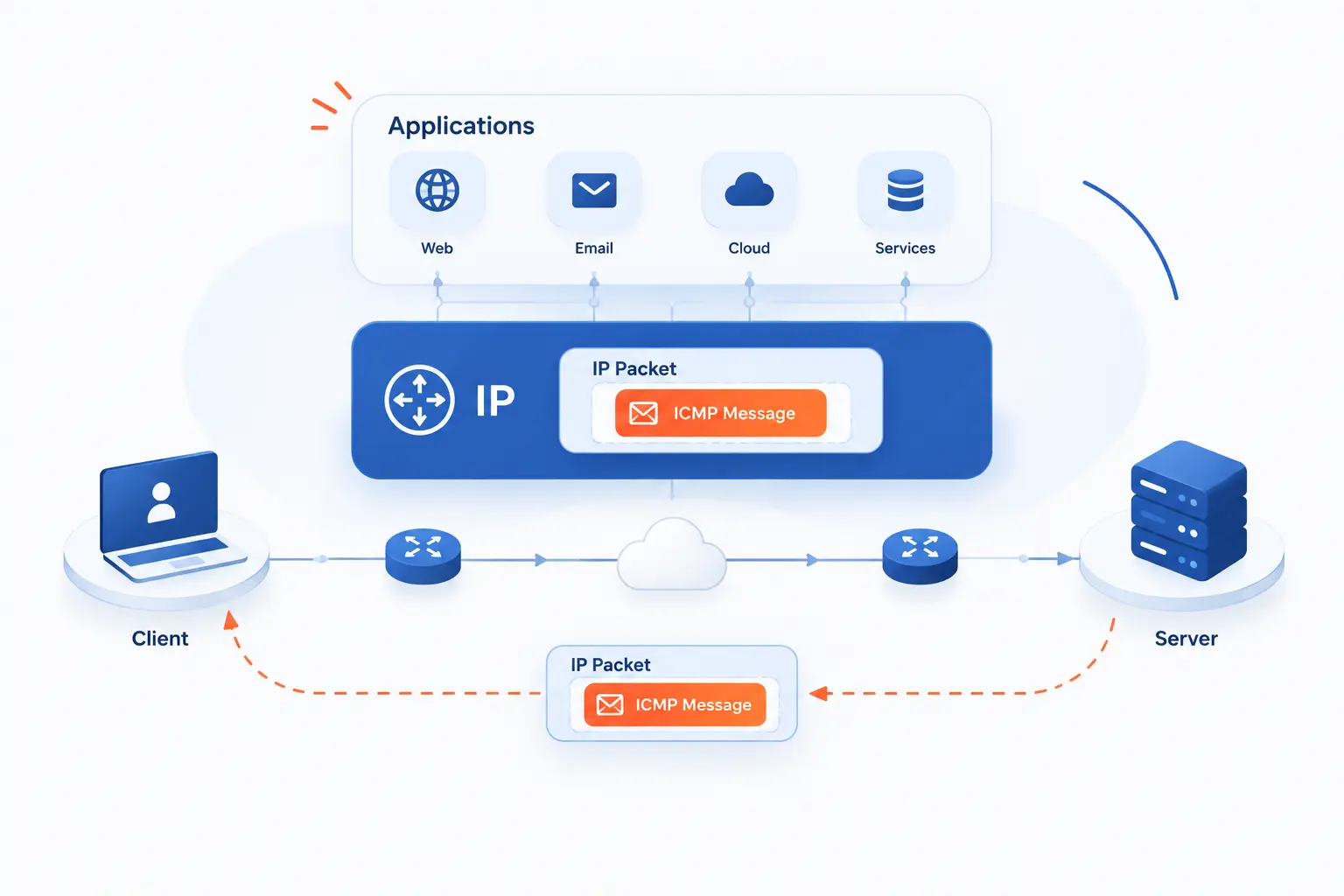
ICMP fits beside IP, not above it like TCP or UDP applications do. A router or host sends an ICMP message when it needs to report something about IP delivery. The message is placed inside an IP packet so it can travel back through the network. It is not a conversation protocol for apps, and it is not used by browsers the way HTTPS uses TCP or QUIC.
Why Routers and Hosts Send ICMP Messages
Routers and hosts send ICMP messages because IP delivery can fail in ways the original sender needs to know. A router may not know a route to the destination. A host may be reachable, but the requested transport port may have no listening service. A packet may loop too long and expire. A gateway may also know a better next hop for local traffic.
This is why ICMP feels like a field report from the network. It does not fix the failure by itself. It reports the condition so the sender, operating system, administrator, or monitoring tool can react. In our daily hosting work, that distinction matters. An ICMP reply is evidence, not a cure.
For example, if a customer cannot reach a cloud server, an ICMP Destination Unreachable may suggest that routing or filtering is blocking the path. A Time Exceeded message may show that packets are moving, but not reaching the final destination. Echo replies may show that the host is alive even when the website is still down.
Why ICMP Rides Inside IP Packets
ICMP rides inside IP packets because it reports on IP delivery while still needing IP to carry the report. That sounds circular at first, but it is normal network layering. The ICMP message becomes the payload of an IP packet, with an IP header around it. The outer IP header gets the message back to the source address of the original packet whenever possible.
This design keeps ICMP close to the network layer. It can be generated by routers in the middle of the path, not just by the final destination. That is why tools such as ping and path mapping utilities can learn about intermediate hops. The network can speak up before traffic reaches the destination server.
There is one useful caution here. ICMP error reports are usually sent in response to a problem, but not every problem produces a report. Firewalls may drop packets silently. Some routers rate-limit ICMP. Attack conditions may force devices to ignore low-priority diagnostic traffic. Silence is a clue, but it is not proof.
Why ICMP Does Not Use Application Ports
ICMP does not use application ports because it is not TCP or UDP traffic. Ports belong to transport-layer protocols that identify application conversations. ICMP has its own message Type and Code fields instead. That is why a firewall rule for “TCP port 443” is different from a rule that permits selected ICMP message types.
This point clears up a common beginner mistake. We sometimes hear, “What port does ping use?” The answer is none. Ping sends Echo Request messages and receives Echo Reply messages. A device may allow HTTPS while blocking ping, or allow ping while blocking HTTP and HTTPS. Those are separate policy choices.
For hosting operations, this matters in monitoring design. A successful ping does not prove that WordPress, an API, or a checkout page works. It only proves that the target answered at the IP diagnostic layer. We still need service-level checks for web ports, TLS certificates, application health, and database reachability.
How ICMP Messages Are Organized
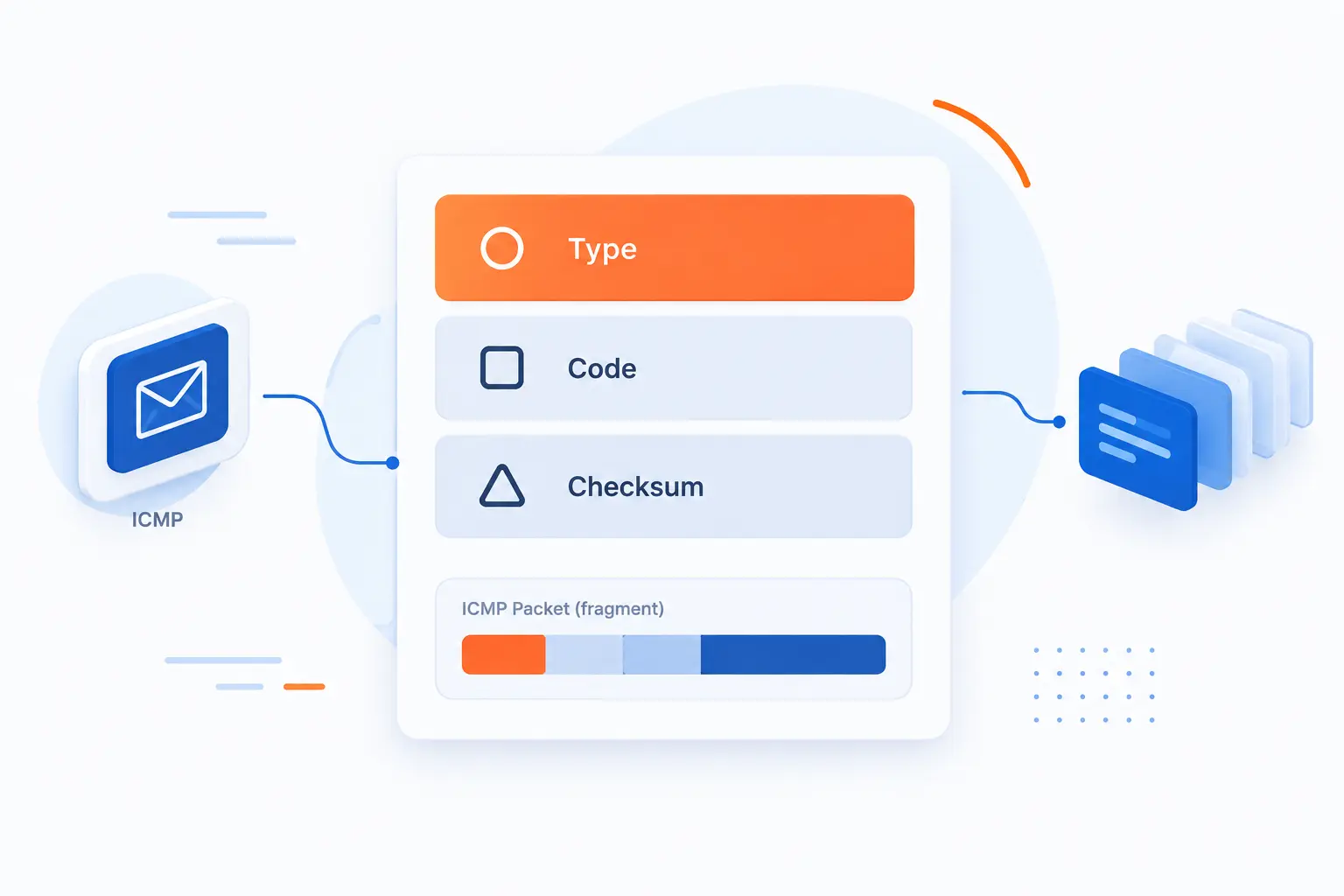
ICMP messages are organized around a compact header and a message-specific body. The Type field gives the broad category, the Code field narrows the reason, and the Checksum helps detect corruption in the ICMP message. Error messages usually include part of the original packet so the sender can match the report to the traffic that caused it. Query messages, such as echo, are designed for request-and-reply diagnostics.
| Part | What it tells us | Practical use |
|---|---|---|
| Type | Main message family | Shows whether the message is echo, unreachable, redirect, or another class |
| Code | Specific reason inside the family | Distinguishes network failure from host failure or port failure |
| Checksum | Integrity check | Helps receivers reject damaged control messages |
| Message body | Extra details | May include data from the original packet or echo identifiers |
Header Fields Type Code and Checksum
The Type, Code, and Checksum fields are the core of an ICMP message. Type names the broad message category. Code gives the more exact reason within that category. Checksum helps the receiver detect whether the ICMP message changed in transit.
The public registry table is the practical reference for assigned ICMP message values. We use that kind of registry when we need precision, especially while reading packet captures. It prevents guesswork, which is a quiet enemy in network troubleshooting.
Think of Type and Code as a short error label. “Destination Unreachable” is useful, but “Port Unreachable” is better. “Time Exceeded” is useful, but knowing it happened during transit points us toward path length, loops, or hop-limit behavior.
Error Messages
Error messages report that a packet could not be delivered or processed as intended. They are sent back to the source address of the traffic that triggered the problem, if the network can send them. Common examples include Destination Unreachable, Time Exceeded, Redirect, and Parameter Problem. Each one gives a different angle on what went wrong.
An error message is not the same as an application error. A website may return a server error while ICMP looks perfectly normal. The reverse can also happen. A server might be healthy, but packets never reach it because a route is missing or a firewall blocks the path.
When we troubleshoot, we try not to overread one packet. ICMP errors are most useful when they line up with other evidence. Logs, packet captures, firewall counters, route tables, and DNS records all help confirm the story.
Informational and Query Messages
Informational and query messages ask for or provide simple network-layer information. Echo Request and Echo Reply are the best-known pair. Router-related messages also exist, especially in older IPv4 discovery behavior and in IPv6 neighbor discovery. These messages help hosts learn or test basic network conditions.
The key difference is intent. Error messages say, “Something went wrong with your packet.” Query messages say, “Please answer this network question.” Ping uses the second pattern, which is why it is so quick and familiar.
Still, query messages can be filtered for security reasons. Many public servers block Echo Request from the open internet. That does not automatically mean the server is down. It may only mean the network refuses that diagnostic question.
Core ICMP Messages to Know
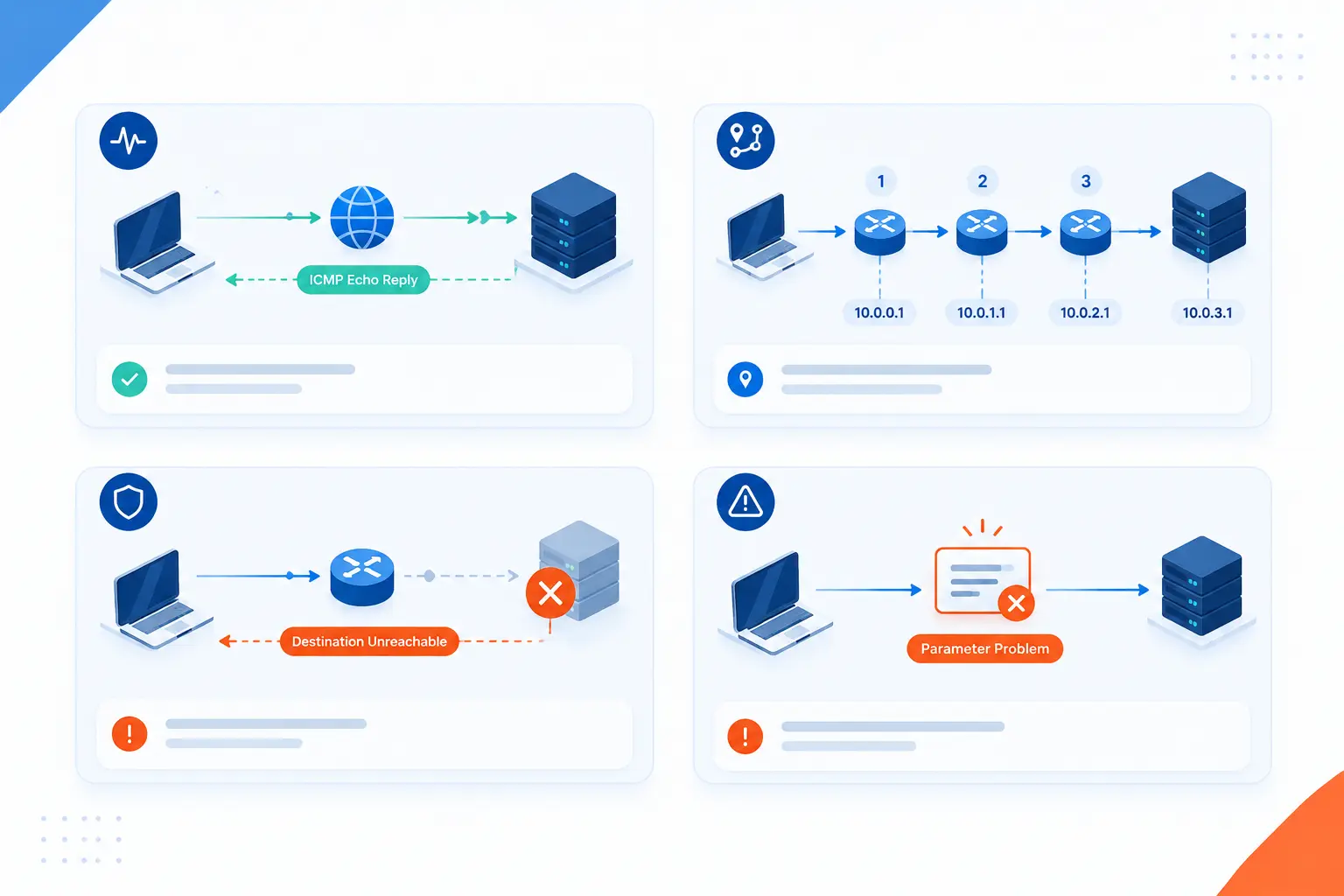
The most useful ICMP messages are the ones that explain reachability, routing, path length, router discovery, malformed packets, and legacy congestion behavior. Beginners do not need to memorize every message value. They should know what each common message means in the real world. Once the meaning is clear, packet captures and command output become far less mysterious.
Echo Request and Echo Reply
Echo Request and Echo Reply are the messages behind the ping test. A device sends a request to an IP address. If the target accepts and answers, it sends a reply. The sender can then estimate reachability and round-trip time.
The Windows command guide describes ping as a tool that verifies IP-level connectivity by sending echo requests and displaying replies with round-trip times. That is the heart of it. Ping is simple, but it is not shallow.
In practice, we use ping as a first pass. It can show packet loss, unstable latency, or a dead path. Yet it cannot prove that a website works. A server can answer ping while Nginx, Apache, PHP, MySQL, or an application process is failing.
Redirect
Redirect messages tell a host that a better gateway exists for a destination on the same local network. This usually happens when a host sends traffic to one router, but that router knows another local router is a better next hop. The goal is more efficient forwarding. The host may update its route choice based on the message.
Redirects can be useful in small or legacy networks, but we treat them carefully. In managed hosting and cloud networks, routing should be explicit and controlled. Unexpected redirects can point to misconfigured gateways, strange local routing, or risky trust assumptions.
As a rule of thumb, ICMP Redirect is not the first tool we want running the show in modern infrastructure. We prefer clean route tables, clear default gateways, and controlled network policy. Redirects are clues, not a substitute for design.
Time Exceeded
Time Exceeded means a packet expired before it reached its destination or fragment reassembly took too long. The most familiar cause is a hop limit or TTL reaching zero in transit. Each router reduces the value as the packet passes through. If it reaches zero, the router discards the packet and may send Time Exceeded back.
This message is the engine behind many path mapping tools. They send packets with increasing hop limits. Each router that expires a packet reports back, revealing one step in the path. That is a clever use of a failure message.
When we see Time Exceeded outside a diagnostic test, we ask why packets are taking too many hops. A routing loop is one possibility. Another is a path that has changed unexpectedly. Either way, the message is a flare in the dark.
Router Advertisement and Router Selection
Router Advertisement messages help hosts discover routers on a local network. In IPv4, router discovery was defined as a way for hosts to learn neighboring routers without using a full routing protocol. The router discovery standard says these messages let hosts discover routers, but they do not make a host understand the best route to every destination.
This distinction matters. Router discovery is not the same as dynamic routing between routers. It is local guidance for hosts. A laptop, virtual machine, or server can learn where to send off-link traffic, but the routers still need their own routing knowledge.
In hosting environments, router advertisement behavior is especially important on IPv6 networks. Bad advertisement settings can break address configuration or default route selection. Good settings make hosts behave predictably.
Parameter Problem and Source Quench
Parameter Problem reports that something in a packet header was invalid or could not be processed. That can happen when a field is malformed, unsupported, or impossible for the receiver to handle. It is less common in everyday troubleshooting than Echo or Destination Unreachable, but it can be valuable in protocol testing and packet captures.
Source Quench is different because it is a legacy message that should not be used for congestion control anymore. A 2012 standards update formally deprecated transport reaction to Source Quench messages and clarified that modern transport protocols should ignore them. In our view, this is a useful reminder that protocol history leaves fossils behind.
Congestion control belongs in modern transport behavior, queue management, and traffic engineering, not in trusting old Source Quench signals. If we see Source Quench in a capture, we treat it as unusual. It is more of a historical artifact than a current best practice.
What Destination Unreachable Messages Reveal
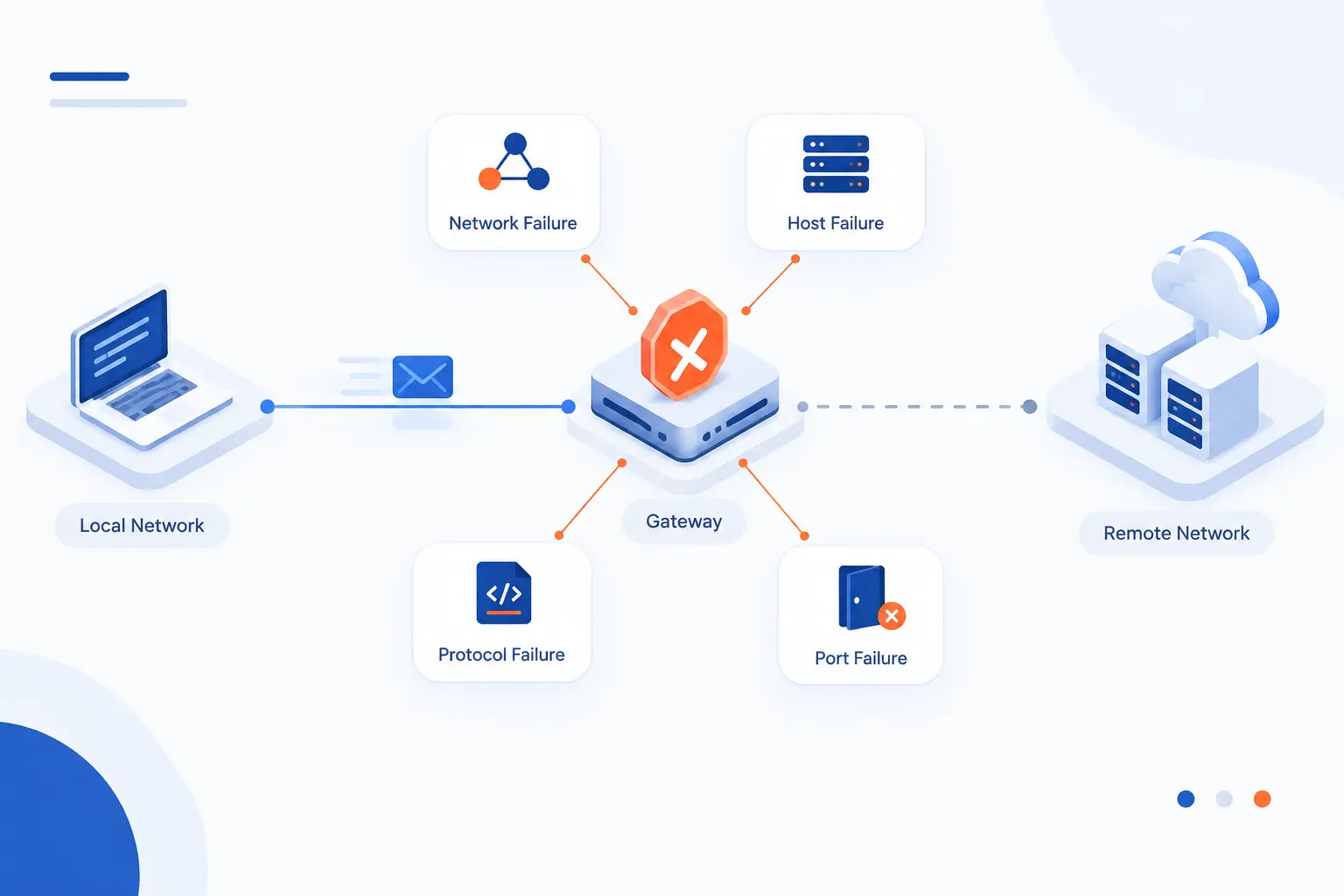
Destination Unreachable messages reveal why a packet could not reach the intended network, host, protocol, or service. This is one of the most useful ICMP families for troubleshooting. The general message says “unreachable,” while the code tells us what kind of unreachable condition was reported. That extra detail can turn a vague outage into a targeted investigation.
Network Unreachable
Network Unreachable means the sender’s packet could not be routed to the destination network. The issue may be a missing route, a broken upstream path, a withdrawn route, or a policy that prevents forwarding. In older language, the network itself is the unreachable target. The host may or may not exist, because the path cannot even get to that network.
For a hosted server, this can appear when a route table is wrong or a provider path is impaired. It can also happen during network changes. If a subnet moves, a route is removed, or a VPN tunnel drops, packets may fail before reaching any machine.
Our instinct is to check route tables first. Then we compare the path from multiple locations. A single user may have an access network problem. Many users across regions may point to a wider routing issue.
Host Unreachable
Host Unreachable means the network may be known, but the specific destination host cannot be reached. The final router may not resolve the host on the local link. The target may be offline. A local firewall or address assignment problem may also be involved.
This message narrows the search. We stop asking only, “Can we reach the network?” and start asking, “Can the last-hop network reach the machine?” That leads to checks such as ARP or neighbor discovery, interface state, server IP assignment, and local firewall policy.
In cloud environments, Host Unreachable can sometimes point to subnet-level rules or virtual network attachment issues. The server might be running, but not correctly connected. The message pushes us closer to the final hop.
Port Unreachable
Port Unreachable means the destination host was reached, but no application was listening on the requested transport port. This is common with UDP tests because UDP has no handshake like TCP. If a UDP packet reaches a closed port, the target may send an ICMP Port Unreachable response.
This does not mean the host is dead. It means the requested service is not available at that port, or the host chose to reject it that way. For example, a DNS query to a host with no DNS service may trigger this kind of response.
We find Port Unreachable useful because it proves more than silence. It suggests that the packet reached the host and came back with a meaningful refusal. That is different from a firewall drop, where no answer returns.
Other Less-Common Destination Failures
Less-common Destination Unreachable codes can point to protocol, fragmentation, source route, or policy problems. Some appear rarely because modern networks avoid the old conditions that created them. Others are hidden because firewalls suppress the response. Still, they matter when troubleshooting odd packet behavior.
One important case involves packet size. If a packet cannot be forwarded without fragmentation, and fragmentation is not allowed or not available, an unreachable-style message can help path MTU discovery. Without that feedback, large transfers may hang while small requests succeed.
That is one reason we dislike blanket ICMP blocking. It may feel tidy from a firewall checklist view, but it can break real network behavior. Better filtering allows useful control messages while limiting abuse.
How ICMP Powers Network Troubleshooting
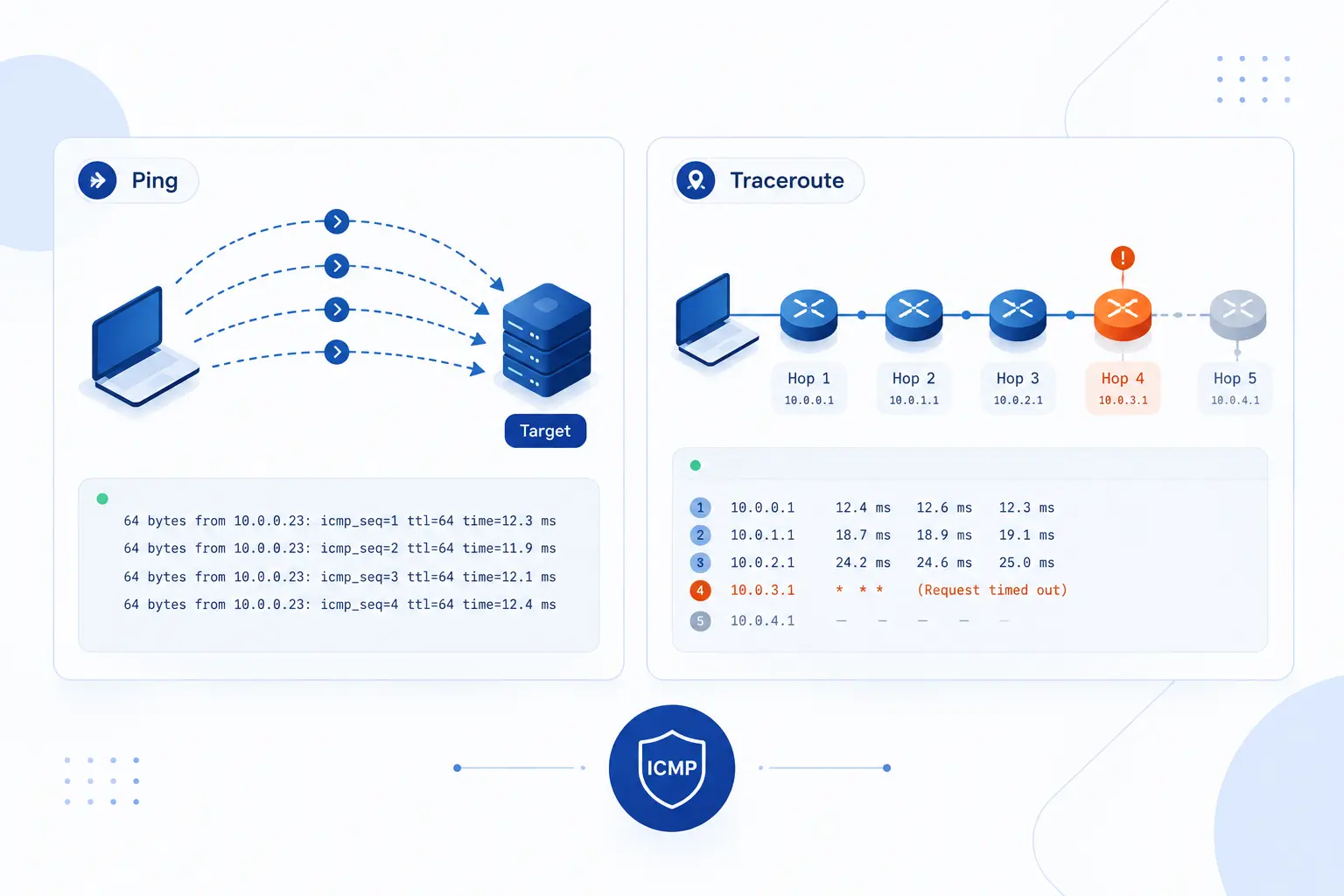
ICMP powers troubleshooting by exposing reachability, delay, packet loss, routing hops, and certain service failures. It gives us fast evidence before we dig into application logs. Ping checks whether a target answers basic probes. Traceroute-style tests map where packets travel and where they stop.
Ping for Reachability and Latency
Ping tests whether an IP address answers Echo Request messages and how long replies take to return. That makes it useful for first-contact diagnosis. If replies are steady, the path is at least partly healthy. If replies are missing or inconsistent, we look for packet loss, filtering, congestion, or routing trouble.
Latency numbers from ping are helpful, but they need context. A server across an ocean will naturally show higher round-trip time than one in the same city. A single spike may be harmless. A pattern of spikes during peak traffic may signal congestion or overloaded network devices.
We also remind customers that ping can be blocked. A failed ping is not always a failed server. The next test should check the actual service, such as HTTPS, SSH, DNS, or a database endpoint.
Traceroute for Hop-by-Hop Path Mapping
Traceroute maps a path by provoking Time Exceeded replies from routers along the way. It starts with a very small hop limit, then increases it step by step. Each router that expires the packet may reveal itself. The final result is a rough path from source to destination.
This is one of the most elegant tricks in networking. It turns a protective field in the IP header into a diagnostic map. We can see where latency rises, where replies stop, or where paths differ from different regions.
Still, traceroute output is not a perfect map. Routers may decline to answer. Some paths are asymmetric, meaning the return route differs from the forward route. Load balancing can also show changing hops. We use traceroute as a guide, not a courtroom verdict.
Using ICMP Clues to Find Routing and Service Problems
ICMP clues are most powerful when we combine them with service checks and configuration evidence. Echo Reply suggests basic reachability. Destination Unreachable narrows the failure category. Time Exceeded points toward path length or routing loops. Port Unreachable can show that a host is alive but a service is absent.
A practical workflow often starts with DNS, then ping, then traceroute, then a port-specific test. For a website, that might mean checking name resolution, IP reachability, path shape, TCP connection to HTTPS, TLS certificate validity, and web server response. Each layer answers a different question.
We prefer layered diagnosis because it avoids wild guesses. If DNS resolves to the wrong address, ICMP tests may lead us to the wrong place. If ping works but HTTPS fails, the problem is likely above simple reachability. If traceroute dies at the same upstream hop from many networks, routing deserves attention.
ICMPv4 vs ICMPv6
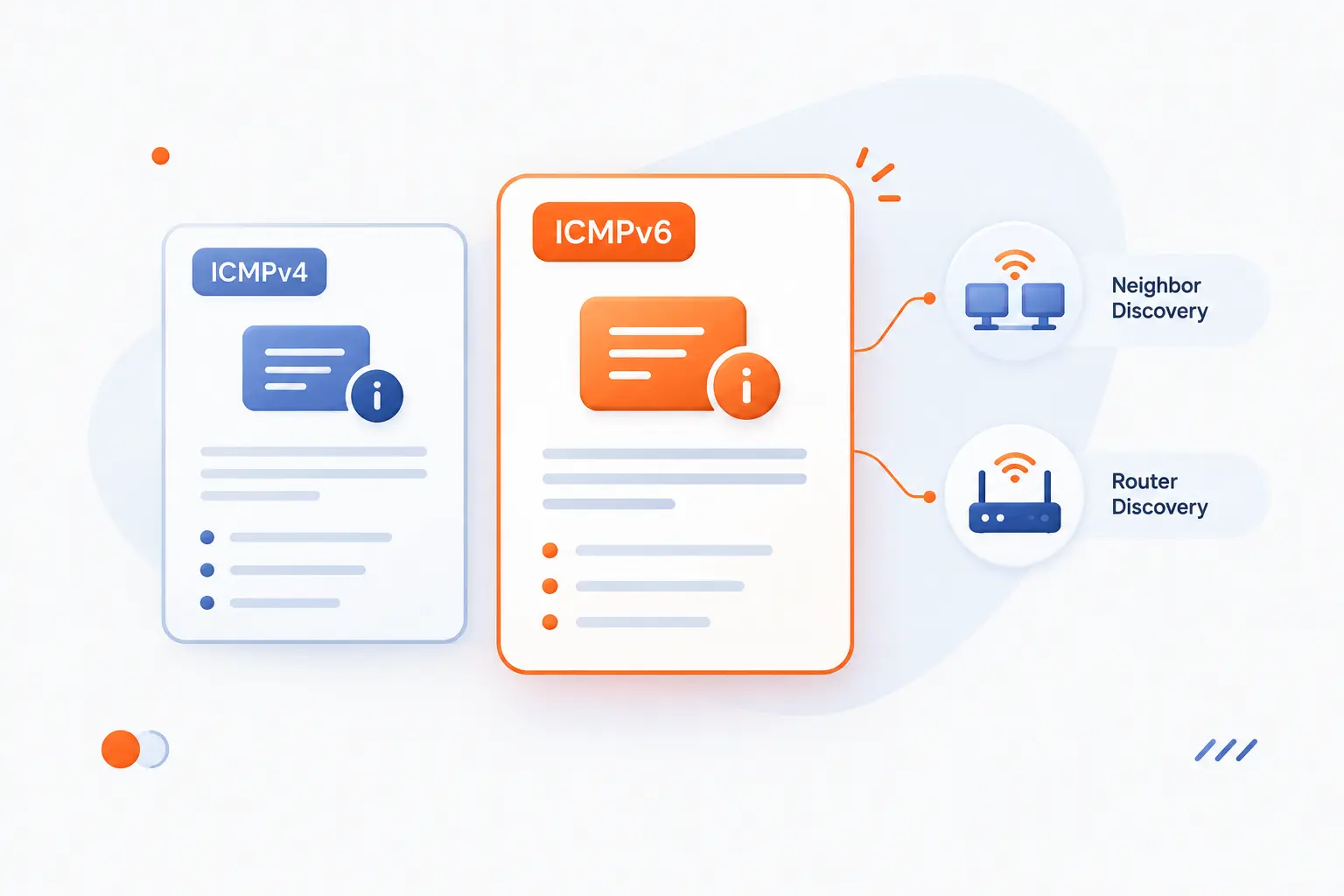
ICMPv4 and ICMPv6 serve the same broad purpose, but ICMPv6 is more central to IPv6 operation. Both report errors and support diagnostics. ICMPv6 also carries essential IPv6 functions such as neighbor discovery and router discovery. Blocking too much ICMPv6 can break IPv6 in ways that look mysterious from the application layer.
| Version | Main role | Operational warning |
|---|---|---|
| ICMPv4 | Error reporting and diagnostics for IPv4 | Overblocking can hide routing and packet-size problems |
| ICMPv6 | Error reporting, diagnostics, and core IPv6 neighbor functions | Overblocking can break address resolution and path behavior |
What Stays the Same Across Both Versions
Both versions send control messages that help IP networks report delivery problems and answer diagnostic probes. Echo testing exists in both worlds. Destination failures exist in both worlds. Time-related expiry messages exist in both worlds. The basic idea remains the same: network devices report conditions that ordinary data packets cannot explain by themselves.
Administrators also face the same tradeoff in both versions. We want enough ICMP to troubleshoot and keep protocol behavior healthy. We do not want unlimited diagnostic traffic to become an attack path. Good policy is selective, not blind.
In hosting, that means allowing the messages required for correct operation and monitoring. It also means rate-limiting or filtering noisy patterns. The best answer is rarely “block all” or “allow all.”
What ICMPv6 Adds for IPv6 Networks
ICMPv6 adds functions that IPv6 networks depend on for normal local communication. The IPv6 error spec defines the core ICMPv6 message format and error behavior. On top of that, IPv6 neighbor discovery uses ICMPv6 messages for router discovery, address resolution, neighbor reachability, and related local-link tasks.
The neighbor discovery standard explains how IPv6 nodes discover routers and neighbors, determine link-layer addresses, and maintain reachability information. This is why IPv6 filtering needs extra care. If we block the wrong ICMPv6 messages, hosts may have addresses but still fail to communicate properly.
Our opinion is firm here: IPv6 without thoughtful ICMPv6 policy is a future outage waiting to happen. It may pass a small test, then fail under normal traffic. Packet size discovery, neighbor reachability, and router information all need room to work.
Security Risks and Monitoring Tradeoffs
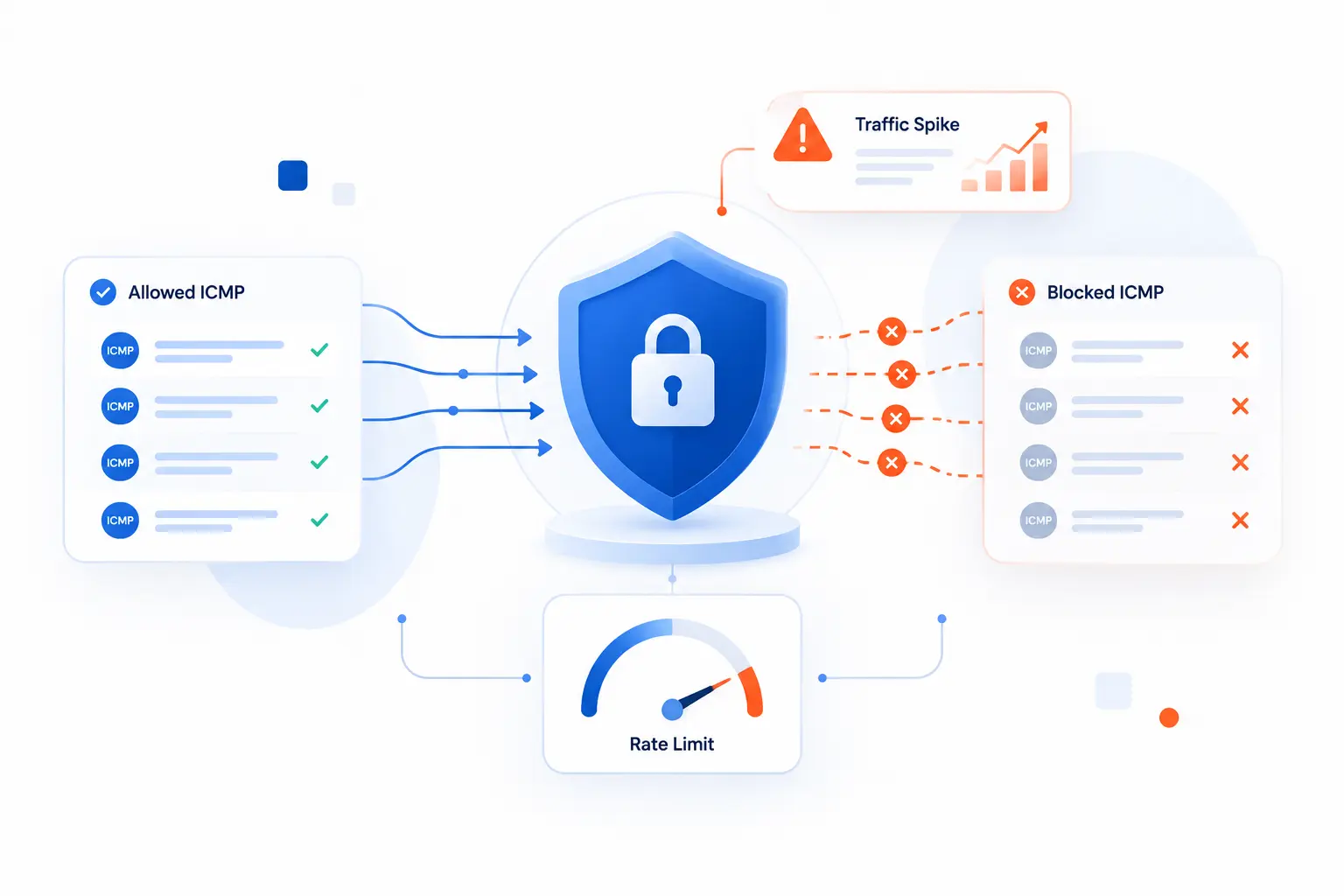
ICMP can be abused, so security teams often restrict it. That instinct is understandable, but total blocking creates blind spots and may break legitimate network functions. The better approach is to allow necessary message types, rate-limit noisy traffic, monitor unusual spikes, and block patterns tied to abuse. In hosting, reliability and security need to share the same table.
Ping Floods
A ping flood is an attack that overwhelms a target with large volumes of echo traffic. The attacker tries to consume bandwidth, CPU, firewall state, or monitoring capacity. The individual packets are simple. The volume is the weapon.
Modern denial-of-service campaigns often mix several network-layer methods. Cloudflare reported that it mitigated 6.9 million DDoS attacks in 2024 Q4, and its network-layer category included multiple flood styles. ICMP is only one possible ingredient, but it is still worth monitoring.
Defenses include rate limits, upstream filtering, anomaly detection, and capacity planning. We also like separating monitoring allowances from public exposure. A server might accept echo from known monitoring systems while ignoring random internet probes.
Ping of Death
Ping of Death is a historical attack that used malformed or oversized packet fragments to crash vulnerable systems. It is far less common on modern patched systems, but the lesson remains useful. Protocol handling bugs can turn harmless-looking traffic into trouble. Old attacks become rare only when systems stay maintained.
We do not usually fear Ping of Death in the same way administrators did decades ago. Operating systems, routers, and firewalls have improved. Yet we still treat strange fragmented traffic with suspicion, especially when it appears with other scanning or flood patterns.
The practical defense is boring and effective: patch systems, drop malformed traffic where appropriate, and watch for abnormal fragment behavior. Security often rewards boring discipline.
Smurf Attacks and Suspicious Traffic Spikes
A Smurf attack abuses broadcast behavior by sending spoofed echo requests that cause many machines to reply to a victim. The attacker does not need every reply to be large. The trick is amplification. A classic incident advisory described forged echo requests sent to broadcast addresses as the core pattern.
This attack is a reminder that the source address in a packet is not always trustworthy. If networks allow spoofing and broadcast amplification, one attacker can make many innocent hosts send traffic toward a target. Better source validation and broadcast controls reduce that risk.
Suspicious ICMP spikes should be handled with context. A monitoring rollout can create more probes. A routing issue can generate many errors. An attack can flood echo traffic. We look at source diversity, packet type, rate, timing, and whether the traffic matches a known operational change.
FAQ
ICMP often raises the same beginner questions because it sits near IP but behaves differently from TCP and UDP. The short version is this: ICMP is for control messages, not application sessions. It can help diagnose problems, but it does not replace service monitoring. Treat it as a network signal, then verify the application separately.
What Is the Difference Between ICMP and TCP
ICMP reports network conditions, while TCP carries reliable application conversations. TCP uses connections, ports, sequence behavior, retransmission, and flow control. ICMP uses message types and codes to report errors or answer diagnostic queries. A website may depend on TCP for HTTPS while ICMP only helps test or explain reachability.
What Type of Protocol Is ICMP
ICMP is a network-layer control and error-reporting protocol used with IP. It is closely tied to IP packet delivery, even though its messages are carried inside IP packets. It is best understood as feedback plumbing for the network layer. That is why routers, hosts, and diagnostic tools all use it.
Is ICMP a Port Protocol
No, ICMP is not a port protocol. Ports belong to TCP and UDP, while ICMP uses Type and Code fields. This is why “ping port” is the wrong mental model. If a firewall allows TCP port 443, that does not automatically mean it allows ICMP echo traffic.
How 1Byte Supports Reliable Networking and Hosting
1Byte supports reliable hosting by giving customers practical building blocks for identity, encryption, site hosting, and cloud infrastructure. ICMP matters here because every hosted service still depends on healthy IP reachability. Domain registration points users to the right place, SSL certificates protect the web session, and hosting infrastructure must remain reachable through real networks. As an AWS Partner, we also view networking as part of a wider cloud operations discipline, not as an afterthought.
| Service area | How it connects to networking | Typical use |
|---|---|---|
| Domain registration | Maps a name to the right online destination | Launching a public website or service |
| SSL certificates | Secures browser-to-server communication after reachability exists | Protecting HTTPS traffic |
| WordPress hosting | Runs a content site that still depends on DNS, routing, and service checks | Blogs, business sites, and publishing |
| Shared hosting | Provides an everyday hosting environment where basic reachability still matters | Small sites and starter projects |
| Cloud hosting | Supports workloads that may need clearer infrastructure planning | Growing websites and web applications |
| Cloud servers | Gives more direct server control for network-aware workloads | Custom apps, services, and system administration |
1Byte Helps You Launch With Domain Registration and SSL Certificates
Domain registration and SSL certificates handle the front door of a website, while ICMP helps test the road leading to that door. A domain gives users a human-readable name. An SSL certificate helps secure the HTTPS session once the browser reaches the server. ICMP cannot validate the certificate or load the page, but it can help confirm whether the server path is reachable before deeper web checks begin.
We see this sequence often. First, confirm the domain points where it should. Next, test reachability to the resolved address. Then verify the HTTPS service and certificate. That order keeps troubleshooting clean.
1Byte Supports WordPress Hosting and Shared Hosting for Everyday Sites
WordPress hosting and shared hosting serve everyday websites that still rely on healthy network paths. If a visitor reports that a site is unreachable, ICMP-style checks can quickly separate network reachability from application behavior. A reachable server with a broken WordPress plugin is one issue. An unreachable IP path is another.
We prefer this layered view because it protects beginners from chasing the wrong problem. A site owner may see “site down,” but the cause may sit in DNS, routing, HTTPS, application code, or resource limits. Network signals help narrow the field.
1Byte Scales Infrastructure With Cloud Hosting and Cloud Servers
Cloud hosting and cloud servers give teams more room to design, monitor, and troubleshoot infrastructure. ICMP becomes useful when administrators need to test server reachability, compare paths, or detect packet loss before investigating services. It is especially helpful when a problem affects some users but not others. Different paths can tell different stories.
As an AWS Partner, we also think cloud networking should be treated as architecture, not decoration. Routing, firewall policy, monitoring, and service checks all need to line up. ICMP is only one piece, but it is a piece we would rather understand than blindly block.







Conclusion
Internet control message protocol (icmp) is the feedback voice of IP networking. It reports delivery failures, answers simple diagnostic questions, and helps tools such as ping and traceroute show what the network is doing. It does not carry application data, and it does not use ports. Instead, it uses message types and codes to explain reachability, routing, expiry, and related conditions.
The practical lesson is simple: do not treat ICMP as either magic or noise. Use it as evidence. Allow the messages your network needs, limit the patterns attackers abuse, and pair ICMP checks with real application monitoring. If your next outage begins with the words “the site is down,” start by asking a sharper question: can the network reach the server, and what is ICMP telling us?