

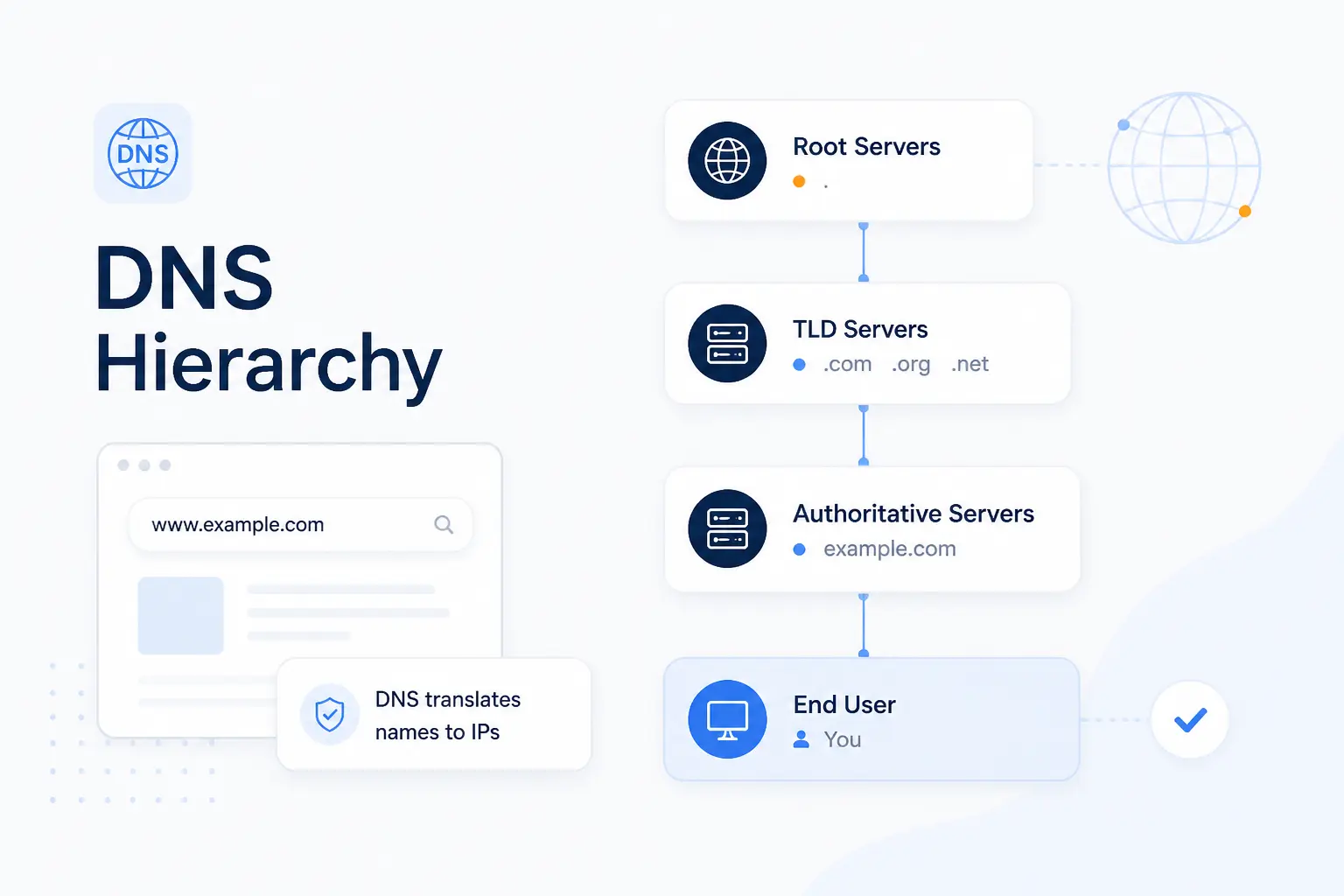
- DNS Hierarchy Is the Layered Structure of the Domain Name System
- How the DNS Hierarchy Is Organized From Right to Left
- Which DNS Servers Move a Query Through the Hierarchy
- How DNS Hierarchy Resolves a Domain Name Into an IP Address
- What Keeps the DNS Hierarchy Scalable
- DNS Records That Support the Hierarchy
- FAQ
- How 1Byte Supports DNS Ready Domains and Hosting
- Conclusion
The DNS hierarchy is the layered structure of the Domain Name System. It arranges domain names from the root at the far right to the most specific label at the far left, so resolvers can narrow a lookup step by step. At 1Byte, we think of it as the Internet’s naming tree and its chain of authority at the same time. Once you see that pattern, records, servers, and subdomains all start to make sense.
DNS Hierarchy Is the Layered Structure of the Domain Name System
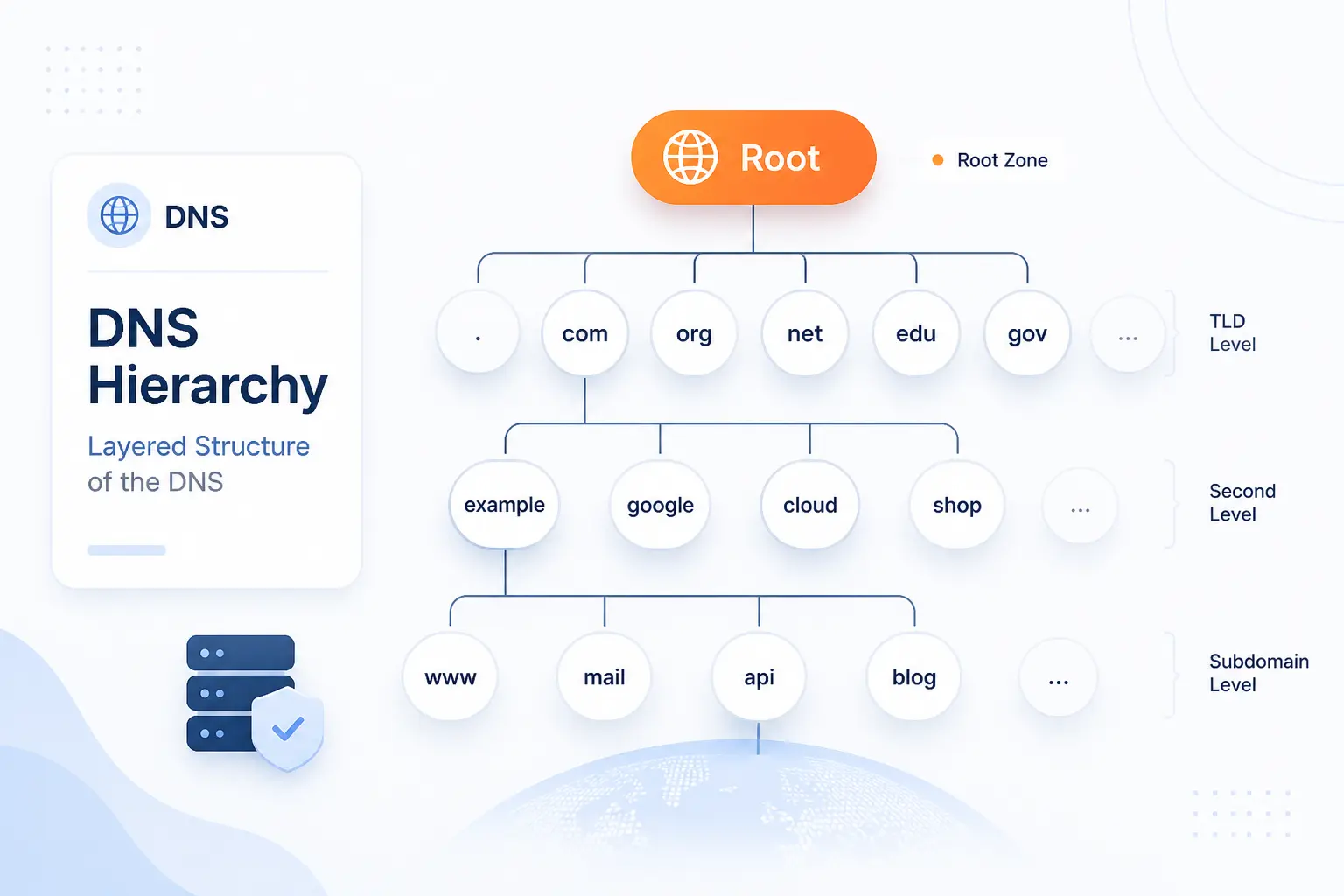
DNS hierarchy is the ordered namespace that lets the Internet distribute naming responsibility instead of storing every domain record on one central server. The core specification describes the namespace as a tree structure, which is why each label has a parent above it and possible children below it. That design is the real reason DNS scales. It also explains why authority can be handed from one layer to the next without breaking the whole system.
FURTHER READING: |
| 1. What Is a Proxy Server and How Does It Work |
| 2. How to Change an IP Address |
| 3. What Is ISP in Computer and How Internet Service Providers Work |
How the DNS Hierarchy Is Organized From Right to Left
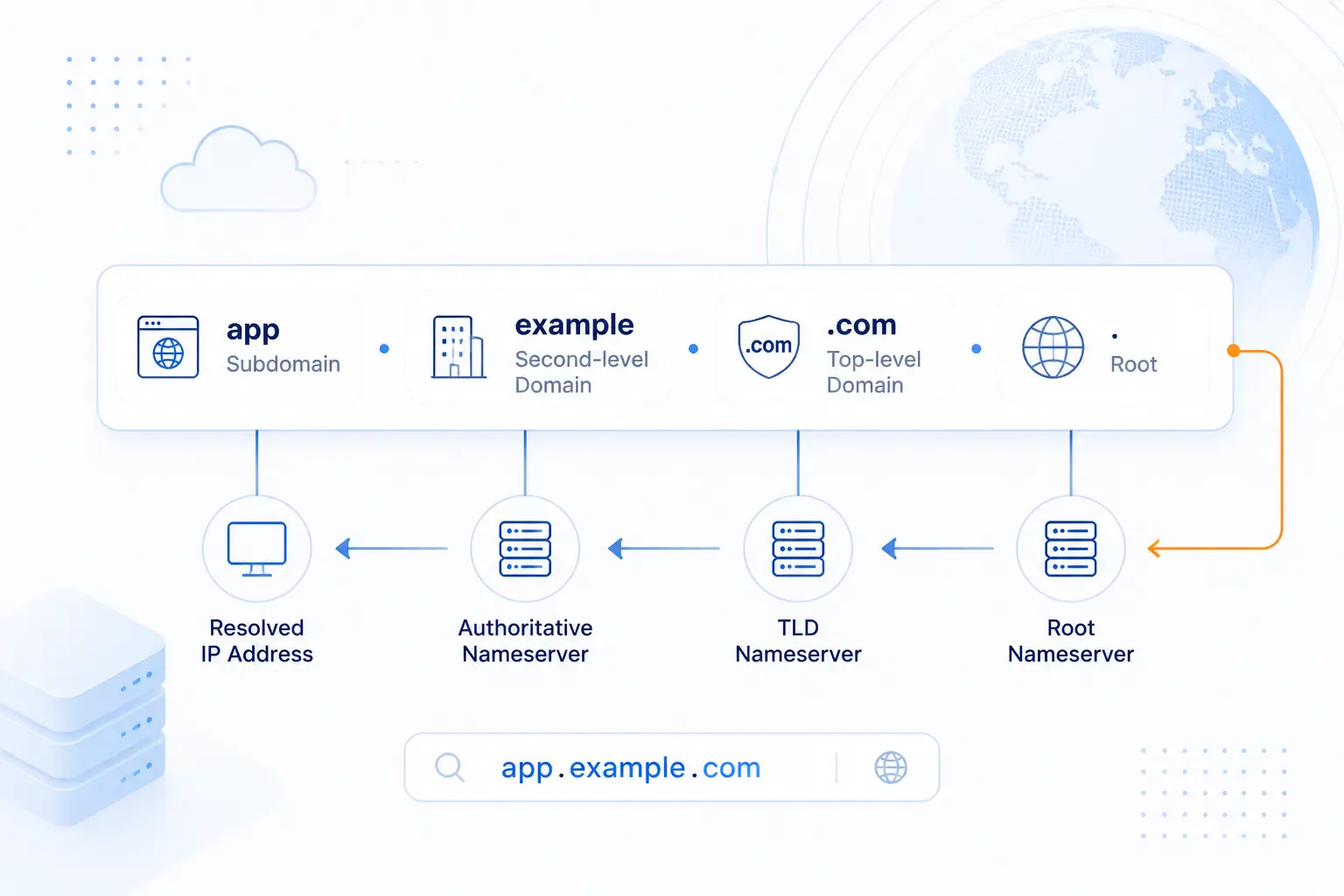
You read the DNS hierarchy from right to left, even though people type it left to right. In blog.shop.example.com, the resolver starts with the root, then .com, then example, then shop, and only then reaches blog. We like this mental model because it turns a long hostname into a simple chain of narrower scopes. Each step says, ask the next, more specific owner.
The Root Domain
The root domain is the top of the DNS tree, and every complete domain name ends there. In strict notation it is written as a trailing dot, as in example.com., though most apps hide that dot from users. The root usually does not tell you the final IP address. Its job is to point you toward the right top-level domain servers.
Top-Level Domains
Top-level domains sit directly under the root, and they are the last visible label in names like .com, .org, or .uk. IANA publishes the authoritative record of top-level domains, which is why TLDs are not just branding choices but formal delegations in the global root zone. A TLD layer narrows the search from the whole Internet to one registry space. From there, the resolver can ask who is authoritative for the specific domain inside that TLD.
Second-Level Domains
Second-level domains are the names people and organizations usually register, such as example in example.com. This is the layer where brands, projects, and public websites normally live. In practical terms, if we register a domain like 1byte.com, we are claiming a second-level name beneath .com. That name then becomes the parent for any subdomains we create later.
Subdomains and Hostnames
Subdomains and hostnames add detail on the left side of a domain name. A label like blog.example.com is a subdomain of example.com, while a name like mail.example.com becomes a hostname when it is used for a specific machine or service and has records that identify where it lives. Not every subdomain has to be a website. Some exist only for mail, verification, or internal service routing.
Which DNS Servers Move a Query Through the Hierarchy
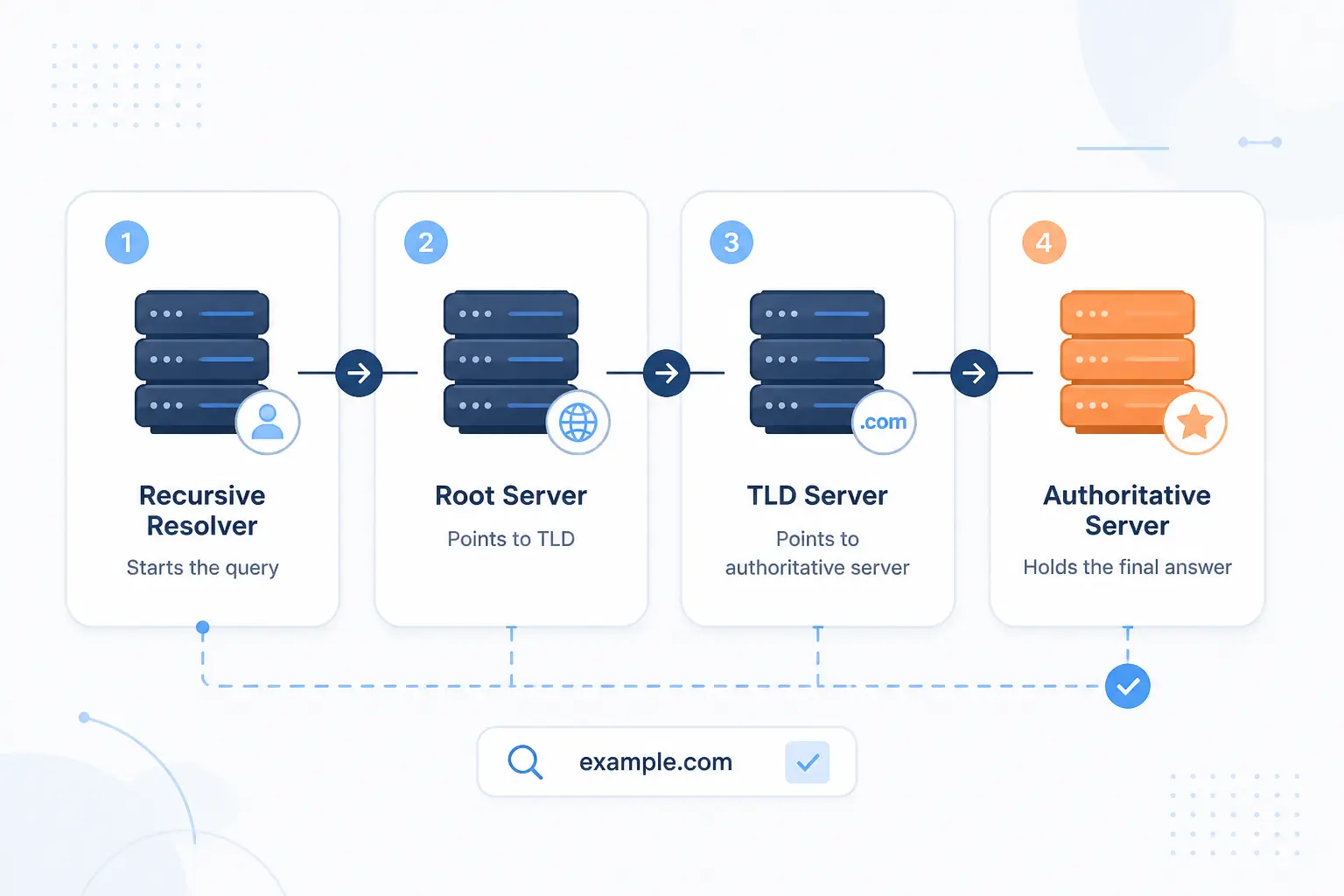
A DNS lookup moves through a small set of server roles, and each one does a different job. The usual chain is a recursive resolver first, then root name servers, then TLD name servers, and finally authoritative name servers. Readers often mix these together, but the distinction matters. If you know which role failed, you know where to troubleshoot.
Recursive Resolvers
Recursive resolvers do the chasing on behalf of the client. Your laptop or phone usually asks a local or public resolver, and that resolver follows the chain until it finds an answer or a valid failure. In other words, the client asks one question, but the resolver may ask several behind the scenes. That is why a resolver is often the most visible part of DNS to end users.
Root Name Servers
Root name servers answer for the root and return referrals to the correct TLD layer. If a resolver asks about www.iana.org, the root does not know the final address for that host. What it does know is where the .org servers are. That sounds modest, but it is the key move that starts the whole descent through the hierarchy.
TLD Name Servers
TLD name servers know which authoritative servers handle domains inside their own extension. For example, a .com server can tell a resolver which name servers are authoritative for example.com. It still may not know the final A or MX record itself. Its value is that it narrows the search from a whole TLD to one specific domain.
Authoritative Name Servers
Authoritative name servers hold the final published records for a zone and give the answer that other servers trust. This is where the resolver asks for the A, AAAA, MX, TXT, or other record that was actually configured for the domain. If the zone owner changes a record, this is the layer that changes first. Everything above it is there to point queries to this source of truth.
How DNS Hierarchy Resolves a Domain Name Into an IP Address
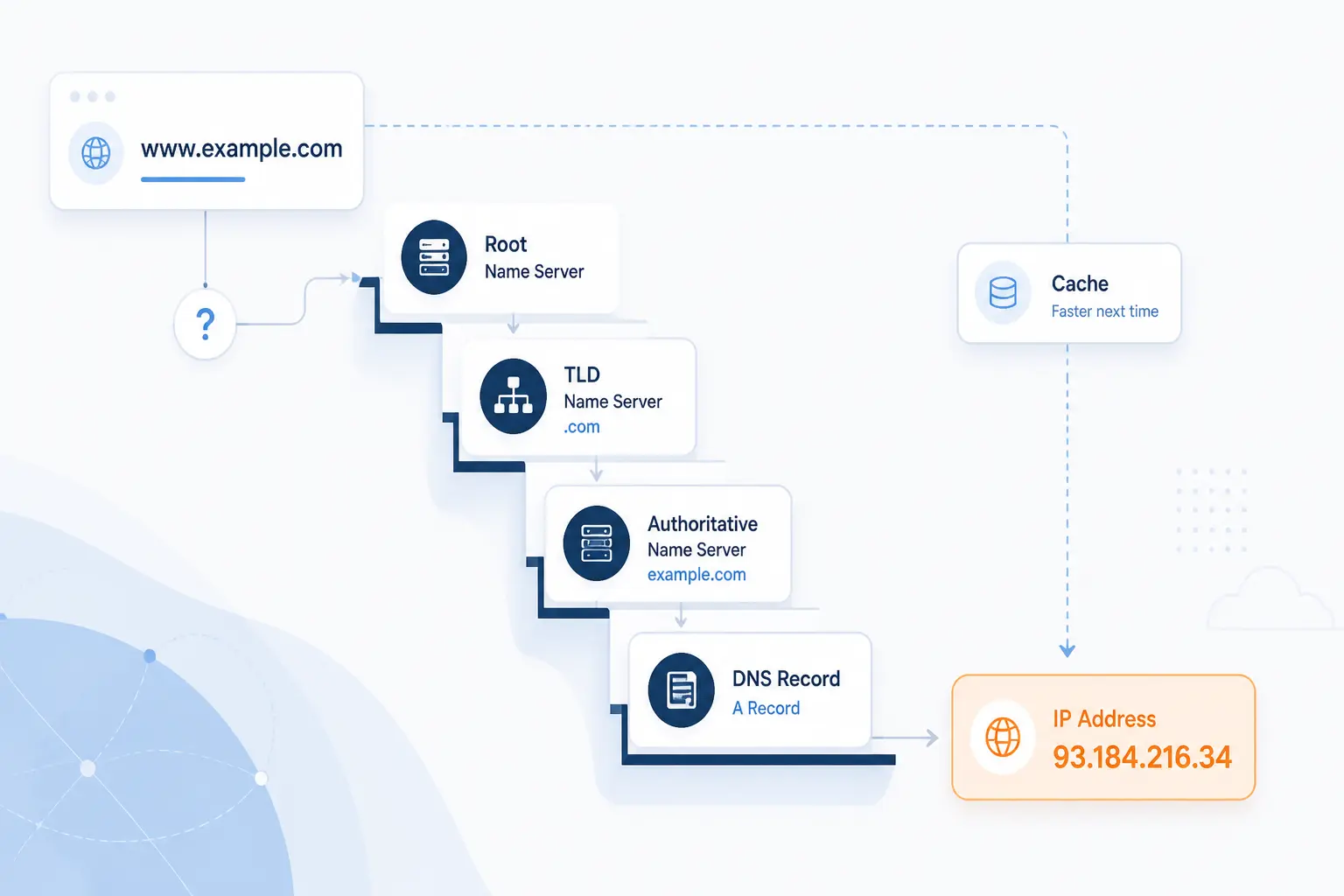
DNS hierarchy resolves a domain name into an IP address by following referrals from broader layers to narrower ones until an authoritative server returns the needed record. A warm cache can skip most of the trip, but the logic stays the same. We like to explain the flow with a concrete example, because the mechanism is easier to remember when you watch a single name move through the stack.
- The client asks a recursive resolver. If someone enters www.iana.org in a browser, the device usually sends that question to a configured resolver rather than talking to root servers directly.
- The resolver checks its cache first. If it already has a fresh answer, or a fresh referral, it can return or reuse that data immediately.
- On a cache miss, the resolver asks the root. The root replies with the name servers for .org, not with the final IP address.
- The resolver asks the TLD layer next. The .org servers reply with the authoritative name servers for iana.org.
- The resolver asks the authoritative server for the final record. That server returns the needed address record, or perhaps a CNAME that leads to the next name, and the resolver sends the result back to the client.
What Keeps the DNS Hierarchy Scalable
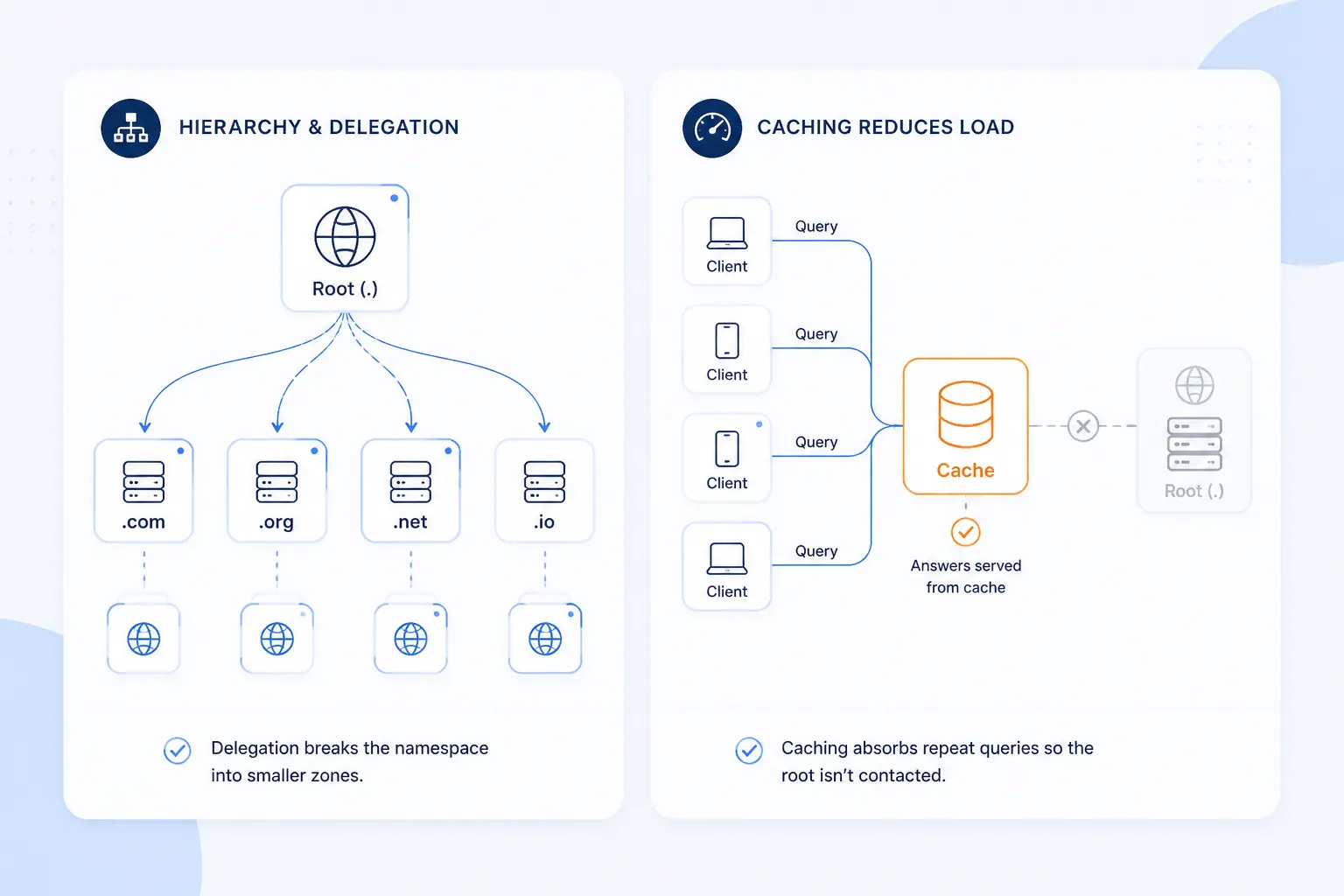
The DNS hierarchy stays scalable because control is delegated and answers are cached. No single server keeps the full Internet, and no resolver needs to walk from the root for every request. That split is simple, but it is powerful. It keeps upper layers smaller and repeat lookups cheaper.
Delegation Across Zones
Delegation lets a parent zone hand responsibility for a child zone to someone else. The child is introduced by NS records in the parent, and when the child names its own servers inside that child zone, the parent may also include glue records so resolvers can reach those servers without getting stuck in a circular lookup. This is the practical trick that makes large trees manageable. Each operator only has to publish the part they control.
Recursive Caching and TTL
Caching keeps repeat lookups from climbing the whole hierarchy again. DNS records carry a time to live, which tells resolvers how long they may reuse an answer before asking again. Short TTLs make changes visible sooner. Longer TTLs cut query traffic and reduce latency, which is why operators balance agility against stability.
DNS Records That Support the Hierarchy
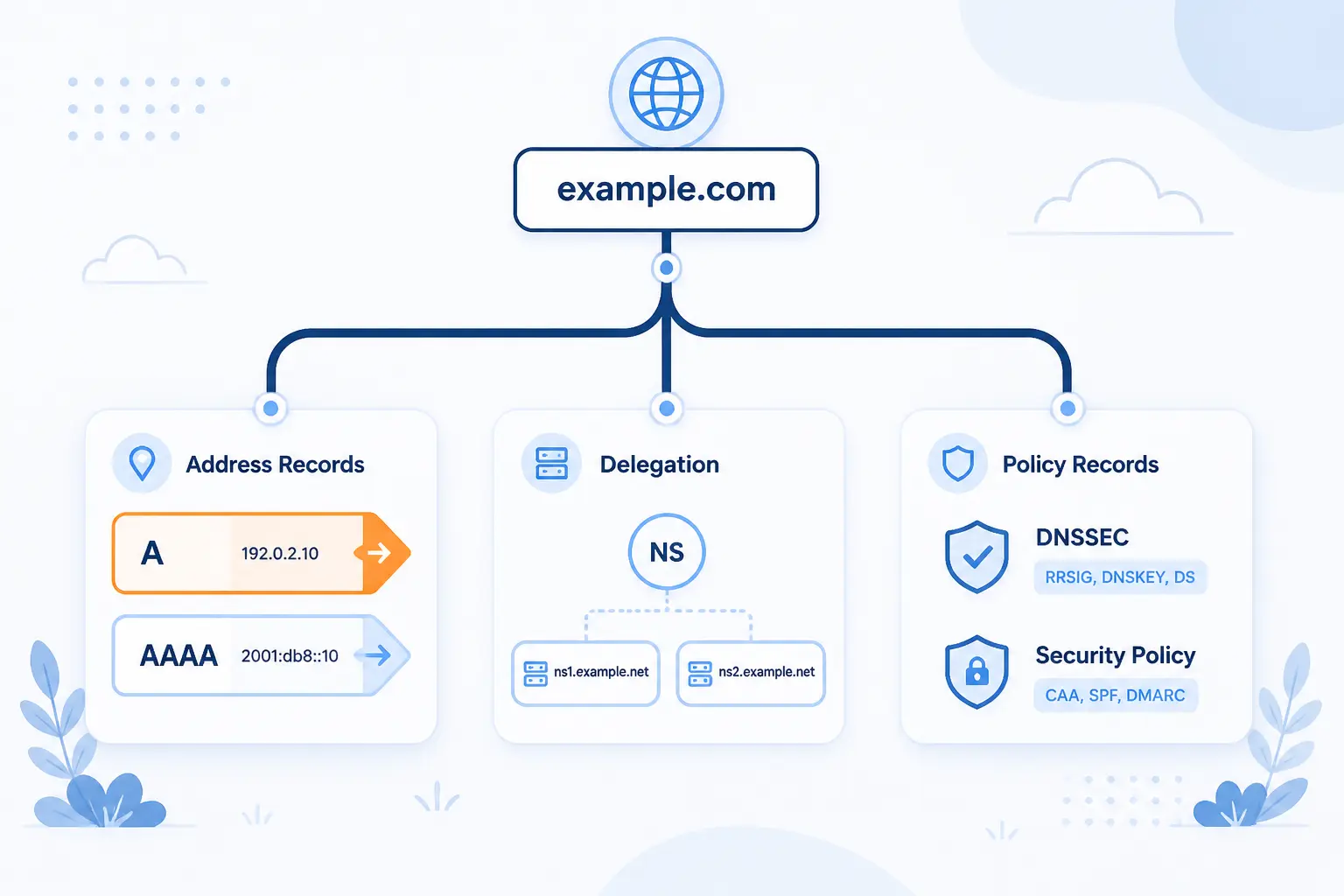
The hierarchy tells resolvers where to ask, but DNS records tell them what answer to trust. Different record types serve different jobs inside the same tree. Some point to servers, some delegate authority, and some publish policy. Once readers separate hierarchy from record type, DNS becomes much less muddy.
A and AAAA Records
A records map a name to an IPv4 address. The base specification defines an A record as a host address, which is why this record is still the standard answer when a browser needs an IPv4 destination for a hostname.
AAAA records do the same job for IPv6. The IPv6 extension defines an AAAA record for a 128-bit IPv6 address, so a site can publish modern addressing without changing the hierarchy above it.
CNAME and MX Records
CNAME records alias one name to another, while MX records tell mail systems which host accepts mail for a domain. A CNAME is useful when one hostname should follow another canonical name. MX records are different. They point mail delivery toward the right host, usually with preference values so senders know which target to try first.
We think beginners often make one costly mistake here. They treat every record like an address record. A CNAME is really a redirect inside DNS, and an MX is really a pointer to a mail destination. Once that clicks, zone files read much more clearly.
NS SOA PTR SPF and TXT Records
NS and SOA records define authority, PTR records support reverse lookups, and TXT records carry text-based metadata such as email policy. The SPF standard says SPF data must be published as a TXT record, which is why modern SPF usually appears as a TXT string rather than as a separate live record type. That one detail clears up a lot of confusion in real-world DNS work. It also shows that DNS is not just for websites. It is a policy channel too.
FAQ
These are the short answers to the questions we hear most from readers learning the DNS hierarchy. The quick version is that lookups use a small chain of server roles, the root sits at the top, the named root identities run from A-root to M-root, and an FQDN is the full path to the root. If those ideas are clear, most DNS diagrams stop looking abstract.
What Are the 4 Types of DNS Servers?
The main server roles are recursive resolvers, root name servers, TLD name servers, and authoritative name servers. The resolver does the work for the client, the root points to a TLD, the TLD points to the domain’s authority, and the authoritative server gives the final record. Some authors also mention a stub resolver on the device, but that is a client component, not one of the core server roles in the lookup chain.
What Is the Highest Level in the DNS Hierarchy?
The highest level is the root domain, often shown as a trailing dot. Every fully qualified domain name ends there, even when software hides it. That is why the DNS hierarchy always starts from the same top node before it narrows into a specific TLD and domain.
What Are the 13 DNS Root Servers?
The named root identities are A-root through M-root. ICANN says the system spans 12 operators, 13 identities, and over 1,500 individual servers, which is why the old phrase 13 root servers is useful as a naming shorthand but incomplete as an operational picture. In day-to-day DNS, resolvers rely on these root identities to learn where each TLD begins.
What Is a Fully Qualified Domain Name in DNS Hierarchy?
A fully qualified domain name is the complete name of a node all the way to the root. DNS terminology describes the strict form as www.example.net., with the trailing dot representing the root label. Many apps omit the final dot when displaying the name, but the hierarchy still implies it.
How 1Byte Supports DNS Ready Domains and Hosting
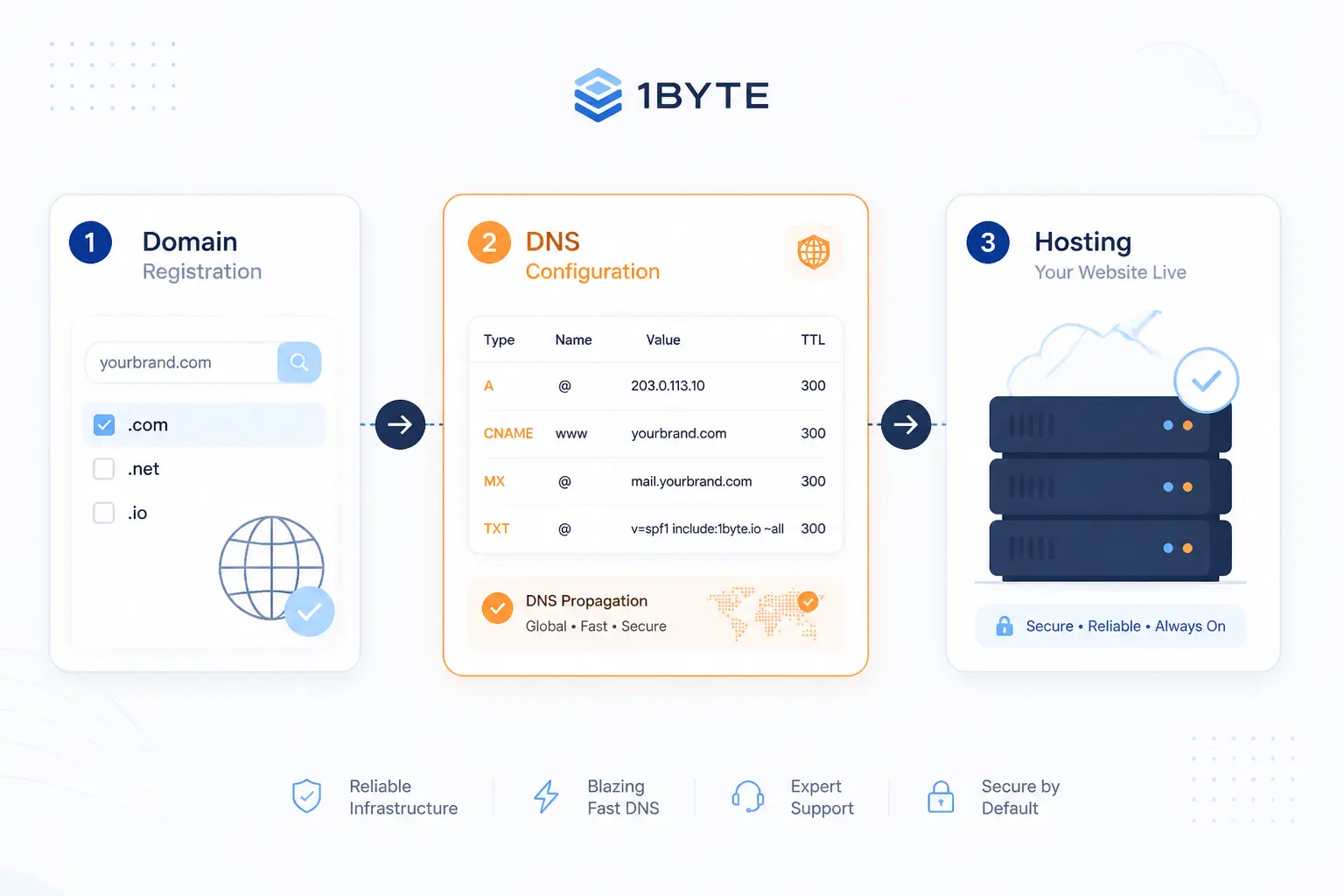
At 1Byte, we see the DNS hierarchy as practical plumbing, not theory. A domain has to exist at the right layer, point to the right servers, and publish the right records before any hosting setup works cleanly. That is why domain registration, SSL certificates, WordPress hosting, shared hosting, cloud hosting, and cloud servers all touch DNS in different ways. As an AWS Partner, we also think about DNS as the first map readers should draw before they move or rebuild a workload.
| Service | Where it fits | Common DNS touchpoint |
|---|---|---|
| Domain registration | Claims the public name | NS delegation |
| SSL certificates | Secures hostnames | Hostname validation |
| WordPress hosting | Publishes the site | A, AAAA, or CNAME |
| Shared hosting | Runs a site on shared infrastructure | Address record changes |
| Cloud hosting | Runs a site on cloud resources | Address or alias updates |
| Cloud servers | Runs workloads on dedicated instances | Address records and hostnames |
Domain Registration and DNS Setup
Domain registration creates the second-level name that the rest of the hierarchy depends on. Once that domain exists, DNS setup decides which name servers are authoritative and which records should live in the zone. From our side at 1Byte, that means domain registration and DNS setup belong together in the reader’s mind. If the delegation is wrong, the prettiest hosting stack in the world will still be unreachable.
SSL Certificates and WordPress Hosting
SSL certificates protect hostnames, but they only work cleanly when DNS points those hostnames to the right place. WordPress hosting is a good example because a site may load under one domain, a www host, or both, and each published name has to resolve correctly before certificate coverage feels natural to visitors. We see this as a simple rule. DNS answers where, and the certificate answers can I trust this name.
Shared Hosting Cloud Hosting and Cloud Servers
Your hosting model changes where DNS points, not how the hierarchy works. With shared hosting, cloud hosting, or cloud servers, you still publish names under the same domain and still rely on the same authority chain from root to zone. What changes is the destination behind the record and how often you may need to update it during a move. That is one reason we like to plan DNS early when readers compare shared hosting, cloud hosting, and cloud servers, especially in AWS Partner discussions.







Conclusion
The DNS hierarchy is simply the Internet’s way of breaking one huge naming problem into smaller, delegated pieces. Read a name from right to left, follow the server roles in order, and most DNS behavior becomes predictable. Once you know who owns each layer, the mystery fades fast.
If you are setting up or moving a domain, trace your NS, A or AAAA, MX, and TXT records on paper before you click save. That small habit catches a surprising number of mistakes. Want a practical next step? Pick one domain you use and map its path from the root to the final authoritative answer.