

- The OSI Model Is a Seven-Layer Framework From the International Organization for Standardization
- Why the Model Still Matters in Modern Networking
- The Seven Layers of the OSI Model
- How Data Moves Through the Layers
- OSI Model vs TCP/IP
- FAQ
- How 1Byte Supports Customers Working With Networked Websites and Applications
- Conclusion
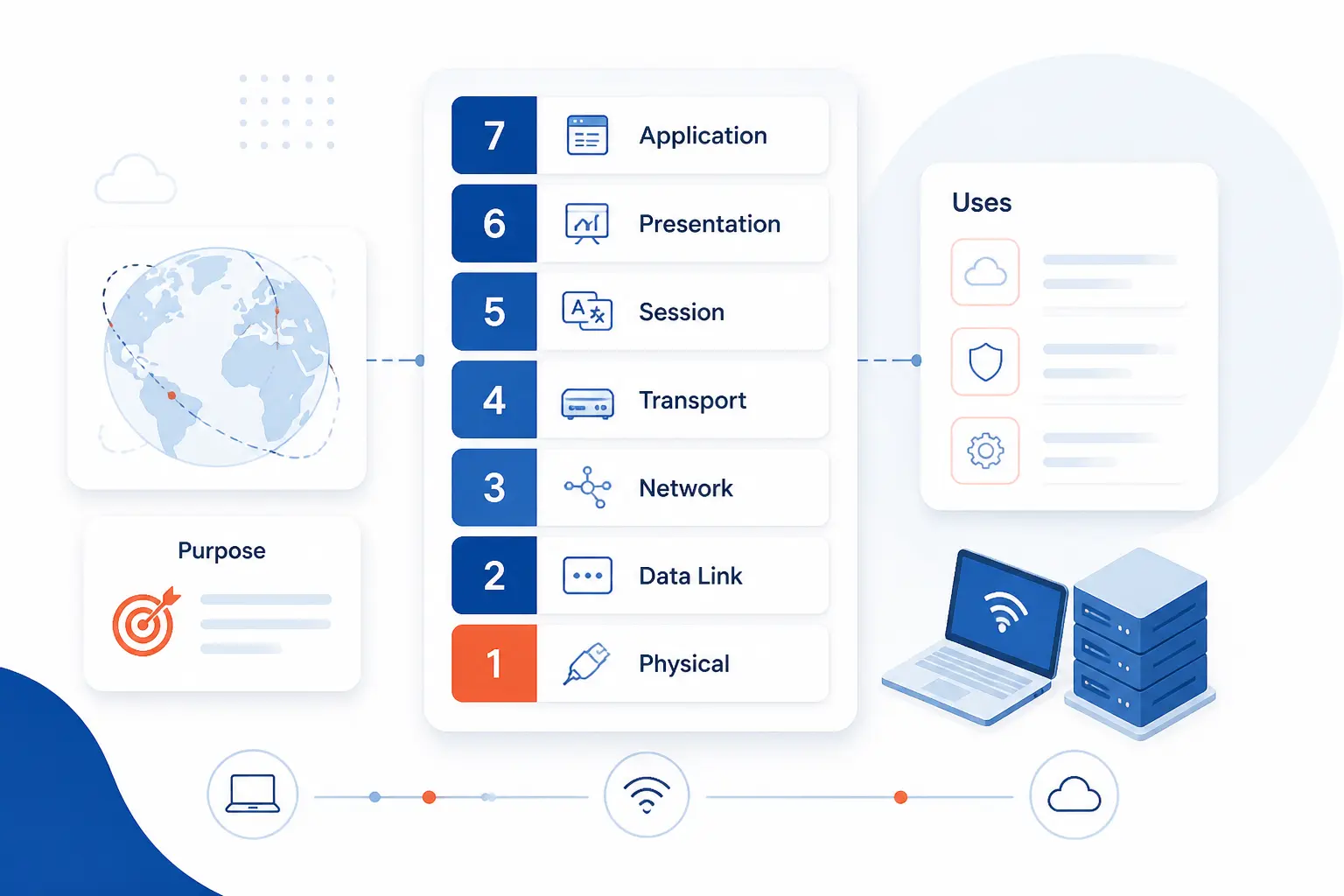
The OSI Model is a way to describe network communication by breaking it into seven layers, from physical signals at the bottom to user-facing software at the top. We at 1Byte treat it as a map for understanding how data moves, where problems happen, and which part of a system is responsible for what. It is not the internet itself, and it is not a protocol you install. It is a mental framework that helps us explain networking quickly and correctly.
The OSI Model Is a Seven-Layer Framework From the International Organization for Standardization
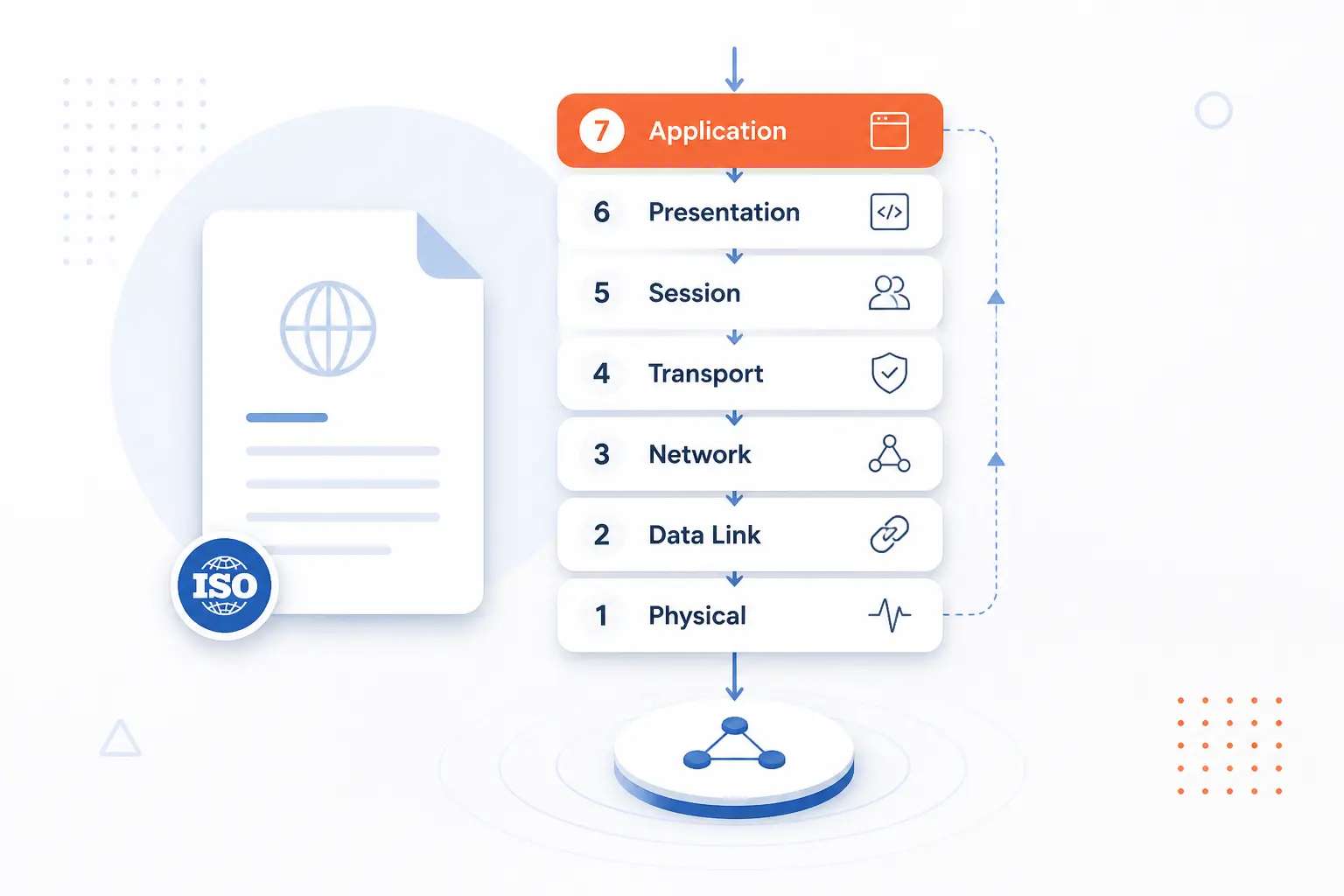
The OSI Model is a conceptual networking framework published by the International Organization for Standardization in ISO/IEC 7498-1. It divides communication into seven layers so engineers can talk about functions separately instead of treating the network as one giant blur. Its job is to organize thinking, not to dictate one exact implementation. We think that distinction is the first thing readers should get right, because many people hear “model” and assume “real protocol stack.”
FURTHER READING: |
| 1. What Is SPF Record and Why It Matters for Email |
| 2. How to Detect Malware With Clear Warning Signs |
| 3. Security Management in the Cloud Guide for Safer Data |
Why the Model Still Matters in Modern Networking
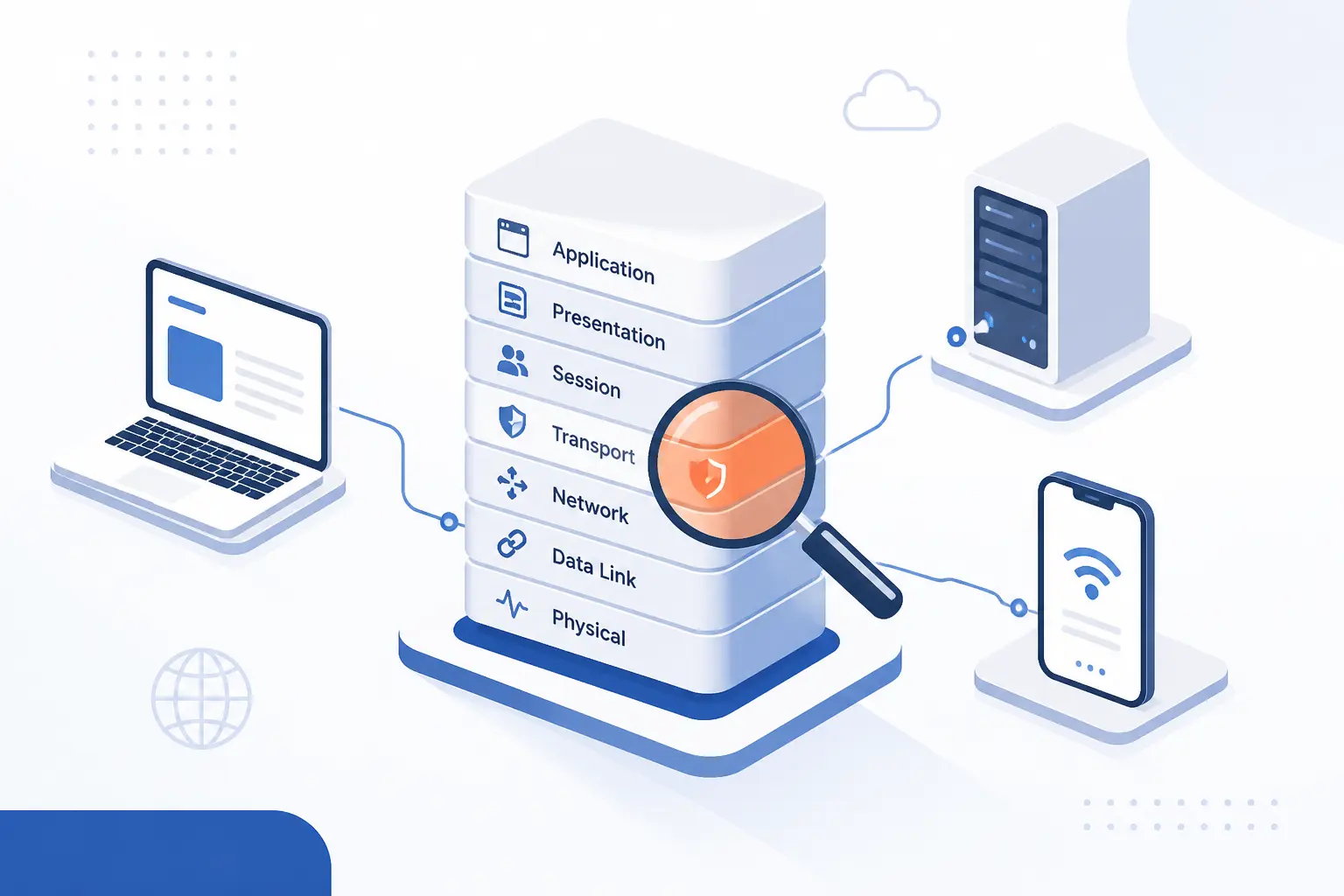
The OSI Model still matters because it gives us a practical way to reason about complex systems. Even when modern networks run on TCP/IP, the layer-by-layer view remains one of the fastest ways to explain faults, responsibilities, and design choices. We still use it in meetings, diagrams, incident calls, and technical interviews for one simple reason: it makes messy networking easier to discuss. That staying power is not nostalgia. It is usefulness.
Troubleshooting Problems One Layer at a Time
The OSI Model matters because it lets us isolate failure by layer instead of guessing blindly. If a site does not load, we can ask whether the problem is physical connectivity, local switching, IP routing, transport behavior, encryption, or the application itself. That sequence keeps teams from rebooting random things and hoping for the best.
We use this constantly in hosting work. A dead cable or disabled network interface points us low in the stack. A VLAN issue or wrong MAC table entry points us to local delivery. A missing route, firewall block, or broken DNS lookup pushes us higher. By forcing that order, the model turns panic into a checklist.
A Shared Language for Vendors, Engineers, and Developers
The model still matters because it gives different teams one common language. When someone says “this looks like a layer 3 problem,” we immediately narrow the scope to addressing and routing instead of wasting time debating application code or cables.
That shared language is especially helpful when multiple vendors are involved. A cloud team, a hosting provider, a firewall vendor, and an app developer may all describe the same outage differently. The OSI Model gives them neutral territory. In our view, that is one reason it keeps surviving every technology wave.
Why Teams Still Use It Even Though the Internet Runs on TCP/IP
Teams still use the OSI Model because the internet protocol suite described in RFC 1122 is operationally real, but the OSI layers are easier to teach and debug against. TCP/IP is the stack we run. OSI is the model we use to explain what is happening.
That difference is not a contradiction. It is a division of labor. TCP/IP tells us which protocols actually move traffic across the internet. The OSI Model gives us a more granular diagram for discussing duties like presentation, sessions, local framing, and physical transmission.
The Seven Layers of the OSI Model
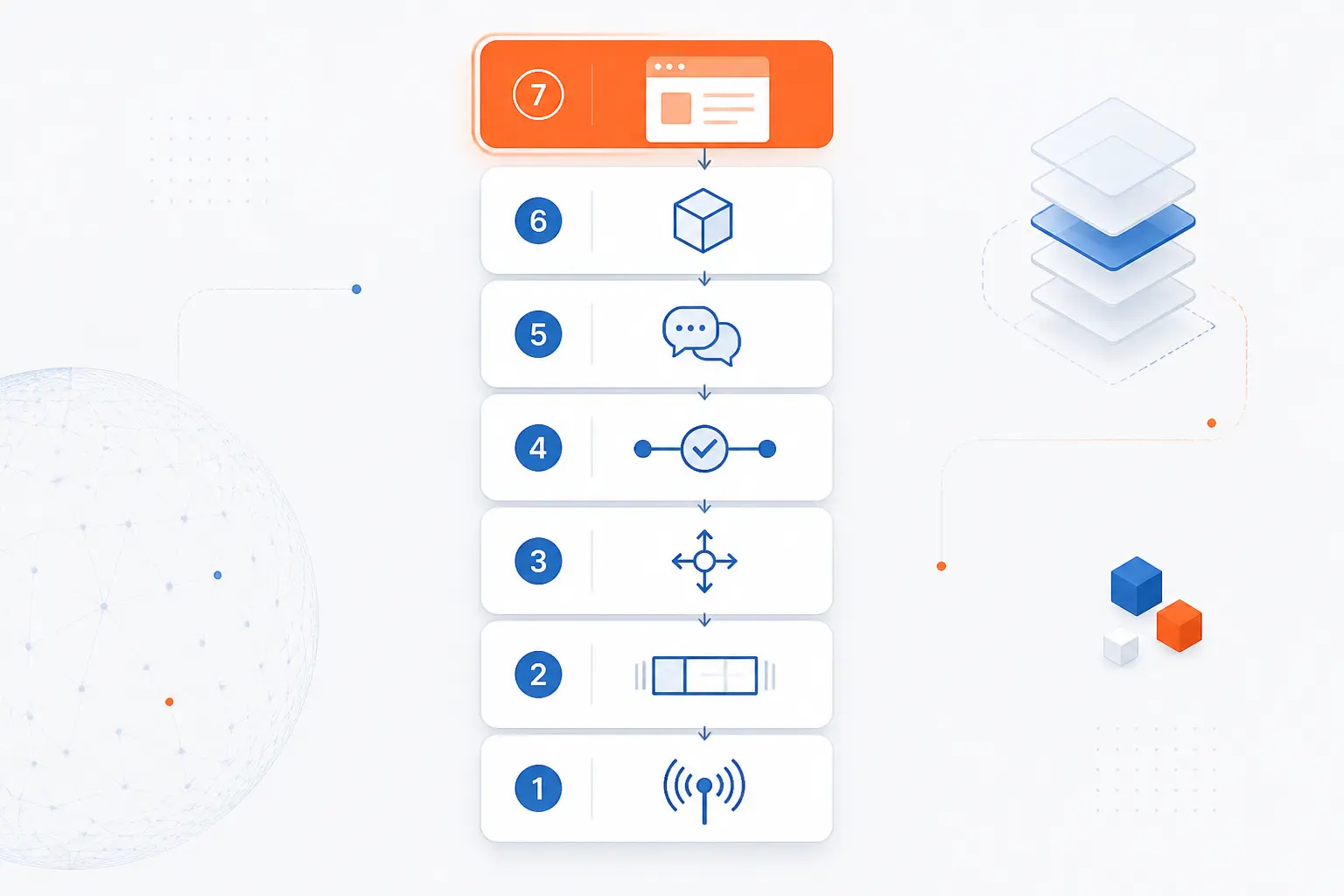
The seven layers of the OSI Model describe network communication from user-facing software down to electrical, optical, or radio transmission. We usually remember them from top to bottom as Application, Presentation, Session, Transport, Network, Data Link, and Physical. Each layer serves the one above it and depends on the one below it. Once readers grasp that stacked relationship, the model stops feeling abstract.
Layer 7 Application and User-Facing Network Services
Layer 7 is where user-facing network services live, such as web access, email, and name lookup. This is the layer closest to the software people actually use, so it is where many networked actions begin and end from a human point of view.
When we load a website, send mail, or call an API, the application layer is the part that defines the service behavior. It answers questions like: what request is being made, what response is expected, and how should the service behave? Readers often confuse “application layer” with “the whole app,” but in practice it means the network-facing service logic, not every line of business code.
Layer 6 Presentation for Translation, Encryption, and Compression
Layer 6 handles how data is represented so both sides can understand it. It covers translation between formats and is commonly used to explain encryption and compression before the data reaches the application.
In real systems, this is where we often place data encoding questions and secure transport preparation. When a browser and server negotiate TLS 1.3, many engineers explain the encryption role through this layer, even though real implementations do not always fit the model with perfect neatness. That is fine. The OSI Model is meant to clarify function, not win purity contests.
Layer 5 Session for Opening, Managing, and Closing Connections
Layer 5 is responsible for establishing, managing, and ending communication sessions between systems. If two programs need a structured conversation instead of a one-off exchange, this layer explains the logic of keeping that conversation organized.
Session concepts include who starts the exchange, how long it stays active, how interruptions are handled, and when the conversation is considered complete. In modern stacks, session behavior is often folded into applications or transport-aware libraries. Even so, keeping it as a separate idea helps us explain login sessions, persistent connections, and coordination between communicating processes.
Layer 4 Transport for End-to-End Delivery With TCP and UDP
Layer 4 handles end-to-end delivery between applications and decides how strict or lightweight that delivery should be. It is where we think about ports, segmentation, reliability, ordering, and retransmission.
For reliable, ordered delivery, RFC 9293 defines TCP as a reliable, in-order byte-stream service. That makes TCP the usual choice for web browsing, email transfer, and many business applications where missing or shuffled data is unacceptable.
For lighter, faster exchanges, RFC 768 defines UDP with minimal protocol mechanism. We reach for that mental model when thinking about DNS queries, voice traffic, live media, or telemetry where low overhead can matter more than perfect delivery.
Layer 3 Network for Logical Addressing and Routing
Layer 3 moves data between networks by using logical addresses and routing decisions. This is the layer that answers the basic question, “How does this packet get from here to a different network over there?”
In internet terms, RFC 791 defines IP as the protocol that carries datagrams between hosts identified by fixed-length addresses. Routers live here in the classic explanation. So do route tables, subnets, and next-hop decisions. If layer 2 gets data around the local neighborhood, layer 3 gets it across town.
Layer 2 Data Link for Frames, MAC Addresses, and Local Delivery
Layer 2 handles local delivery on the same network segment by packaging data into frames and using hardware-level addressing. This is where MAC addresses, switching behavior, and frame-based movement make the most sense.
We think of layer 2 as the “same local network” layer. A switch forwarding an Ethernet frame inside a LAN is the classic example. It is also where concepts like VLANs, ARP side effects, and broadcast domains become easier to reason about. The key idea is local movement, not end-to-end internet routing.
Layer 1 Physical for Signals, Cables, and Hardware Transmission
Layer 1 is the actual transmission of bits as electrical, optical, or radio signals across hardware. It deals with cables, connectors, fiber, radio frequencies, transceivers, and the raw mechanics of moving a signal from one point to another.
A helpful real-world reminder comes from IEEE 802.11-2020, whose formal scope includes both Medium Access Control and Physical Layer specifications for wireless LANs. That split shows why we keep layer 1 separate from layer 2. One part decides access and framing. The other part moves the signal through the medium.
How Data Moves Through the Layers
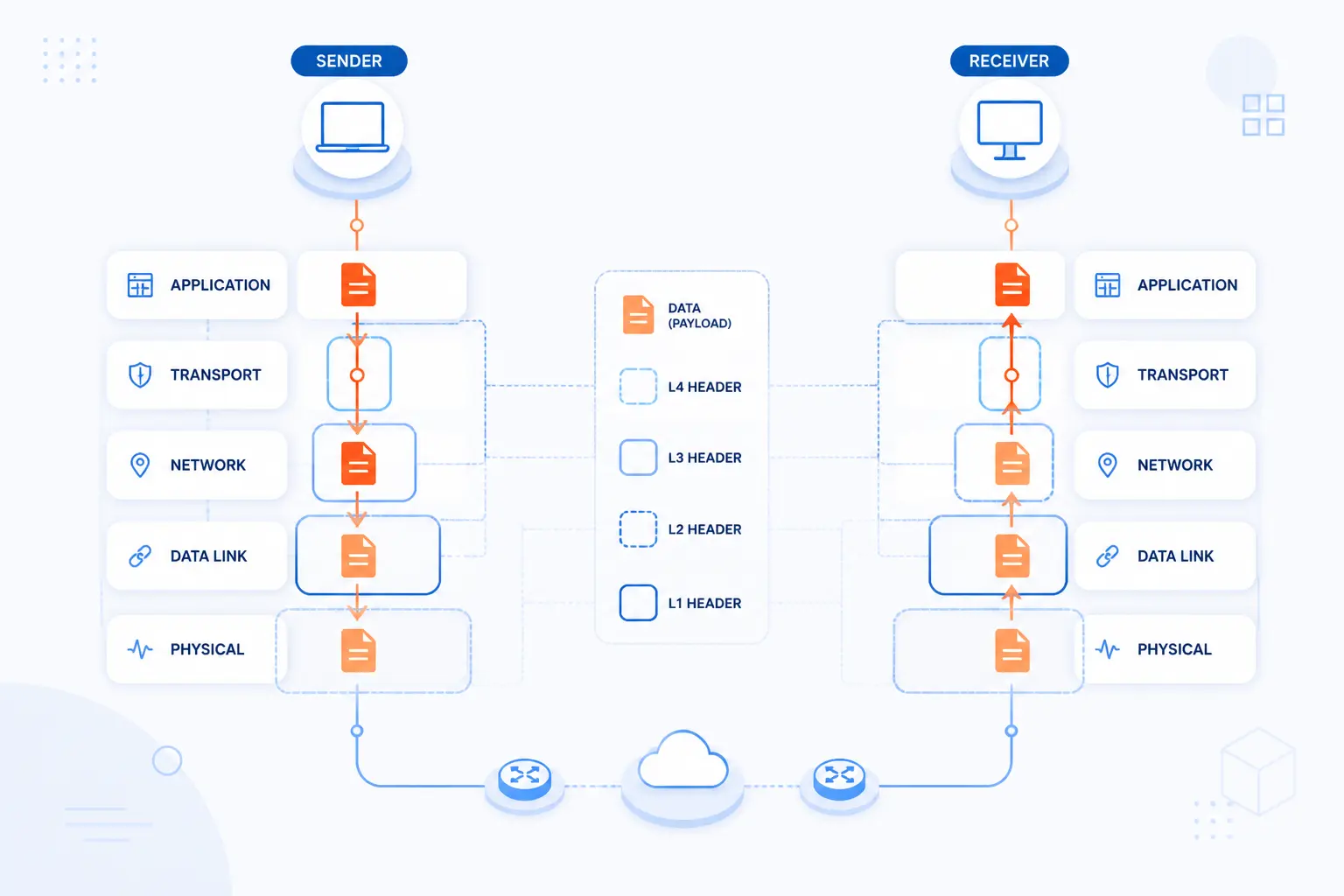
Data moves through the OSI Model by being wrapped with information as it travels down the sender’s stack and unwrapped as it travels up the receiver’s stack. We call that encapsulation on the way down and de-encapsulation on the way up. Each layer adds context for its own job. That is the mechanic behind the model’s neat stack diagram.
Encapsulation on the Sending Device
Encapsulation means each lower layer adds its own control information before sending data onward. The application creates data, the transport layer adds delivery details such as ports, the network layer adds logical addressing, the data link layer frames it for local delivery, and the physical layer turns it into signals.
We find this idea crucial for beginners. It explains why a packet capture shows multiple headers stacked together. The message is still the same message, but each layer wraps it in the details needed for the next leg of the trip.
An Email Example From Application Data to Physical Signals
An email is a good example because it touches several layers in an obvious order. A mail client or server commonly uses SMTP for transfer, so the message begins as application-layer data with commands and content that the mail system understands.
Before that message reaches the right destination, the sending system often needs a domain lookup based on records defined in RFC 1035. Then transport and network functions take over, carrying the traffic over TCP and IP, while the local network frames it on Ethernet or Wi-Fi and the physical medium sends the actual bits as signals.
If HTTPS feels easier to picture than email, the same logic applies. A browser creates a request, the transport layer carries it, IP routes it, the local link frames it, and the physical medium transmits it. Different app, same layered journey.
De-Encapsulation on the Receiving Device
De-encapsulation is the reverse process on the receiving side. The physical interface receives signals, the data link layer checks the local frame, the network layer checks IP information, the transport layer delivers the data to the right application process, and the upper layers prepare it for use.
What matters here is that each layer reads what belongs to it and passes the rest upward. That is why the model remains such a strong teaching tool. It mirrors how we mentally peel an onion when analyzing traffic.
OSI Model vs TCP/IP
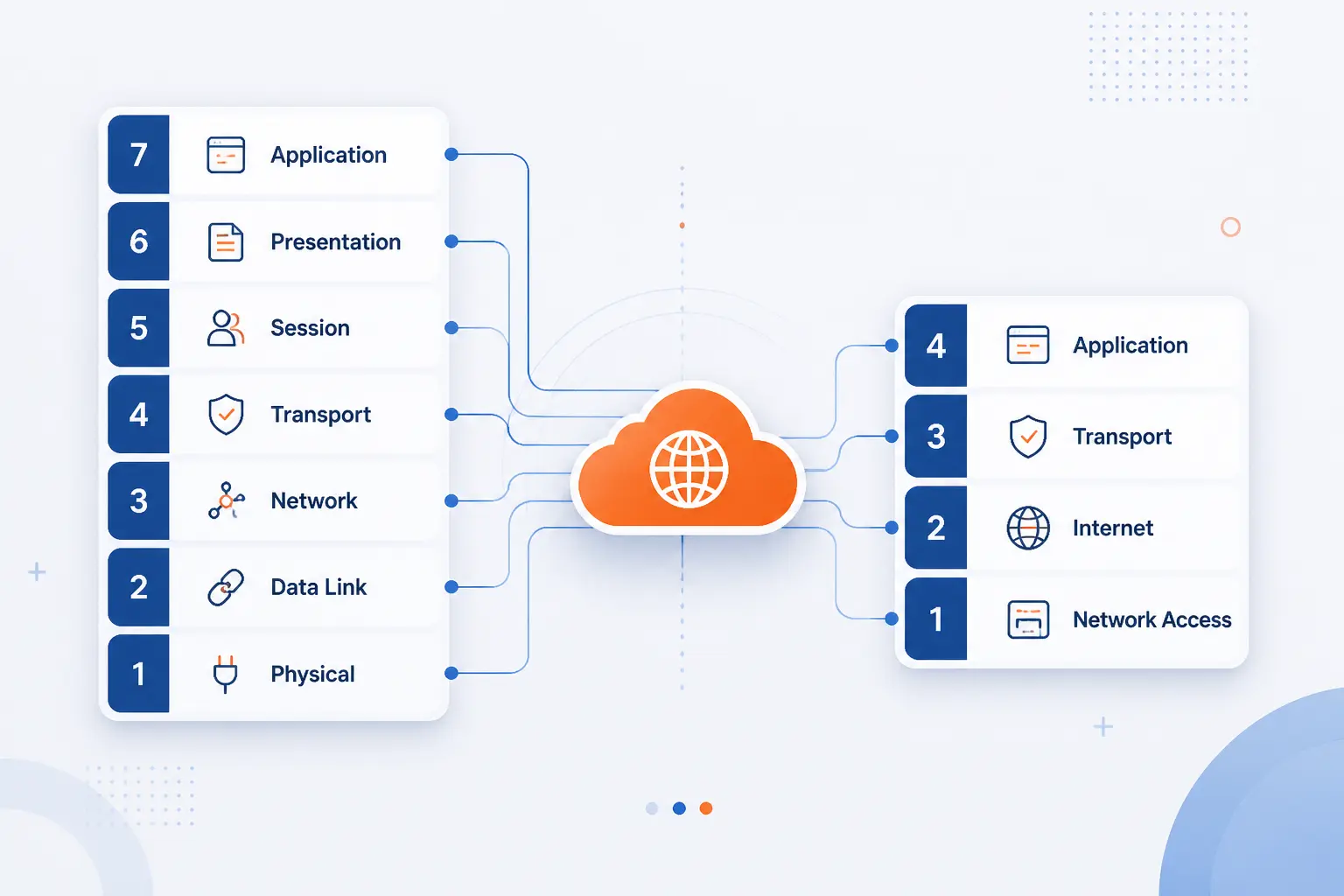
The OSI Model and TCP/IP both describe layered networking, but they serve different roles. OSI is a seven-layer reference model used mainly for explanation and troubleshooting. TCP/IP is the practical protocol suite that powers the internet, usually discussed in four broad layers. We use OSI when we want clarity and TCP/IP when we want operational accuracy.
| Aspect | OSI | TCP/IP | Why it matters |
|---|---|---|---|
| Purpose | Reference model | Real protocol suite | One explains, the other runs |
| Layer count | 7 layers | Usually 4 layers | OSI is more granular |
| Upper layers | Application, Presentation, Session | Application | TCP/IP groups more functions together |
| Lower layers | Data Link, Physical | Link or Network Access | TCP/IP compresses local delivery details |
How the Seven Layers Map to the Simpler TCP/IP Stack
The usual mapping is straightforward once we stop expecting a perfect one-to-one match. OSI layers 5 through 7 map roughly to the TCP/IP application layer. OSI layer 4 maps to TCP/IP transport. OSI layer 3 maps to the internet layer. OSI layers 1 and 2 usually map to the link or network access layer.
We tell readers not to obsess over exact borders. Real systems blur them. The value lies in understanding which functions are grouped together in each model and why.
Why OSI Layers 5 Through 7 Are Often Grouped Together
OSI layers 5 through 7 are often grouped together because modern applications usually handle those responsibilities together. Session management, data representation, and application behavior are frequently bundled inside the same software stack, library, or service.
That is why TCP/IP keeps a broader application layer. In day-to-day engineering, we often do not separate “presentation” from “session” with surgical precision. Still, OSI’s separation remains useful when we want to explain exactly what kind of upper-layer behavior is failing.
How Layer Numbers Show Up in Real-World Terms Like L1, L2, and L3
Terms like L1, L2, and L3 are shorthand for the lower OSI layers and show up constantly in real infrastructure work. An L2 switch is concerned with local frames and MAC-based delivery. An L3 device adds routing between networks. L1 issues point to physical connectivity and signaling.
You will also hear phrases like “layer 4 load balancing” or “layer 7 firewalling.” Those labels are not academic decoration. They quickly signal what information a device or service is using to make decisions.
FAQ
These are the questions we hear most often when people are trying to learn the OSI Model fast. The short answers below are enough to get the core idea right without drowning in textbook language.
What Are the 7 Layers of an OSI Model?
The seven layers are Application, Presentation, Session, Transport, Network, Data Link, and Physical. From top to bottom, they move from user-facing network services to raw transmission over hardware. If you remember what each one is responsible for, you already understand most of the model.
What Is L1, L2, and L3 Networking?
L1, L2, and L3 refer to the Physical, Data Link, and Network layers. L1 is signals and hardware, L2 is local frame delivery, and L3 is addressing and routing between networks. If someone mentions an L2 loop or an L3 route, they are using OSI shorthand.
How Do You Explain the OSI Model in an Interview?
The best interview answer is that the OSI Model is a seven-layer framework for describing how data travels across a network. Then briefly walk from Application to Physical and explain that each layer has a specific job. We also recommend adding one practical example, such as loading a website or sending email, because that shows understanding instead of memorization.
What Is a Simple Way to Understand the OSI Model?
A simple way to understand it is to see it as a delivery chain where each layer adds one kind of information or service. The top layer knows what the message means, while the bottom layer knows how to physically move it. If you trace one web request from browser to cable and back, the model becomes much easier to remember.
Is the OSI Model Still Relevant Today?
Yes, the OSI Model is still relevant today. We still use it to troubleshoot, teach networking, explain device roles, and communicate across teams even though live internet traffic runs on TCP/IP. It remains relevant because clear thinking never goes out of style.
How 1Byte Supports Customers Working With Networked Websites and Applications
We support customers working with networked websites and applications by covering the pieces they most often need around naming, encrypted traffic, hosting, and server infrastructure. In OSI terms, those needs span several layers rather than living in one neat box. Domains affect how services are found, certificates affect trust in application traffic, and hosting affects where and how web workloads run. As an AWS Partner, we also see firsthand how classic networking ideas still shape modern cloud decisions.
| Service area | Best fit | Connection to networking |
|---|---|---|
| Domain registration and SSL certificates | Public-facing sites and trusted access | Naming and encrypted web traffic |
| WordPress hosting and shared hosting | Business sites and standard web publishing | Reliable application delivery over common web stacks |
| Cloud hosting and cloud servers | Custom applications and growing workloads | More control over infrastructure placement and traffic flow |
Domain Registration and SSL Certificates for Trusted Connections
Domain registration and SSL certificates help customers make services reachable and trustworthy. A domain gives users a stable name to find, while a certificate supports trusted HTTPS sessions between browsers and servers.
That may sound simple, but it connects directly to how people experience a networked service. If naming is wrong, users cannot find the service cleanly. If certificates are missing or broken, browsers warn users before the application can even do its real job.
WordPress Hosting and Shared Hosting for Everyday Business Sites
WordPress hosting and shared hosting are practical choices for everyday business websites that need standard web delivery without unnecessary complexity. They fit the common pattern of browser requests, application responses, and routine site publishing.
From our point of view, these services matter because most businesses do not need to reinvent the stack. They need a reliable place for pages, forms, and content to live so customers can reach them over normal web protocols with as little friction as possible.
Cloud Hosting and Cloud Servers for Scalable Web Infrastructure
Cloud hosting and cloud servers are better suited to workloads that need more control over how infrastructure is arranged and expanded. They are useful when a site or application grows beyond a simple one-box setup.
That matters in networking terms because traffic paths become more deliberate. Teams may separate web services, application processes, and background jobs across different systems, then tune how requests reach each part. We see this as the point where knowing the layers stops being theory and starts helping with real architecture choices.







Conclusion
The OSI Model is still one of the clearest ways to understand networking. It defines communication as seven layers, helps us troubleshoot in the right order, and gives teams a shared vocabulary that still works in cloud and hosting environments.
If you want to make the model stick, take one familiar action, like opening a website or sending an email, and trace it from layer 7 down to layer 1. Once you can do that confidently, what other networking concept would you like us at 1Byte to break down next?