


- Compare the Options and Understand Our Selection
- Top 10 Best Content AI Writing Tools
- Five More AI Writing Tools Worth Considering
- Build an AI-Assisted Content Writing Workflow
- Keep AI Content Accurate, Original, and On Brand
- Use AI Writing Tools for Search Visibility, Not Just Volume
- Frequently Asked Questions
- Conclusion
The best content AI writing tools depend on what needs fixing: the blank page, inconsistent brand voice, awkward sentences, or publishing coordination. Our shortlist favors Jasper for brand-led marketing, ChatGPT and Claude for flexible drafting, and Grammarly for editing where you already write. Specialized options cover fiction, search research, and content approvals. We reviewed official product pages, pricing information, documentation, and independent reviews to separate useful capabilities from ambitious marketing claims.
This is a research-based comparison, not a hands-on test. We explain what each tool offers, where its limits matter, and which subscription deserves consideration. Our main recommendation is simple: choose for your hardest recurring writing task, not the longest feature list.
Compare the Options and Understand Our Selection

Start by matching the tool to your workflow, then compare its billing model and usage restrictions. A sentence editor and a marketing automation platform solve different problems. The table summarizes those differences without treating every product as a substitute for every other product.
FURTHER READING: |
| 1. 15 Best Web Scraping Tools for Your Next Project |
| 2. 15 Best Data Backup Solutions for Home and Business |
| 3. Best CRM for Small Businesses: 15 Tools Compared |
Best Content AI Writing Tools Compared by Use Case, Pricing, Limits, Integrations, and Editing Needs
Our strongest recommendations vary by task, so a higher score does not automatically mean a better purchase for you. Scores reflect our editorial assessment of the documented offering. Editing needs are our judgment, not measured error rates. Prices and detailed allowances appear within each review to keep the comparison readable.
| Tool | Best for | Pricing model and limits | Connections and working environment | Editing needs | Score |
|---|---|---|---|---|---|
| Jasper | Brand-led marketing production | Paid seats, trial available, customization varies by plan | Canvas, Business API access | Check claims and remove generic campaign language | 4.6 |
| Copy.ai | Repeatable marketing and sales workflows | Chat subscription or workflow-credit plans | Visual workflows, enterprise integrations and API | Review workflow inputs and every output format | 4.3 |
| Writesonic | Research-led articles and search visibility monitoring | Paid plans with article, prompt, and audit allowances | Google Drive and Notion source inputs | Verify citations, positioning, and optimization suggestions | 4.4 |
| Rytr | Budget-conscious short-form drafting | Free character allowance, paid creation and communication tiers | Browser extension, connected communication sources | Add supporting evidence and develop longer arguments | 4.2 |
| ChatGPT | Flexible drafting, research, and repurposing | Free and paid tiers with feature-specific allowances | Projects, uploads, supported Google Workspace apps | Verify facts and supply clear editorial direction | 4.7 |
| Grammarly | Editing across everyday applications | Free and paid plans with generative prompt allowances | Browser, desktop, and mobile assistance | Accept suggestions selectively to preserve voice | 4.6 |
| Wordtune | Sentence rewrites and tone adjustments | Free daily limits, paid capped or unlimited plans | Chrome, Edge, and web editor | Check meaning after rewrites | 4.3 |
| Claude | Document-based drafting and sustained revision | Free and paid plans with usage windows | Projects, uploads, eligible Microsoft 365 connections | Check source interpretation and maintain argument structure | 4.7 |
| HyperWrite | Autocomplete and personalized writing assistance | Paid message allowances or unlimited messages | Chrome extension, Google Docs, Gmail | Review suggested continuations and cited material | 4.1 |
| Notion AI | Drafting from shared workspace knowledge | AI trials on lower tiers, credit allowances on business tiers | Notion pages, Slack, Google Drive, other connectors | Check source freshness and permissions | 4.4 |
How We Weighed Recommendations, Checked Official Pages, and Accounted for Source Bias and Outdated Claims
We prioritized documented workflows and purchase conditions over promises about writing quality. Official pages establish features and billing terms. Independent reviews reveal friction, but they do not prove factual accuracy or business results. We did not run writing benchmarks or measure output quality directly.
We applied the same criteria throughout the scored shortlist:
- Writing-task fit: We judged how clearly the documented features support a specific drafting, revision, research, or content-management need.
- Editorial control: We examined reusable instructions, source inputs, voice settings, revision options, and human review opportunities.
- Value and limits: We compared billing commitments, included capabilities, usage restrictions, and the cost of accessing important features.
- Workflow compatibility: We considered supported applications, collaboration features, integrations, and the effort required to move content between tools.
- Evidence and transparency: We favored clear documentation and readable pricing, while considering the size and relevance of independent review samples.
The scores are our editorial judgments on a five-point scale. They are not copied from review platforms. List order follows the requested shortlist and does not strictly follow score order. We also distinguish platform-wide reviews from feedback about a specific AI feature.
Where official pages and review-site pricing differed, we used the official offering. Older reviews can describe discontinued plans or earlier product positioning. Vendor testimonials and vendor-reported performance improvements were not treated as independent validation.
Top 10 Best Content AI Writing Tools

These options cover the most common business writing needs, from producing marketing drafts to improving existing copy. Jasper stands out for managed brand context, while ChatGPT and Claude offer broader drafting flexibility. Grammarly and Wordtune make more sense when you already have a draft. Choose the category first, then decide how much control and usage you need.
1. Jasper

- Category: AI marketing platform
- Best for: Brand-led marketing teams
- Ease of use: Guided creation with brand setup required
- Pricing: Paid subscription or custom agreement
- Standout feature: Brand Voice and reusable marketing context
Brand consistency is the strongest reason to choose this marketing-focused platform over a general chatbot. Its documentation connects content creation with Brand Voice, Knowledge, Audiences, and collaborative production. We place it first for teams whose main problem is inconsistent messaging across campaigns.
The distinction matters when several contributors write for the same business. A capable chatbot can follow a style prompt. A dedicated marketing platform gives that context a more explicit place in the workflow. We would judge Jasper on whether those controls reduce corrections across real assignments, not whether its first draft sounds polished.
How Jasper works
Start by defining the brand context that should guide output. Jasper’s product pages describe voice, tone, style, product knowledge, and audience information as reusable inputs. Brand Voice can flag off-brand wording and recommend adjustments. That is more specific than simply requesting a friendly or professional tone.
Teams then create and revise material in Canvas. The platform describes this as a collaborative surface for working with agents on research, drafting, adaptation, and optimization. Humans retain responsibility for direction and quality. Its wider platform also includes Marketing Editor, Chat, Grid, and content pipelines.
We would begin with an approved campaign brief and representative writing samples. Ask for an outline before generating channel-specific assets. Review the core message before adapting it into an email or social post. This approach uses the documented brand controls without assuming they can decide your positioning.
Business buyers should distinguish creation features from organization-wide controls. Custom agents, systematic execution through Grid, API access, and administrative governance sit within the higher-level offering. Those capabilities matter more when content production involves repeatable processes and multiple stakeholders.
Who is Jasper for?
We recommend considering Jasper for marketing departments, agencies managing established voices, and businesses producing related assets across channels. Its clearest fit is a team with approved messaging that needs consistent application.
It is less convincing for occasional personal writing or a freelancer who mainly needs brainstorming. Those buyers may pay for controls they rarely use. Teams without an agreed voice should also settle their editorial standards first. Software can apply a direction more consistently, but it cannot resolve conflicting stakeholder preferences.
Jasper pricing
- Pro: $69 per seat monthly. Includes a seat, Canvas, core marketing agents, two Brand Voices, five Knowledge assets, and three Audiences.
- Business: Custom pricing. Adds complex workflow agents, a no-code custom agent builder, Jasper Grid, unlimited IQ customization, and API access.
Compare the required governance features against the published subscription details before choosing a plan.
Pros and cons
Pros
- Brand Voice provides specific controls for tone and style consistency.
- Canvas supports collaborative drafting and revision with agents.
- Business includes custom agents, Grid, and API access.
Cons
- Organization-wide customization and governance require the custom-priced tier.
- G2 reviewers describe generic or repetitive output that still needs editing.
- The subscription is harder to justify for occasional drafting.
Jasper rating and reviews
- G2: rated 4.7/5 across 1,319 reviews.
The review page highlights ease of use, drafting speed, and voice consistency. It also records concerns about cost and output requiring further revision. We treat those reports as support for its workflow appeal, not evidence that generated claims are reliable.
Our verdict: shortlist Jasper when brand control is a daily requirement. For an individual writer with varied assignments, a flexible assistant may offer better value.
2. Copy.ai

- Category: Go-to-market AI workflow platform
- Best for: Repeatable marketing and sales processes
- Ease of use: Accessible chat, more involved workflow design
- Pricing: Chat subscription and workflow-credit tiers
- Standout feature: Visual workflow builder
Repeatable production tasks, rather than isolated writing requests, are the strongest argument for this platform. Its official positioning centers on go-to-market operations. Content creation sits alongside prospecting, localization, research, and data-related processes.
That makes its place in this list slightly different. We would not buy it simply because a team needs article introductions. We would consider it when the same approved inputs must repeatedly become different deliverables. The value comes from organizing that process, not merely generating another paragraph.
How Copy.ai works
The platform separates conversational assistance from automated workflows. Chat provides access to multiple model providers and organizes work through Chat Projects. That supports everyday drafting without requiring a complete automation project.
The workflow builder chains actions into a repeatable sequence. Official documentation names text generation, web scraping, research agents, adjustable prompts, parameters, and logic. Users can build visually and reuse components across different processes. Event-based triggers can initiate workflows.
For content work, we would map the process before building anything. Identify the approved inputs, desired outputs, and review point. A product brief might inform a draft, which then becomes channel-specific variations. That is an editorial application of the documented builder, not a claim about a ready-made template.
Keep the approval point visible. A workflow can reproduce an unclear brief just as consistently as a clear one. We would first run a small batch and inspect each action’s contribution. Only then would we increase volume or connect downstream systems.
Enterprise documentation also lists integrations, API access, bulk workflow runs, implementation assistance, and dedicated support. Those capabilities explain the platform’s business focus. They also make the gap between buying chat and deploying organization-wide automation especially important.
Who is Copy.ai for?
Copy.ai suits marketing operations teams, sales organizations, and businesses with repeatable content processes. It is especially worth investigating when writing is one stage within a larger sequence of research, transformation, and delivery.
Small teams can consider Chat separately from automation. However, solo bloggers should look elsewhere if they mainly need a flexible drafting partner. The workflow-focused subscriptions are a different purchase category. Before committing, assign someone to maintain prompts, inspect failures, and revise the process when source material changes.
Copy.ai pricing
- Chat: $29 monthly. Includes five seats, unlimited chat words, unlimited Chat Projects, and access to OpenAI, Anthropic, and Gemini models.
- Growth: $1,000 monthly equivalent, billed annually. Includes 75 seats, unlimited chat words, and 20,000 monthly workflow credits.
- Expansion: $2,000 monthly equivalent, billed annually. Includes 150 seats, unlimited chat words, and 45,000 monthly workflow credits.
- Scale: $3,000 monthly equivalent, billed annually. Includes 200 seats, unlimited chat words, and 75,000 monthly workflow credits.
- Enterprise: Custom pricing. Adds guided implementation, bulk workflow runs, integrations, and dedicated account support.
Use the official plan breakdown to distinguish chat access from workflow capacity.
Pros and cons
Pros
- The visual builder combines research and generation actions.
- Chat supports models from several named providers.
- Enterprise includes implementation help and bulk workflow execution.
Cons
- Chat words and workflow credits are separate purchase considerations.
- The jump into workflow subscriptions is substantial for small editorial teams.
- Repeatable automation still needs maintained prompts and review checkpoints.
Copy.ai rating and reviews
- Gartner Peer Insights: rated 4.2/5 across 57 ratings.
The page includes favorable feedback about brainstorming and navigation. It also includes criticism of generic advertising copy. Its review footprint supports considering the platform, but not assuming its automation removes editorial work.
Our verdict: buy for repeatable business processes. If your needs stop at drafting and revision, compare the simpler assistants first.
3. Writesonic

- Category: Content and search visibility platform
- Best for: Research-led articles and visibility monitoring
- Ease of use: Guided process with several moving parts
- Pricing: Paid plans with defined allowances
- Standout feature: Article production connected to search research
Search research and article production belong together here, which makes this a more specialized choice than a general assistant. The official offering combines AI visibility tracking, article creation, audits, and action recommendations. We would shortlist it for teams that want research and publishing decisions connected.
Its positioning has expanded beyond generating blog copy. That matters when comparing older reviews or low entry prices quoted elsewhere. Buyers should assess the package they can actually purchase, including the allowances for articles, monitored prompts, projects, and users.
How Writesonic works
The article writer describes two starting approaches. One uses uploaded brand briefs, product documentation, founder insights, and customer research. The other emphasizes web research. Supported source inputs include documents and URLs, with Google Drive and Notion shown as knowledge sources.
The documented process moves through audience research, competitor analysis, positioning, outlining, section-level drafting, and review. It also describes citation verification and brand voice handling. These are vendor-described capabilities, not independently measured guarantees.
We would favor the first-party knowledge route whenever possible. Product documentation and approved research provide a stronger editorial starting point than asking the system to reconstruct your expertise. Web research can then fill clearly identified gaps.
The broader platform tracks brand presence across supported AI search surfaces. Users can select prompts, inspect visibility and citations, and review suggested actions. Higher plans expand analysis and execution features. That can inform which pages deserve attention, but it cannot establish that a particular rewrite caused a business result.
Keep the writing and measurement decisions separate. First ask whether the article accurately answers the reader’s question. Then examine how it performs. A draft should not become more promotional simply because a visibility dashboard highlights a competitor.
Who is Writesonic for?
We see a fit for content marketers, agencies, and search teams managing an ongoing article program. It is particularly relevant when those teams also need to monitor brand representation in AI-generated answers.
Writers who only want a low-cost drafting window should look elsewhere. The bundled research and monitoring features may exceed their needs. Likewise, a company without an established review process should not mistake automated checks for subject expertise. The platform’s breadth makes most sense when someone can act on the findings.
Writesonic pricing
- Starter: $79 monthly, billed annually. Includes 50 monitored prompts, 15 monthly AI articles, site audits, and a single-user project.
- Basic: $199 monthly, billed annually. Includes 100 monitored prompts, 25 monthly AI articles, expanded audits, and two users.
- Growth: $399 monthly, billed annually. Includes 200 monitored prompts, 50 monthly AI articles, sentiment analysis, and limited Action Center access.
- Enterprise: Custom pricing. Includes broader platform tracking, full Action Center access, customized content allowances, and a dedicated strategy resource.
Check the current package allowances, especially the distinction between trial workflow runs and full access.
Pros and cons
Pros
- The article workflow accepts first-party source material.
- Research, outlining, drafting, and review form a documented sequence.
- Visibility monitoring can inform which existing pages deserve investigation.
Cons
- Article, audit, project, and workflow allowances require separate attention.
- Full Action Center functionality is reserved for Enterprise.
- G2 reviewers report accuracy and tone edits remain necessary.
Writesonic rating and reviews
- G2: rated 4.7/5 across 2,148 reviews.
Review themes include accessible content generation and quick draft production. Cost, credit restrictions, and further editing also appear. Some feedback concerns earlier versions of the product, so compare those comments with the official package rather than assuming every feature remains unchanged.
Our verdict: a useful specialist when content research and search monitoring share an owner. It is a heavier purchase than a standalone writing assistant.
4. Rytr

- Category: Writing and communication assistant
- Best for: Affordable short-form creation
- Ease of use: Straightforward use-case approach
- Pricing: Free and paid subscriptions
- Standout feature: Create tools alongside communication features
Budget-conscious writers should focus on the Create offering rather than assuming they need the platform’s full communication package. The official site separates writing assistance from Engage, its relationship and follow-through functionality. That distinction makes the pricing easier to understand.
We consider it a practical entry point for emails, posts, rewrites, and other short assignments. The attraction is a focused creation workflow without the commitment of a marketing operations platform. For research-heavy articles, however, we would budget more editorial work around the generated draft.
How Rytr works
Create supports generating from a blank page and improving existing text. The product page names shortening, expanding, sharpening, and translating. It also emphasizes voice, tone, format, and language as controls for adapting the result.
A sensible starting workflow is to select the intended writing use case and supply the necessary context. Explain the audience, purpose, and facts that must remain unchanged. Generate a short draft, then use the rewrite functions to adjust it rather than repeatedly restarting the entire piece.
The browser extension makes writing assistance available outside the main application. The wider platform also lists connected sources such as Gmail, Outlook, Slack, and calendar-related services. Those connections are particularly relevant to Engage’s briefings, meeting preparation, and follow-up features.
Do not confuse connected communication context with independent research for an article. Knowing a contact’s history and verifying a technical claim are different tasks. We would keep factual reference material in the brief and inspect anything added during expansion.
For a longer article, use Create on a limited assignment within the draft. Request alternative openings, clearer explanations, or a shorter summary. This is a better fit for its documented controls than expecting a complete editorial argument from minimal instructions.
Who is Rytr for?
Rytr deserves consideration from freelancers, small businesses, and professionals who write frequent short messages. It also fits buyers who want to explore a permanent free option before subscribing.
The higher communication tiers may interest client-facing professionals managing follow-ups alongside writing. However, teams mainly seeking article research, complex approvals, or a dedicated publishing system should compare more specialized options. We would also avoid upgrading for relationship features unless someone can explain exactly how those features will be used.
Rytr pricing
- Free: No subscription charge. Includes 10,000 monthly characters, a connected source, 25 active relationships, and access to writing use cases and languages.
- Lite: $9 monthly. Includes Free features and unlimited monthly characters for content creation.
- Personal: $19 monthly. Adds two connected sources, 250 active relationships, communication actions, and person-research runs.
- Pro: $49 monthly. Adds all connected sources, expanded relationship and action allowances, morning and evening briefings, and custom use cases.
The official subscription lineup separates content creation from the broader communication allowances.
Pros and cons
Pros
- Lite offers unlimited characters without requiring the higher communication tiers.
- Create includes specific shorten, expand, refine, and translate actions.
- A permanent free subscription supports limited ongoing use.
Cons
- The free creation allowance is character-based rather than word-based.
- Personal and Pro include communication features that some writers will not need.
- Independent reviews still discuss older product packaging, requiring careful interpretation.
Rytr rating and reviews
- G2: rated 4.7/5 across 820 reviews.
The review page emphasizes ease of use and access to different tones. Restrictions on the free allowance are a recurring complaint. Its listed review-site pricing differs from the official lineup, which is why we use the vendor’s subscription page for purchase decisions.
Our verdict: start with the creation-focused tier if short drafts are the real need. Upgrade into communication features only when they solve a separate, clearly defined problem.
5. ChatGPT

- Category: General-purpose AI assistant
- Best for: Flexible drafting, research, and repurposing
- Ease of use: Easy to start, benefits from precise instructions
- Pricing: Free, individual, and organizational plans
- Standout feature: Projects with reusable files and instructions
Flexibility makes this our broadest recommendation for writers who handle varied assignments. You can develop a brief, inspect source material, draft sections, and adapt approved copy within the same conversational environment. The trade-off is that you must define the editorial process yourself.
Unlike a dedicated campaign platform, it does not force every task into a marketing template. We see that as an advantage for independent writers and mixed-role teams. It is less helpful when an organization expects the software to supply its approval structure automatically.
How ChatGPT works
Create a project from the sidebar, then add related chats, reference files, and instructions. The documentation supports uploaded documents, spreadsheets, images, PDFs, and pasted text. This gives recurring assignments a shared base rather than requiring a fresh brief every time.
Ask for an outline using the approved material. Review the structure, then request sections individually. Use follow-up instructions to explain what is wrong, such as an unsupported claim or an opening that misses the audience’s main question.
ChatGPT Work can create and edit documents from instructions, source material, or templates. Its documentation describes specifying the output format and identifying what must remain unchanged. Supported Google Workspace connections can create native files where enabled.
Search and deep research can provide cited material, but a citation is still something to inspect. We would check the source’s actual wording before retaining a number or quotation. Available tools and allowances depend on the plan and account settings.
Who is ChatGPT for?
We would shortlist ChatGPT for freelancers, small editorial teams, founders, and marketers who need one adaptable assistant. It is particularly useful when assignments vary between explanations, interviews, email, and research summaries.
Look elsewhere if your priority is a dedicated publishing calendar or enforced marketing approvals. Organizations should also compare workspace controls before uploading sensitive materials. An individual subscription and a managed business environment are not interchangeable purchases.
ChatGPT pricing
- Free: No subscription charge. Includes text conversations and limited access to uploads, research, and other tools.
- Go: $8 monthly in the United States. Expands tool use, uploads, image creation, and memory.
- Plus: $20 monthly. Adds broader reasoning access, expanded research, uploads, and writing-related tools.
- Pro 100: $100 monthly. Includes Pro capabilities, deep research, uploads, and higher usage.
- Pro 200: $200 monthly. Includes Pro capabilities and more usage than the lower Pro tier.
- Pro 500: $500 monthly. Includes the highest Pro allowance and Ultrafast access.
- Business Standard: $25 per user monthly. Includes a managed workspace, administrative controls, and access to Work and Codex.
- Business Premium: $125 per user monthly. Adds higher Work and Codex usage without a five-hour usage limit.
- Enterprise: Custom pricing. Provides organizational deployment with enterprise security and administration features.
Use the plan comparison and checkout to confirm account-specific availability and billing commitments.
Pros and cons
Pros
- Projects organize reference files, instructions, and related conversations.
- Work supports document creation from source material and reusable templates.
- A free subscription allows ongoing evaluation.
Cons
- Model and tool allowances differ across subscription tiers.
- Important facts and quotations require independent checking.
- Editorial approvals must be designed outside the basic chat workflow.
ChatGPT rating and reviews
- G2: rated 4.6/5 across 4,160 reviews.
Reviewers praise versatility and quick responses, while identifying inaccuracies as a reason for verification. The score covers a broad assistant, not a controlled assessment of article writing.
Our verdict: a strong default shortlist option when flexibility matters more than built-in publishing structure. Supply the evidence and editorial direction rather than expecting the assistant to invent either.
6. Grammarly

- Category: AI editing and communication assistant
- Best for: Improving drafts across everyday applications
- Ease of use: Low-friction suggestions within existing writing
- Pricing: Free, Pro, and Enterprise options
- Standout feature: Contextual editing across writing environments
Editing an existing draft is the clearest reason to choose this assistant. Its official offering emphasizes correctness, clarity, sentence rewriting, and tone. We would consider it an editing layer rather than the center of a research-led content operation.
That distinction prevents a common buying mistake. A writer may not need more generated paragraphs. They may need help spotting awkward sentences in email, documents, and browser-based work. For that problem, assistance inside the existing writing environment can matter more than a sophisticated standalone editor.
How Grammarly works
Install the appropriate browser, desktop, or mobile component, then write in a supported environment. Grammarly provides suggestions while you compose. The documented functions include grammar correction, tone feedback, sentence rewriting, and generative assistance.
We recommend finishing the argument before accepting extensive sentence-level changes. First decide what the section should say. Then evaluate suggestions for clarity and correctness. This keeps line editing from disguising a weak explanation.
Pro adds full-sentence rewrites and tone adjustments. It also includes plagiarism-related checking and a larger generative allowance. Team-related features documented in the support material include style guides, brand tones, snippets, and analytics.
The broader product arrangement now includes Superhuman. Official support distinguishes the suite’s annual subscription from monthly packaging and optional add-ons. Buyers should therefore verify whether the offer includes Grammarly Pro itself, not merely another product with a similarly named plan.
For an editorial team, we would establish a short acceptance policy. Keep suggestions that correct an error or improve comprehension. Reject changes that weaken a technical distinction or remove intentional voice. An assistant’s preferred phrasing is not automatically the right phrasing.
Who is Grammarly for?
Grammarly fits professionals who write throughout the day, editors reviewing existing copy, and teams seeking consistent language conventions. It is also worth considering when writing happens across several applications rather than inside one dedicated editor.
Choose another primary tool if you need source gathering, article planning, or manuscript development. Grammarly can assist with generated text, but its strongest documented differentiation remains editing and communication. We would pair it with an established drafting process rather than ask it to replace that process.
Grammarly pricing
- Free: $0 monthly. Includes correctness suggestions, tone visibility, and 100 monthly generative prompts.
- Pro: $12 per member monthly on the annual offer. Includes full-sentence rewrites, tone adjustment, plagiarism checking, and 2,000 monthly generative prompts.
- Enterprise: Custom pricing. Adds dedicated support, custom roles and permissions, bring-your-own-key encryption, and data loss prevention.
Review the listed plans and purchase conditions, particularly the billing term and included product access.
Pros and cons
Pros
- Browser, desktop, and mobile options support writing in existing environments.
- Pro combines rewriting, tone controls, and plagiarism-related checking.
- Documented team features include style guides and reusable snippets.
Cons
- Generative assistance has plan-specific prompt allowances.
- Suite packaging requires attention to billing terms and product inclusions.
- G2 reviewers report incorrect or overly formal suggestions.
Grammarly rating and reviews
- G2: rated 4.7/5 across 14,108 reviews.
The review page emphasizes real-time corrections and clearer communication. It also documents suggestions that feel generic, irrelevant, or inconsistent with the writer’s voice. That reinforces our recommendation to use it selectively.
We would evaluate its value on finished copy, not suggestion counts. Does the revised paragraph retain its intended meaning? Did the assistant catch an error that a normal review might miss? Those are more useful questions than whether every sentence receives a green light.
Our verdict: a compelling editing companion for frequent business writing. Keep research, structure, and final editorial judgment under human ownership.
7. Wordtune

- Category: Rewriting and summarization assistant
- Best for: Clearer sentences and tone alternatives
- Ease of use: Simple selection-and-rewrite approach
- Pricing: Free and paid subscriptions
- Standout feature: Multiple context-based rewrite suggestions
Awkward phrasing is where this focused assistant makes the most sense. Its product pages emphasize rewriting, tone changes, grammar help, and summarization. We prefer it for improving what a writer already means rather than deciding what an entire article should argue.
That narrower role is useful. Sometimes the problem is a sentence that sounds stiff, not a missing content strategy. Getting several alternatives can help a writer choose clearer wording without handing over the whole draft.
How Wordtune works
Use the web editor or supported browser extension to work with existing text. The rewriting interface produces context-based alternatives. Tone controls distinguish formal from casual wording, while other functions shorten or expand material.
We would rewrite a limited passage at a time. Compare each option against the original meaning, especially qualifiers and technical terms. A shorter sentence is not an improvement if it removes a necessary condition.
The summarization function provides a separate way to digest longer material. It can support preliminary reading, but the summary should not replace the source when checking a quotation or detailed claim. Return to the original before publishing anything consequential.
Wordtune also includes grammar and spelling assistance. The free plan treats those functions differently from rewriting and summarization, which have usage allowances. That makes it possible to keep basic checking while reserving limited rewrites for difficult passages.
For non-native English writers, the selection-based process can be especially appealing. It exposes alternative phrasing rather than only returning a finished paragraph. Our editorial preference would be to compare those options and retain the one that communicates the intended meaning most directly.
Who is Wordtune for?
Wordtune suits professionals revising emails, writers improving readability, and people who know their subject but struggle with phrasing. It also fits occasional users who can work within daily rewrite limits.
Look elsewhere for comprehensive research, publishing approvals, or a dedicated brand knowledge system. Its documented strength is language refinement. Teams choosing between it and Grammarly should identify whether their main difficulty is alternative phrasing or broader correctness and communication guidance.
Wordtune pricing
- Basic: Free. Includes 10 daily rewrites and AI suggestions, three monthly summaries, and unlimited spelling and grammar checks.
- Advanced: $6.99 monthly, billed annually. Includes 30 daily rewrites and suggestions, 15 monthly summaries, and unlimited grammar and spelling checks.
- Unlimited: $9.99 monthly, billed annually. Includes unlimited rewrites, suggestions, summaries, grammar checks, and premium support.
The official allowance comparison makes the daily and monthly restrictions easier to separate.
Pros and cons
Pros
- Rewrite suggestions give writers alternatives instead of one imposed revision.
- Formal and casual controls support different communication contexts.
- Basic includes unlimited spelling and grammar checking.
Cons
- Lower tiers restrict rewrites even when basic checking remains available.
- G2 reviewers describe repetitive or generic suggestions.
- A fluent rewrite can still require checking for changed meaning.
Wordtune rating and reviews
- G2: rated 4.6/5 across 200 reviews.
The review page highlights clearer phrasing and multiple rewrite options. Recurring criticism concerns repetitive suggestions and restrictions on the free edition. Those comments match the main purchase decision: how often do you need alternatives?
We would assess the tool on difficult sentences from actual work. Include an explanation, a sensitive email, and a paragraph with necessary technical detail. Compare whether the alternatives preserve the intended tone and qualifications. Avoid choosing solely because one example sounds more sophisticated.
Our verdict: a useful specialist for sentence-level revision. It belongs beside a writing process, not in place of research or editorial planning.
8. Claude

- Category: General-purpose AI assistant
- Best for: Document-based drafting and revision
- Ease of use: Conversational, with useful project organization
- Pricing: Free, individual, team, and enterprise plans
- Standout feature: Project knowledge and reusable instructions
Document-heavy assignments are the strongest reason to place this assistant on your shortlist. Its Projects documentation explains how uploaded knowledge and standing instructions guide related conversations. We consider that a practical foundation for recurring editorial work.
We are not declaring a universal prose-quality winner between Claude and ChatGPT. That would require a controlled comparison we did not conduct. Instead, our recommendation rests on the documented workflow and its fit for writers revising material against an established brief.
How Claude works
Open Projects and create a new project. Add relevant documents or text to project knowledge, then set instructions for how responses should behave. The documentation says uploaded project knowledge becomes available across chats within that project.
An important limitation deserves attention. Chat context is not automatically shared across project conversations unless the relevant information enters the knowledge base. If one conversation establishes a crucial editorial decision, record it in the shared project material rather than assuming every later chat knows it.
We would separate source material from stylistic guidance. Put approved facts and reference documents in project knowledge. Use instructions for audience, tone, prohibited claims, and output structure. Then request an outline that identifies where each major assertion comes from.
Drafting can proceed section by section. Ask for a revision against specific feedback rather than repeatedly requesting something better. For instance, explain that a paragraph needs a concrete example or that its conclusion exceeds the evidence.
The product also supports connected applications and document-related work. Available connections, models, and usage depend on the subscription. These features broaden its usefulness, but the core editorial attraction remains controlled work with supplied context.
Who is Claude for?
Claude deserves consideration from content writers, analysts, consultants, and editors working from substantial reference material. It is also suitable for teams that want reusable project instructions without buying a dedicated marketing platform.
Choose another category if your central requirement is scheduled publishing or campaign approvals. Heavy users should also examine allowances carefully. Paying for a subscription does not remove every usage restriction, particularly when conversations or attached files become large.
Claude pricing
- Free: No charge. Includes limited usage, web search, file creation, connected tools, and Artifacts.
- Pro: $20 monthly. Adds more usage, additional models, Projects, and expanded work capabilities.
- Max: $100 monthly. Includes Pro features, higher usage, priority access, and early feature access.
- Ultra: $200 monthly. Expands weekly usage and removes the short usage-window limit for verified accounts.
- Team Standard: $25 per seat monthly. Includes centralized administration, organizational search, and more usage than Pro.
- Team Premium: $125 per seat monthly. Includes Team capabilities and higher usage than Standard.
- Enterprise: $20 per seat monthly, billed annually, plus usage at API rates. Includes spend controls, audit logs, and custom retention controls, with a 20-seat minimum.
- Education: Institution-specific pricing. Includes university access, academic features, and adoption resources.
Compare the subscription and usage terms before choosing between individual and organizational access.
Pros and cons
Pros
- Project knowledge supports reusable source material across related chats.
- Project instructions keep editorial requirements in a dedicated location.
- Team plans add shared administration and organizational controls.
Cons
- Information from one project chat is not automatically context for every other chat.
- Usage limits remain a consideration on paid plans.
- Publishing workflows require separate arrangements.
Claude rating and reviews
- G2: rated 4.7/5 across 1,320 reviews.
Review themes include context handling, ease of use, and clear responses. Restrictions during heavy workloads also appear. The rating covers broad assistant usage, including coding, rather than writing alone.
Our verdict: a strong candidate for source-rich drafting and sustained revision. Compare it with ChatGPT using the same brief and judge the work remaining before publication.
9. HyperWrite

- Category: Personalized writing assistant
- Best for: Autocomplete and writing inside browser applications
- Ease of use: Accessible extension and task-based tools
- Pricing: Paid subscriptions with different message allowances
- Standout feature: TypeAhead and custom Personas
Autocomplete makes this a different proposition from assistants built around long conversations. The official offering combines predictive suggestions, rewriting, chat, research, and personalized writing styles. We would consider it when interruptions between writing applications and a separate chatbot are the main frustration.
Its value depends on how you prefer to compose. Some writers want an outline and a complete draft. Others want help continuing a sentence while keeping their hands on the document. HyperWrite’s documented features lean toward the latter without excluding broader assistance.
How HyperWrite works
The platform offers a web application and Chrome extension. TypeAhead supplies context-aware writing suggestions as you type. AutoWrite generates text from a request, while HyperChat supports conversational assistance.
The product library also includes tools for rewriting, explanations, emails, and research. Rather than requiring every task to start with a blank prompt, these tools provide more specific starting points. We would choose the smallest tool that matches the assignment.
Personas add style guidance. Official material describes predefined options and custom personas built from examples, product details, and tone instructions. A writer can switch between styles for different audiences or projects.
For editorial work, we would create a persona from approved writing rather than from aspirational adjectives alone. Provide representative examples and explain what should not change. Then examine whether suggestions preserve the intended vocabulary and level of detail.
The research offering describes web information and citation-backed results, including scholarly material. Those features can help locate references. They do not eliminate the need to inspect the source, understand its scope, and confirm that the draft represents it accurately.
Autocomplete also changes the review habit. Instead of reviewing only a generated passage at the end, evaluate suggestions as they appear. Reject continuations that introduce a new claim without evidence. The convenience of accepting a sentence should not lower the publication standard.
Who is HyperWrite for?
HyperWrite fits individual professionals, frequent email writers, and people who want browser-based drafting support. It is especially worth considering for writers who prefer incremental assistance over a separate drafting conversation.
Large content teams seeking formal approvals, publishing coordination, or extensive governance should compare other categories. Buyers should also be comfortable with a smaller independent review sample. We would give a personal pilot more weight than the headline rating when assessing this particular tool.
HyperWrite pricing
- Premium: $19.99 monthly. Includes 250 monthly AI messages, three custom Personas, citation and real-time information features, and unlimited TypeAheads.
- Ultra: $44.99 monthly. Includes unlimited AI messages, 10 custom Personas, unlimited TypeAheads, and early access to experimental features.
The published plan details separate message allowances from autocomplete availability.
Pros and cons
Pros
- TypeAhead provides suggestions while the writer continues composing.
- Custom Personas support different audiences and writing styles.
- The library includes specific rewriting, email, and research tools.
Cons
- Premium caps conversational AI messages despite unlimited TypeAheads.
- The Chrome-centered workflow may not match every writing environment.
- The independent review sample is too small for broad confidence.
HyperWrite rating and reviews
- G2: rated 5.0/5 across five reviews.
That is a small sample, so we would not rank it above established alternatives based on the rating. The published feedback includes positive reports about usability and writing help, but cannot establish a dependable pattern across many organizations.
Our verdict: shortlist it when inline suggestions and personal style controls match your habits. Judge its usefulness on your actual documents before choosing a longer billing commitment.
10. Notion AI

- Category: Workspace AI assistant
- Best for: Drafting from shared organizational knowledge
- Ease of use: Most approachable for existing Notion users
- Pricing: Lower-tier trials and business-level AI allowances
- Standout feature: Workspace context and connected search
Shared knowledge is the strongest reason to choose this workspace-based assistant. The documented offering can work with Notion pages, connected applications, and organizational context. We would consider it when the material needed for a draft already lives in the workspace.
That advantage is less compelling for a writer starting from an empty account. Moving an entire editorial operation into Notion solely for AI drafting may introduce unnecessary work. Existing users should assess the AI addition against their current document and project habits.
How Notion AI works
The official guide describes brainstorming, rough drafting, summarization, grammar correction, and translation. Those functions operate alongside the workspace’s existing pages and information structure. The wider offering adds agents, meeting notes, connected search, and database-related assistance.
A content team can begin with approved product notes or an internal brief. Ask the assistant to summarize the relevant material, identify missing information, and develop a draft. We would keep the source pages visible so an editor can inspect their freshness and authority.
Enterprise Search connects information across supported applications, including Slack and Google Drive. Notion Agent can create and edit pages and databases using available context. Permissions still matter, so administrators should review what the assistant can access and change.
Custom Agents handle recurring work through triggers or schedules. That introduces an automation decision beyond writing itself. We would first confirm the task is stable, the source pages have owners, and the generated material goes somewhere a human will review.
The AI offering also uses credit allowances. Standard credits apply when Notion selects the model, while Select credits cover model selection and specified agent usage. Additional workspace-managed credits can support further use if administrators enable them.
Who is Notion AI for?
Notion AI suits teams already using Notion for briefs, documentation, notes, and editorial coordination. It is particularly relevant when writers repeatedly ask colleagues for facts that already exist in internal pages.
Look elsewhere if you mainly want an inexpensive standalone drafting assistant. A free Notion workspace does not provide unrestricted ongoing AI use. Organizations should also clean up outdated or contradictory documents before expecting workspace context to improve writing.
Notion AI pricing
- Free: $0 per member monthly. Includes basic pages, databases, sites, and a trial of AI capabilities.
- Plus: $10 per member monthly at the displayed annual rate. Adds collaboration features, custom forms, and basic connections, but AI remains a trial.
- Business: $20 per member monthly at the displayed annual rate. Includes Notion Agent, AI Meeting Notes, Enterprise Search, and more granular permissions.
- Enterprise: Custom pricing. Adds user provisioning, expanded organizational controls, and zero retention by external model providers for covered workspace use.
Review the workspace plan comparison alongside the AI credit explanation before budgeting.
Pros and cons
Pros
- Drafting can draw from workspace pages and connected applications.
- Agents can create and edit pages and databases.
- Business includes search and meeting-note capabilities alongside writing assistance.
Cons
- Free and Plus provide AI trials rather than unrestricted ongoing access.
- Credit categories and optional additional usage complicate budgeting.
- Stale internal pages remain an editorial risk.
Notion AI rating and reviews
- G2: Notion is rated 4.6/5 across 13,966 reviews.
This is a rating for the overall Notion platform, not a separate score for its writing assistant. We use it as evidence of the wider product’s review footprint. It should not be read as a measured assessment of AI draft quality.
Our verdict: strongest when the workspace already contains useful, maintained knowledge. Organize those sources first, then assess whether AI improves access and drafting.
Five More AI Writing Tools Worth Considering

These specialists deserve attention when your needs extend beyond general business drafting. StoryChief emphasizes coordination and distribution, while ProWritingAid and Sudowrite focus more heavily on storytelling. Scalenut connects planning with search-oriented content, and Anyword adds performance prediction. Their narrower strengths can make them better fits than a higher-profile general assistant.
11. StoryChief

- Category: Content marketing and publishing platform
- Best for: Coordinating creation, review, and distribution
- Ease of use: Structured around a shared content operation
- Starting price: €49 monthly, billed annually, for Starter
Publishing coordination is the reason to move this specialist onto your shortlist. Its official offering brings briefs, shared editing, review links, calendars, repurposing, and distribution into the same content operation. Compared with most general assistants, it gives the publishing process more explicit structure.
The Starter plan includes a user, four social channels, 25 monthly articles, and an AI credit allowance. It also includes inline comments, public review links, and external review comments. Those details make it relevant to a small operation that needs feedback without immediately building a larger approval system. We would assess whether those collaboration features replace work currently scattered across documents and messages.
Growth adds approval workflows, tasks, deadlines, campaign analytics, and content audit features. That is an important distinction. Collecting comments is not the same as controlling a formal approval process. Before subscribing, identify who can request changes, who can approve publication, and which channels must receive the finished material. The published package comparison shows which tier includes those capabilities.
We would not buy StoryChief solely for paragraph generation. Its stronger case is reducing the separation between writing and distribution. That also means migration and setup deserve attention. A team with a working calendar and publishing system may gain less than a team coordinating everything manually. Judge it on whether an assignment can move from brief to approved publication with clear ownership. Draft quality remains a separate editorial question, even when the operational workflow is more organized.
Who is StoryChief for?
StoryChief fits marketing teams and agencies that need coordinated review and multi-channel publishing. Independent writers seeking only inexpensive drafting assistance should compare simpler tools first.
12. ProWritingAid

- Category: Story planning, critique, and editing toolkit
- Best for: Authors revising long-form work
- Ease of use: More involved than a basic grammar checker
- Starting price: Free, with Premium displayed at £30 monthly
Manuscript development gives this toolkit a different role from the business-focused tools above. Its official offering combines planning, writing support, line editing, and story critique. We would consider it when the problem concerns a chapter’s effectiveness, not merely whether its sentences are grammatical.
Named features include Story Canvas, Plot Analysis, Chapter Critique, Rephrase, and Writing Reports. The free edition offers limited report use on passages of up to 500 words, along with daily rephrasing and creative assistance. That makes it useful for evaluating individual functions, but not equivalent to unrestricted manuscript editing. We would begin with a representative passage rather than an unusually polished excerpt.
Premium includes unlimited line-editing report runs and rephrases, advanced style improvements, a custom style guide, and a daily Chapter Critique allowance. The pricing page also distinguishes advanced manuscript analysis through Story Credits. Our research session displayed prices in British pounds, so we have not invented a dollar conversion. Check the displayed subscription and credit terms for your purchase currency and preferred billing period.
The main buying distinction is generation versus diagnosis. Sudowrite puts more emphasis on helping produce and expand fictional material. ProWritingAid’s documented toolkit gives substantial attention to inspecting and strengthening a story. Neither role removes the need for an author’s judgment. We would use critique to identify questions, then decide whether the suggested change serves the intended work. A conventional recommendation is not necessarily right for an experimental manuscript. For business blog production, many of these storytelling features may be unnecessary.
Who is ProWritingAid for?
ProWritingAid suits novelists, long-form authors, and writers who want detailed revision support. Teams primarily producing advertisements or managing publication calendars should look at other categories.
13. Sudowrite

- Category: Fiction-focused AI writing assistant
- Best for: Story development and scene expansion
- Ease of use: Guided around creative writing tasks
- Starting price: Hobby & Student displays $10 monthly
Fiction writers should evaluate this specialist before paying for a marketing platform. Its official offering centers on story development, descriptive writing, scene expansion, rewriting, and continuity. Those are different priorities from producing search-oriented articles or maintaining corporate messaging.
Named functions include Write, Rewrite, Describe, Expand, and Brainstorm. The product also promotes fiction-specific models and support for maintaining style across a series. We would use those features to explore alternatives, not to settle creative decisions automatically. A suggested scene can introduce a useful possibility while still conflicting with a character’s motivation or the book’s pacing.
The entry subscription includes 225,000 monthly credits. Higher tiers increase the available credit pool, while Max includes rollover provisions. Credits should not be interpreted as a fixed number of finished chapters. The pricing page displays monthly and yearly controls, so confirm the selected commitment in the subscription selector before paying. Its FAQ also says existing projects remain accessible after cancellation, although AI features require a paid plan.
Compared with ChatGPT or Claude, the appeal is a workspace organized around fiction-specific actions. That may reduce the amount of instruction needed to ask for a sensory description or a scene expansion. Still, we would keep a separate continuity record and inspect every generated addition. Do the details fit the setting? Does the character know something they should not know yet? Creative fluency is not the same as narrative consistency. For factual business articles, the same freedom to invent becomes a liability rather than a benefit.
Who is Sudowrite for?
Sudowrite fits novelists, screenwriters, and fiction writers seeking structured creative assistance. We would not choose it as the primary tool for research-led commercial articles.
14. Scalenut

- Category: Search-oriented content planning and optimization platform
- Best for: Connected planning, drafting, and article updates
- Ease of use: Guided, with search-specific concepts to learn
- Starting price: Starter displays $59 monthly before promotional pricing
Connected planning and optimization make this worth considering beyond basic draft generation. The official platform groups content creation, keyword clustering, article optimization, audits, and AI visibility features. We see it as a specialist for an ongoing content program rather than occasional writing.
The Starter package covers a workspace, prompt tracking, content creation, and optimization features. Higher tiers add broader audit capabilities, internal linking, topic-gap recommendations, and additional collaboration. These features can help organize what to write next and which existing pages need attention. They do not prove that suggested changes will produce rankings or citations.
The page we opened also advertised a limited-time early-access annual discount with increased allowances. We have not treated that offer as a permanent starting price. Promotions can change both the effective cost and the apparent capacity of a plan. Compare the underlying package and renewal conditions through the official package details, rather than relying on the largest discount displayed.
Compared with a general assistant, the benefit is a more explicitly connected search workflow. Plus lists WordPress and Shopify auto-publishing, which can matter when the destination is already established. We would still retain a human approval step before content goes live. An optimization score should prompt questions about coverage and clarity, not override factual accuracy. Buyers should also separate writing needs from visibility monitoring needs. If the team already has research and audit software, duplicated functionality may weaken the value proposition. A focused pilot should establish which existing task the platform actually replaces.
Who is Scalenut for?
Scalenut fits content marketers managing search-oriented planning and article maintenance. Writers seeking only conversational drafting or fiction development should compare more direct alternatives.
15. Anyword

- Category: Performance-oriented marketing writing platform
- Best for: Comparing campaign messaging variations
- Ease of use: Guided marketing tools with data-oriented features
- Starting price: $49 monthly for Starter
Performance prediction is the clearest distinction from the other options in this roundup. The official platform combines copy generation with prediction scores, content intelligence, brand controls, and campaign-related data. We would consider it when choosing between marketing variations is a recurring task.
Starter includes unlimited copy generation, a brand voice, a single seat, and 50 performance predictions. It also lists Blog Wizard with plagiarism checking and a Chrome extension. That means generation capacity and prediction capacity are different allowances. A buyer should not assume unlimited writing includes unlimited scoring.
Data-Driven adds real-time predictions for manual edits and more team access. Business introduces custom-built models and comparisons against past campaign material, while Enterprise adds private-model and integration options. Review the plan and prediction allowances according to the number of variations your team actually evaluates.
Compared with Jasper’s emphasis on managed brand context, Anyword gives predicted performance a more central role. We would treat those scores as a way to prioritize candidates for real-world evaluation, not as promised conversion results. The final decision still depends on the audience, offer, channel, and evidence. A high-scoring claim is unacceptable if the business cannot support it. For a research-led article, factual completeness may matter more than persuasive phrasing. Before subscribing, identify the decisions the scores will influence and how actual campaign outcomes will be measured. Otherwise, another number in the interface may add activity without improving judgment.
Who is Anyword for?
Anyword suits demand-generation teams, advertisers, and marketers evaluating multiple messages. Novelists and writers seeking a low-cost general assistant should look elsewhere.
Build an AI-Assisted Content Writing Workflow
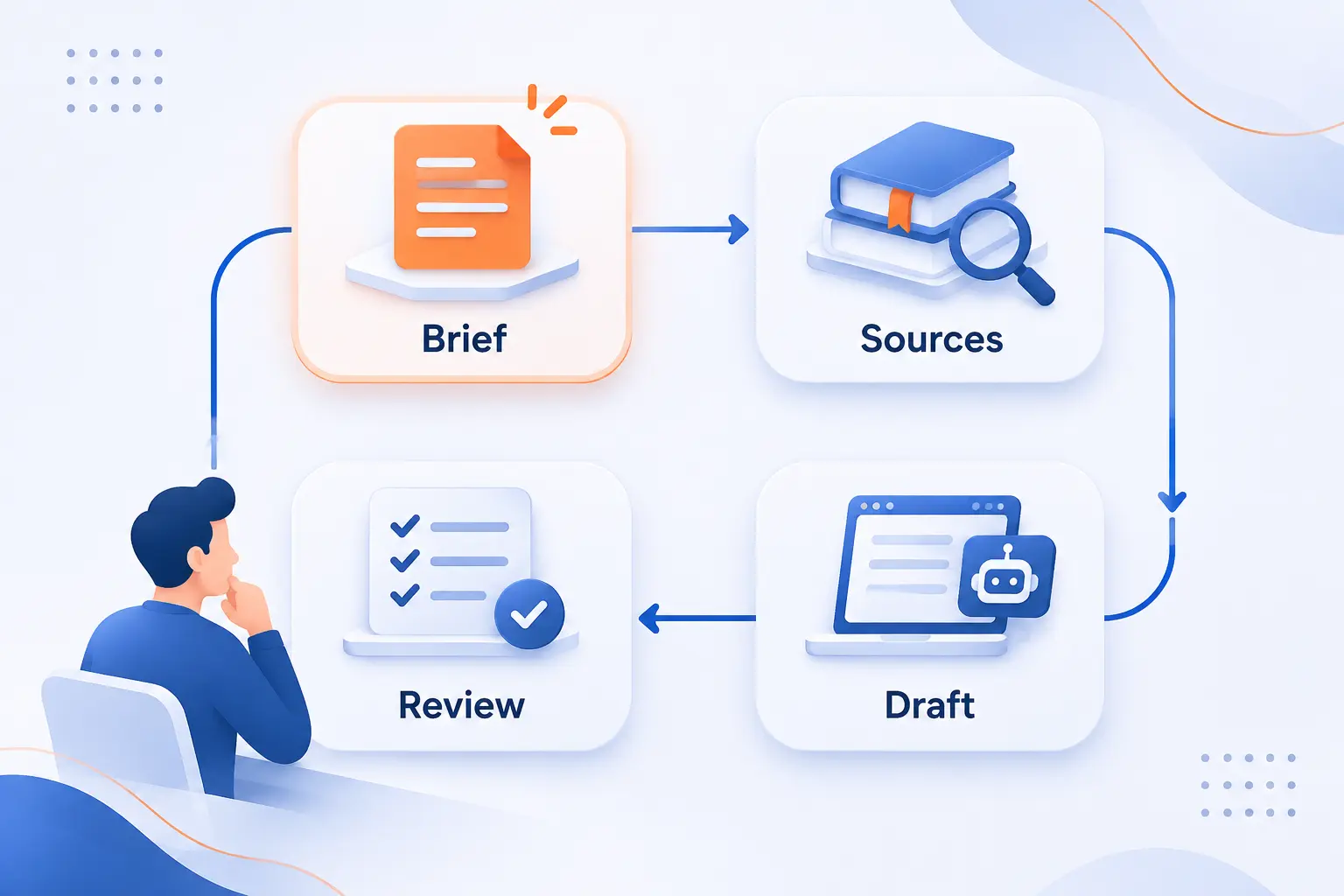
A useful workflow gives AI a bounded assignment and a human clear responsibility for the result. We recommend starting with a real brief, approved sources, and an explicit review sequence. The best content AI writing tools become more useful when the team knows what good work looks like.
Start With a Small Project and Clear Editorial Ownership
Choose a manageable assignment and name the person responsible for publication. An article update or customer email is easier to evaluate than an entire content program. Define the desired outcome before generating anything.
Our suggested sequence keeps responsibility visible:
- Select an assignment with accessible source material.
- Write the brief and identify prohibited or unsupported claims.
- Approve the outline before drafting.
- Review facts, structure, voice, and originality.
- Publish only after the named owner approves the final version.
- Record what required correction before expanding the workflow.
Turn Audience Needs and Research Into a Content Brief
The brief should explain the reader’s problem and the decision the content should support. Include approved sources, essential questions, product limitations, and the next action readers should take.
Reusable project context can keep those inputs together. ChatGPT’s documentation explains how to organize files and standing instructions for recurring work. We would use that structure to preserve approved context, not to hide source material from the editor.
Specify Structure, Reading Level, Language, and Brand Voice in Your Prompts
Specific instructions are more useful than asking for engaging content. State the audience, American English preference, reading level, required sections, and wording to avoid.
Official prompting guidance recommends clear instructions and representative examples. We would provide an approved paragraph and explain why it works. Examples make tone requirements less ambiguous than adjectives alone.
Approve the Outline Before Drafting and Revising Sections
Approve the argument before polishing sentences. Check whether the outline answers the main question, includes the necessary evidence, and avoids repetitive sections.
Then draft by section and request targeted revisions. Explain whether the problem concerns accuracy, missing detail, sequence, or tone. Rewriting an entire article to fix one paragraph creates unnecessary review work.
Connect Collaboration, Approvals, and Publishing Without Losing Human Control
Automate movement between stages without automating final approval by default. Decide who can edit, approve, publish, and reverse a change.
Keep source documents and approval records accessible. When connecting a CMS, begin with draft creation rather than automatic publication. That recommendation applies even when the platform markets content as ready to publish.
Repurpose Approved Content Into Emails and Social Posts
Repurpose the approved version rather than an unfinished draft. Specify the channel, audience, desired action, and facts that must survive compression.
We would compare each adaptation against the original promise. Shortening copy must not remove eligibility conditions, exaggerate a benefit, or introduce a claim that never appeared in the approved article.
Refresh Existing Articles Using Performance Data and Content Audits
Refresh pages because something meaningful changed, not because a calendar reminder demands new wording. Look for outdated facts, weak explanations, broken references, or a changed reader need.
Keep the original and revised versions available during review. Ask AI to identify gaps first, then approve the changes individually. Avoid rewriting accurate sections merely to make an update look substantial.
Keep AI Content Accurate, Original, and On Brand

Human review remains necessary because fluent output can contain unsupported facts, altered meanings, and generic claims. We separate factual checking from language editing. A draft should pass both before publication.
Verify Facts, Statistics, Quotations, and Linked Sources
Open the original source behind every consequential claim. Confirm the number, timeframe, population, and qualifications before using a statistic.
OpenAI explicitly warns about fabricated quotations and references. A citation-shaped sentence is not proof. Check that the page exists and supports the exact statement.
Check Originality Without Treating Plagiarism Scores as Guarantees
A similarity result is an inspection aid, not a guarantee of originality. Review highlighted passages and determine whether they involve proper quotations, common wording, or unattributed borrowing.
Turnitin explains that its similarity score measures matching text, rather than deciding whether plagiarism occurred. We would also inspect the article’s reasoning and contribution, which a matching-text score cannot settle.
Add Firsthand Experience, Expert Judgment, and Distinctive Examples
Add real knowledge that the draft could not responsibly invent. Use documented observations, expert explanations, original analysis, or clearly labeled hypothetical examples.
Google’s quality guidance asks whether content provides original information and substantial added value. Do not fabricate firsthand experience to satisfy that standard. Research-based work should identify itself honestly.
Review Tone, Cultural Context, and Inclusive Language
Review whether the language respects the actual audience and context. Check assumptions about job roles, family structures, geography, and access to resources.
Microsoft’s guidance recommends gender-neutral wording and varied examples. Automated tone controls can assist, but a person should evaluate sensitive or culturally specific material.
Protect Confidential Information and Review Data Privacy Settings
Check the approved data policy before uploading private documents. Review training settings, retention, sharing permissions, connected applications, and the contract covering your plan.
For personal ChatGPT accounts, the documented path is Settings, then Data controls, where users can manage the Improve the model for everyone setting. An available privacy control does not replace organizational authorization to upload sensitive information.
Use AI Writing Tools for Search Visibility, Not Just Volume

Use AI to improve the usefulness and maintenance of content, not merely to publish more pages. Search-oriented features can inform research and organization. They do not remove the need for evidence, clear answers, or business measurement.
Research Search Intent, Content Gaps, and Competitive Topic Angles
Identify what the reader needs to understand or decide before selecting a topic angle. Compare existing coverage for missing explanations, unanswered objections, and unsupported assumptions.
We would ask AI to identify gaps, then verify them manually. Repeating competitor headings with different wording is not a distinctive contribution. Your article needs a better explanation, useful evidence, or a more relevant decision framework.
Distinguish SEO Features From AEO and GEO Claims
Separate measurable functions from promises about being selected by an answer engine. Keyword research, prompt monitoring, and citation tracking are identifiable features. Guaranteed inclusion is a different claim.
| Label | Practical focus | What to verify |
|---|---|---|
| SEO | Search discovery, indexing, and useful page content | Technical access, relevant queries, and page performance |
| AEO | Clear answers to specific questions | Whether the content answers the question accurately |
| GEO | Visibility and citations within generative answers | Which prompts, engines, locations, and observations are measured |
For Google’s AI features, the official guidance says foundational practices still apply, without additional technical eligibility requirements. Treat vendor labels as descriptions of functionality, not proof of preferential placement.
Structure Clear Answers With Useful Headings, Summaries, and Relevant Metadata
Answer the main question early, then provide the detail needed to support that answer. Use headings that describe the section’s purpose rather than repeat keywords mechanically.
Google’s guidance extends manual review to titles, descriptions, structured data, and image text. We would review those elements alongside the article, not generate them after approval and publish them unchecked.
Measure Content Outcomes Rather Than Relying on Optimization Scores
Measure whether the content attracts relevant readers and supports the intended action. Optimization scores can inform a review, but they are not business outcomes.
Search Console provides query and page performance reporting, including impressions and clicks. Combine those observations with your own conversion data. Avoid attributing every improvement to an AI rewrite when other changes occurred.
Frequently Asked Questions
The right choice depends on your assignment, budget, and required level of control. These answers address the most common shortlist decisions. For product-specific limits, use the detailed entries rather than assuming every free or paid plan works alike.
What Are AI Content Writing Tools, and How Do They Work?
AI content writing tools generate, revise, summarize, or organize text from instructions and supplied context. Their capabilities vary, with some adding source retrieval, templates, editing suggestions, or publishing connections. We recommend treating generated text as draft material rather than an authoritative source.
Which AI Writing Tools Offer Free Plans Rather Than Limited Trials?
ChatGPT, Claude, Rytr, Grammarly, Wordtune, and ProWritingAid offer ongoing free options. Each restricts some combination of usage, features, or document handling. Notion’s free workspace includes trial AI access, which is different from a permanent unrestricted AI plan.
What Websites Similar to ChatGPT Are Useful for Content Writing?
Claude is the closest general-purpose alternative within this shortlist. Jasper, Copy.ai, and Writesonic suit more structured marketing workflows, while HyperWrite emphasizes personalized assistance and autocomplete. Choose according to the task rather than how closely the interface resembles a chat window.
Is ChatGPT or Claude Better for Writing?
Neither is universally better, and our research does not establish a controlled prose-quality winner. ChatGPT offers a broad drafting and tool environment, while Claude’s documented project workflow makes it a strong candidate for reference-heavy assignments. Compare them using the same source pack and judge factual fidelity, revision effort, and instruction following.
Which AI Writing Tools Are Best for Blog Posts Versus Fiction?
Jasper, Writesonic, ChatGPT, and Claude are sensible blog-writing candidates, while Sudowrite and ProWritingAid deserve special attention for fiction. The business-focused options emphasize briefs, research, brand context, or flexible drafting. The fiction specialists provide story-development or manuscript-critique features.
Can AI Writing Tools Replace Human Writers and Editors?
AI can assist with parts of drafting and editing, but we would not remove human responsibility for publication. Someone must verify sources, judge the argument, protect confidential information, and approve claims. The useful question is which recurring task to delegate, not whether editorial ownership can disappear.
Is It Legal to Use ChatGPT to Write a Book?
In the United States, using ChatGPT to assist with a book is not inherently prohibited, but publication must still respect others’ rights. OpenAI’s terms assign its interest in output to the user, subject to applicable law and the agreement’s conditions. The U.S. Copyright Office distinguishes protectable human contributions from material generated without sufficient human authorship. Check publisher requirements and obtain legal advice for a specific rights dispute or commercially significant uncertainty.


Conclusion
The best content AI writing tools solve different problems, so start with the work rather than the ranking. We would shortlist Jasper for managed brand consistency, ChatGPT or Claude for flexible drafting, and Grammarly or Wordtune for revision. StoryChief deserves attention when coordination is the bottleneck, while the fiction specialists serve a different creative workflow.
Choose a realistic assignment, provide approved sources, and compare how much editorial work remains. Confirm the billing commitment and usage restrictions before subscribing. Which recurring writing task would make the biggest difference if you could improve it first?