

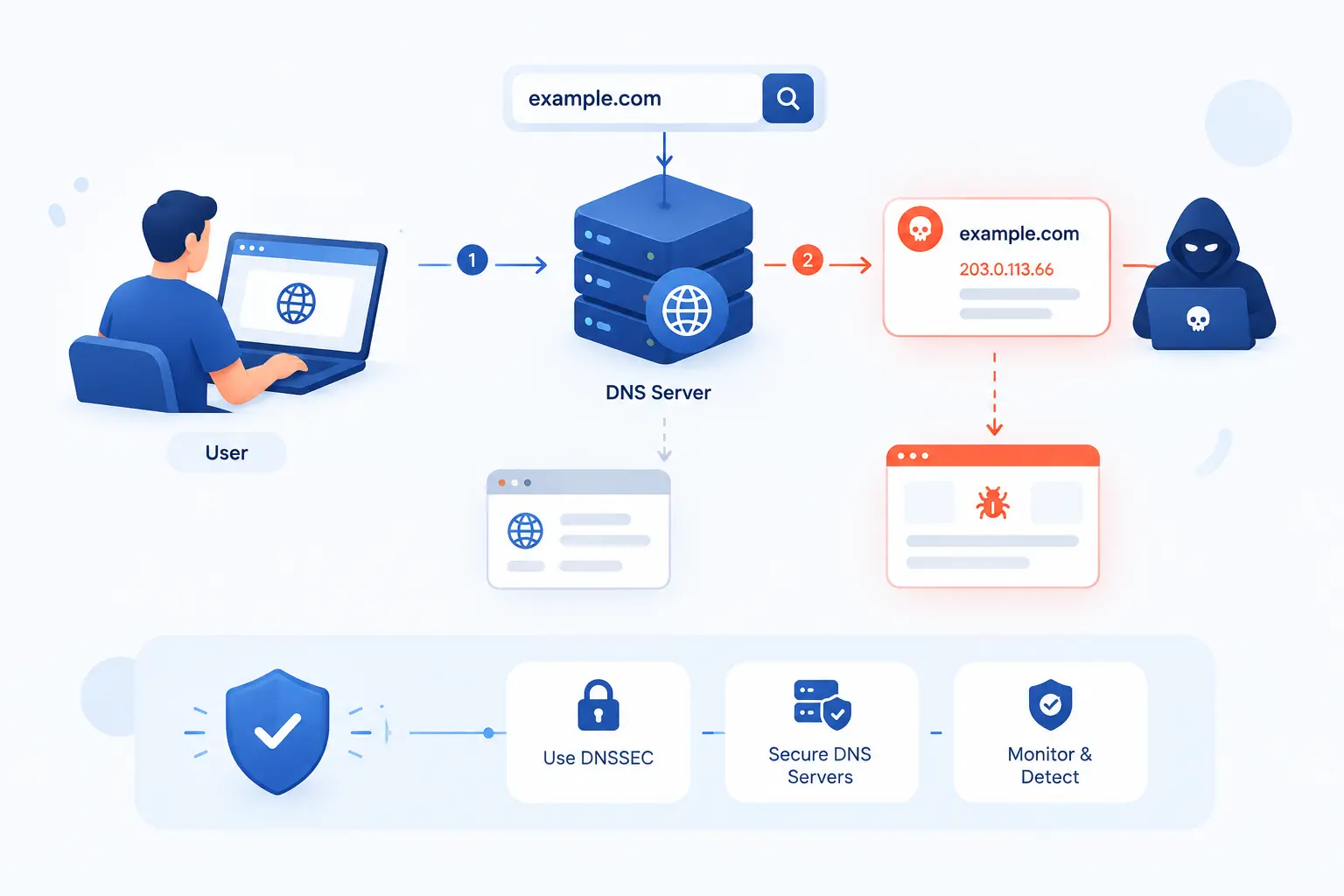
- DNS Poisoning Is the Insertion of False DNS Data
- How Resolvers and DNS Caching Set Up the Risk
- How a Poisoned DNS Record Reaches Users
- Where DNS Poisoning Fits Among Related DNS Attacks
- Why These Attacks Can Succeed
- What DNS Poisoning Can Lead To
- Prevention and Mitigation for DNS Poisoning
- FAQ
- How 1Byte as an AWS Partner Supports Safer Hosting
- Conclusion
DNS Poisoning is an attack where false address information is inserted into the Domain Name System, so users are sent to the wrong server when they type a real domain name. The domain may look correct in the browser, yet the underlying IP address can point somewhere malicious. We think of it as changing a trusted signpost, not changing the road itself. For website owners, developers, and hosting teams, the danger is simple: people can be guided away from the service they meant to reach before the website ever has a chance to defend itself.
At 1Byte, we like this topic because it shows how invisible infrastructure can make or break trust. DNS usually works quietly in the background. That quietness is useful, but it also means many teams notice the problem only after users complain, certificates fail, traffic drops, or login pages start behaving oddly. A basic understanding of DNS Poisoning helps us ask sharper questions before trouble spreads.
DNS Poisoning Is the Insertion of False DNS Data
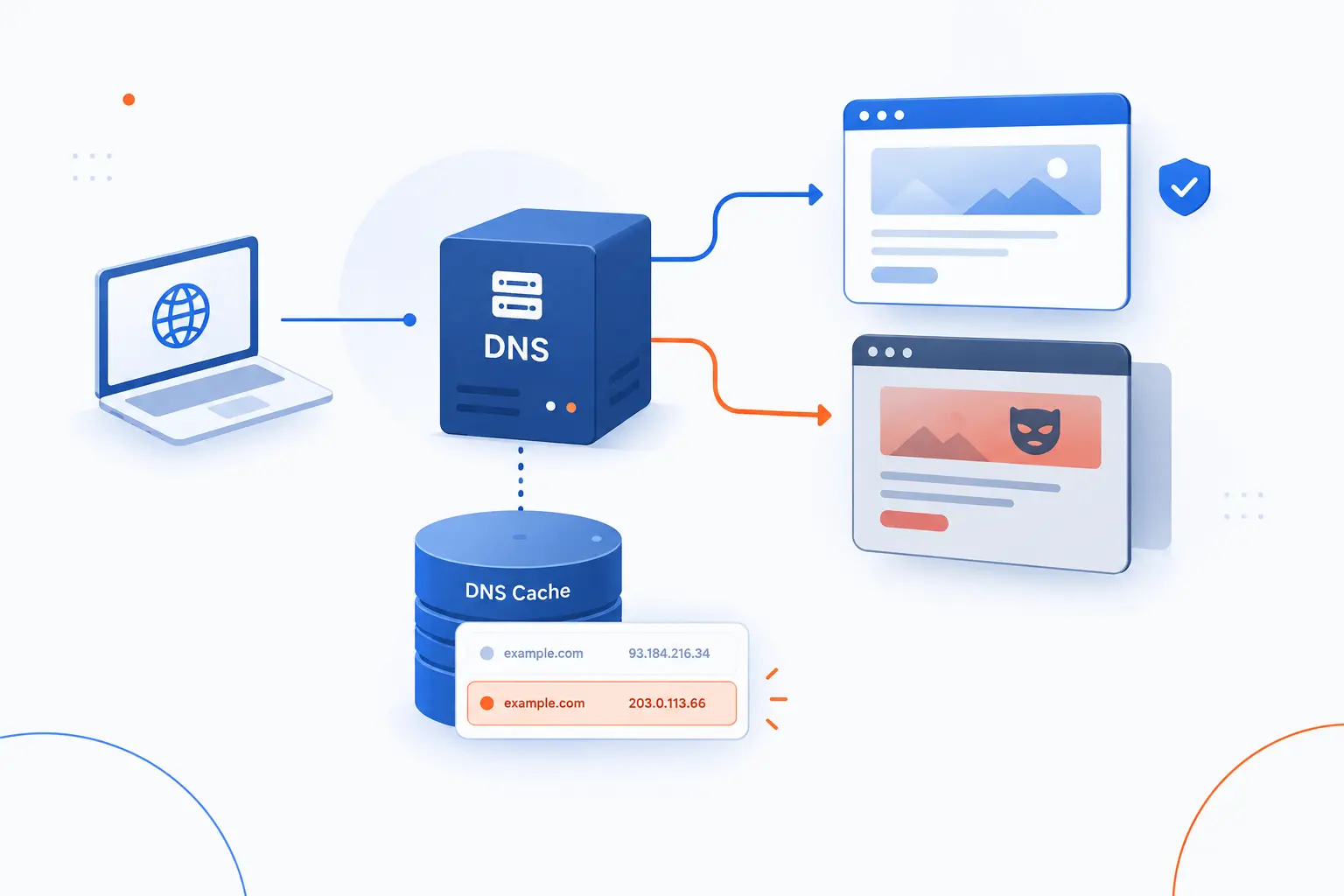
DNS Poisoning is the act of placing false DNS data into a resolver, cache, server, device, or local configuration so a domain resolves to an attacker-chosen destination. Instead of receiving the real IP address for a domain, the user receives a fake answer. The attack can affect one device, one network, or many users who share the same poisoned resolver. The core idea is always the same: corrupt the answer before the user connects.
DNS exists because people remember names better than numbers. We type a domain, and DNS translates that name into an IP address. If that translation is tampered with, the user may still believe everything is normal. The browser address bar can show the expected domain, while the connection attempts to go elsewhere.
This is why we do not treat DNS as “just plumbing.” In hosting, DNS is part of the trust chain. A clean application stack cannot fully protect a user who has already been sent to the wrong place. DNS Poisoning is especially troubling because it abuses routine behavior, not exotic user behavior. The person may do nothing strange. They type the right name, press Enter, and still land in danger.
The phrase is often used loosely. Some people use it to mean cache poisoning only. Others use it for broader DNS redirection attacks, including compromised DNS records or malicious resolver settings. In this guide, we use it in the practical security sense: false name-resolution data causes traffic to go somewhere it should not.
FURTHER READING: |
| 1. What Is Spear Fishing Cyber and How It Steals Data |
| 2. What Is Defense in Depth Strategy in Cybersecurity |
| 3. What Is a Threat Model? Risks, Flaws, and Fixes |
How Resolvers and DNS Caching Set Up the Risk
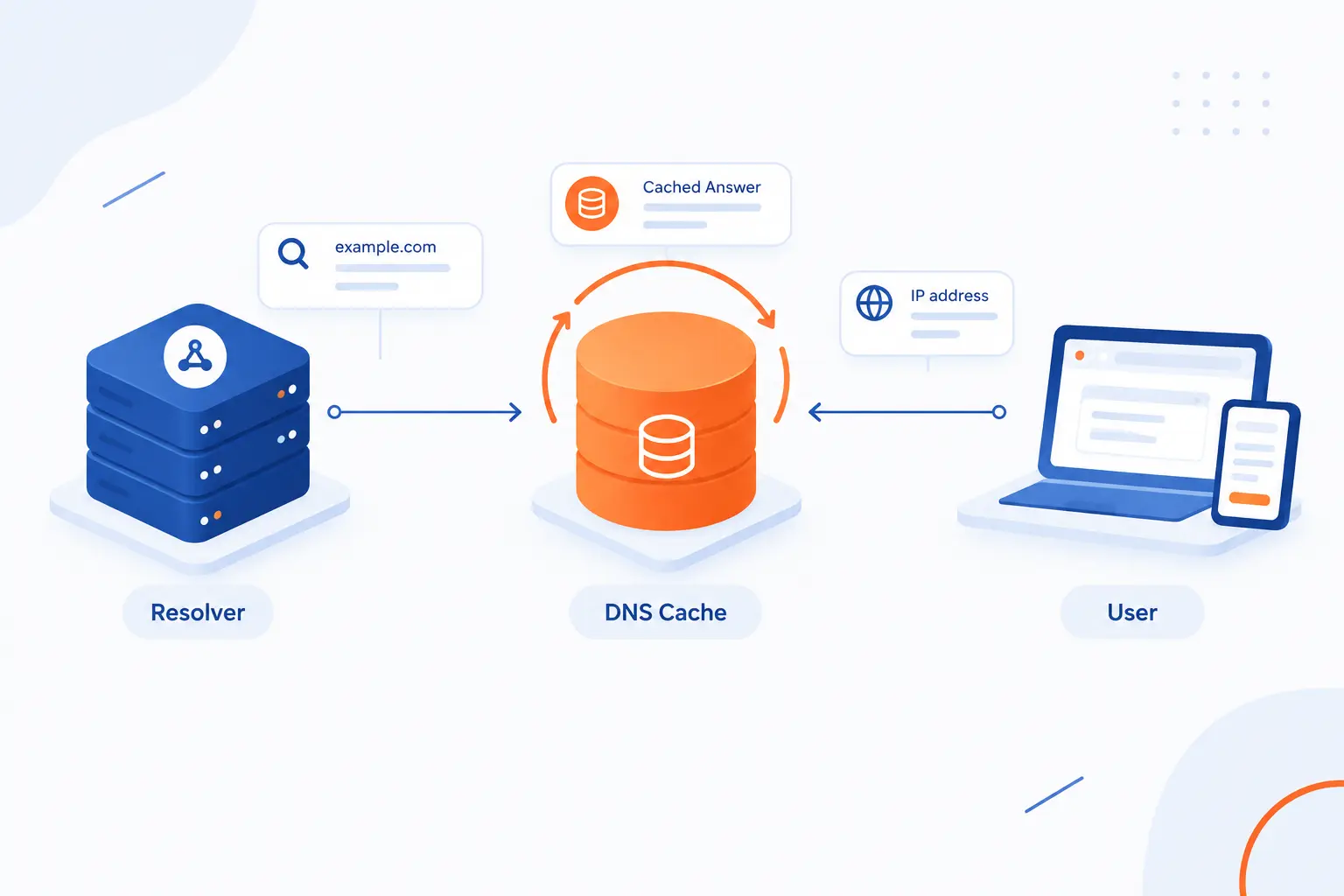
Resolvers and caching create the conditions that make DNS Poisoning powerful. A resolver asks DNS questions for a device, and a cache stores answers so future lookups are faster. That design is efficient, but a bad cached answer can be reused until it expires or is removed. The original DNS design even described using a recursive service to centralize the cache for a whole local network, which is exactly why one bad answer can matter to more than one user.
What the Stub Resolver and Recursive Resolver Do
A stub resolver starts the lookup on the user’s device, while a recursive resolver does the heavier work of finding the answer. The stub resolver is usually built into the operating system or network stack. It does not typically walk the whole DNS hierarchy by itself. Instead, it asks a configured recursive resolver, such as one from an ISP, company network, public provider, router, or local server.
The recursive resolver is the workhorse. If it already knows the answer, it replies from cache. If it does not, it asks other name servers until it finds the authoritative answer. Then it returns that answer to the stub resolver, which gives it to the application.
This separation is useful. Phones, laptops, and small devices do not need to perform full resolution for every lookup. But it also creates a trust point. If the recursive resolver accepts a forged answer, every client relying on it may inherit the mistake.
How the Resolver Cache and TTL Speed Up Lookups
A resolver cache stores recent answers so repeated lookups do not need to ask the whole DNS hierarchy again. Each DNS answer includes a time-to-live value, often shortened to TTL. The TTL tells caches how long the answer may be reused. When the timer runs out, the resolver should fetch a fresh answer.
Caching is one of the reasons the web feels quick. If many users on the same network visit the same site, the resolver can answer later requests from memory. This reduces latency and cuts unnecessary traffic to authoritative name servers.
The risk is obvious once we slow down and look at it. A cache does not care whether an answer is helpful or harmful unless validation catches the difference. If a false address gets stored, the resolver can repeat that false answer as confidently as it would repeat a legitimate one.
Why One Poisoned Cache Can Affect Many Users
One poisoned resolver cache can affect many users because the resolver answers repeated requests for everyone who depends on it. In a home, that may mean several devices behind one router. In a company, it may mean a department, office, or entire network segment. In an ISP or public resolver scenario, the possible blast radius can be much larger.
This is the part that makes DNS Poisoning feel unfair. The victim does not need to click a suspicious link. They may type the correct domain from memory. They may use a saved bookmark. If their resolver serves the poisoned record, the lookup can still betray them.
That shared-trust pattern is also why incident response must move quickly. Cleaning one laptop may not be enough. We need to inspect resolver behavior, upstream DNS settings, local host files, router settings, and authoritative records where appropriate.
How a Poisoned DNS Record Reaches Users
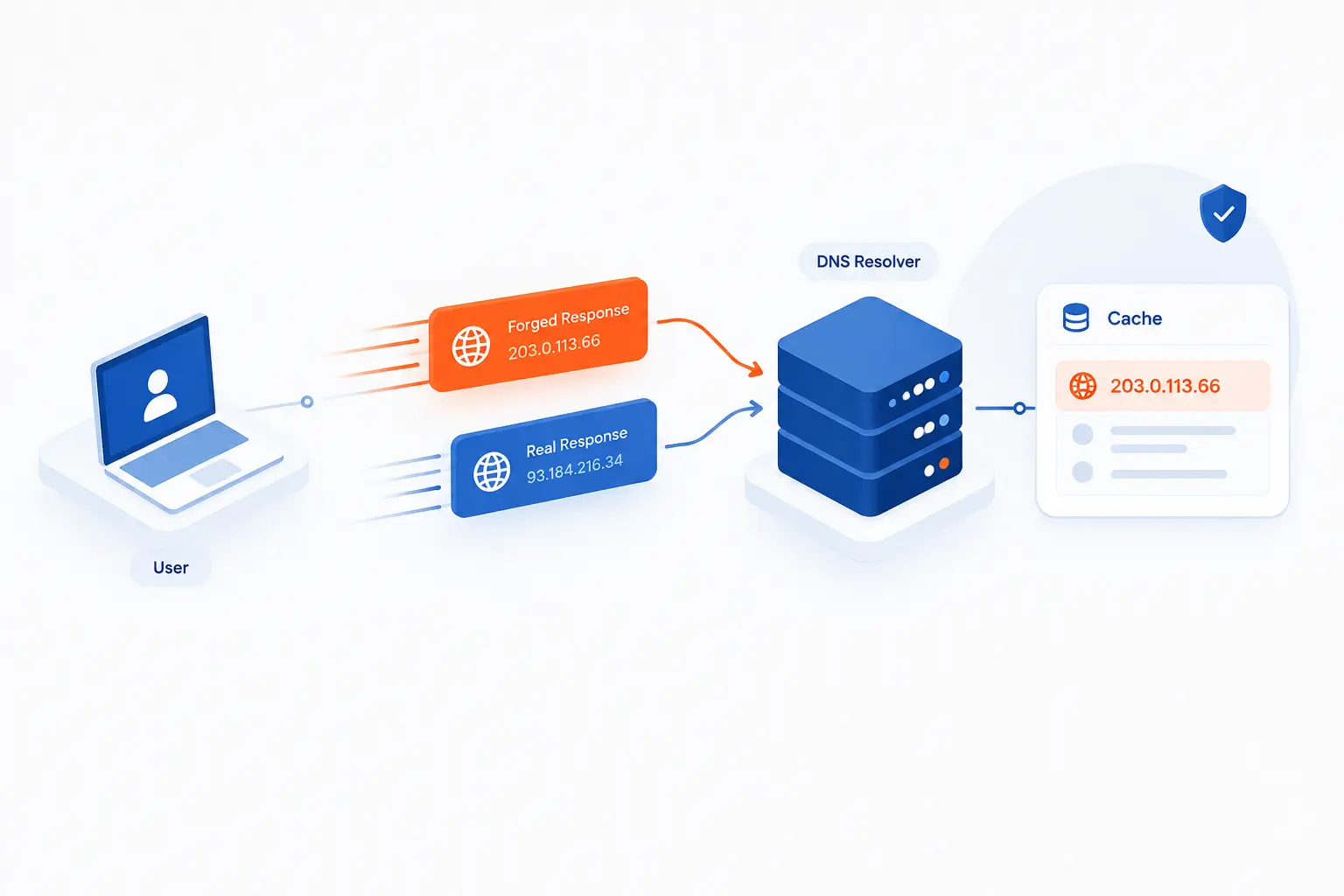
A poisoned DNS record reaches users when a lookup path accepts a false answer and then serves that answer during normal browsing or application use. The common cache-poisoning version is a race: the attacker tries to make the forged response arrive before the real one. If the resolver accepts and stores the false response, later users receive the wrong IP address. The attack succeeds before the website content loads, which makes it especially slippery.
A Query Leaves the Device for a Resolver
The process starts when a device asks a resolver for the address of a domain. A browser, mail client, app, or background service may trigger the query. The device sends that question to the resolver configured in its network settings. Most users never see this step.
If the resolver has a fresh cached answer, it responds immediately. If not, it asks other servers to locate the authoritative answer. This uncached moment is attractive to attackers because the resolver is waiting for a new answer. The door is briefly open.
From a defender’s point of view, this is why resolver choice matters. A modern resolver should randomize query details, validate signed data where possible, restrict who can use it, and log enough information to support investigations.
A Forged Reply Tries to Beat the Legitimate Answer
A forged reply tries to arrive first with the right-looking details, so the resolver mistakes it for the legitimate answer. Classic DNS uses fast, connectionless traffic for many lookups. The base protocol specifies UDP port 53 for standard query traffic, which is efficient but easier to spoof than a fully established connection.
To be accepted, the forged response must match enough details from the original query. That usually includes the queried name, type, destination, source port, and request identifier. If the attacker guesses poorly, the resolver rejects the packet. If the attacker guesses correctly and arrives first, the resolver may accept the lie.
This is why good resolver implementations avoid predictable behavior. Randomness does not make attacks impossible. It does make guessing harder, which raises the attacker’s cost.
The Cache Saves the Wrong IP Address
The damage becomes persistent when the resolver stores the forged answer in cache. Once cached, the wrong IP address can be served to later users without repeating the original race. That is the multiplier. A momentary trick becomes a repeated misdirection.
The stored record lasts until the resolver expires it, flushes it, overwrites it, or rejects it through validation. Some attacks also try to poison related records, such as name server records, to gain broader control over later lookups. That can turn a single false answer into a chain of false answers.
We prefer to treat cache poisoning as both a technical fault and a trust failure. The resolver becomes a bad witness. It keeps repeating something that sounds authoritative but is wrong.
Users Are Redirected to a Malicious Website
Users are redirected when the poisoned answer points their browser or application to an attacker-controlled system. That system may imitate a real login page, serve malware, intercept traffic, or simply break access to the intended service. The user may see the expected domain in their habits and bookmarks, yet the network route has changed underneath them.
Modern HTTPS makes this harder to abuse silently, especially when certificates are checked correctly. A fake server should not have a valid certificate for a domain it does not control. But attackers still exploit confusion. They may use lookalike domains, stolen sessions, compromised certificate workflows, or pages that trick users into ignoring warnings.
When we investigate strange redirects, we do not stop at the website. We also ask where the name resolved, which resolver answered, whether the answer was cached, and whether other devices saw the same result.
Where DNS Poisoning Fits Among Related DNS Attacks
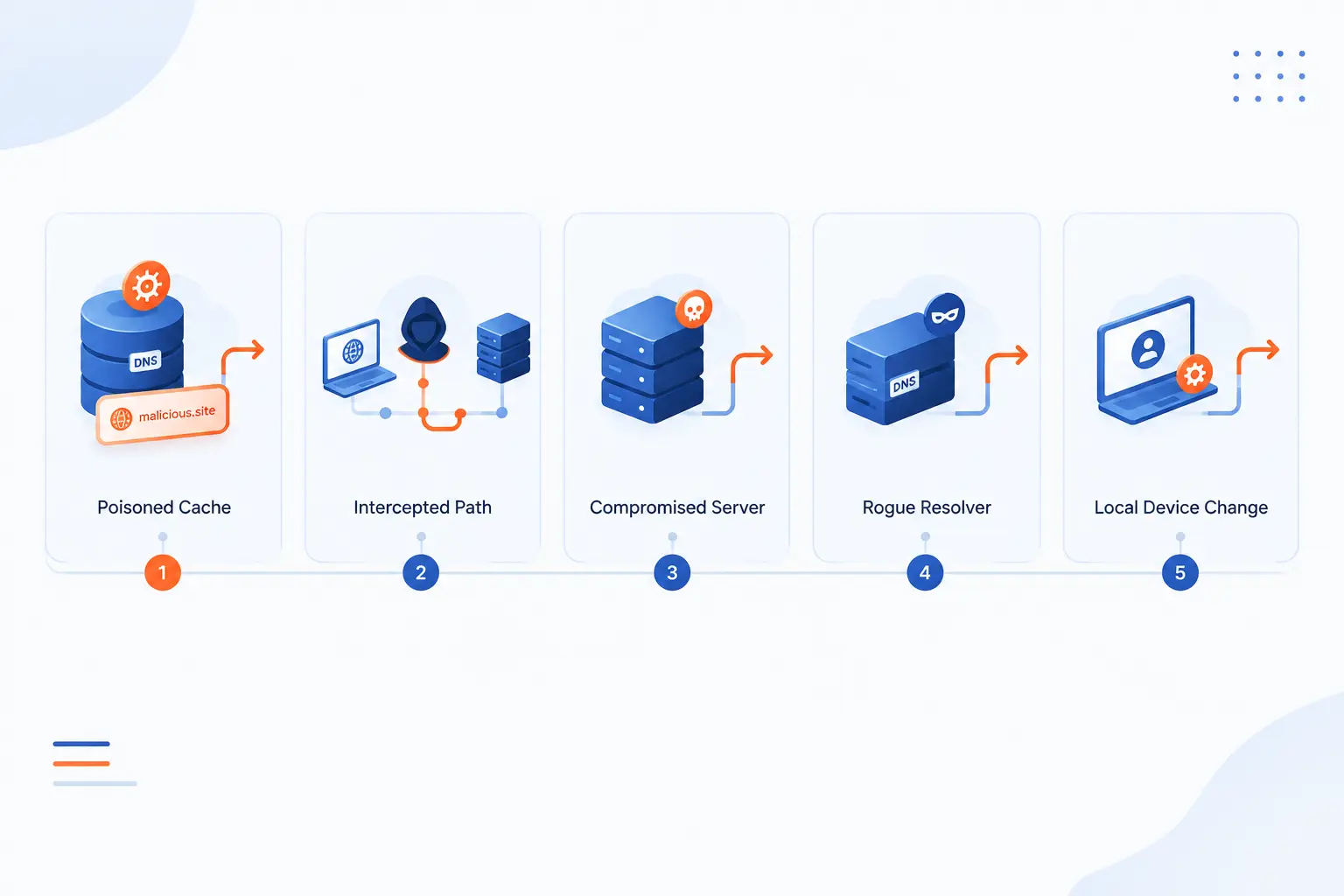
DNS Poisoning is one member of a wider family of DNS redirection and trust attacks. Cache poisoning targets stored resolver answers, while interception, server compromise, rogue resolvers, and local device changes alter the path in different places. The difference matters because the fix changes with the attack type. We use the table below as a quick map before digging into each case.
| Attack type | Main target | Practical sign |
|---|---|---|
| Cache poisoning | Recursive resolver cache | Many users behind one resolver see the same wrong answer |
| Interception | Traffic between client and resolver | Wrong answers appear on one network path |
| Server compromise | Authoritative records or control panel | Official records show unauthorized changes |
| Rogue local settings | Device, router, or host file | Only certain devices or networks are affected |
DNS Cache Poisoning
DNS cache poisoning means a resolver stores a false answer and reuses it for later lookups. This is the classic form many people mean when they say DNS Poisoning. The attacker’s goal is to inject a forged response at the right moment. If the resolver accepts it, the cache becomes the delivery mechanism.
This attack is dangerous because it scales through normal resolver behavior. Users keep asking ordinary questions. The resolver keeps giving the wrong answer. Nothing about the user’s intent looks suspicious.
Strong validation, randomization, patching, and careful resolver exposure reduce this risk. We also like short, disciplined response playbooks. When a cache is suspect, teams should know how to flush it, switch resolvers, and compare answers from trusted sources.
DNS Spoofing Through Man-in-the-Middle Interception
DNS spoofing through man-in-the-middle interception means an attacker alters or injects replies while traffic is in transit. The resolver itself may not be compromised. Instead, the attacker sits on a network path and races or replaces the answer. Public Wi-Fi, compromised routers, malicious gateways, and hostile networks can all create this kind of risk.
Encrypted transport between the client and resolver can help here. DNS over TLS and DNS over HTTPS protect that last-mile path from casual inspection and tampering when configured correctly. They do not replace DNSSEC, though. They protect the channel, while DNSSEC validates the data.
Our practical view is simple: use encrypted transport where it fits, but do not mistake it for complete origin validation. A private ride to the wrong destination is still the wrong destination.
DNS Server Compromise and Hijacking
DNS server compromise and hijacking happen when attackers change legitimate DNS control points instead of only forging replies. That may involve registrar access, authoritative DNS hosting, control panels, API keys, or admin credentials. Once records are changed at the source, resolvers may receive bad answers from systems that appear legitimate.
This is not cache poisoning in the strict sense. The poison is upstream. CISA’s guidance on infrastructure tampering tells organizations to review records and change account passwords because unauthorized DNS changes can redirect web and email traffic.
This attack often leaves administrative evidence. Look for record changes, login events, new API tokens, altered name servers, unfamiliar MX records, and certificate transparency entries. If the source records changed, flushing a cache only treats the symptom.
Rogue Resolvers and Host File Manipulation
Rogue resolvers and host file manipulation redirect traffic by changing where a device asks questions or by overriding the answer locally. Malware can modify resolver settings on a device. A compromised router can hand out malicious resolver addresses through network configuration. A host file entry can force one domain to resolve to a specific IP address before external DNS is even queried.
This category often affects a smaller scope. One laptop may be wrong while another is fine. One office Wi-Fi network may fail while mobile data works. Those patterns are clues.
We usually test from several networks and devices. If the same domain resolves differently only on one machine, local configuration deserves attention. If every device behind one router is affected, inspect the router and DHCP settings next.
Why These Attacks Can Succeed
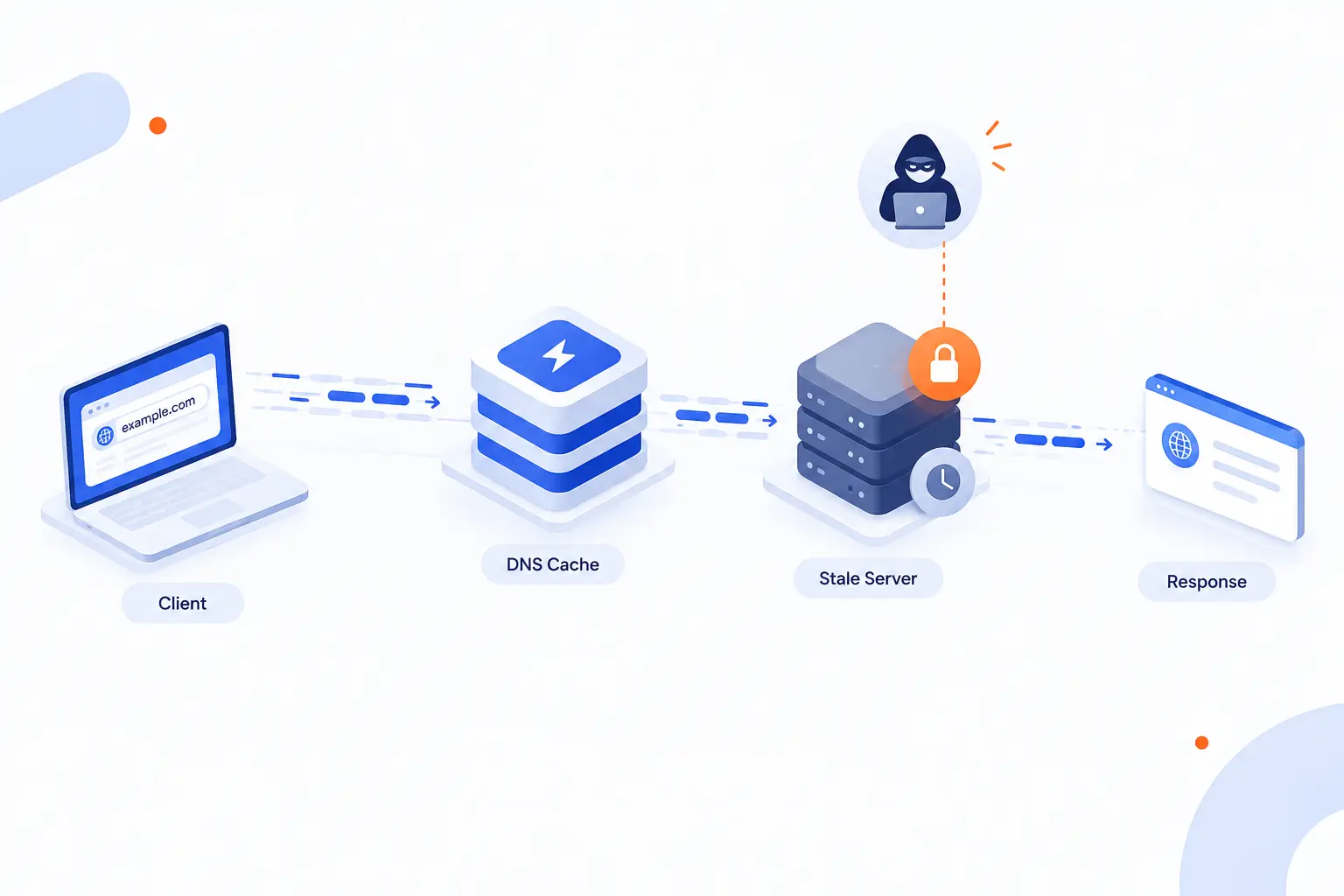
These attacks can succeed because basic DNS was built for speed and availability before modern authentication was common. Traditional lookups often use lightweight packets, cached answers, and trust in matching response details. Attackers look for predictable behavior, exposed resolvers, stale software, weak admin controls, and missing validation. NIST warns that an attack against DNS infrastructure can threaten every network operation in an enterprise, which is exactly the scale we worry about in real hosting environments.
UDP Makes Forged Replies Easier to Send
UDP makes forged replies easier to send because it does not require a full connection handshake before data arrives. That speed is useful for routine lookups. It also gives attackers a chance to inject packets that pretend to be from an authoritative server. The resolver must decide whether the response matches the query closely enough to accept.
Connectionless does not mean defenseless. Modern resolvers use randomization, validation, rate limiting, and other controls. Still, the protocol shape matters. A forged UDP response can be sprayed quickly, and the attacker does not need to complete a normal session like they would with many TCP-based exchanges.
We do not blame UDP for everything. The real issue is predictable acceptance. If a resolver is easy to guess, UDP gives the attacker a fast delivery lane.
Attackers Target Uncached Queries, Ports, and Request IDs
Attackers target uncached queries because the resolver is waiting for a fresh answer. If the answer is already cached, there is no race to win. When a cache miss happens, the attacker tries to guess the right query details before the legitimate response arrives. The more predictable those details are, the easier the attack becomes.
One historic weakness was relying too heavily on the request identifier. Forged-answer guidance recommends source-port randomization to extend protection beyond the 16-bit request ID. In other words, the resolver should make attackers guess more than one small value.
This is why patched resolver software matters. Security improvements often look boring from the outside. Under the hood, they change the odds. In DNS security, better odds can be the difference between a failed spray of forged replies and a poisoned cache.
Open Resolvers and Weak Validation Expand the Blast Radius
Open resolvers and weak validation expand the blast radius because they let more clients depend on answers that may not be properly checked. An open resolver accepts queries from the broader internet instead of a controlled audience. That can invite abuse, load, reflection attacks, and unnecessary exposure. If it also lacks strong validation, the risk grows.
DNSSEC helps by allowing resolvers to verify that signed DNS data came from the expected source and was not modified. The security extension standard describes data origin authentication and data integrity as services provided by DNSSEC. That is a big deal for poisoning defense.
Validation is not magic, though. Domains must be signed correctly, resolvers must validate, and operational mistakes can cause failures. We see DNSSEC as a strong control, not a permission slip to neglect resolver hardening.
What DNS Poisoning Can Lead To

DNS Poisoning can lead to phishing, malware delivery, service disruption, data loss, financial harm, and reputation damage. The technical act is small: change the answer to a name lookup. The consequences can be large because DNS sits before web, email, APIs, software updates, and many internal services. Once name resolution lies, every dependent system has to fight uphill.
Phishing, Credential Theft, and Fake Login Pages
DNS Poisoning can send users to fake login pages that imitate trusted services. The user may type the right domain, follow a saved bookmark, or open a familiar application. That makes the social-engineering side more convincing. The attacker does not need to persuade the user to visit a strange domain.
The fake page may ask for passwords, one-time codes, recovery phrases, payment details, or admin credentials. If the page also mimics branding well, users may miss warning signs. Browser certificate warnings can stop many attempts, but people sometimes click through under pressure.
For businesses, the scariest scenario is admin credential theft. One stolen DNS, hosting, email, or cloud account can turn a redirection incident into a broader compromise. We recommend treating suspicious DNS behavior as a possible identity incident, not just a networking issue.
Malware Delivery Through Trusted-Looking Sites
DNS Poisoning can deliver malware by sending users to a site that appears to be the one they meant to visit. The attacker may host fake downloads, browser updates, document viewers, or support tools. Users are more likely to trust a download when the journey began with a familiar domain. That trust is the attacker’s fuel.
Software-update paths are especially sensitive. If an application fetches updates or configuration from a domain without strong validation, poisoned resolution can become a supply-chain doorway. Good update systems verify signatures, certificates, and package integrity. Weak systems rely too much on the address lookup alone.
Our advice is to layer checks. DNS should be trustworthy, but applications should still verify what they receive. One control failing should not make the whole house fall down.
Service Disruption, Censorship, and Business Downtime
DNS Poisoning can break access to real services by resolving domains to unreachable or wrong destinations. Users may see timeouts, wrong pages, certificate errors, failed email delivery, or API failures. To them, the service looks broken. Behind the scenes, the application may be healthy while resolution is sick.
This pattern can also be used for censorship or traffic steering. If a resolver returns the wrong address or blocks the right one, users cannot reliably reach the intended service. The technical method may differ by environment, but the user experience is similar: the name no longer leads where it should.
For business owners, downtime from DNS problems can be maddening. Servers run, code works, and databases respond, yet customers cannot reach the service. That is why DNS monitoring belongs beside application monitoring.
Data Loss, Financial Harm, and Reputation Damage
DNS Poisoning can cause data loss and financial harm when users submit sensitive information to the wrong system. Login credentials, order details, personal data, and internal requests may be captured. If email-related records are hijacked, attackers may intercept or redirect messages. The impact depends on what the domain is used for.
Reputation damage can be just as painful. Customers rarely distinguish between a web server breach, DNS compromise, and resolver poisoning. They remember that a trusted name led them somewhere unsafe. Fair or not, the brand takes the bruise.
We believe DNS incidents deserve plain communication. If users were exposed, say what happened, what was affected, and what actions they should take. Silence may feel safe in the first hour, but it often costs more later.
Prevention and Mitigation for DNS Poisoning
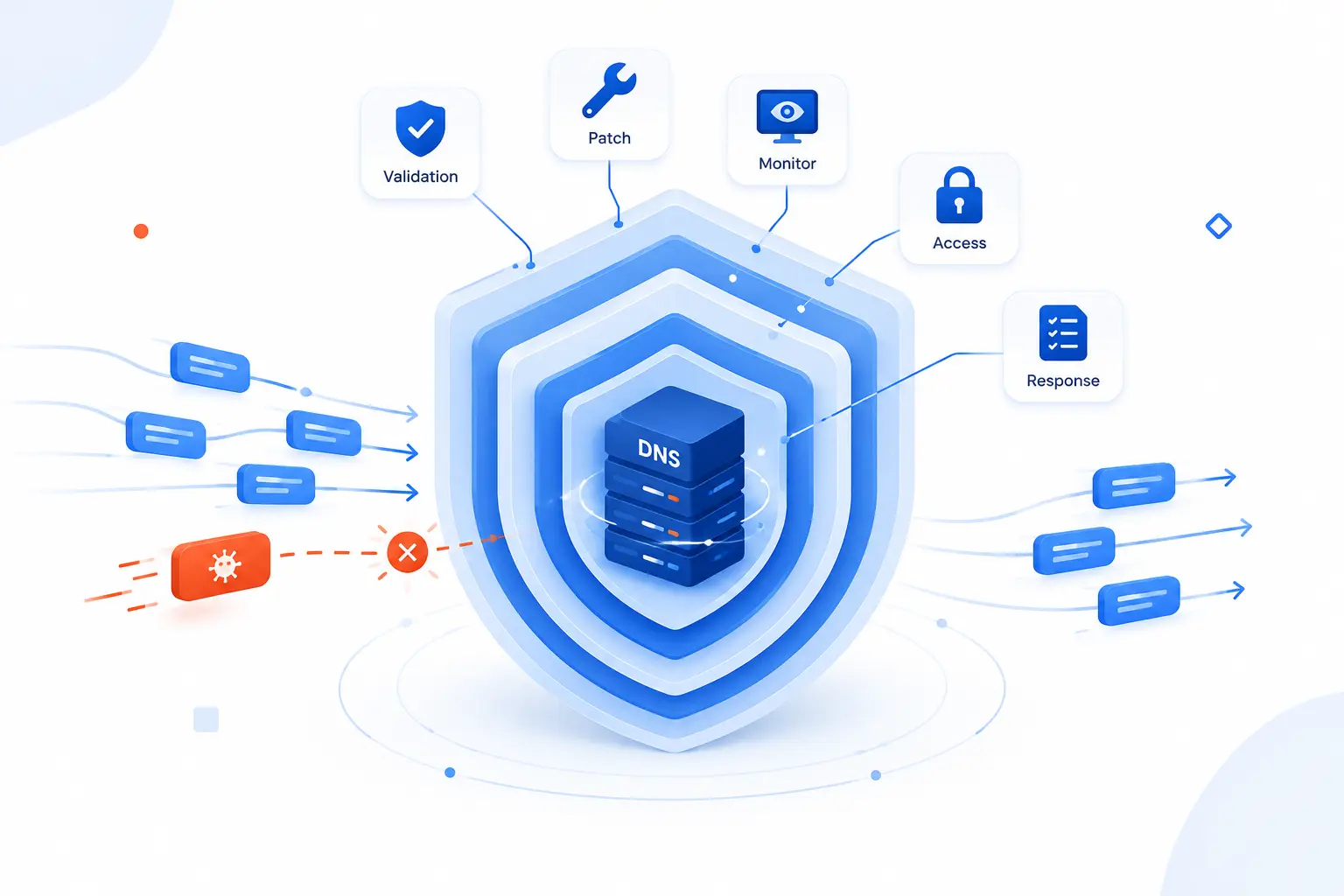
Prevention means making false DNS answers harder to inject, harder to accept, and faster to detect. Mitigation means limiting damage when bad answers appear. The best approach combines DNSSEC validation, reputable providers, patching, monitoring, access control, and a practiced response plan. We prefer layered defenses because DNS Poisoning rarely respects neat boundaries.
Use DNSSEC and Reputable DNS Providers
Use DNSSEC and reputable DNS providers so resolvers can reject forged or modified signed answers. DNSSEC adds cryptographic signatures to DNS data. A validating resolver checks those signatures before trusting the answer. If validation fails, the resolver should refuse to return the bad data.
This control works best when both sides do their part. Domain owners need correct signing and delegation. Recursive resolvers need validation enabled. For example, public resolver guidance says validation failures return SERVFAIL when signed data cannot be verified.
Choose DNS providers with mature security practices and clear management controls. We also recommend avoiding unknown resolvers on sensitive networks. If a resolver is free but opaque, ask what you are really trusting.
Patch DNS Software and Keep DNS Records Reviewed
Patch DNS software and review records regularly to close known weaknesses and catch unauthorized changes. Resolver and authoritative server software should receive security updates just like web servers and databases. Old resolver behavior may be easier to predict or exploit. Old control panels may expose account risks.
Record reviews are simple, but they work. Check A, AAAA, CNAME, MX, NS, TXT, DS, and other important records against known-good values. Look for unfamiliar IP addresses, unexpected name servers, odd mail routing, and stale verification records. Keep a change log so legitimate edits do not look like mysteries later.
We like pairing review discipline with least privilege. The person who can edit DNS controls the front door to the business. That access deserves the same respect as production deployment access.
Monitor Logs, Traffic, and Unexpected DNS Changes
Monitor logs, traffic, and DNS changes so poisoning or hijacking is noticed before users report it at scale. Resolver logs can show unusual answer patterns, spikes in failed validation, unexpected upstream behavior, or repeated queries for suspicious domains. Authoritative DNS logs and registrar events can reveal record changes. Network monitoring can show traffic flowing to unfamiliar destinations after lookups.
We recommend comparing answers from more than one trusted network during an investigation. If your office resolver, mobile network, and a known public resolver disagree, the pattern tells you where to look next. One wrong device points local. One wrong resolver points cache or resolver settings. Wrong authoritative answers point upstream.
Monitoring should include alerting for critical records. If your main website, mail routing, or name server delegation changes unexpectedly, someone should know quickly. DNS drift is quiet until it is loud.
Harden Access With Strong Credentials, Firewalls, and Segmentation
Harden access so attackers cannot easily change DNS settings or abuse resolvers. Use strong passwords, multi-factor authentication, role-based access, and careful API key handling for registrars, DNS providers, and hosting panels. Limit who can edit records. Remove access when staff, vendors, or projects no longer need it.
Firewall rules matter too. Recursive resolvers should usually serve only intended clients. Authoritative servers should expose the services they must expose and nothing extra. Management interfaces should not be open to the internet unless there is a strong reason and strong control.
Segmentation reduces the damage when something goes wrong. A compromised workstation should not be able to reconfigure core DNS services. A guest network should not share the same level of trust as production systems. Good boundaries make attackers work harder.
Flush Caches, Change Resolvers, and Isolate Affected Systems
Flush caches, change resolvers, and isolate affected systems when poisoning is suspected. Start by identifying the scope. Test the same domain from multiple devices, networks, and resolvers. Compare the returned IP addresses with known-good authoritative data.
If a recursive cache is poisoned, flush it and investigate how the false data arrived. If endpoint settings are changed, reset resolver configuration and scan for malware. If a router is handing out bad resolver addresses, remove it from service or reconfigure it from a trusted device. If authoritative records changed, secure the account first, then repair the records.
Do not rush straight back to normal. Preserve logs where possible. Rotate affected credentials. Watch for repeated changes. DNS Poisoning is sometimes the first visible symptom of a larger compromise.
FAQ
These answers cover the questions we hear most from beginners and site owners. DNS Poisoning can sound abstract, but the practical checks are straightforward. Look for wrong destinations, certificate warnings, unexpected record changes, and resolver differences. When in doubt, compare results from trusted networks before assuming the website itself is broken.
How Do I Know if My DNS Has Been Hacked?
You may suspect DNS has been hacked if your domain resolves to unfamiliar IP addresses, users see unexpected redirects, or DNS records changed without approval. Also watch for certificate warnings, broken email delivery, new name servers, and login alerts from your registrar or DNS provider. Compare results from several resolvers and check your authoritative records directly.
Can HTTPS or SSL Completely Stop This Attack?
No, HTTPS or SSL cannot completely stop DNS Poisoning because the DNS answer happens before the browser connects to the website. HTTPS can help users detect a fake destination if the attacker lacks a valid certificate for the real domain. It is a vital layer, but it should be paired with DNSSEC, secure resolver settings, monitoring, and strong account protection.
Does DNSSEC Encrypt DNS Traffic?
No, DNSSEC does not encrypt DNS traffic. It validates the authenticity and integrity of signed DNS data, which helps stop forged answers from being trusted. For privacy between a device and a resolver, teams usually look at encrypted transports such as DNS over HTTPS or DNS over TLS.
How 1Byte as an AWS Partner Supports Safer Hosting
1Byte supports safer hosting by helping customers put the right pieces around DNS trust, website identity, and hosting architecture. DNS Poisoning is not solved by one product alone. It is reduced through careful domain setup, HTTPS trust signals, secure hosting choices, and disciplined server management. As an AWS Partner, we connect those practical needs to real hosting workflows without pretending that any single control is a silver bullet.
1Byte Domain Registration and DNS Setup
1Byte domain registration and DNS setup matter because domain ownership and DNS records define where users go. If those records are wrong, every layer above them starts from a bad assumption. A domain should have clear ownership, accurate records, and careful change control. That sounds basic, but basics are where many incidents begin.
We encourage customers to treat DNS edits like production changes. Know who can change records. Keep a record of what changed and why. Review name servers, address records, and mail records when launching a new site or moving hosting. A tidy zone is easier to defend than a forgotten one.
Good DNS setup also helps incident response. When the expected values are documented, suspicious answers stand out faster. That makes recovery less guessy and more disciplined.
1Byte SSL Certificates and Safer HTTPS Trust Signals
1Byte SSL certificates support safer HTTPS trust signals by helping browsers verify that users reached a site with the expected identity. SSL certificates do not replace DNS security. They add a second checkpoint after resolution. If DNS points users to the wrong server, a valid certificate check can still warn that something is wrong.
For site owners, HTTPS also protects data in transit once the browser reaches the correct service. Login forms, checkout pages, admin panels, and user dashboards should never rely on plain HTTP. We see SSL as part of the visible trust layer. Users may not understand every certificate detail, but they do understand browser warnings.
The practical lesson is to use SSL certificates and still care about DNS. A locked door helps, but the street sign must point to the right building.
1Byte WordPress Hosting, Shared Hosting, Cloud Hosting, and Cloud Servers
1Byte WordPress hosting, shared hosting, cloud hosting, and cloud servers help customers place websites and applications on hosting foundations that match their needs. DNS Poisoning prevention still requires correct domain records, trusted resolvers, HTTPS, access control, and monitoring. Hosting does not erase DNS risk, but good hosting habits make the whole environment easier to manage.
For WordPress hosting and shared hosting, the key is keeping domain settings, SSL certificates, and site access aligned. For cloud hosting and cloud servers, teams often have more responsibility for system configuration, firewall rules, and monitoring. That extra control is useful, but it also asks for more discipline.
As 1Byte, our viewpoint is practical: pick the hosting model you can operate safely. Bigger control surfaces are not automatically better. The right choice is the one your team can configure, review, and protect consistently.







Conclusion
DNS Poisoning is dangerous because it attacks trust before the website loads. It changes the answer to a basic question: where should this domain go? Once that answer is false, users can be pushed toward phishing pages, malware, outages, or silent interception. The attack feels technical, but the result is painfully human: people trust a familiar name and end up somewhere else.
The best defense is layered. Use DNSSEC where possible. Choose reputable resolvers and DNS providers. Patch resolver software. Protect registrar and DNS accounts. Monitor records and resolver behavior. Keep SSL certificates in place. Practice cache flushing and resolver changes before an emergency forces your hand.
Our advice at 1Byte is to treat DNS as production infrastructure, not background paperwork. If your website, email, store, or application depends on a domain, then DNS is part of your security boundary. The next good step is simple: review your most important domain records, confirm who can change them, and make sure your team knows what “normal” looks like.