

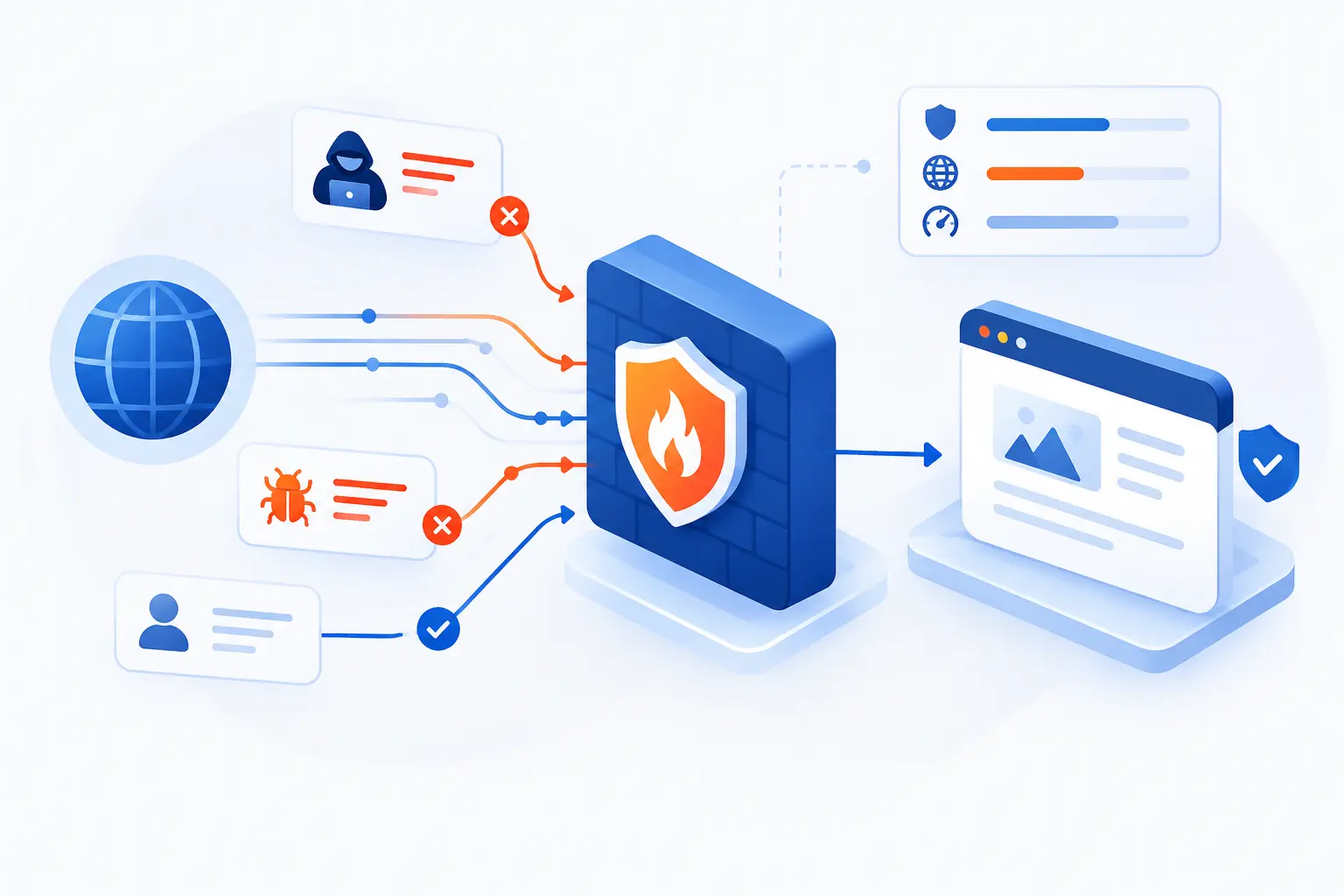
- Web Application Firewalls Filter and Monitor HTTP and HTTPS Traffic
- How a WAF Screens Requests Before They Reach Your App
- How Rules and Security Models Guide WAF Responses
- Deployment Models and Tradeoffs
- Which Threats WAFs Help Reduce
- Why Organizations Pair WAFs With Other Security Controls
- Where a WAF Fits vs Other Firewalls
- The Main Benefits and Limitations to Know
- Frequently Asked Questions
- How 1Byte Supports Safer Websites and Applications
- Conclusion
Web Application Firewalls are security tools that inspect traffic between users and a web application, then block or flag requests that look harmful. They focus on HTTP and HTTPS, so they understand the language of websites, login forms, shopping carts, APIs, cookies, headers, and URLs. We think of a WAF as a careful gatekeeper for the application layer, not a replacement for secure code. It buys teams time, reduces common attacks, and gives visibility into traffic that a traditional network firewall may not understand.
At 1Byte, we like WAFs because they sit close to where real business risk often lives: the public-facing site or app. A server can be patched, a database can be locked down, and a network firewall can be configured well, yet a bad request can still target a vulnerable form field. That is where a WAF earns its keep. It reads the request before the application has to answer it.
Web Application Firewalls Filter and Monitor HTTP and HTTPS Traffic
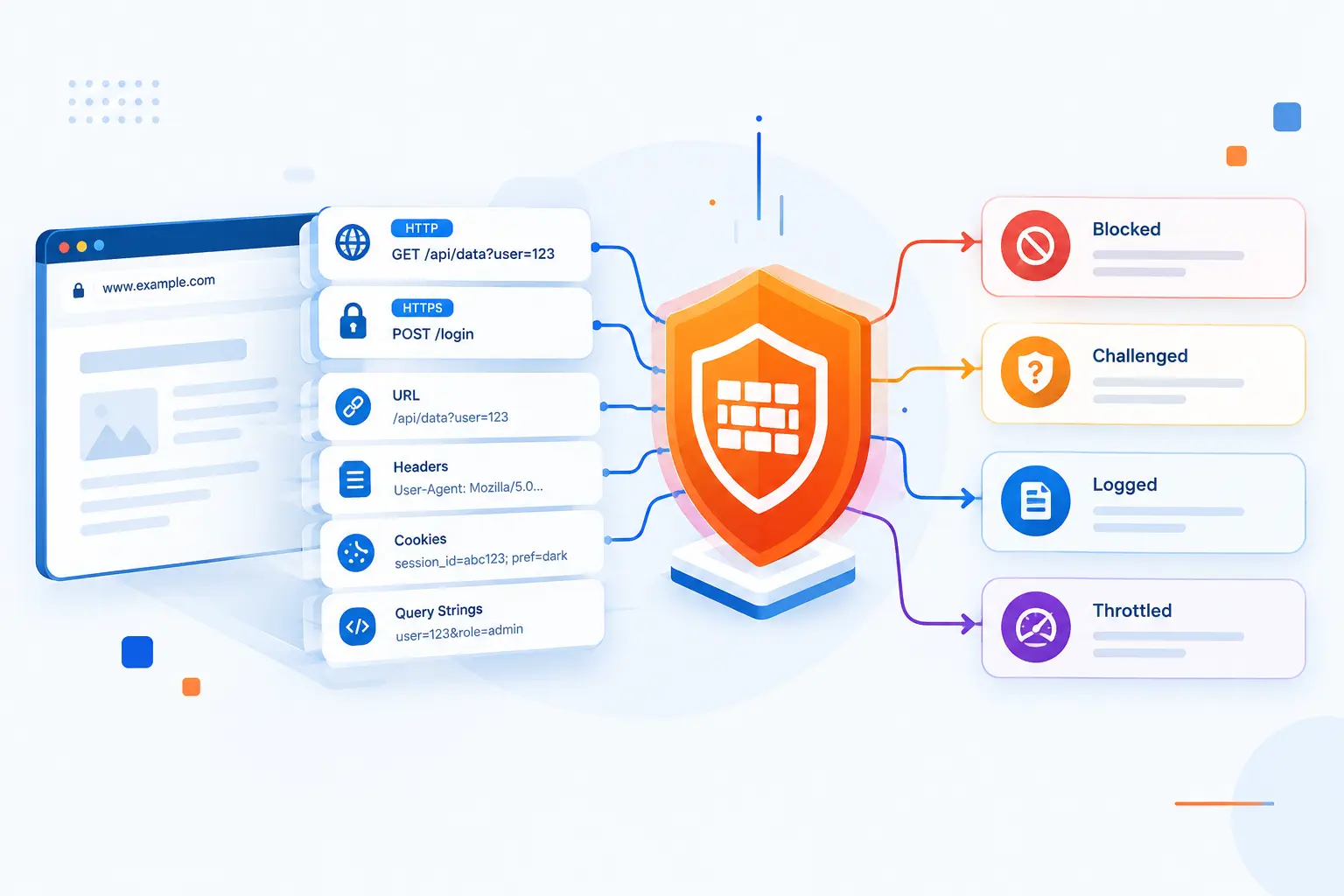
Web Application Firewalls filter and monitor HTTP and HTTPS traffic so malicious requests can be blocked, challenged, logged, or rate limited before they reach an application. Unlike a basic network firewall, a WAF is built to inspect the structure and content of web requests. It can evaluate URLs, headers, cookies, query strings, request bodies, file uploads, and other parts of a transaction. This is why a WAF is commonly used to reduce attacks such as SQL injection, cross-site scripting, file inclusion, credential stuffing, and abusive bot traffic.
The key idea is simple: a WAF looks at what a user is asking the application to do. A normal request might ask for /products?id=42. A hostile request might add database syntax, script tags, path traversal strings, or repeated login attempts. The WAF compares that request against policies, signatures, reputation data, behavior rules, and sometimes machine-learning signals.
We do not treat a WAF as magic. It is a control point, not a cure for weak application design. A WAF can reduce exposure while engineers fix the root cause, but it should not become an excuse to leave broken access checks or unsafe database queries in place.
FURTHER READING: |
| 1. What Is Network Security and How It Protects Data |
| 2. What Is a Firewall and How Does It Protect Networks |
| 3. What Is Personally Identifiable Information in Practice |
How a WAF Screens Requests Before They Reach Your App
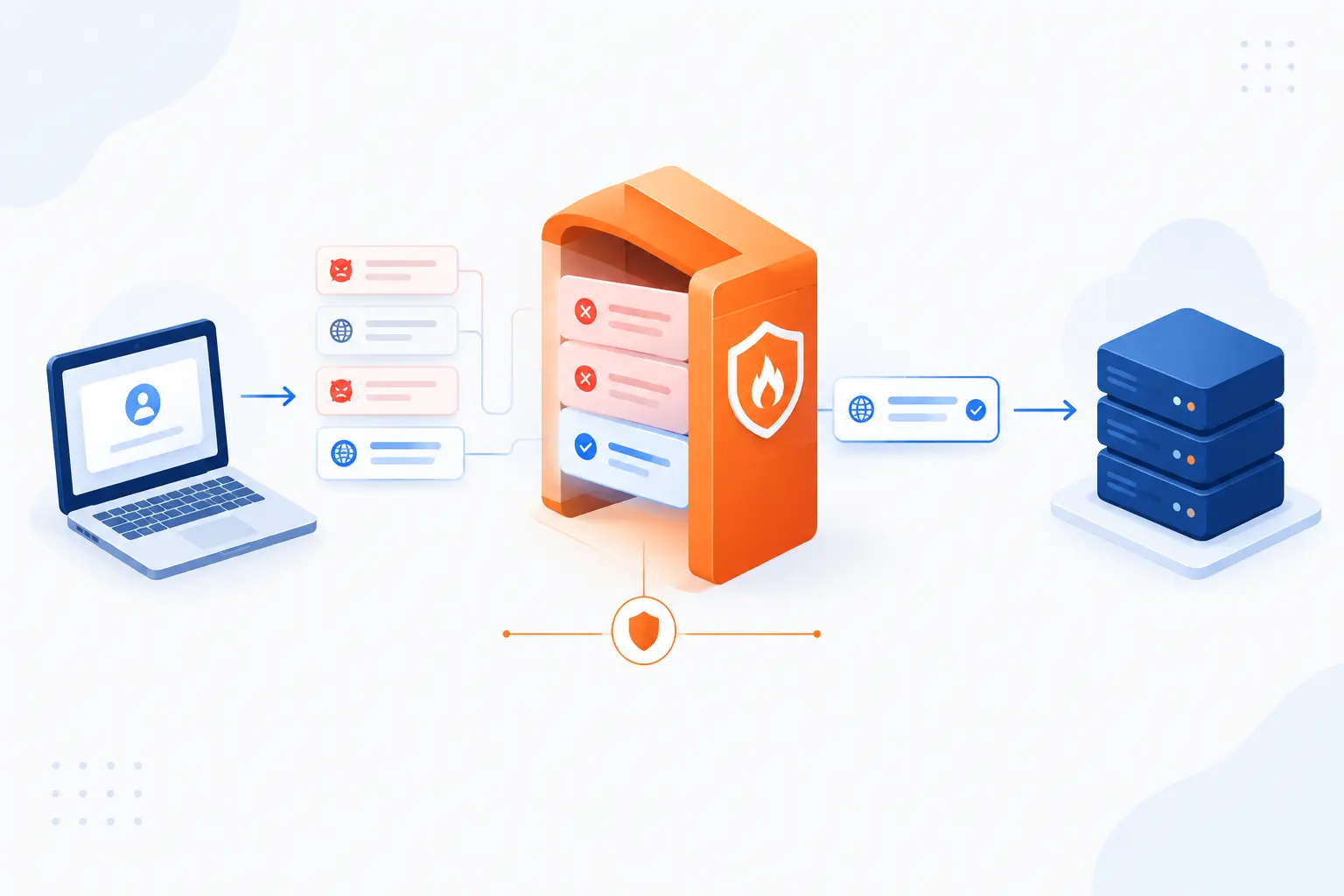
A WAF screens requests by standing between the user and the application, reading each request, and deciding whether it should pass. Most modern deployments use a reverse-proxy pattern, where traffic reaches the WAF first and the WAF forwards approved traffic to the origin server. The decision is based on request attributes, configured policies, threat intelligence, rate thresholds, and application-specific exceptions. If a rule fires, the WAF may block the request, log it, alert a team, present a challenge, or slow traffic from the source.
Reverse-Proxy Placement in Front of Web Servers
A WAF is usually placed in front of web servers so it can inspect traffic before the application processes it. In a reverse-proxy setup, users connect to the WAF endpoint, not directly to the origin server. The WAF then forwards clean requests to the application and returns responses to the user.
This placement matters because the WAF becomes the first application-aware checkpoint. It can terminate or inspect TLS traffic when configured to do so, apply policy, and hide some origin details from the public internet. Cloud WAFs often sit at an edge network or load balancer, while self-managed WAFs may run on an appliance, server, or reverse proxy.
The pattern is not new. Security architects have long used proxy designs to inspect application-layer traffic, and NIST notes that application-proxy gateways can understand more about protocol behavior than simple packet filters. A WAF applies that idea directly to web traffic.
What Parts of a Request a WAF Reviews
A WAF reviews the parts of a request that commonly carry user input or attack payloads. That includes the method, path, query string, headers, cookies, body fields, JSON payloads, XML data, uploaded files, and sometimes response content. These are the places attackers try to hide commands, scripts, traversal patterns, oversized input, or malformed values.
For example, a login request may include headers, a session cookie, a username field, a password field, and metadata about the browser. A WAF can inspect those pieces for suspicious patterns. It can also normalize encoded input, because attackers often disguise payloads with URL encoding, mixed case, or extra characters.
That detail is why tuning matters. A comment box, code editor, or CMS post body may legitimately contain text that looks like code. If the WAF cannot tell the difference, it may block real users.
How Policies Trigger Blocking, Alerts, and Rate Limits
WAF policies trigger an action when traffic matches a condition or crosses a threshold. A rule might block requests containing SQL injection patterns, count requests from a suspicious IP address, or rate limit repeated hits to a login endpoint. The action depends on the organization’s risk tolerance and how confident the rule is.
Common actions include allow, block, count, log, alert, challenge, CAPTCHA, and rate limit. We often prefer starting new rules in a monitoring mode before blocking. That gives teams a chance to see whether a rule catches real attacks or breaks normal workflows.
Major cloud services document the same basic mechanics. For example, one service describes conditions such as IP addresses, headers, bodies, URI strings, SQL injection, and cross-site scripting, plus rate-based rules measured over a 5-minute evaluation window. The point is not that every provider works identically. The point is that WAF decisions are rule and policy driven.
How Rules and Security Models Guide WAF Responses
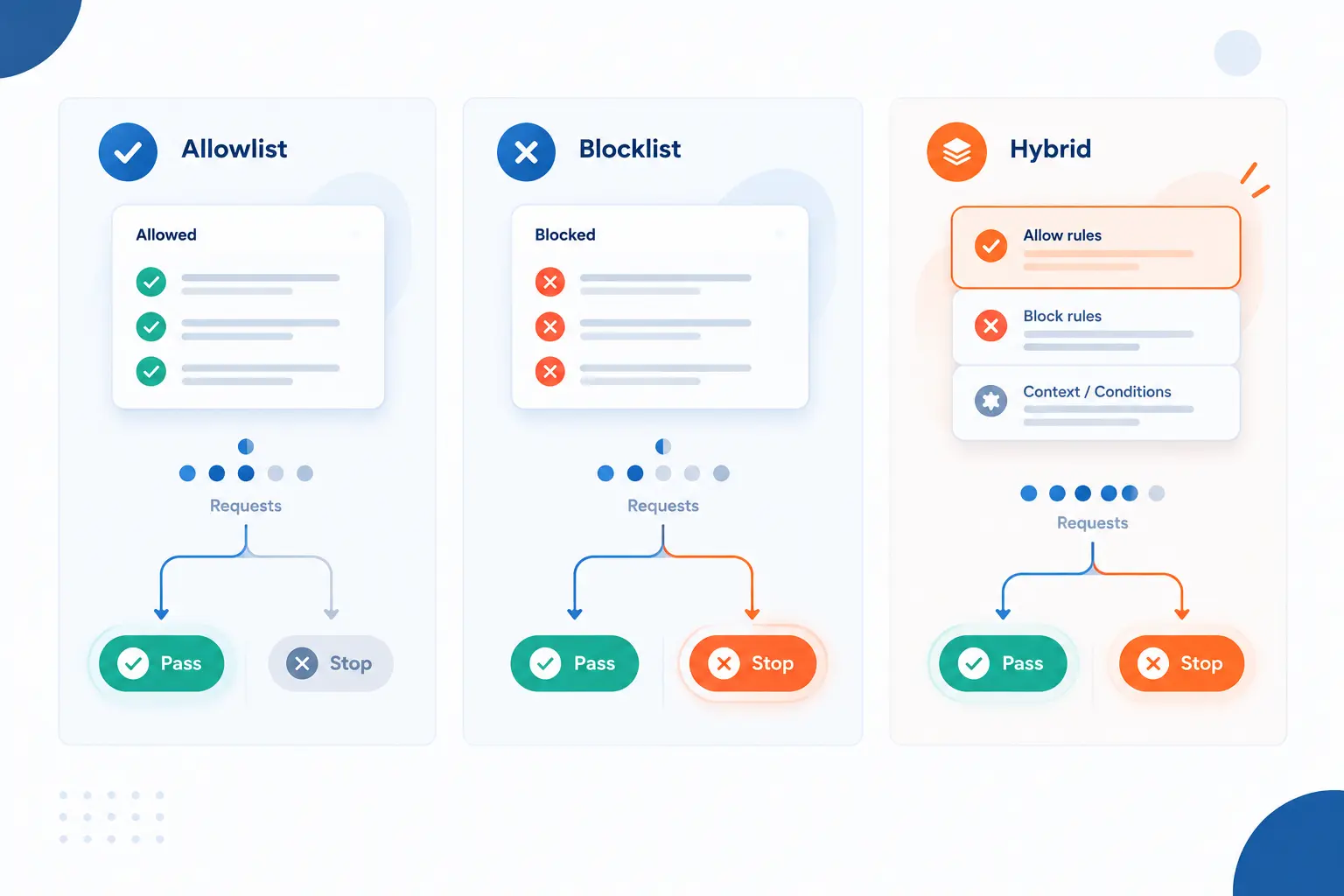
WAF responses are guided by security models that decide what traffic is acceptable, suspicious, or forbidden. An allowlist model starts with known-good behavior and blocks what falls outside it. A blocklist model starts with known-bad patterns and blocks matching traffic. Most practical deployments use a hybrid model because web applications change, attackers adapt, and strict rules can interrupt real users.
Allowlist Positive Security Models
An allowlist model allows only traffic that matches expected behavior. It defines what good requests look like, such as approved paths, methods, parameter names, data types, length limits, and content formats. Anything outside that profile can be blocked or flagged.
This model is powerful when an application has predictable patterns. A payment callback endpoint, for example, may accept only POST requests with specific fields and value formats. If that endpoint suddenly receives a long query string with script tags, the WAF can reject it.
The tradeoff is maintenance. Modern applications change often. New routes, new fields, new API versions, and new third-party integrations can cause false positives if the allowlist is not kept current. We like allowlists for narrow, high-value endpoints, not necessarily for every corner of a fast-moving site.
Blocklist Negative Security Models
A blocklist model blocks traffic that matches known attack patterns. These rules look for signatures, payload fragments, malicious IPs, abnormal protocol usage, suspicious user agents, and other bad signals. It is easier to deploy than a strict allowlist because normal traffic is allowed unless it matches something dangerous.
Blocklists are useful for common attacks. If a request contains classic SQL injection syntax or a known scanner pattern, the WAF can stop it quickly. Open rule projects also show how broad these patterns can be. The OWASP Core Rule Set describes itself as generic detection rules for ModSecurity-compatible defenses, covering categories such as SQL injection, cross-site scripting, and local file inclusion.
The weakness is obvious. A blocklist is always chasing what is known. Skilled attackers may encode, split, or reshape payloads to dodge simple matching, which is why normalization and layered rules matter.
Hybrid Approaches and Virtual Patching
A hybrid approach combines allowlists, blocklists, behavior rules, and temporary protections for known weaknesses. This is the most realistic model for many production systems. It lets teams protect stable areas tightly while using broader detection for dynamic areas.
Virtual patching is a good example. Suppose a plugin has a file upload flaw, and the vendor patch is not ready or the change needs testing. A WAF rule can block the exploit pattern at the edge while engineers prepare the real fix. We like virtual patching because it reduces panic. Still, it should have an owner, a ticket, and an expiration path.
The danger is treating the virtual patch as the final patch. It is not. A WAF rule may fail if traffic reaches the origin through another path, if the app changes, or if an attacker finds a bypass.
Deployment Models and Tradeoffs
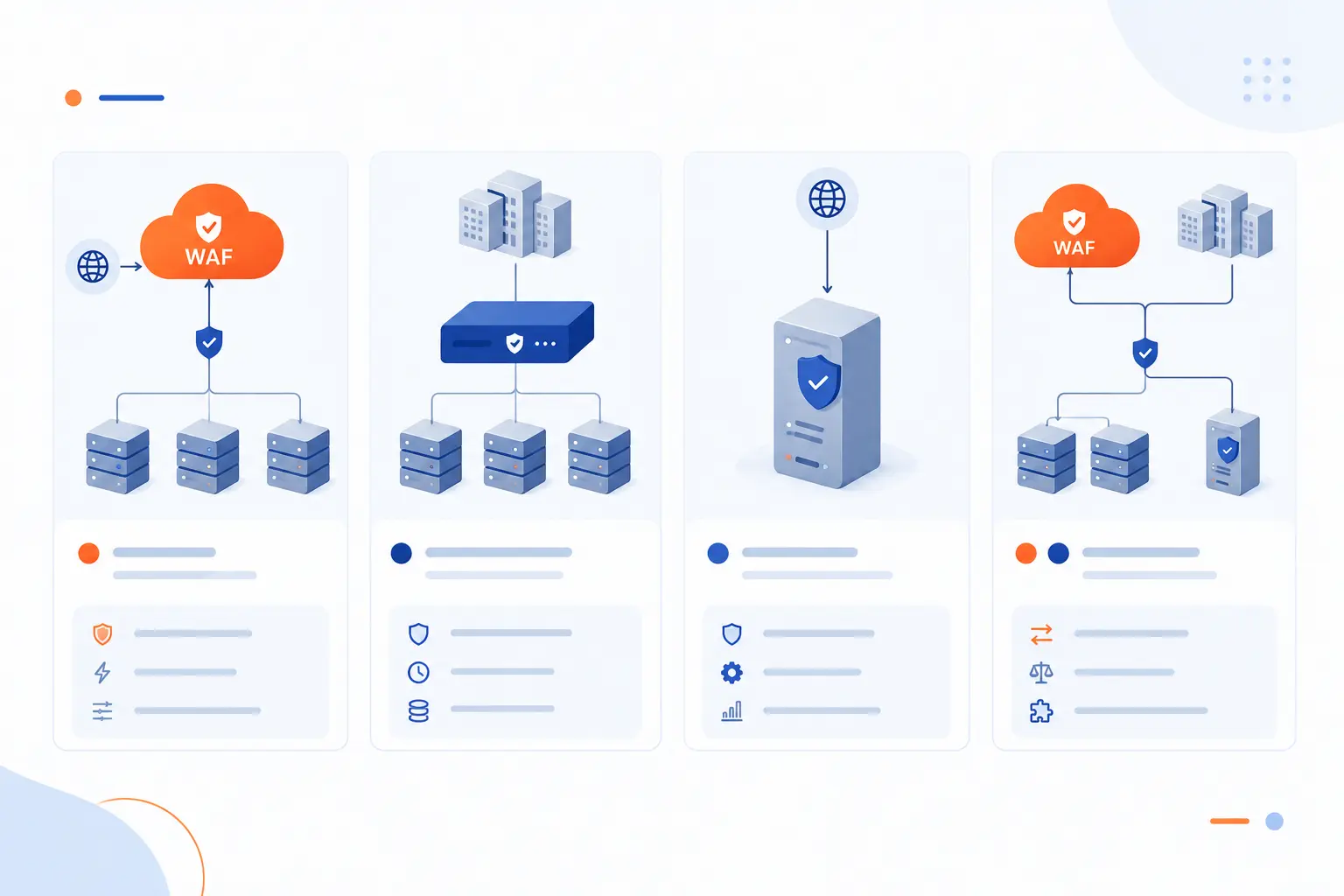
WAF deployment models differ by where inspection happens and who manages the infrastructure. Cloud-based services sit outside the origin and are often fastest to adopt. On-premises or network-based appliances give teams more direct control but require hardware, capacity planning, and maintenance. Host-based and hybrid setups can fit specialized applications, but they usually demand more tuning.
| Model | Best fit | Main tradeoff |
|---|---|---|
| Cloud-based service | Public sites, APIs, distributed traffic | Less direct infrastructure control |
| On-premises or network appliance | Strict network control, private environments | More operational responsibility |
| Host-based or hybrid | Custom apps, mixed cloud and private systems | More tuning and architecture work |
Cloud-Based Services
Cloud-based services route traffic through a provider-managed inspection layer before it reaches the origin. They are popular because teams can often deploy them by changing DNS, attaching a policy to a load balancer, or enabling a managed security service. That makes them attractive for websites that need protection without buying appliances.
The practical upside is reach. A cloud WAF can sit near users, absorb some abusive traffic upstream, and apply managed rules that are updated by the provider. This works well for public websites, SaaS apps, and APIs with internet-facing endpoints.
The tradeoff is dependency. You need to understand how traffic is routed, how TLS is handled, what logs you receive, and how to bypass or recover from a bad rule. We always recommend testing fail-safe behavior before a busy sales day.
On-Premises and Network-Based Appliances
On-premises and network-based appliances inspect traffic inside infrastructure controlled by the organization. They are common where teams need tight control over routing, data handling, regulatory boundaries, or private network design. Banks, government systems, and large enterprises may choose this route for governance reasons.
The strength is control. Security teams can manage hardware placement, network paths, certificates, logging pipelines, and change windows. They can also integrate closely with internal monitoring tools.
The downside is ownership. Appliances need capacity planning, upgrades, high availability design, and skilled operators. If traffic doubles, the appliance must be ready. If rules grow too heavy, latency can creep in. Control is valuable, but it is never free.
Host-Based and Hybrid Setups
Host-based and hybrid setups run inspection close to the application or combine several WAF locations. A host-based WAF might run as a web server module, sidecar, or local reverse proxy. A hybrid design might use a cloud WAF at the edge and a local rule engine near a sensitive service.
This approach is useful when one application needs special rules that would be too noisy at the edge. For example, an admin tool may need strict allowlists, while the public site uses managed rules. APIs may also need endpoint-specific validation.
The risk is complexity. If two WAF layers disagree, debugging becomes harder. Logs must be correlated, rules must be documented, and teams must know which layer blocked which request. We like hybrid setups when there is a clear reason, not as a reflex.
Which Threats WAFs Help Reduce
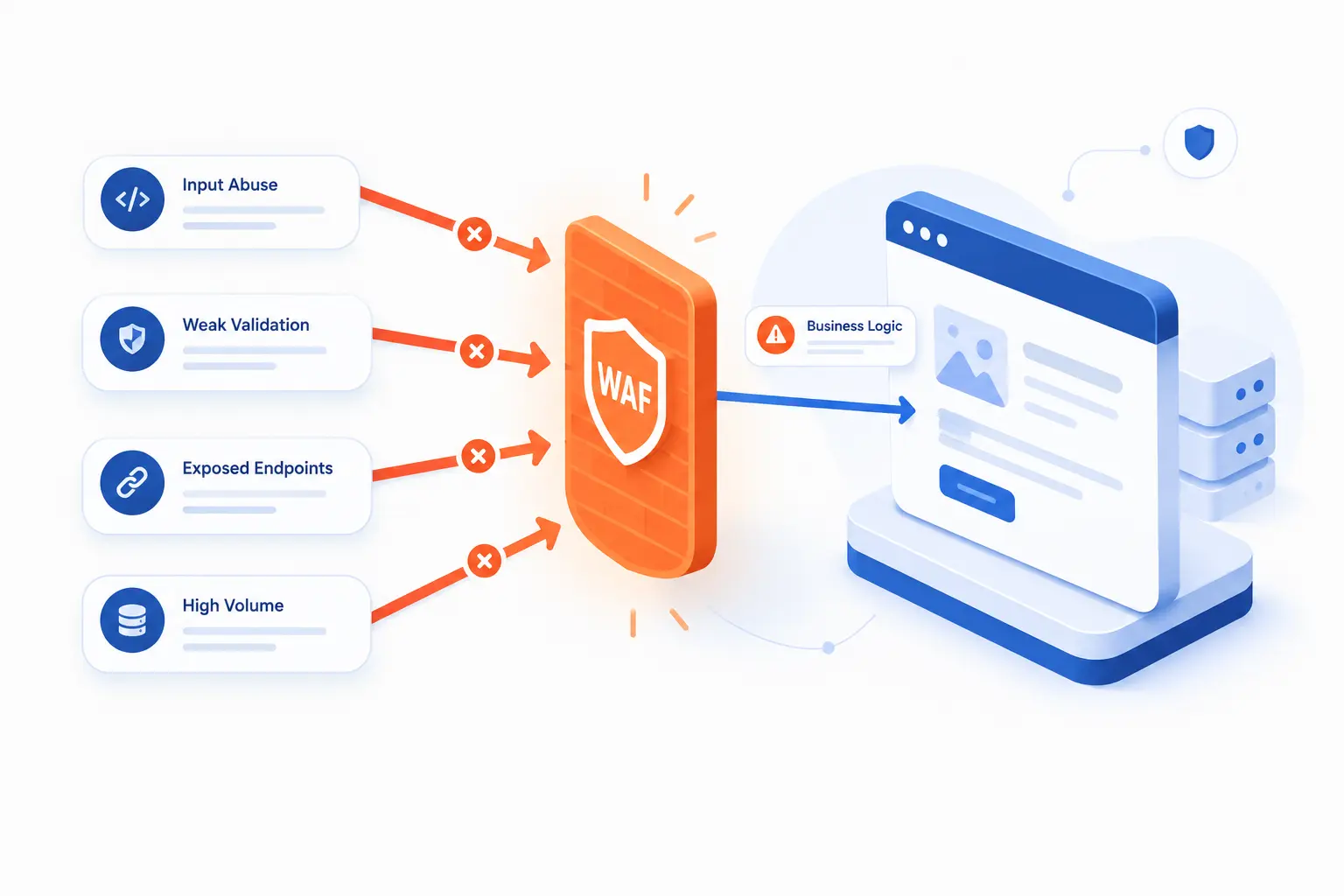
WAFs help reduce attacks that travel through web requests, especially attacks that abuse user input, weak validation, exposed endpoints, or excessive request volume. They are most useful against known patterns and repeatable behavior. They are less reliable against business-logic flaws that require understanding user intent. This is why a WAF can reduce risk, but it cannot replace secure design, testing, authentication, authorization, and patching.
SQL Injection, Cross-Site Scripting, and File Inclusion
WAFs commonly reduce SQL injection, cross-site scripting, and file inclusion by detecting suspicious input before the app processes it. These attacks often appear in query strings, form fields, cookies, headers, or request bodies. A WAF can match payload patterns, normalize encoded input, and block requests that resemble known exploit attempts.
SQL injection tries to make the application send unintended commands to a database. Cross-site scripting tries to inject browser-executed script into pages viewed by users. File inclusion tries to make the application load an unexpected local or remote file.
These are not theoretical risks. OWASP lists A03:2021 as Injection and includes cross-site scripting within that category. A WAF can reduce exposure to these patterns, especially while code fixes are being developed.
Bots, Broken Access Control, and API Abuse
WAFs can reduce bot and API abuse, but they cannot fully solve broken access control. They can detect suspicious request rates, strange user agents, credential stuffing patterns, missing headers, malformed JSON, and endpoint probing. They can also enforce basic rules, such as allowing only certain methods on certain routes.
Broken access control is harder. If a logged-in user changes /invoice/1001 to /invoice/1002, the WAF may not know whether that user is allowed to view the second invoice. The application must enforce that decision.
APIs make this issue sharper. OWASP’s API list places broken object-level authorization at API1:2023, because APIs often expose object identifiers that attackers can tamper with. A WAF helps at the edge, but authorization belongs in the application.
HTTP Floods and Other Layer-7 Denial-of-Service Attacks
WAFs help reduce Layer-7 denial-of-service attacks by limiting abusive HTTP behavior. A Layer-7 attack targets the application layer, not just raw bandwidth. It might repeatedly hit search endpoints, login pages, expensive reports, or API routes that trigger database work.
Rate limits are a common control. A WAF can limit requests by IP address, session, path, token, country, header, or other attributes depending on the product. It may also challenge suspicious clients or block known automation frameworks.
Still, volumetric attacks may require additional DDoS protection. If the attack saturates network links before the WAF sees traffic, application-layer rules will not be enough. We prefer pairing WAF rules with upstream DDoS controls when uptime is business-critical.
Why Organizations Pair WAFs With Other Security Controls
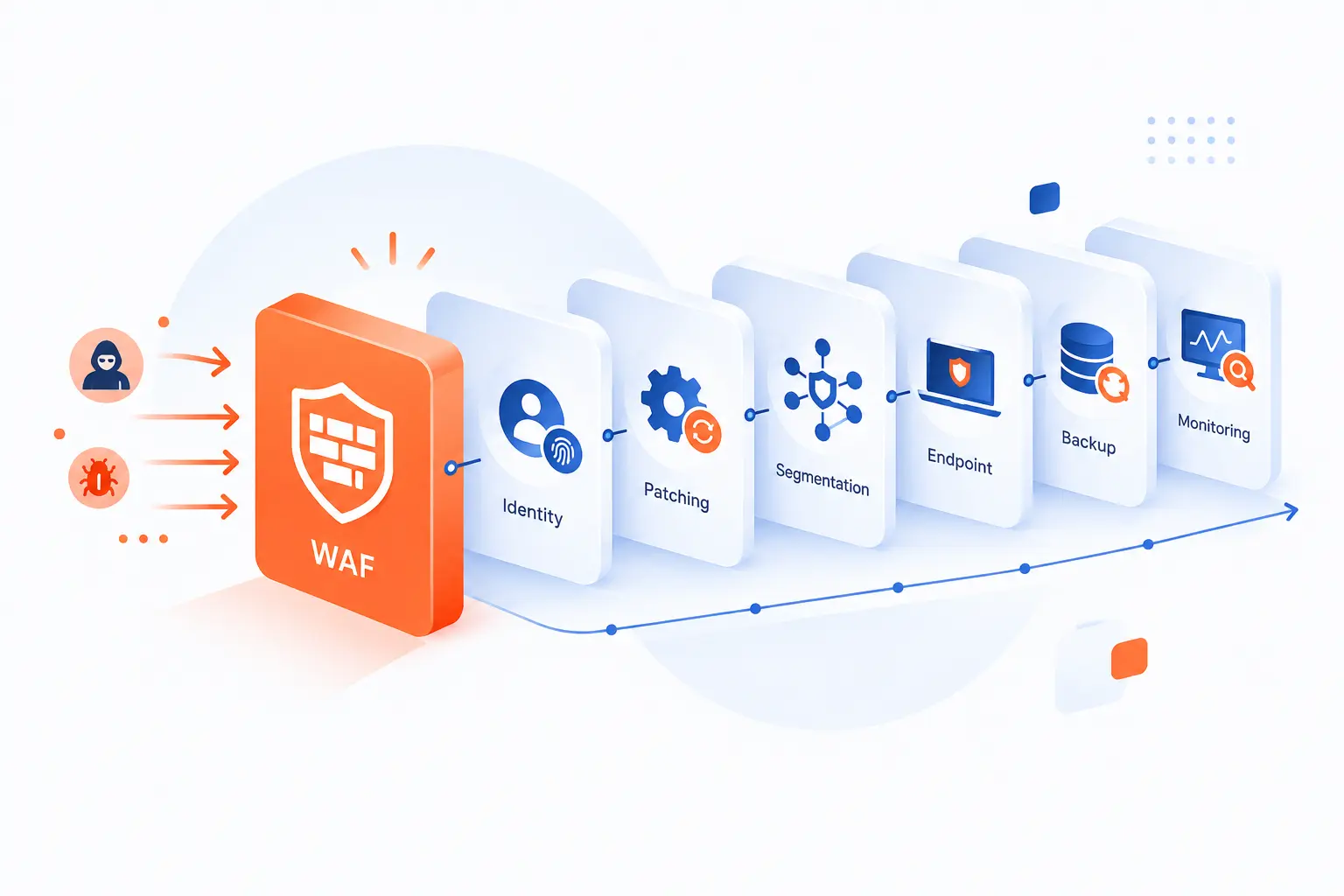
Organizations pair WAFs with other security controls because no single tool sees every risk. A WAF inspects web traffic, but it does not replace secure coding, identity controls, patch management, network segmentation, endpoint detection, backups, or monitoring. It is one layer in a defense strategy. The best results come when WAF logs feed the same operational view as application logs, firewall logs, authentication events, and vulnerability data.
Protecting Sensitive Data and Supporting Compliance
A WAF helps protect sensitive data by reducing web-based attacks against forms, sessions, APIs, and public endpoints. That matters for sites that handle account data, personal data, payment flows, or private customer records. If an attacker cannot easily exploit a vulnerable field, the chance of data exposure drops.
Compliance is another driver. PCI DSS v4.0.1 Requirement 6.4.2 expects public-facing applications to use an automated technical solution that continually detects and prevents web-based attacks. A WAF is a common way to satisfy that kind of control, though the exact compliance answer depends on scope, configuration, logging, and assessor review.
Our view is practical: do not buy a WAF only to check a box. Configure it so it actually blocks known attack paths, logs useful evidence, and has someone responsible for reviewing what it finds.
Adding Coverage for Legacy or Inadequately Built Apps
A WAF adds useful coverage when an application cannot be fixed quickly. Legacy applications often use older frameworks, fragile plugins, or patterns that are hard to change without breaking business workflows. A WAF can reduce exposure while teams plan safer repairs.
This is especially valuable after a public vulnerability appears. If the code owner needs a week to test a patch, a targeted WAF rule can block known exploit traffic in the meantime. That does not make the vulnerable code safe forever, but it narrows the window.
We have seen this pattern many times in hosting: the emergency rule goes in first, then the real fix follows. The order is reasonable. The mistake is forgetting the second step.
Building a Layered Defense With Firewalls, IDS, and IPS
A WAF belongs in a layered defense with firewalls, IDS, IPS, monitoring, and secure application controls. Each tool watches a different slice of risk. A network firewall controls ports and flows, an IDS watches for suspicious activity, an IPS can block certain threats, and a WAF inspects web requests.
This layered approach matters because attackers rarely follow one neat path. The 2026 DBIR reported that vulnerability exploitation accounted for 31% of breaches, which reinforces a hard lesson: exposed weaknesses get used. A WAF can reduce some exploit traffic, while patching and vulnerability management remove the weakness itself.
NIST’s guidance on intrusion detection and prevention describes several IDPS classes, including network-based and host-based options. We see WAFs as complementary to those controls, not a replacement for them.
Where a WAF Fits vs Other Firewalls
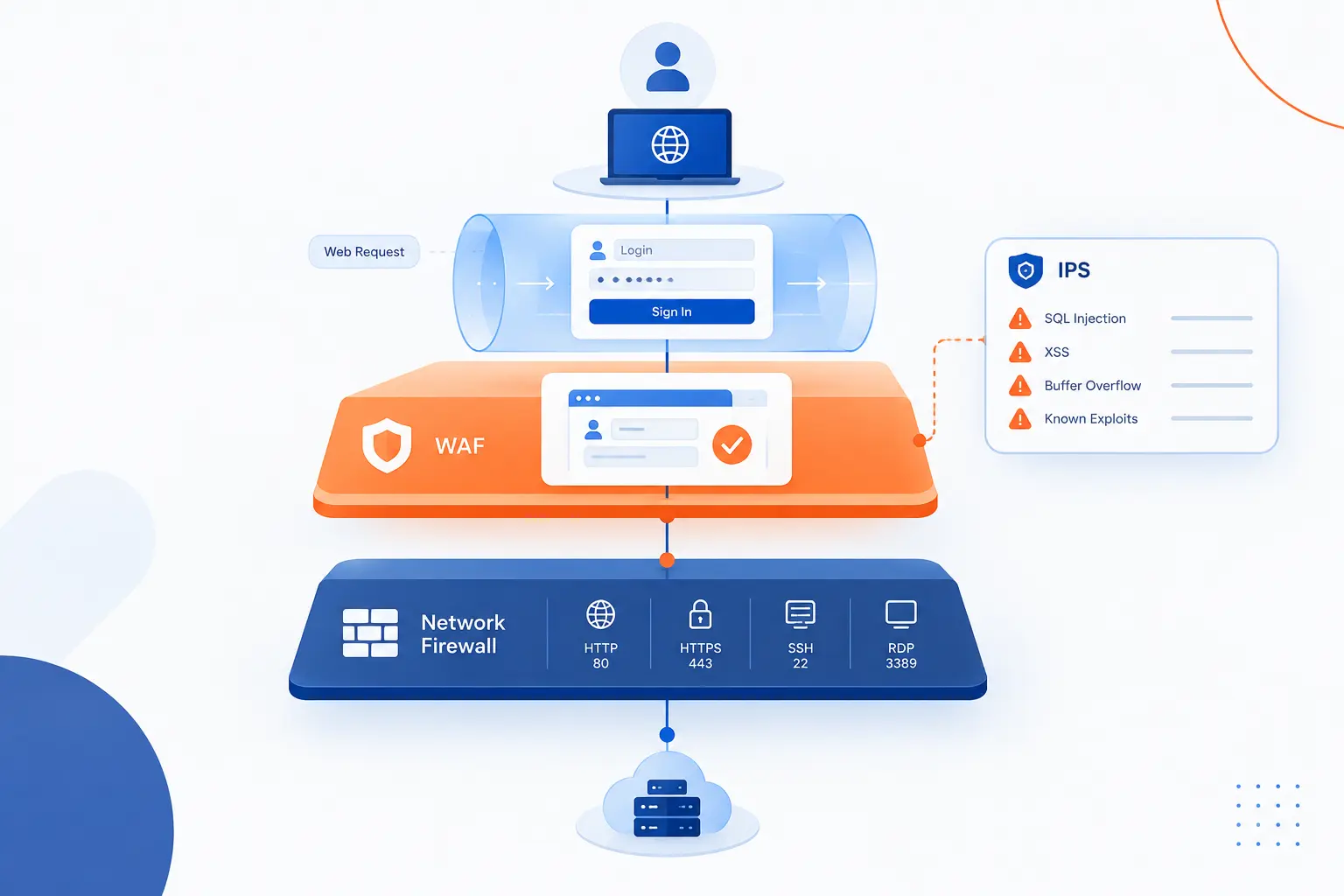
A WAF fits at the application layer, while many other firewalls focus on network traffic, ports, sessions, and broader threat patterns. That difference is the whole point. A network firewall may know that traffic is going to port 443, but a WAF can inspect the login request inside that encrypted web flow when deployed for that role. An IPS may detect exploit signatures across protocols, while a WAF specializes in HTTP and HTTPS behavior.
| Control | Primary focus | Example decision |
|---|---|---|
| WAF | HTTP and HTTPS requests | Block a suspicious form payload |
| Network firewall | Ports, IPs, protocols, flows | Allow only HTTPS to a server |
| NGFW | Network control plus deeper inspection | Block risky applications or traffic categories |
| IPS | Exploit and intrusion patterns | Drop traffic matching a known attack signature |
WAF vs Network Firewall and NGFW
A WAF protects web applications, while a network firewall controls network access. A network firewall decides whether traffic from one IP address, port, or protocol should be allowed. A WAF decides whether a web request looks safe for a specific application.
A next-generation firewall, or NGFW, adds features such as application awareness, user identity, intrusion prevention, and threat intelligence. That makes it more capable than a traditional firewall, but it still does not replace specialized request validation for web apps.
Here is the simple test. If the question is “Should this network connection be allowed?” think firewall or NGFW. If the question is “Is this HTTP request trying to exploit my login form?” think WAF.
WAF vs IPS Across OSI Layers
A WAF focuses on application-layer web traffic, while an IPS detects and may block suspicious activity across broader network or host contexts. An IPS can look for exploit signatures, scans, malware traffic, protocol anomalies, and other intrusion patterns. A WAF is narrower, but deeper for HTTP and HTTPS.
The OSI model is not perfect for every modern system, but it is useful here. Network controls often operate around layers 3 and 4, where IP addresses, ports, and transport sessions matter. WAF logic sits closer to layer 7, where requests, headers, cookies, and payloads carry application meaning.
This specialization is why both tools can exist together. An IPS may stop a known exploit against a service. A WAF may stop a malicious JSON body against an API endpoint.
Why Specialized Web Filtering Still Matters
Specialized web filtering still matters because web attacks hide inside normal-looking HTTPS traffic. Most legitimate users and attackers use the same ports, the same browsers, and the same public endpoints. The difference is often in the request content.
Without application-aware inspection, dangerous input may look like ordinary encrypted traffic. A WAF can unpack the meaning of a request after TLS termination, compare it with policy, and stop requests that do not belong.
We like to say that a network firewall guards the building entrance, while a WAF watches what visitors do at the reception desk. You need both perspectives if the application is exposed to the public internet.
The Main Benefits and Limitations to Know
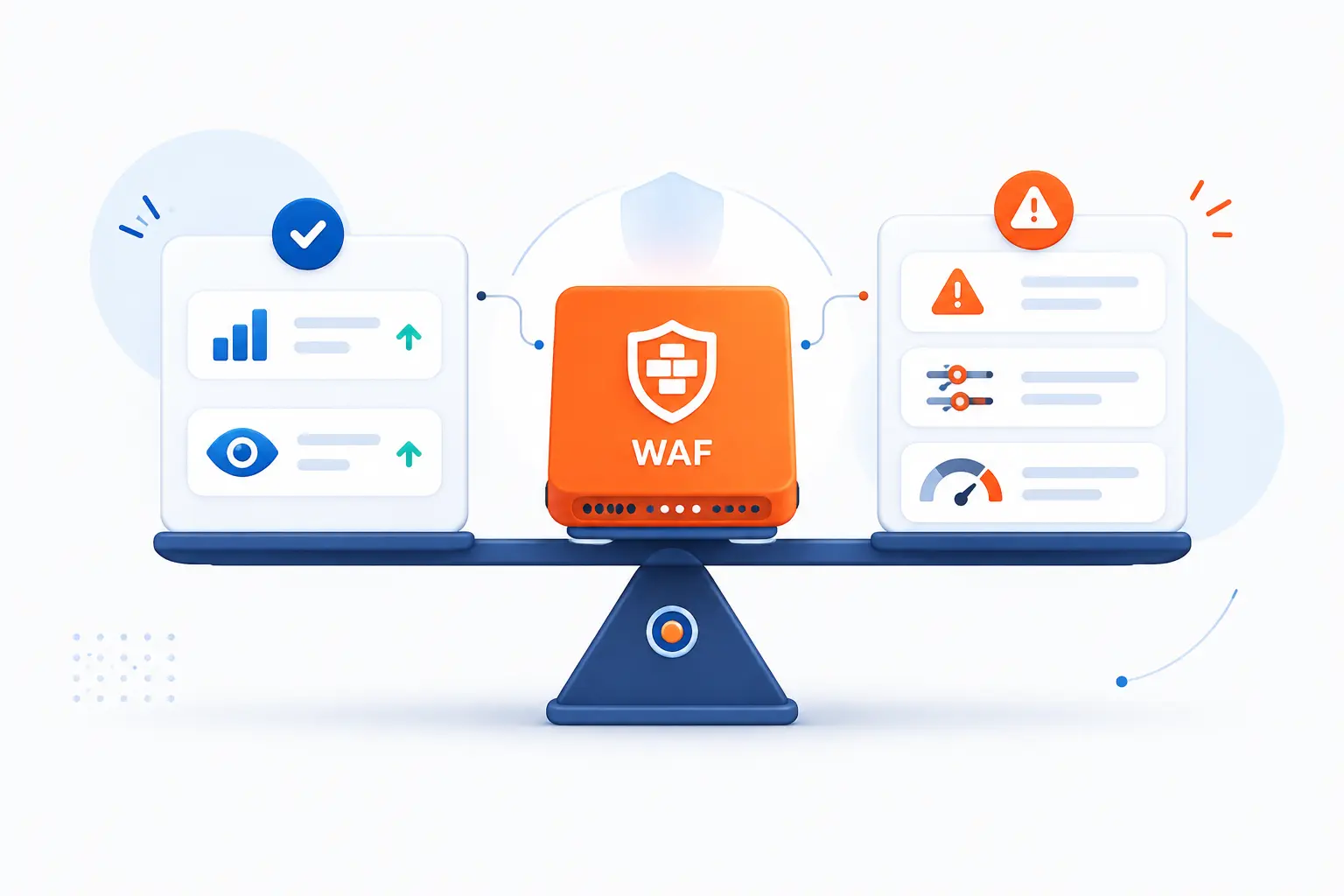
The main benefits of a WAF are faster protection, application-aware filtering, managed rule updates, traffic visibility, and flexible deployment. The main limitations are false positives, tuning effort, performance overhead, cost, and incomplete coverage for business-logic flaws. A WAF is strongest when teams understand what it can and cannot decide. It should protect the application, inform the security team, and buy time for code-level fixes.
Fast Setup, Managed Updates, and Scalability
A WAF can often be deployed faster than rewriting vulnerable application code. That speed matters during active exploitation, product launches, and compliance deadlines. Cloud-based options are especially quick when they attach to DNS, a CDN, or a load balancer.
Managed updates are another advantage. Providers and rule projects can update detection logic as new patterns emerge. That can help smaller teams that do not have dedicated security engineers writing signatures every week.
Scalability depends on the model. A cloud WAF may absorb more traffic without hardware planning, while an appliance needs capacity sized for peak load. Either way, rules should be tested under realistic traffic before a production cutover.
Customization, Performance, and Control
A useful WAF must be customized to the application it protects. Default rules catch common attacks, but every real app has quirks. Search boxes, CMS editors, API payloads, file upload flows, and admin panels often need specific exceptions or stricter rules.
Customization improves accuracy. For example, a public product search field may allow broad text, while a checkout amount field should accept only a narrow numeric format. Treating both fields the same would be lazy security.
Performance also needs attention. Deep inspection, body parsing, bot checks, and complex rule chains add work. Good teams measure latency, test large requests, and monitor error rates after policy changes. Security that breaks the buyer’s checkout is not a win.
Maintenance Costs, Resource Use, and False Positives
A WAF needs maintenance because applications, attackers, and traffic patterns keep changing. New endpoints may need policy updates. Old exceptions may become risky. Managed rules may change behavior after an update.
False positives are the everyday nuisance. A WAF might block a developer posting JavaScript in a CMS, a customer using special characters in a form, or an API client sending a large JSON object. Those blocks can frustrate users if no one is watching the logs.
There are also costs. Cloud WAFs may charge by traffic, requests, rules, or managed features. Self-managed WAFs consume CPU, memory, storage, staff time, and change-review effort. We still believe the tradeoff is worth it for exposed apps, but only when someone owns the policy.
Frequently Asked Questions
These common questions answer what beginners usually want to know after learning how Web Application Firewalls work. The short version is that WAFs are practical edge controls for websites and APIs, but they do not replace good code. They are best used with patching, logging, secure hosting, TLS, and access control. If a site is public and valuable, a WAF deserves serious consideration.
What Are Examples of Web Application Firewalls
Examples of Web Application Firewalls include AWS WAF, Cloudflare WAF, Azure Web Application Firewall, F5 Advanced WAF, Imperva WAF, Barracuda WAF, and ModSecurity with the OWASP Core Rule Set. These products differ in deployment style, pricing model, rule management, bot controls, logging, and integration options. The right choice depends on where your app runs and how much control your team needs.
What Does Blocked by a Web Application Firewall Mean
“Blocked by a Web Application Firewall” means the WAF rejected the request because it matched a security rule or policy. The request may have looked like an attack, exceeded a rate limit, came from a suspicious source, or violated an expected format. If you are a legitimate user, try again after checking your input. If you own the site, review the WAF logs before disabling the rule.
Do Web Applications Need a WAF
Most public web applications benefit from a WAF, especially if they handle logins, payments, personal data, APIs, or content management. A small brochure site may have lower risk, but it can still be attacked through plugins, forms, or admin paths. A WAF is not mandatory for every project, but exposed applications should have a clear reason if they skip it.
Can a WAF Protect APIs as Well as Websites
Yes, a WAF can protect APIs as well as websites when it understands the API’s routes, methods, headers, payloads, and authentication patterns. API protection often needs stricter rules for JSON bodies, schemas, tokens, object IDs, and rate limits. The WAF should be paired with real authorization checks in the API code because edge filtering cannot decide every user permission correctly.
How 1Byte Supports Safer Websites and Applications
1Byte supports safer websites and applications by helping customers build on practical foundations that work well with WAF planning. Domain registration, SSL certificates, WordPress hosting, shared hosting, cloud hosting, and cloud servers all connect to the same basic goal: make public web traffic easier to route, encrypt, host, and protect. As an AWS Partner, 1Byte can also fit into cloud architectures where WAF placement is part of the deployment plan. We do not see security as one switch. We see it as a set of choices made from the domain layer down to the server and application layer.
Domain Registration and SSL Certificates for Trust and Encrypted Traffic
Domain registration and SSL certificates give a website the identity and encrypted connection that WAF deployments usually sit behind. The domain decides where users go. The SSL certificate helps protect traffic in transit and lets browsers establish HTTPS sessions.
A WAF often relies on correct DNS and TLS planning. If traffic can bypass the protected hostname and reach the origin directly, the design has a gap. That is why we view domain and certificate setup as more than housekeeping. It shapes the path that traffic takes before any WAF can inspect it.
For a small business site, that may mean registering the domain, issuing an SSL certificate, and routing public traffic through the chosen protective layer. For a larger app, it may mean planning subdomains for APIs, admin panels, and customer portals.
WordPress Hosting and Shared Hosting With Practical Security Foundations
WordPress hosting and shared hosting need practical security foundations because many attacks target common CMS patterns, login pages, forms, and plugins. A WAF can help reduce noisy scans, common injection attempts, and abusive requests before they hit the application. It works best when the site is also kept updated.
WordPress is a good real-world example. A WAF may block exploit attempts against a vulnerable plugin, but the better long-term answer is still to update or remove the plugin. Hosting, patching, SSL, backups, and WAF policy all have a role.
Shared hosting has a similar lesson. The environment should be treated carefully, and each site owner should avoid weak passwords, stale CMS versions, and unnecessary plugins. A WAF adds a useful gate, but clean site management remains essential.
Cloud Hosting and Cloud Servers for Flexible WAF Deployment Options
Cloud hosting and cloud servers give teams flexible places to deploy or connect WAF controls. A WAF may sit in front of a load balancer, reverse proxy, application server, API endpoint, or cloud edge service. The right design depends on the app’s traffic pattern and risk level.
For a simple website, a managed cloud-based WAF may be enough. For a custom application, teams may combine edge filtering with stricter origin rules. For an API, they may add endpoint-specific rate limits and request validation.
As 1Byte, we favor designs that are understandable. If the team cannot explain the traffic path, it cannot reliably secure it. Cloud hosting and cloud servers create options, but the WAF should be placed where all public traffic must pass through it.







Conclusion
Web Application Firewalls inspect HTTP and HTTPS traffic so harmful requests can be blocked, challenged, logged, or rate limited before they reach a website or API. They are especially useful against common web attacks, abusive bots, exploit attempts, and sudden Layer-7 traffic spikes. Still, a WAF is not a substitute for secure code, patching, identity checks, network controls, or monitoring.
Our practical advice is to start with the traffic path. Know which domains, APIs, and admin areas are public. Decide where inspection should happen. Then tune rules carefully, review logs, and fix the application weaknesses the WAF helps reveal.
If your site or application is public, the next step is simple: map every route users can reach, then ask which ones should pass through a WAF before touching your app.