

- Penetration Testing Is an Authorized Simulated Attack Used to Find and Exploit Security Weaknesses
- Why Organizations Use Penetration Testing
- How a Pen Test Is Scoped and Framed
- What a Pen Test Can Target
- How a Pen Test Moves From Discovery to Exploitation
- Tools That Support Each Stage of a Pen Test
- What Pen Tests Can and Cannot Prove
- FAQ
- How 1Byte Supports a Stronger Security Foundation
- Conclusion
Penetration Testing is an authorized simulated attack against a system, application, network, cloud environment, or organization. Its purpose is to find security weaknesses and show how an attacker could exploit them before a real attacker does. At 1Byte, we see it as a controlled way to turn security assumptions into evidence. A good test does not just say “this is vulnerable.” It shows what the weakness could allow, what data or access is at risk, and what to fix first.
The key word is authorized. Without written permission, the same techniques can cross legal and ethical lines fast. With clear permission, defined boundaries, and skilled testers, Penetration Testing becomes one of the most practical ways to understand real-world security risk.
Penetration Testing Is an Authorized Simulated Attack Used to Find and Exploit Security Weaknesses
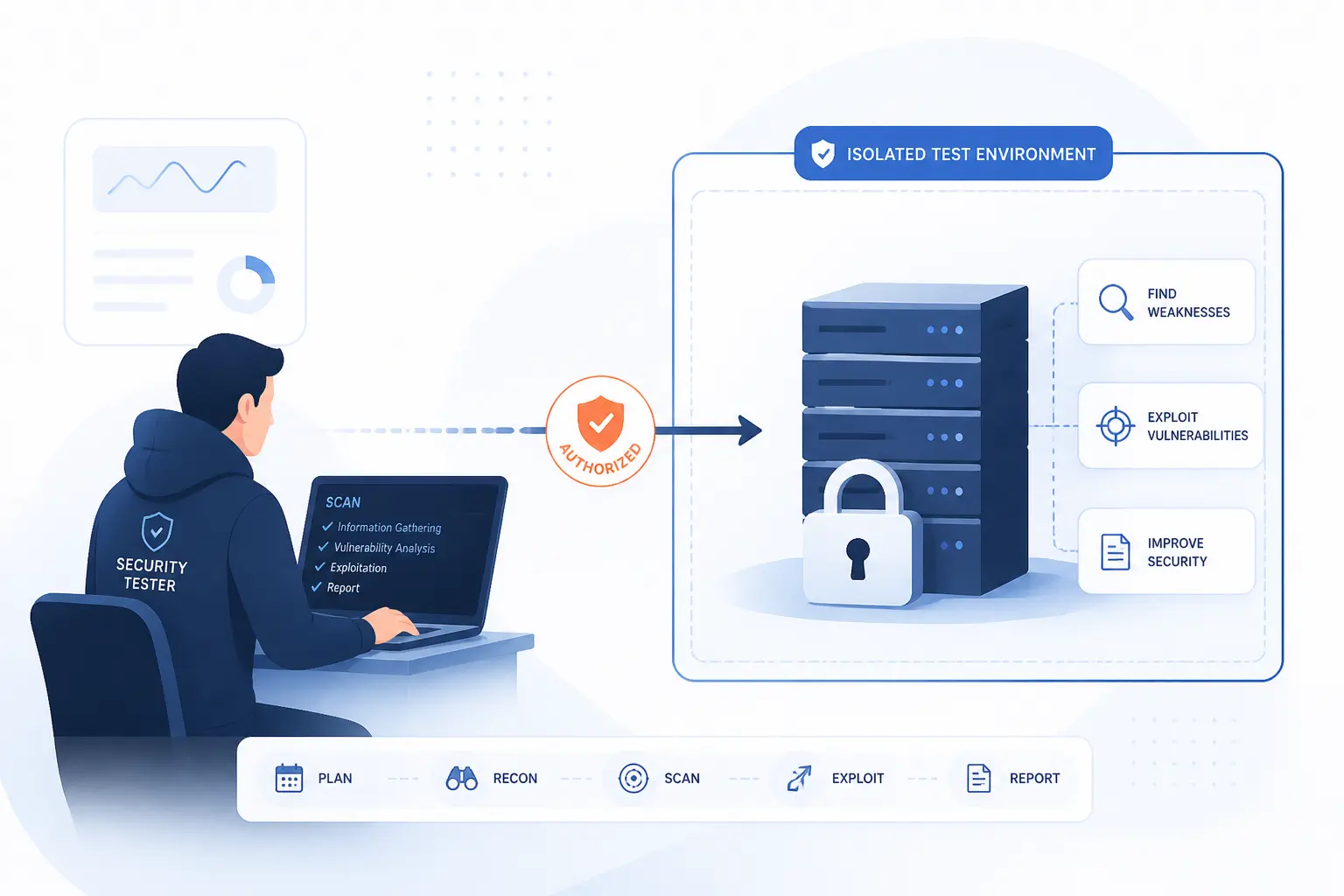
Penetration Testing is a planned security exercise where approved testers use attacker-like methods to find and safely exploit weaknesses. The goal is to prove whether a weakness can lead to real damage, such as stolen data, account takeover, system access, or business disruption. It is different from a simple checklist because testers think creatively, chain issues together, and adapt as they learn more. NIST describes technical assessment work as a process for planning, conducting, analyzing findings, and developing mitigation strategies through guidance for planning and conducting assessments.
We like to think of it as a fire drill for digital systems. The point is not to embarrass a team. The point is to learn where doors are unlocked, where alarms are quiet, and where a small mistake could turn into a serious incident. The best pen tests are narrow enough to be safe and broad enough to reveal how systems behave under pressure.
A tester might begin with public information, identify an exposed admin panel, find weak authentication, gain limited access, and then prove whether that access reaches customer records. That chain matters more than any single bug. Real attackers rarely stop at one weakness, so a meaningful test shows how weaknesses combine.
FURTHER READING: |
| 1. What Is a Botnet? How It Works and Why It Matters |
| 2. What Is the OSI Model? Layers, Purpose, and Uses |
| 3. VPN Security Guide for Safer Browsing and Access |
Why Organizations Use Penetration Testing
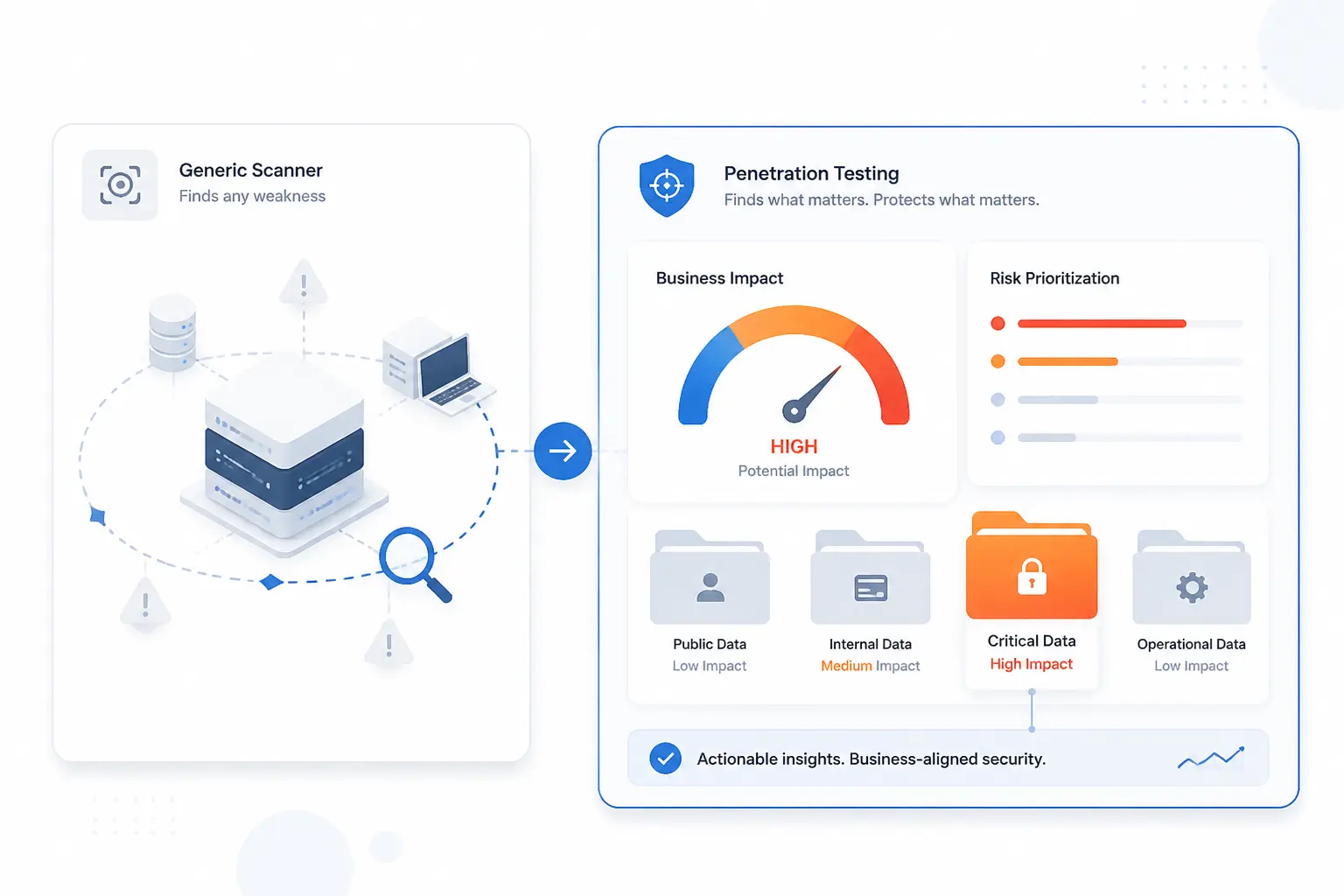
Organizations use Penetration Testing to understand what attackers could actually do, not just what a scanner can detect. It helps security teams prioritize fixes by business impact. It also gives executives a clearer picture of risk, because “critical remote access to billing data” is easier to act on than “high severity CVE found.” In our view, this is where the craft earns its keep: it turns abstract risk into a specific path to close.
The financial stakes are real. IBM’s 2026 research put the global average breach cost at $4.99 million, which explains why boards ask tougher questions about prevention, detection, and recovery. A pen test will not guarantee safety, but it can show where money and effort should go first.
Threat patterns also support the case. Verizon reported that vulnerability exploitation accounted for 31% of all breaches in its 2026 data, making unpatched or poorly controlled weaknesses a practical business concern. This is exactly the sort of risk a well-scoped test can expose before someone else does.
Real incidents make the lesson sharper. In the Equifax incident, the company said attackers used an Apache Struts weakness in its online dispute portal, and later public disclosures identified Apache Struts as the attack vector. That example is not ancient folklore for security teams. It is a reminder that known weaknesses, missed patches, and exposed systems can become expensive very quickly.
How a Pen Test Is Scoped and Framed
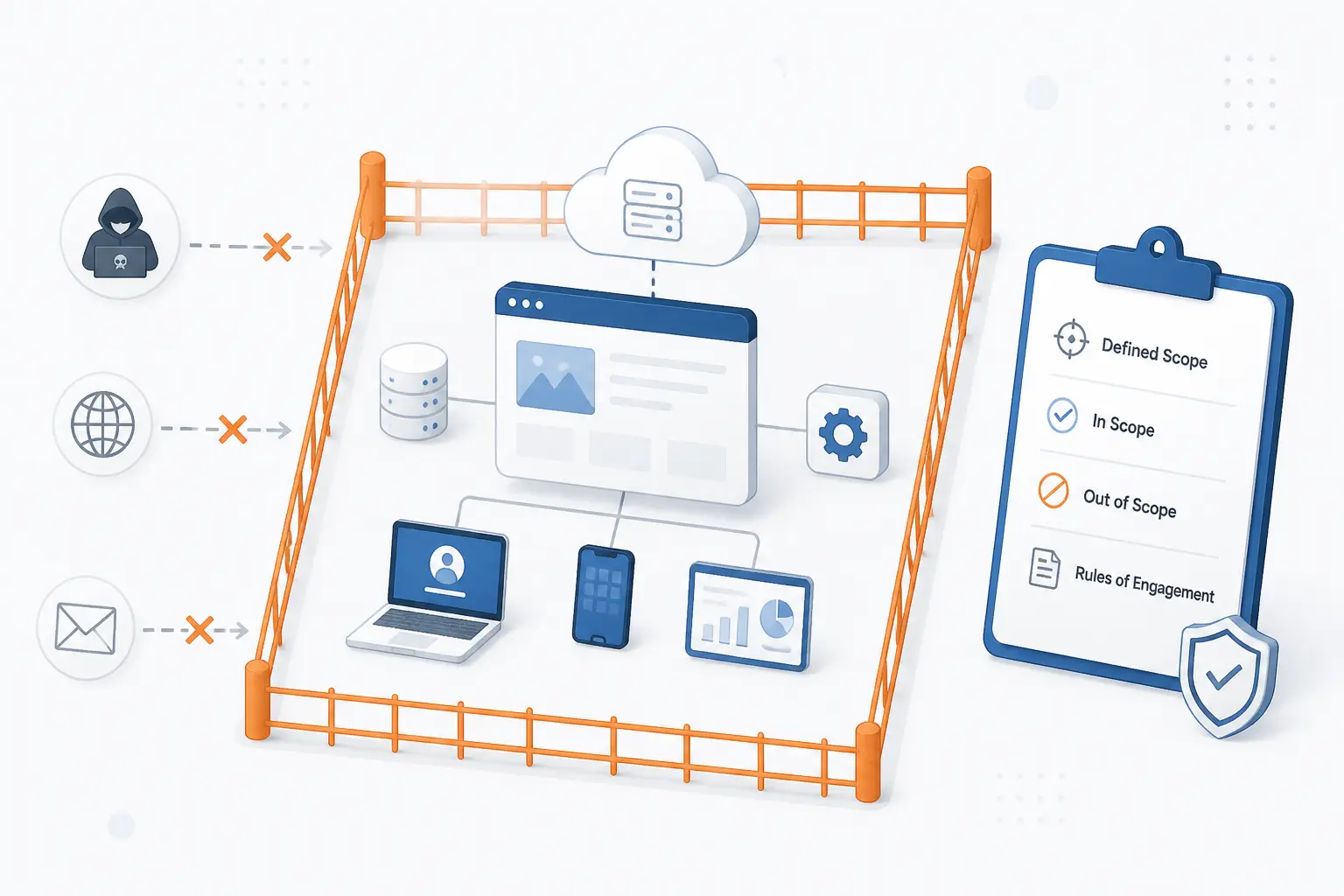
A pen test is scoped by defining what testers may attack, what access they receive, what methods are allowed, and what outcomes the organization wants to measure. Scope is the safety rail. It protects production systems, customer data, staff, vendors, and the test team. NIST defines rules of engagement as constraints that give the test team authority to conduct defined activities.
Scoping also decides how realistic the test should feel. A black-box test may imitate an outsider with little information. A white-box test may give testers architecture diagrams, credentials, and source-level context. Neither is automatically better. The right choice depends on the question the business needs answered.
| Framing choice | What it controls | Best used when |
|---|---|---|
| Access level | How much information testers receive | You want to compare outsider and insider risk |
| Location | Whether testing starts outside or inside | You need to measure perimeter or lateral movement risk |
| Awareness | Who knows the exercise is happening | You want to test people, process, and detection |
Black-Box, Gray-Box, and White-Box Access
Black-box, gray-box, and white-box tests differ by how much information testers receive before they begin. In a black-box engagement, testers start with little more than the company name, domain, or IP ranges. This imitates an outside attacker, but it can spend a lot of paid time rediscovering basic facts.
A gray-box test gives partial knowledge, such as a test account, API documentation, or limited network context. We often prefer gray-box work for web apps and APIs because it balances realism with efficiency. It lets testers spend more time on meaningful abuse cases and less time guessing how the application works.
A white-box test gives the most context. Testers may receive diagrams, credentials, code access, cloud architecture, or admin-level documentation. This approach is excellent when the goal is depth, such as reviewing a payment flow, internal platform, or sensitive admin interface.
External and Internal Engagements
External and internal engagements differ by where the tester starts in relation to the organization’s environment. An external test begins from the internet and focuses on exposed assets, such as websites, VPN gateways, mail systems, APIs, and cloud endpoints. It answers a blunt question: what can someone reach from outside?
An internal test starts from a trusted or semi-trusted position. That may mean a workstation, office network, VPN account, or compromised low-privilege user. This style answers a different question: if one account or device is breached, how far can the attacker go?
Both views matter. We have seen organizations with a tidy perimeter and messy internal access. We have also seen the opposite, where internal segmentation is decent but forgotten public services are exposed. Scope should match the most likely business risk, not the neatest diagram.
Blind, Double-Blind, and Targeted Exercises
Blind, double-blind, and targeted exercises differ by how much the defending team knows during the test. In a blind test, defenders may know an exercise is coming but not the exact timing or methods. This can measure monitoring, alert handling, and internal escalation.
In a double-blind test, only a small leadership group knows. That can feel realistic, but it must be governed carefully. Production disruption, mistaken incident response, and staff stress are not badges of honor. They are planning risks.
A targeted exercise is more collaborative. Testers and defenders may work from a shared plan, compare notes, and focus on specific controls. For many growing teams, this is the healthiest starting point. It teaches without turning the exercise into theater.
What a Pen Test Can Target
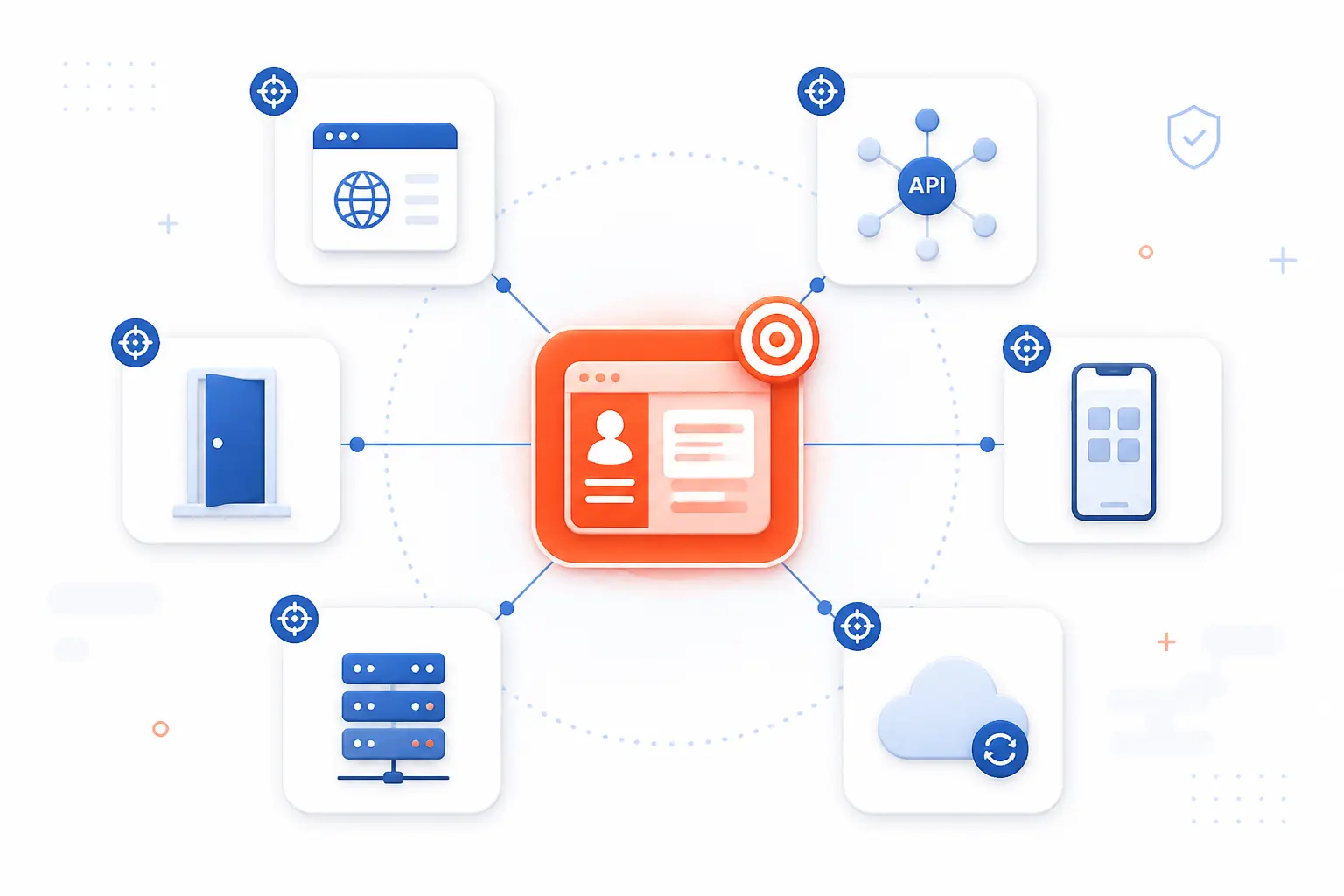
A pen test can target almost any area where technology, people, and business process meet. Common targets include web applications, APIs, mobile apps, networks, servers, cloud accounts, containers, connected devices, employees, and physical controls. The target should be chosen because it carries meaningful risk. We would rather test one critical customer portal well than skim across twenty low-value systems.
Targets also change the skill set required. API testing is different from phishing. Cloud testing is different from an office badge-access exercise. A strong scope names the target, the business concern, the success criteria, and the safety limits.
| Target area | Typical risk tested | Example outcome |
|---|---|---|
| Apps and APIs | Broken access, injection, weak sessions | Read or change another user’s data |
| Networks and servers | Exposed services, weak credentials | Gain shell access or escalate privileges |
| Cloud and containers | Misconfigured identity, storage, metadata | Access secrets or sensitive workloads |
| People and facilities | Social engineering, badge controls | Obtain credentials or enter restricted areas |
Web Apps, APIs, and Mobile Apps
Application-focused tests look for ways to bypass business rules, authentication, authorization, and data handling controls. For a web app, that could mean testing login flows, session cookies, file uploads, admin functions, and input validation. For a mobile app, it may include local storage, API calls, certificate handling, and backend trust assumptions.
APIs deserve special care because they expose application logic directly. OWASP notes that APIs often expose sensitive data and business logic through customer-facing, partner-facing, and internal systems, which makes application logic and sensitive data central to API risk. A tester may try changing object IDs, reusing tokens, altering roles, or sending requests the normal interface never sends.
Web and API tests are most useful when testers understand the business workflow. A checkout system, medical portal, school platform, and admin dashboard do not fail in the same way. The bug may be technical, but the damage is usually tied to business logic.
Networks, Servers, and External Assets
Network and server tests examine exposed services, trust relationships, credentials, patch levels, and paths between systems. On the outside, testers look at domains, IP ranges, VPN portals, remote access services, mail infrastructure, DNS records, and public cloud endpoints. Inside, they look at segmentation, domain privileges, file shares, service accounts, and management interfaces.
The danger is rarely just “a port is open.” The real question is what that exposure permits. An outdated service might allow remote code execution. A weak password might lead to an admin panel. A forgotten development server might contain database credentials.
External asset testing is also a useful reality check for inventories. Many organizations believe they know every internet-facing system. Then a pen test finds an old staging site, a vendor-managed portal, or a subdomain nobody owns anymore. That is where trouble likes to hide.
Cloud Environments, Containers, and Connected Devices
Cloud, container, and device tests focus on configuration, identity, permissions, network paths, secrets, and isolation boundaries. In cloud environments, testers often examine identity roles, object storage permissions, public endpoints, key management, logging, and administrative access. The cloud provider secures part of the stack, but customers still control important choices.
AWS explains this through the shared responsibility model, where responsibility is divided between security of the cloud and in the cloud. We like that phrasing because it forces a useful question: which settings are ours to configure, monitor, and test? Misunderstanding that line can leave storage, credentials, or workloads exposed.
Containers add another layer. Testers may review image contents, runtime privileges, secrets, network policies, and cluster access. Kubernetes guidance calls out practical hardening areas in its cluster security checklist, including access control and workload isolation concerns. Connected devices bring their own mix of firmware, default credentials, exposed management ports, and update risks.
Employees and Physical Security Controls
People and physical controls are tested to see whether human process can be abused to gain access. This may involve approved phishing simulations, phone pretexting, badge tailgating tests, visitor process checks, or attempts to obtain sensitive information through social engineering. These tests must be handled with care because they affect trust and workplace culture.
We are not fans of “gotcha” exercises. A phishing test that humiliates employees may create fear without improving security. A better exercise measures whether training, reporting channels, access controls, and incident response work under realistic pressure.
Physical testing needs even tighter planning. The scope should define locations, times, escalation contacts, banned actions, and proof requirements. Nobody should be guessing whether a badge access test is allowed while a tester is standing in a lobby.
How a Pen Test Moves From Discovery to Exploitation
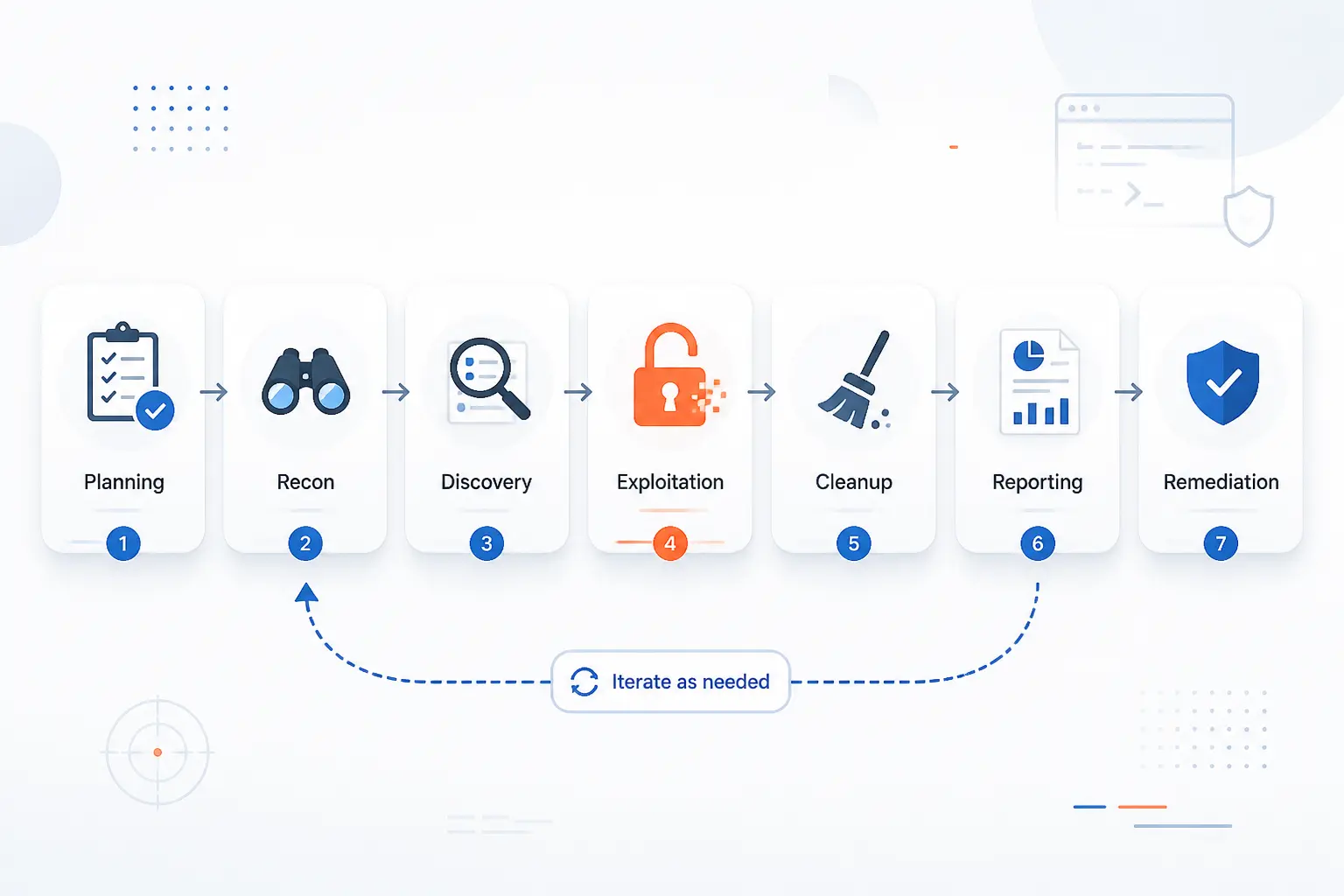
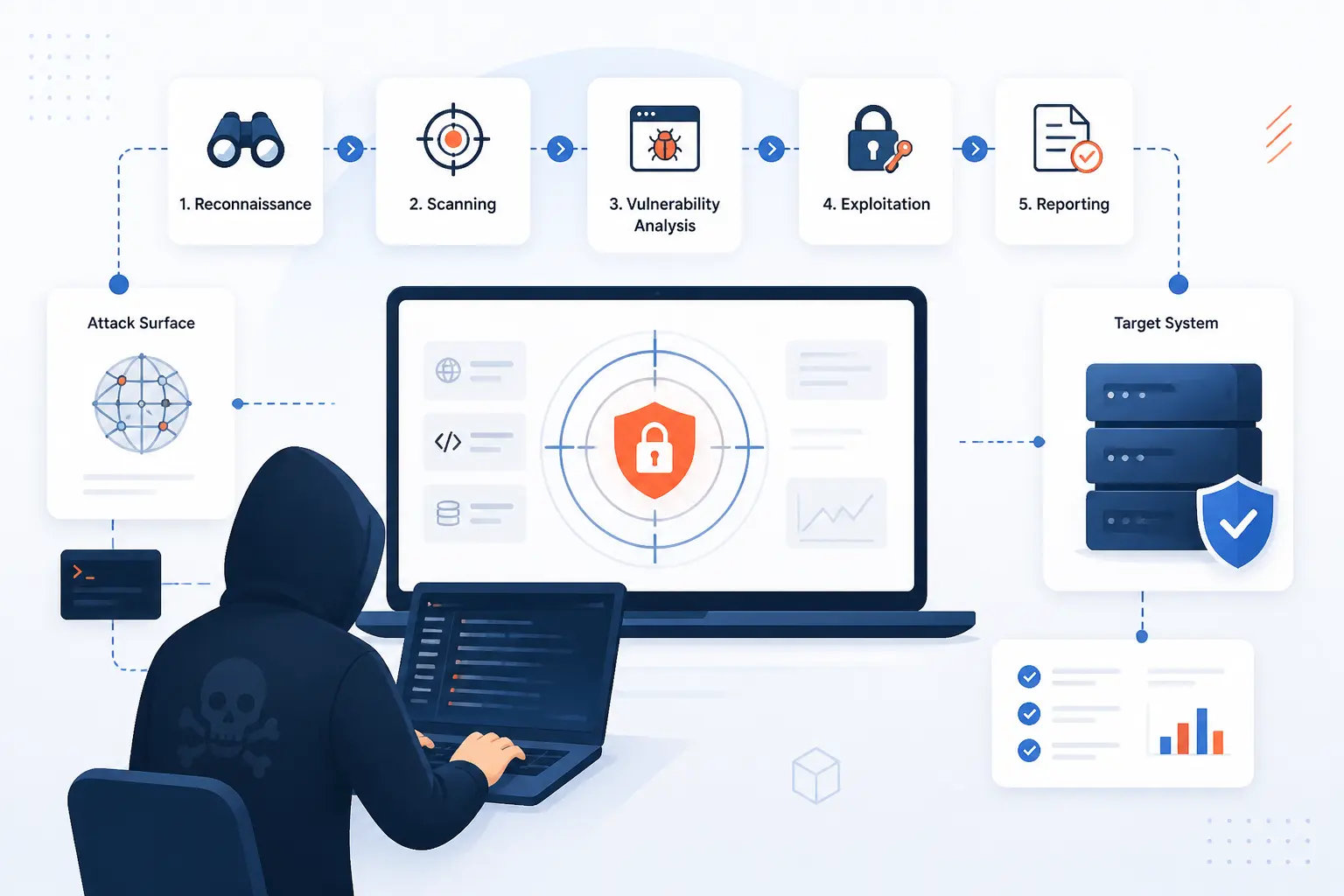
A pen test usually moves through planning, reconnaissance, discovery, controlled exploitation, possible expansion, cleanup, reporting, and remediation support. The flow is not always perfectly linear. Testers often learn something, pivot, verify, and return to earlier steps. Still, the structure keeps the work safe and understandable.
We see the process as a disciplined investigation. The tester forms a hypothesis, gathers evidence, tries a controlled action, records the result, and avoids unnecessary harm. The best teams prove risk without turning production into a punching bag.
Planning and Reconnaissance
Planning and reconnaissance define the rules first, then collect information about the approved target. Planning covers scope, contacts, timing, accounts, data handling, emergency stop conditions, and reporting expectations. Reconnaissance gathers details such as domains, technologies, public records, exposed services, employee naming patterns, and application behavior.
This phase is where many tests succeed or fail. If the scope is vague, the test becomes risky. If the objectives are vague, the report becomes noisy. We prefer scopes that name the business question clearly, such as “Can a low-privilege customer reach another customer’s invoice?” or “Can an internet attacker gain access to the admin network?”
Reconnaissance does not always look dramatic. Sometimes it is reading documentation, mapping login flows, checking DNS, reviewing certificate names, or observing how error messages behave. Patient work here often prevents wasted effort later.
Scanning and Vulnerability Discovery
Scanning and vulnerability discovery identify reachable systems, running services, application behavior, and likely weaknesses. Testers may use automated scanners, manual review, request interception, configuration checks, and targeted probes. The goal is not to dump every possible issue into a report. The goal is to find weaknesses that matter in this environment.
Automated tools are useful, but they are not judges. A scanner can flag outdated software, missing headers, open ports, or common misconfigurations. It may miss business logic flaws, chained attacks, authorization gaps, and context-specific abuse paths.
This is where skilled testers add judgment. They ask whether a finding is reachable, exploitable, valuable to an attacker, and fixable by the team. Ten medium findings may matter less than one quiet path to sensitive data.
Gaining Access With Controlled Exploitation
Controlled exploitation proves whether a discovered weakness can produce unauthorized access or impact. Testers might exploit SQL injection to read harmless proof data, use weak credentials to enter a test account, abuse an API flaw to view another user’s record, or exploit a known server issue to obtain limited command execution. The action should be strong enough to prove risk and restrained enough to avoid damage.
Control is the difference between professional testing and reckless hacking. A tester should avoid destructive payloads, unnecessary data access, persistence that cannot be removed, and actions outside scope. If sensitive data appears, the right move is usually to stop, capture minimal proof, and notify the agreed contact.
Good exploitation also records the path clearly. The report should show what was done, why it worked, what access resulted, and how to reproduce the issue safely. That is what lets engineers fix the root cause instead of treating the symptom.
Maintaining Access and Expanding Reach
Maintaining access and expanding reach test whether one foothold can become deeper access. This stage may examine privilege escalation, credential reuse, token theft, lateral movement, network segmentation, service account permissions, and access to sensitive systems. It is often the stage that turns “one vulnerable box” into a real business story.
Not every engagement should include this stage. Some organizations only want vulnerability proof in a narrow application. Others want to know what happens after an initial compromise. That second question is valuable, but it needs explicit approval.
We believe this is where many reports become more useful to leadership. A single flaw may sound technical. A path from one exposed service to payroll data, backups, or production deployment keys gets attention. It also gives teams a practical map for defense.
Cleanup, Reporting, and Remediation
Cleanup, reporting, and remediation turn test activity into safer systems. Cleanup removes test accounts, payloads, files, keys, scheduled tasks, temporary firewall rules, and any other artifacts created during the engagement. Reporting explains the findings in business and technical terms.
A useful report includes an executive summary, scope, methods, affected systems, evidence, risk ratings, reproduction steps, likely impact, and remediation guidance. We prefer reports that separate urgent fixes from hygiene improvements. Everything cannot be priority one, and pretending otherwise helps nobody.
Remediation is the real finish line. After fixes are applied, retesting confirms whether the weakness is closed. Without that step, teams may believe they fixed an issue when they only changed its shape.
Tools That Support Each Stage of a Pen Test
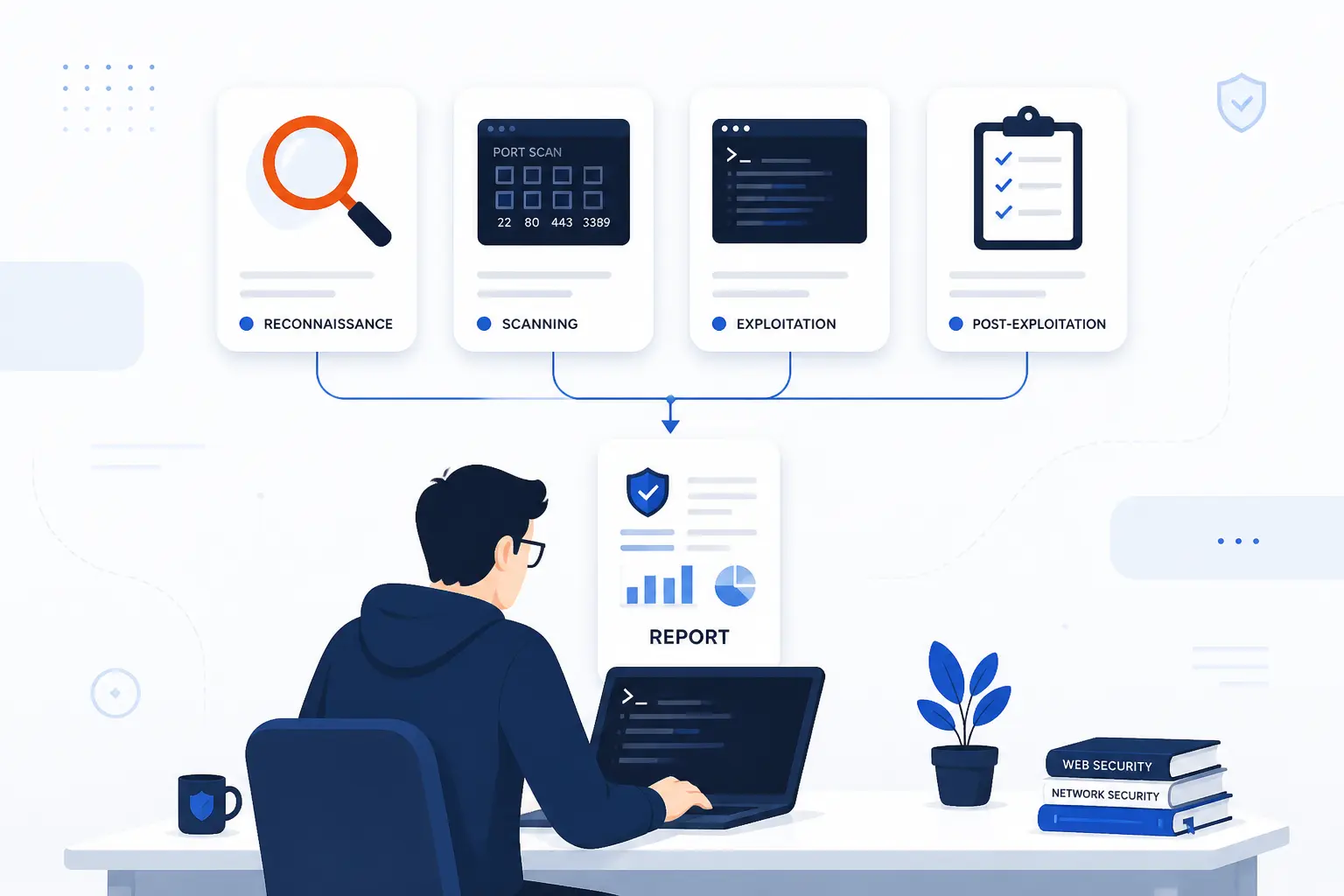
Tools support a pen test by speeding up discovery, analysis, exploitation, documentation, and verification. They do not replace judgment. A tool can find an open port, capture a request, or run a payload, but it cannot decide whether the finding matters to a business. The tester makes that call.
We encourage beginners to learn what a tool is doing before trusting its output. That habit prevents false confidence. It also helps teams explain findings to developers, system administrators, and executives without hiding behind screenshots.
| Tool category | Common examples | Main purpose |
|---|---|---|
| Recon and traffic tools | Nmap, Wireshark, Amass | Map assets, services, and packets |
| Discovery and analysis tools | Burp Suite, OWASP ZAP, Nessus, hashcat | Find app flaws, system issues, and weak passwords |
| Exploitation frameworks | Metasploit, Cobalt Strike-style platforms, custom scripts | Validate exploitability and post-access behavior |
Reconnaissance, Port-Scanning, and Traffic Analysis
Reconnaissance, port-scanning, and traffic analysis tools help testers understand what exists and how it communicates. Nmap is often used to discover hosts, open ports, service versions, and basic network exposure, and its official reference guide explains common scan options and output. Wireshark helps inspect packets when testers need to understand protocols, redirects, handshake behavior, or suspicious traffic.
These tools are powerful because they reduce guesswork. If a server exposes SSH, HTTP, and a database port, the tester has a clearer starting point. If traffic shows a mobile app calling undocumented endpoints, the tester can follow the real application path.
The risk is noise. Aggressive scanning can trigger alerts or stress fragile services. That is why scan timing, rate limits, source addresses, and emergency contacts belong in the scope.
Vulnerability Scanners, Web Proxies, and Password Crackers
Vulnerability scanners, web proxies, and password crackers help testers find known issues, inspect requests, and evaluate credential strength. A vulnerability scanner can identify missing patches, risky configurations, exposed services, and known software flaws. A web proxy lets testers intercept and modify browser or app traffic to test authorization, validation, and session handling.
Password crackers are used differently. They may test whether captured hashes, password dumps, or allowed password samples are weak enough to guess. The point is not curiosity. It is to show whether password policy, storage, and multi-factor controls can withstand realistic attack pressure.
These tools produce many results, so triage matters. A scanner finding without reachability may be low priority. A weak password on an administrative service may be urgent. Context turns output into risk.
Exploitation and Post-Exploitation Frameworks
Exploitation and post-exploitation frameworks help testers validate access and understand what an attacker could do next. Frameworks can provide tested modules, payload handling, session management, credential capture, and controlled post-access actions. Skilled testers also write custom scripts when a standard module is too noisy, too risky, or too broad.
This is the stage where restraint matters most. Exploitation frameworks can make serious actions easy. Easy does not mean appropriate. A professional tester should use the least intrusive method that proves the risk.
Post-exploitation should answer approved questions only. Can the tester escalate privileges? Can they reach a database? Can they move from one segment to another? Once the question is answered, the tester should document proof and stop rather than wander.
What Pen Tests Can and Cannot Prove
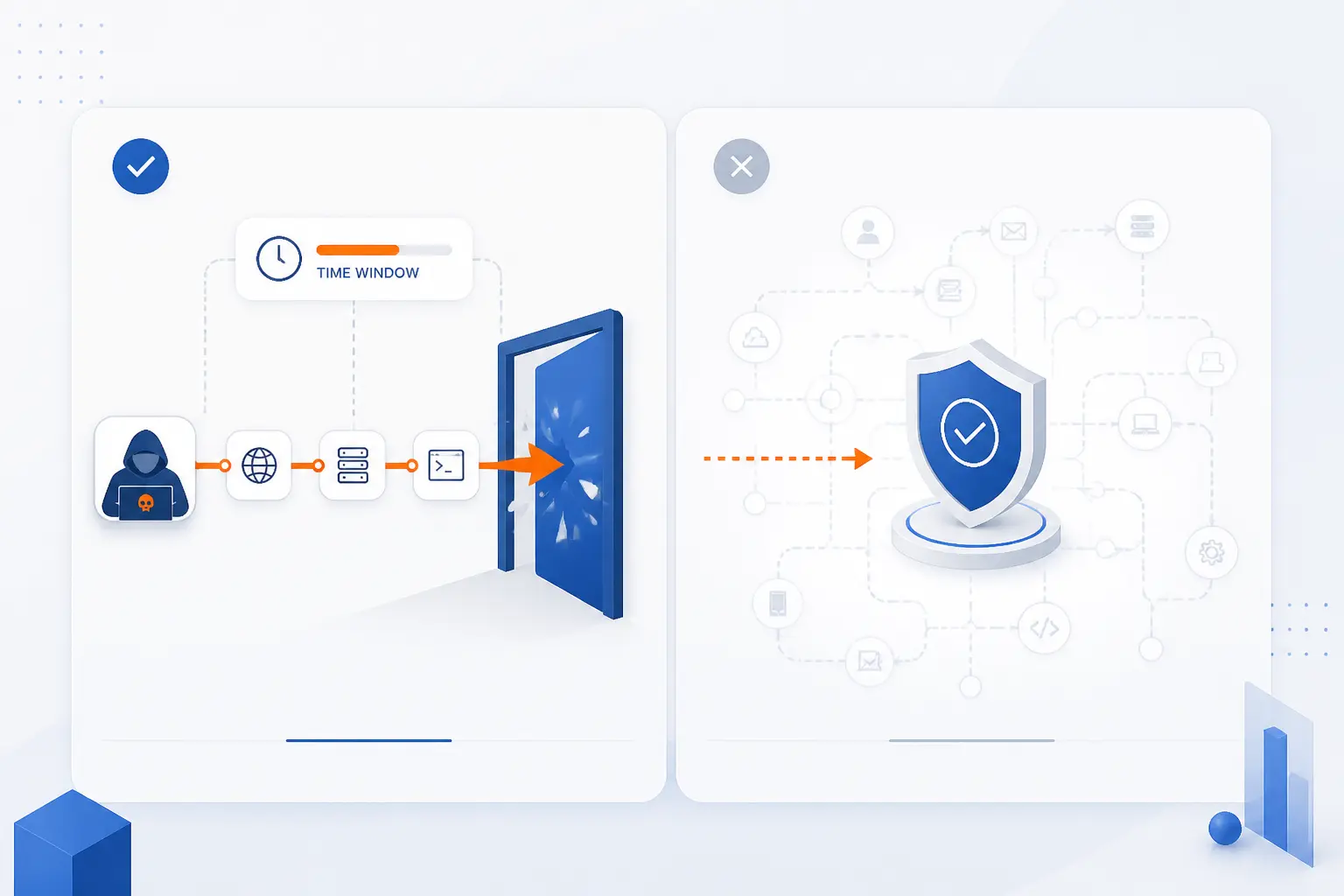
A pen test can prove that specific attack paths worked under specific conditions during a defined time window. It can show exploitable weaknesses, business impact, control gaps, and remediation priorities. It cannot prove that an organization is secure forever. It also cannot guarantee that no other weakness exists.
This limitation is not a flaw. It is the nature of security testing. Systems change, code changes, credentials change, vendors change, and attackers change tactics. A clean report is a snapshot, not a shield.
A pen test also depends on scope. If the test excludes production databases, physical offices, cloud identity, or third-party services, the report cannot make strong claims about those areas. We have seen disappointment when leaders expected a “whole company” answer from a small web app test. That mismatch is avoidable with better framing.
What a pen test does well is reveal reality. It tests whether controls behave as expected. It shows how small issues can chain together. It gives teams evidence they can act on. Used alongside secure development, patching, monitoring, backups, access review, and incident response, Penetration Testing becomes part of a stronger security habit.
FAQ
This FAQ answers the most common beginner questions about Penetration Testing directly. The short version is simple: a pen test is authorized, evidence-based, and focused on exploitability. It works best when paired with vulnerability management, secure configuration, and ongoing monitoring.
Does a Pen Test Replace a Vulnerability Assessment
No, a pen test does not replace a vulnerability assessment. A vulnerability assessment finds and prioritizes weaknesses across systems, often with broader coverage and less exploitation. A pen test goes deeper on selected targets to prove whether weaknesses can be used in a real attack path.
How Is a Pen Test Different From a Vulnerability Scan
A pen test is different from a vulnerability scan because humans validate, exploit, and chain findings. A scan mainly detects known issues and produces tool output. A pen test interprets that output, tests business logic, and shows practical impact.
Why Must a Pen Test Be Authorized
A pen test must be authorized because it uses techniques that can affect systems, data, users, and legal boundaries. Written permission defines what is allowed, what is forbidden, who to contact, and when to stop. Without authorization, even well-intended activity can look like an attack.
What Does a Pen Test Report Usually Include
A pen test report usually includes scope, methodology, findings, evidence, impact, risk ratings, and recommended fixes. Strong reports also include an executive summary for leaders and technical reproduction steps for engineers. The most useful reports make ownership clear so teams know who should fix what.
How 1Byte Supports a Stronger Security Foundation
1Byte supports a stronger security foundation by helping customers put basic hosting, identity, encryption, and infrastructure choices on firmer ground before and after a pen test. We do not see Penetration Testing as a one-time event. We see it as a checkpoint in a longer security routine. The cleaner the foundation, the more valuable the test becomes.
As an AWS Partner, 1Byte can also help customers think practically about cloud responsibility. That does not remove the need for customer-owned security work. It makes the boundaries clearer, especially when teams are choosing where to host applications, how to manage domains, and how to prepare systems for review.
| 1Byte service area | How it connects to security work | Practical benefit |
|---|---|---|
| Domain registration and SSL certificates | Supports trustworthy identity and encrypted browser connections | Reduces avoidable exposure around domains and certificates |
| WordPress hosting and shared hosting | Gives site owners a place to apply hardening basics | Helps teams prepare common websites for review |
| Cloud hosting and cloud servers | Supports environments where teams can manage workloads and fixes | Helps remediation become part of normal operations |
Domain Registration and SSL Certificates That Reduce Exposure
Domain registration and SSL certificates reduce exposure by making ownership and encrypted connections easier to manage correctly. Domains are often the first thing attackers and customers see. If domain records are stale, confusing, or poorly controlled, security teams can lose visibility before the application is even reached.
SSL certificates matter because users should not send credentials or sensitive data over unencrypted browser sessions. Certificates do not make an insecure app secure, and we would never claim they do. They do, however, remove a basic class of avoidable transport risk.
For a pen test, clean domain and certificate management also reduces noise. Testers can focus on real weaknesses instead of chasing expired certificates, abandoned subdomains, or unclear ownership.
WordPress Hosting and Shared Hosting With Practical Hardening
WordPress hosting and shared hosting support practical hardening when site owners manage updates, access, plugins, themes, and configuration carefully. Many small business risks start with ordinary websites, not exotic infrastructure. A neglected plugin, weak admin password, or exposed backup file can become an easy foothold.
We believe beginners should treat shared environments with discipline. Use only necessary plugins. Keep admin access tight. Remove old themes, old test sites, and forgotten accounts. These habits make any later Penetration Testing more useful because the obvious clutter is already gone.
WordPress hosting does not eliminate owner responsibility. Shared hosting does not make every site identical. The practical goal is simple: keep the site understandable, current, and easier to assess.
Cloud Hosting and Cloud Servers That Support Ongoing Security Work
Cloud hosting and cloud servers support ongoing security work by giving teams environments where they can apply fixes, review access, and improve configurations over time. Pen test findings often require infrastructure changes, not just code changes. Teams may need to adjust server exposure, rotate secrets, change firewall rules, or rebuild workloads.
Cloud servers are especially useful when customers need control over operating systems, application stacks, and security settings. Cloud hosting can support applications that need room to change as traffic and security requirements grow. In both cases, the value is in disciplined management.
We see the hosting layer as part of the evidence chain. If a pen test finds an exposed admin panel, weak TLS setup, or excessive server access, remediation should be tracked and verified. Hosting should make that work manageable, not mysterious.







Conclusion
Penetration Testing is an authorized simulated attack that shows whether weaknesses can become real compromise. It is valuable because it connects technical findings to business impact. It is limited because it reflects a specific scope and moment in time. Both truths matter.
For beginners, the safest mental model is this: a vulnerability scan tells you what might be wrong, while a pen test shows what could actually happen. The strongest organizations use both, then fix the root causes. They do not treat the report as a trophy.
Our viewpoint at 1Byte is practical. Start with clear scope. Protect production. Test what matters. Fix what is proven. Then retest. If your website, cloud server, domain setup, or hosting environment would be painful to explain during a security review, that is a good place to begin.
What system would hurt your business most if an attacker reached it first?