

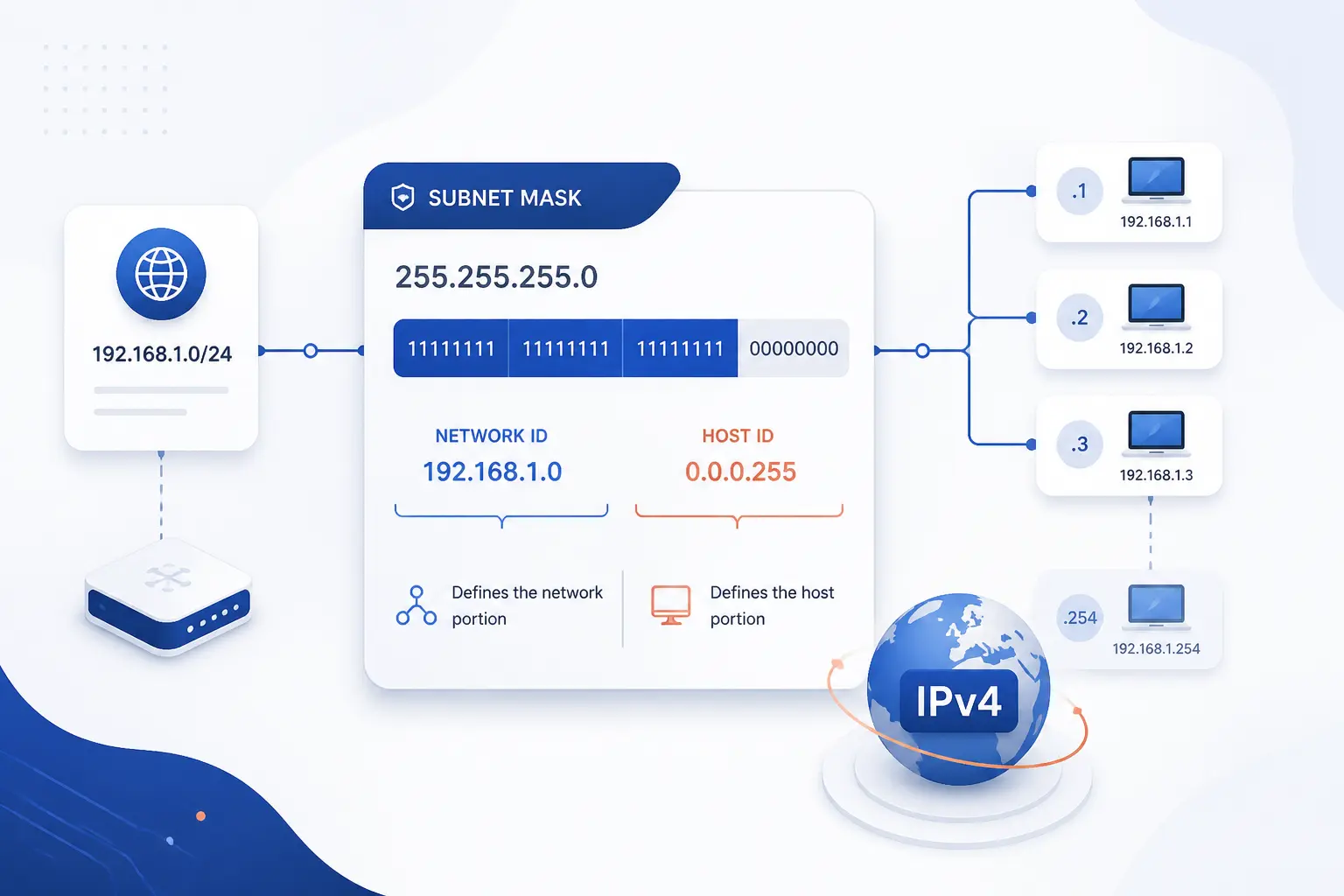
- Subnet Masks Are 32-Bit IPv4 Values That Separate the Network From the Host
- Reading the 1s and 0s in the Mask
- CIDR Notation and Dotted-Decimal Form
- Common IPv4 Prefixes and Host Counts
- How Subnetting Changes a Network
- Why the Right Mask Matters in Practice
- FAQ
- How 1Byte Supports Hosting and Network Setup
- Conclusion
Subnet masks are the rules that tell an IPv4 device which part of an address names the network and which part names the individual host. We use subnet masks to decide whether traffic should stay local or go to a router. That is why they sit at the heart of everyday IPv4 behavior, even on a small office LAN. Once we understand that split, the rest of subnetting becomes much easier to read.
Subnet Masks Are 32-Bit IPv4 Values That Separate the Network From the Host
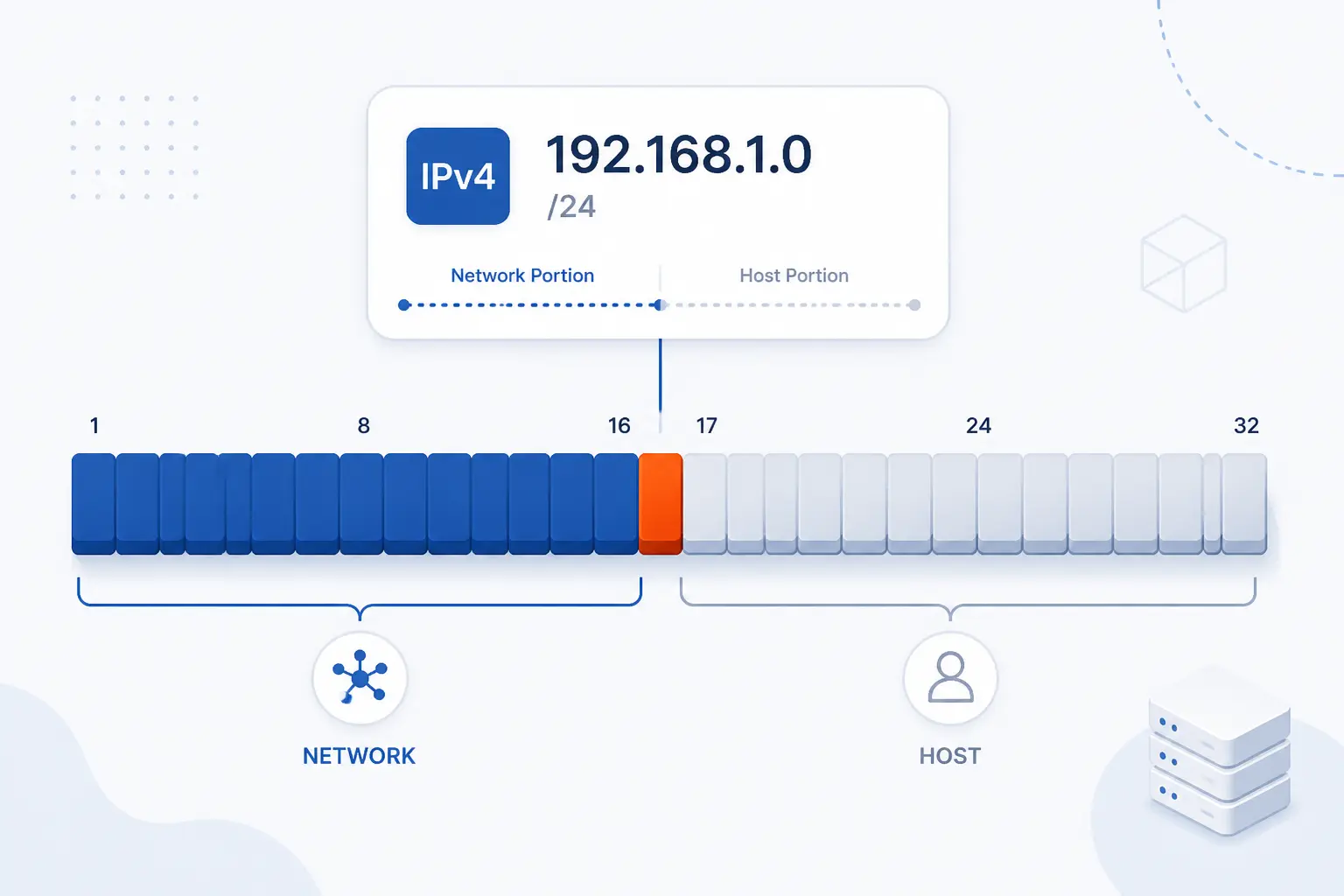
A subnet mask is a 32-bit pattern that divides an IPv4 address into two parts: the network portion and the host portion. We read the network portion as the shared part of the address for a local segment. We read the host portion as the part that identifies one device inside that segment. In practice, the mask tells a machine who is “nearby” and who is not.
That matters because IPv4 addresses themselves are defined as 32-bit values, so the mask works by carving those bits into a boundary. If a laptop has 192.168.1.34 with 255.255.255.0, we treat 192.168.1 as the local network and .34 as the device. Change the mask, and the meaning of the same address can change with it. We think that is the key mental model beginners should keep in front of them.
FURTHER READING: |
| 1. How the Internet Works From Cables to Websites |
| 2. What Is Virtual Networking and Why It Matters |
| 3. Understanding DNS Hierarchy: From Root Servers to Your Website |
Reading the 1s and 0s in the Mask
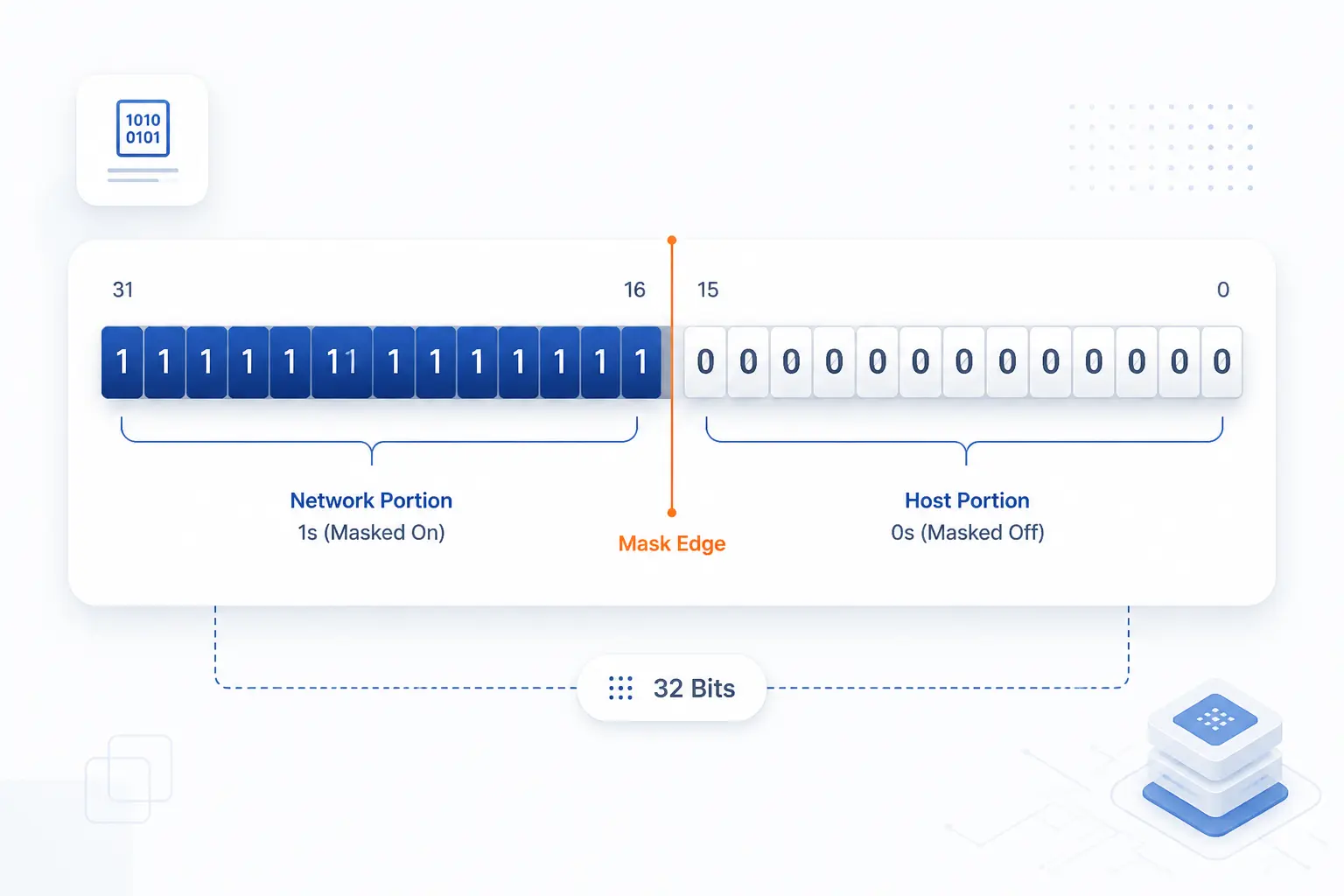
Reading subnet masks starts with one simple rule: 1s mean “this bit belongs to the network,” and 0s mean “this bit can vary for hosts.” We do not need to love binary to use that rule well. We only need to see that the mask is a boundary line drawn across 32 bits. Once we see the boundary, local routing logic stops looking like magic.
Binary Ones Mark the Network Portion
Binary ones define the fixed part of the address that every device on the same local network must share. A /24, for example, means the first 24 bits are all 1s in the mask, so those bits identify the network. Devices that match in those fixed bits belong to the same prefix. That is why 192.168.1.10 and 192.168.1.200 sit together under a /24, while 192.168.2.10 does not.
Binary Zeros Leave Room for Host Addresses
Binary zeros define the part of the address that can change from one device to another. In a /24, the last 8 bits are zeros in the mask, so those 8 bits provide the host range. More zero bits mean more address room inside that network. Fewer zero bits mean a tighter range and a smaller local segment.
Bitwise AND Reveals the Network Prefix
Bitwise AND is the operation that extracts the network prefix from an IPv4 address. When we AND 192.168.1.34 with 255.255.255.0, the result is 192.168.1.0. That output is the network address for that host under that mask. We do not need to perform the binary math by hand every day, but knowing that this is the underlying rule makes every routing decision easier to trust.
Routers Use the Result to Judge Local vs Remote Traffic
The network result is what lets a device decide whether a destination is local or remote. If the destination falls inside the same prefix, the host sends directly on the local link, usually after resolving a Layer 2 address. If it falls outside, the host sends the packet to its default gateway. Routers apply the same general idea at a larger scale by comparing destination prefixes against their routing tables and choosing the best match.
CIDR Notation and Dotted-Decimal Form
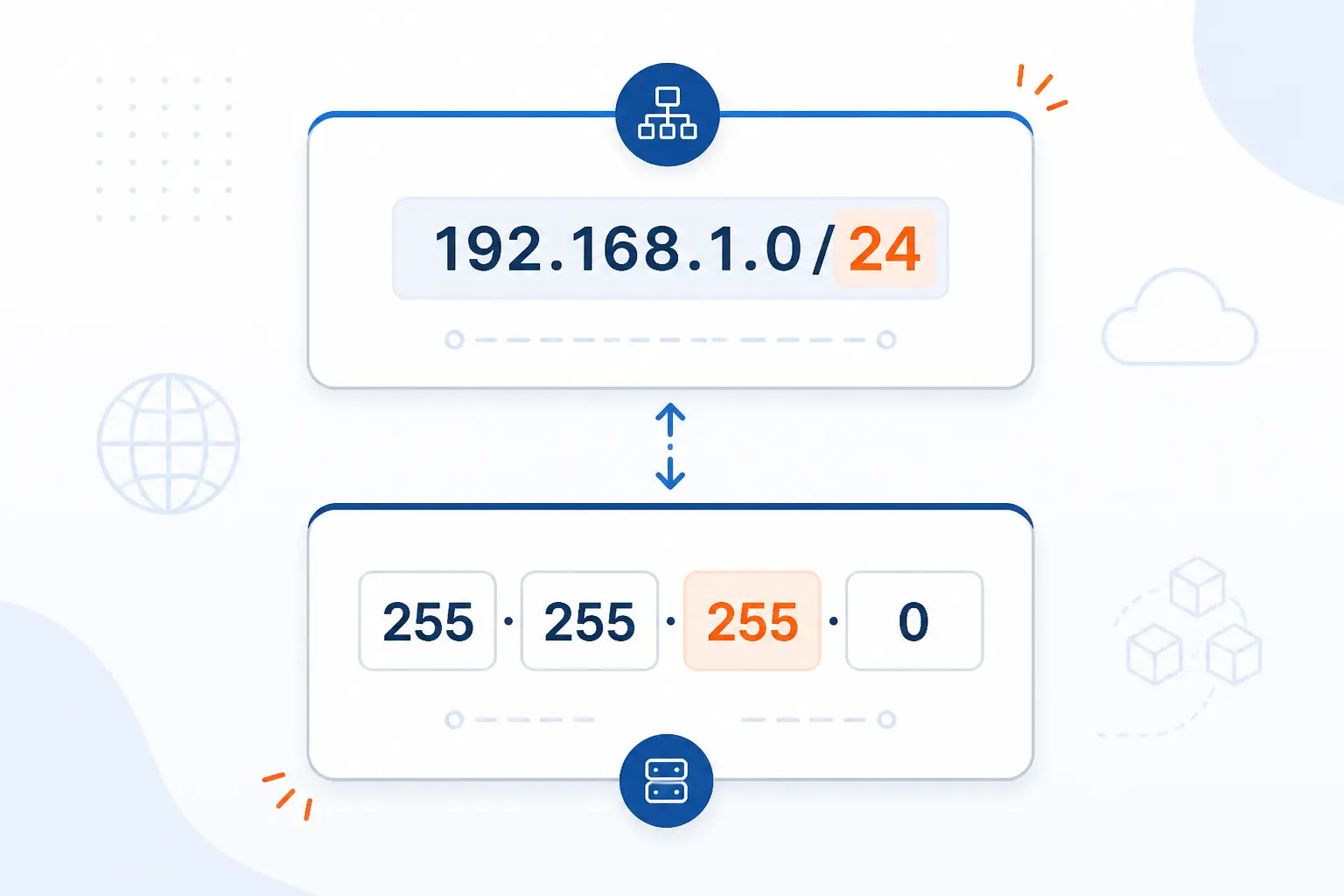
CIDR notation and dotted-decimal form describe the same mask in two different ways. We use CIDR because it is shorter and easier to reason about, while dotted decimal remains common in device settings and legacy documentation. The modern classless model was formalized in the classless routing update, and it is the form most engineers think in first. If we can move comfortably between the two notations, IPv4 planning gets much less clumsy.
Why 255.255.255.0 Matches /24
255.255.255.0 matches /24 because it contains 24 consecutive 1 bits followed by 8 zeros. Each 255 in binary is 11111111, so three full 255 octets give us 24 network bits. The final 0 octet gives us 8 host bits. That is why /24 and 255.255.255.0 are simply two ways to say the same thing.
How CIDR Replaced Fixed Class Boundaries
CIDR replaced the old Class A, B, and C mindset by letting us choose prefix lengths that fit the network instead of forcing a few rigid sizes. Under the older classful model, an organization often received far more address space than it actually needed. CIDR made route aggregation cleaner and address assignment less wasteful. We still mention classful ranges because old diagrams and habits die hard, but they are no longer the planning model we should lead with.
Common IPv4 Prefixes and Host Counts
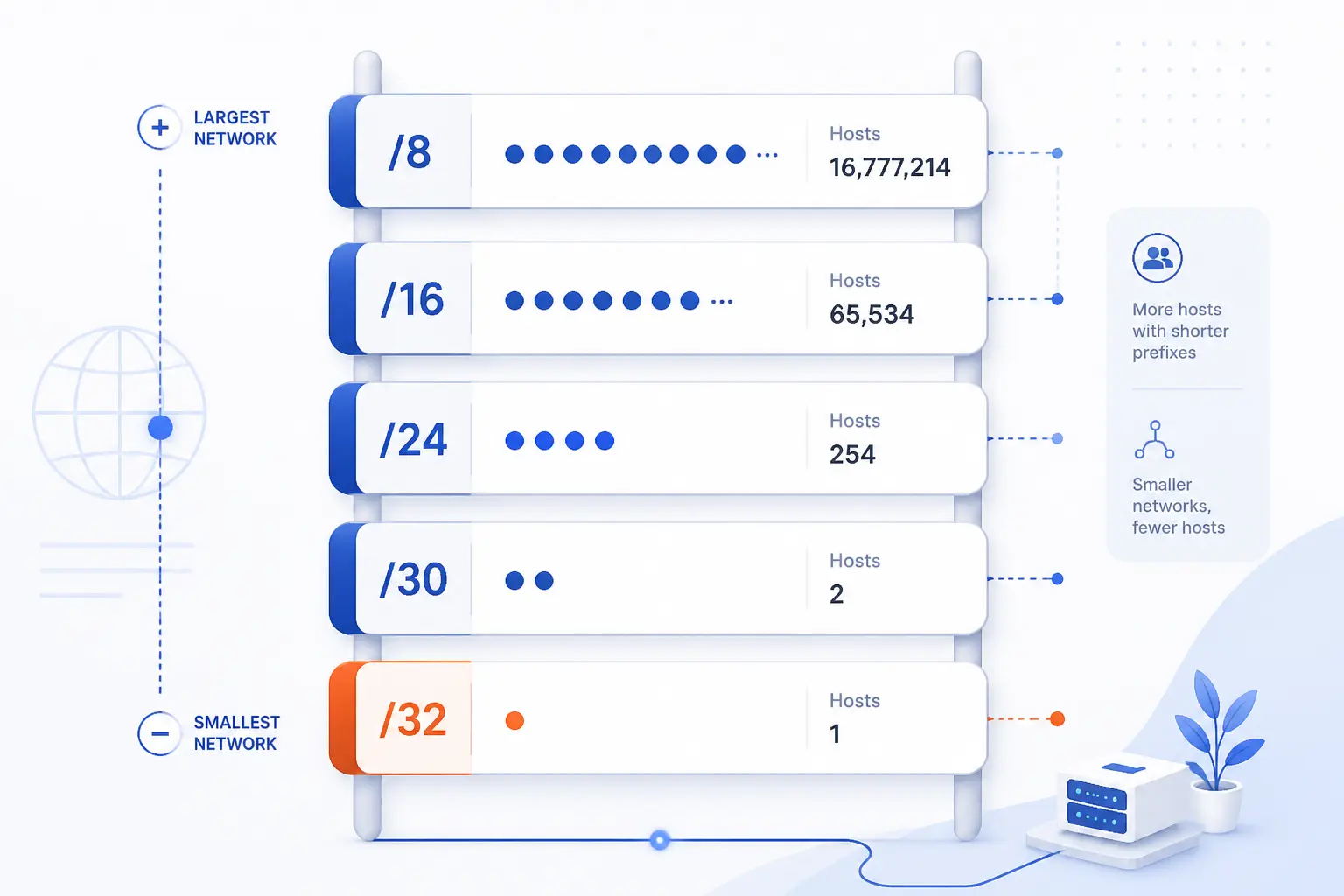
Common IPv4 prefixes are just common network sizes with predictable address ranges. We usually memorize a small set because those sizes show up again and again in offices, labs, cloud networks, and point-to-point links. A handy reference table confirms the patterns, but the bigger idea is simple: shorter prefixes create larger networks, and longer prefixes create smaller ones. The table below gives the quick comparison most readers need before the details.
| Prefix | Dotted Form | Typical Usable Range | Common Use |
|---|---|---|---|
| /23 | 255.255.254.0 | 510 hosts | Larger local segment |
| /24 | 255.255.255.0 | 254 hosts | Small office or home LAN |
| /25 | 255.255.255.128 | 126 hosts | Split one /24 into two parts |
| /30 | 255.255.255.252 | 2 hosts | Older point-to-point links |
| /31 | 255.255.255.254 | 2 endpoints | Modern point-to-point links |
| /32 | 255.255.255.255 | 1 address | Single host route or loopback |
/23 for Larger Local Segments
A /23 creates one network that spans two neighboring /24-sized blocks. In practical terms, 192.168.0.0/23 covers addresses from 192.168.0.0 through 192.168.1.255. We use it when one broadcast domain genuinely needs more room than a /24 can offer. That said, we prefer to pause before using it, because a bigger local segment also means a noisier one.
/24 as the Familiar 254-Host Network
A /24 is the classic small LAN size that many people learn first. Home routers, branch office networks, and lab environments often use it because the boundary lands neatly on an octet. It is easy to recognize, easy to document, and easy to troubleshoot. We would call it the “plain vanilla” IPv4 prefix for a reason.
/25 for Splitting a /24 in Half
A /25 cuts a /24 into two equal networks. For example, 192.168.1.0/25 covers the lower half, while 192.168.1.128/25 covers the upper half. We use that split when one flat /24 is too open or too large, but a full redesign would be overkill. It is a tidy way to separate staff from guests, or servers from user devices, without jumping to a much smaller prefix.
/30, /31, and /32 for Narrower Ranges and Edge Cases
/30, /31, and /32 are specialized prefixes used when a broad host range would be wasteful. A /30 historically fit many router-to-router links, while a /31 is explicitly allowed for point-to-point links under the point-to-point rule, which avoids burning extra addresses. A /32 identifies exactly one address and often appears in loopbacks, host routes, access lists, and monitoring rules. These are not the prefixes most beginners start with, but they matter a lot once networks become more intentional.
How Subnetting Changes a Network
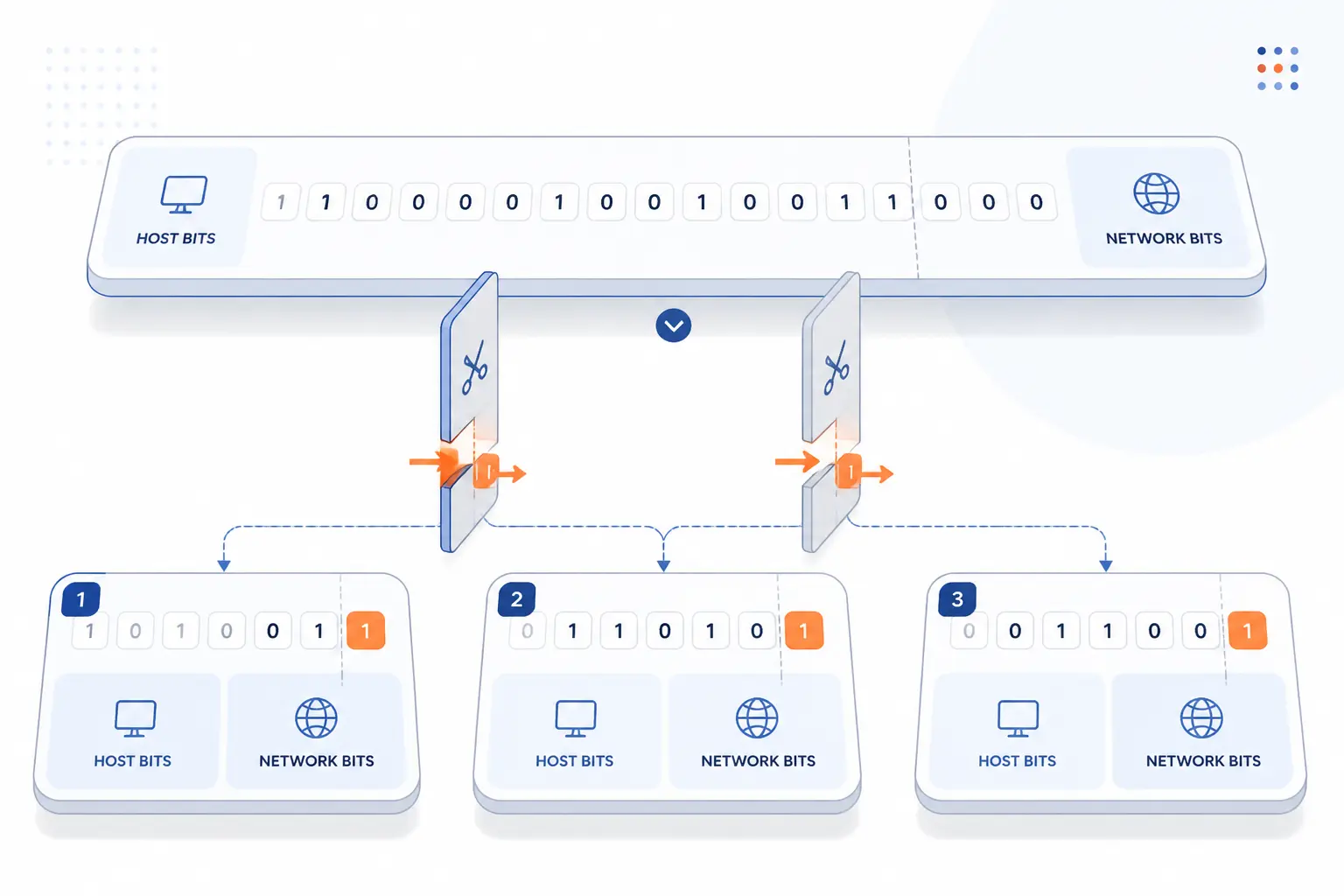
Subnetting changes a network by taking one address block and dividing it into smaller, more controlled parts. We do that by borrowing bits from the host side and moving the boundary to the right. The process was laid out in the original 1985 standard, but the practical idea is still current: smaller segments give us tighter control over size, traffic, and policy. When readers ask us what subnetting really does, this is the shortest accurate answer.
Borrowing Host Bits Creates Smaller Subnets
Borrowing host bits is the act of turning some host bits into network bits so one large block becomes several smaller ones. If we start with a /24 and borrow 2 host bits, we get four /26 networks instead of one larger segment. Each new subnet has its own network address, broadcast address, and usable host range. This is the move that lets us shape the address plan around departments, applications, or sites.
Finding the Network Address and Broadcast Address
The network address is the first address in the range, and the broadcast address is the last. For 192.168.1.128/25, the network address is 192.168.1.128 and the broadcast address is 192.168.1.255. Everything in between is part of the usable host range, aside from any platform-specific reservations a cloud provider may impose. We always recommend writing these three lines down together, because many configuration errors start when someone knows the prefix length but forgets the actual range limits.
Using the Host Formula to Size a Subnet
The usual host formula is 2host bits minus 2 usable addresses. We subtract two because the all-zeros host value becomes the network address and the all-ones host value becomes the broadcast address. That rule works well for most ordinary IPv4 LANs, though /31 and /32 are special cases with their own logic. In our view, the formula is useful, but the better habit is to pair it with a real address-range check so the math and the plan agree.
Why the Right Mask Matters in Practice
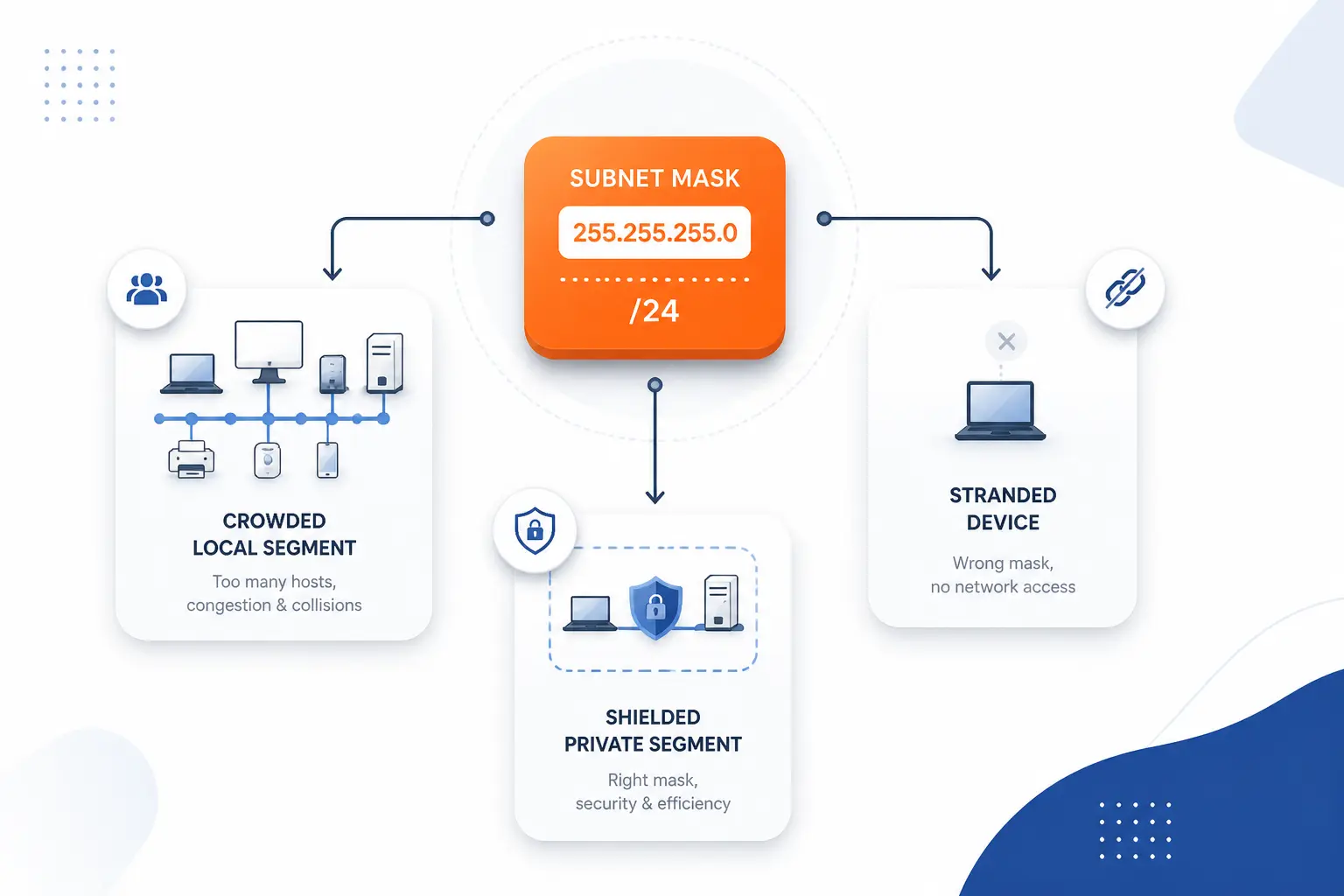
The right mask matters because it affects address efficiency, local traffic behavior, troubleshooting, and security boundaries all at once. A mask that is too large can create unnecessary noise and sloppy segmentation. A mask that is too small can strand devices or force awkward redesigns. We have seen few IPv4 settings cause more quiet confusion than a mask that “looks close enough” but is actually wrong.
Better Address Allocation and Less Waste
Better address allocation starts with choosing a prefix that matches the real need instead of grabbing the biggest block that seems convenient. That is especially important inside private address space, where teams often carve internal ranges for users, servers, labs, VPNs, and management networks. A right-sized plan leaves room for growth without turning every segment into a giant catch-all. We favor that approach because clean allocation makes later troubleshooting much less painful.
Smaller Broadcast Domains and Smoother Traffic Flow
Smaller broadcast domains reduce the number of devices that must hear local broadcast traffic. That can make troubleshooting easier and keep chatty protocols from splashing across more machines than necessary. The gain is not mystical. It comes from limiting how much “everyone on this segment” really means. On a modest office floor, that can be the difference between a tidy network and one that feels like a crowded room.
Segmentation for Administration and Security
Segmentation uses prefixes to create boundaries that administrators can name, monitor, and protect. We might place finance devices in one range, guest Wi-Fi in another, and backend servers in a third, then apply different firewall and routing rules between them. The mask itself is not a security control, but it creates the address boundaries that security policy depends on. That is why good segmentation begins in the IP plan, not after the fact.
Configuration Mistakes That Cause Conflicts and Confusion
A wrong mask can make healthy devices appear broken. One machine may think a destination is local and send ARP requests, while another may think the same destination is remote and send traffic to the gateway. Overlapping ranges can trigger duplicate-use headaches, failed reachability, and strange “it works from here but not there” reports. If we had to pick one beginner troubleshooting habit, it would be this: verify the IP, the prefix length, and the gateway together, every time.
FAQ
Most questions about subnet masks come down to what they do, how to read common values, and how they differ from other network settings. The short answers below cover the cases we see most often. If one detail still feels slippery, test it with a real IP address and prefix. IPv4 concepts stick faster when we run them against concrete examples.
What Does a Subnet Mask Do?
A subnet mask tells a device which part of an IPv4 address is the network and which part is the host. That lets the device decide whether a destination is on the local segment or should be reached through a router. We can think of it as the rule that defines who counts as a neighbor on the network.
Are 255.255.255.0 and 255.255.0.0 Valid Subnet Masks?
Yes, both are valid subnet masks. They represent different prefix lengths, so they describe different network sizes and host ranges. The real question is not whether they are valid, but whether they are correct for the network we are building.
What Does 255.255.255.252 Mean?
255.255.255.252 means a /30 prefix. In ordinary IPv4 use, that creates a very small range with room for two usable host addresses between the network and broadcast values. We often see it in older point-to-point designs and in lab exercises because it illustrates tight address allocation clearly.
How Is a Subnet Mask Different From a Default Gateway?
A subnet mask defines the local boundary, while a default gateway is the router a host uses to reach destinations outside that boundary. One answers “who is local?” and the other answers “where do I send remote traffic?” If either one is wrong, connectivity can break, but they break it in different ways.
How 1Byte Supports Hosting and Network Setup
At 1Byte, we see subnet masks as part of the basic plumbing that keeps hosting and network design understandable. They matter most when domains, certificates, websites, and cloud workloads need clean addressing underneath them. Because 1Byte is an AWS Partner, we also view prefix planning through a practical cloud lens, where private IPv4 layout affects how workloads are grouped and reached. The table below shows where that planning shows up across the services named here.
| Service Area | Where Address Planning Helps | Practical Outcome |
|---|---|---|
| Domain registration and SSL certificates | Clean mapping between names, endpoints, and network zones | Clearer setup and easier troubleshooting |
| WordPress hosting and shared hosting | Private IPv4 layout for app, admin, and supporting systems | Simpler internal organization |
| Cloud hosting and cloud servers | Flexible prefixes for public and private segments | Better separation as workloads grow |
Register Domains and Add SSL Certificates With a Clean Network Foundation
A clean network foundation makes domain registration and SSL certificate deployment easier to reason about. When the underlying IPv4 plan is orderly, it is simpler to map a domain to the right endpoint and to understand where certificate-protected services actually live. We do not need a large environment for this to matter. Even a small deployment becomes easier to document when names, addresses, and network boundaries line up cleanly.
Run WordPress Hosting and Shared Hosting With Simpler Private IPv4 Planning
Simpler private IPv4 planning helps WordPress hosting and shared hosting stay understandable behind the scenes. We may separate application components, administration paths, or supporting services into sensible internal ranges so each role is easier to track. That does not make the public website “about subnetting,” of course. It simply means the hosting environment rests on a tidier address plan, and tidy foundations usually age better.
Scale Cloud Hosting and Cloud Servers With Flexible Subnet-Aware Infrastructure
Flexible infrastructure depends on choosing prefixes that fit how cloud hosting and cloud servers are grouped. We might keep public-facing services in one segment and backend systems in another so routing and policy stay readable as the environment expands. That is one reason we think prefix planning should happen early, not after workloads are already scattered. In cloud work, a thoughtful address layout is less glamorous than the app itself, but it often decides how manageable the whole setup feels a year later.







Conclusion
Subnet masks shape IPv4 by drawing the line between the network and the host. That one line decides local reachability, prefix size, address efficiency, and a good deal of everyday troubleshooting. Once we can read 1s and 0s, convert CIDR to dotted decimal, and recognize common prefixes, subnetting stops being a memorization game and starts making practical sense.
If we are planning a home lab, an office LAN, or a cloud deployment, the next useful step is simple: take one real IPv4 address, apply its mask, and write out the network, broadcast, and usable range by hand. That small exercise teaches more than a dozen abstract definitions. Which address block would you like to test first?