


- Cross Site Scripting Is a Code-Injection Attack That Makes Trusted Websites Deliver Malicious JavaScript
- How XSS Turns User Input Into Browser-Run Code
- Common XSS Variants and Where They Appear
- What an Attacker Can Do After the Injection
- How to Reduce Cross Site Scripting Risk
- FAQ About Cross Site Scripting
- How 1Byte Supports Safer Websites and Hosting
- Conclusion
Cross site scripting is a web security flaw that lets attackers make a legitimate website send malicious JavaScript to a visitor’s browser. Once that happens, the browser often runs the code as if the trusted site meant to send it. That is the core idea readers need to know first. We think of cross site scripting as a broken trust chain between user input, page output, and browser execution.
Cross Site Scripting Is a Code-Injection Attack That Makes Trusted Websites Deliver Malicious JavaScript
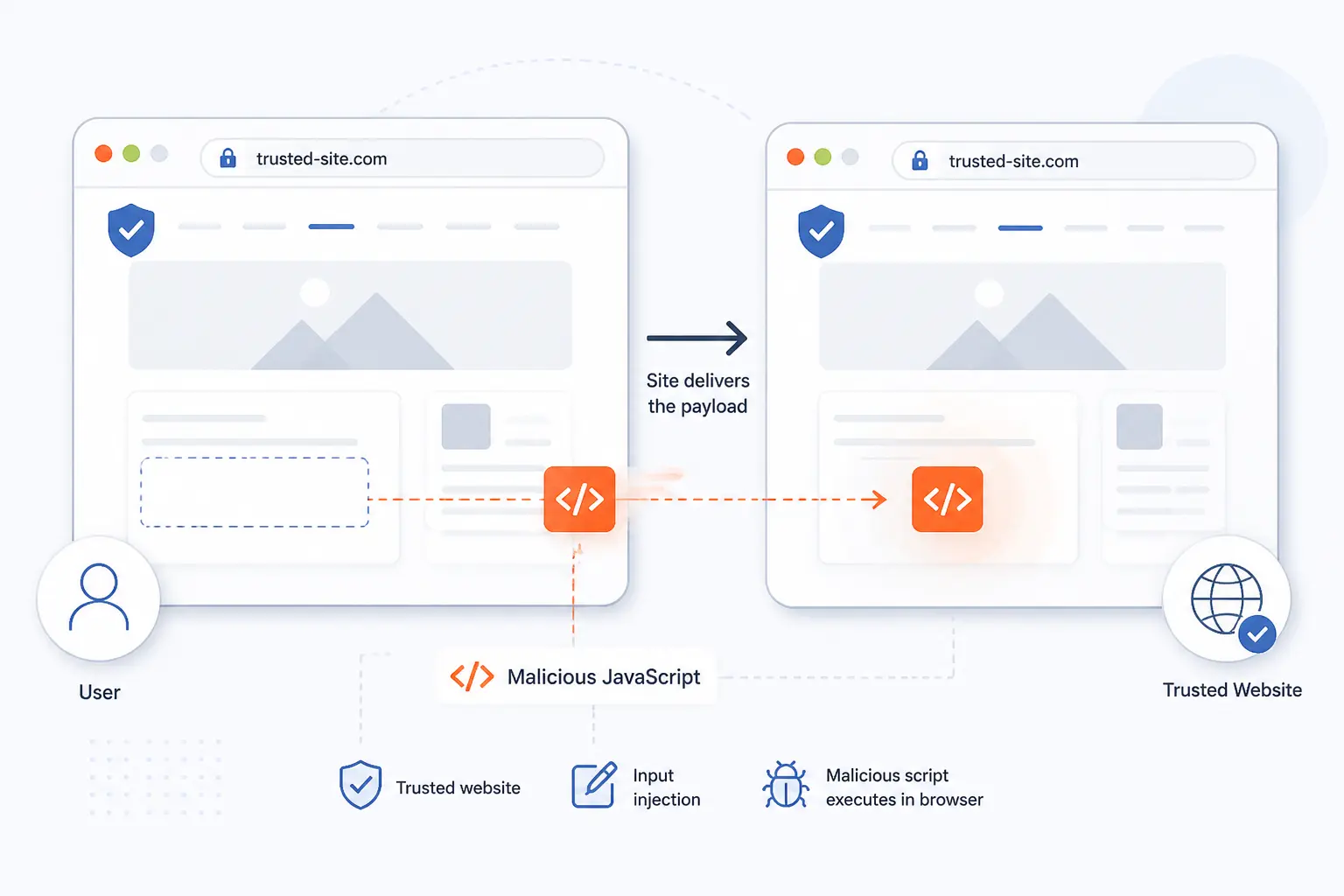
Cross site scripting, usually shortened to XSS, happens when a site mixes untrusted data into a page in a way the browser can execute. The attacker does not need to break into the browser itself. Instead, they trick the website into serving hostile code inside a trusted response. In the weakness catalog used by security teams, this is described as improper neutralization of input during page generation.
That matters because the bug is still a front-line problem, not an old classroom example. In fact, it was ranked #1 in the 2025 Top 25 of dangerous software weaknesses. We see the same pattern again and again. A page accepts input, renders it in the wrong place, and the browser does the rest.
FURTHER READING: |
| 1. How to Build a Website From Scratch in 10 Steps |
| 2. Best WordPress Site Examples for Design Ideas |
| 3. How to Speed Up Ecommerce Website With 10 Fixes |
How XSS Turns User Input Into Browser-Run Code
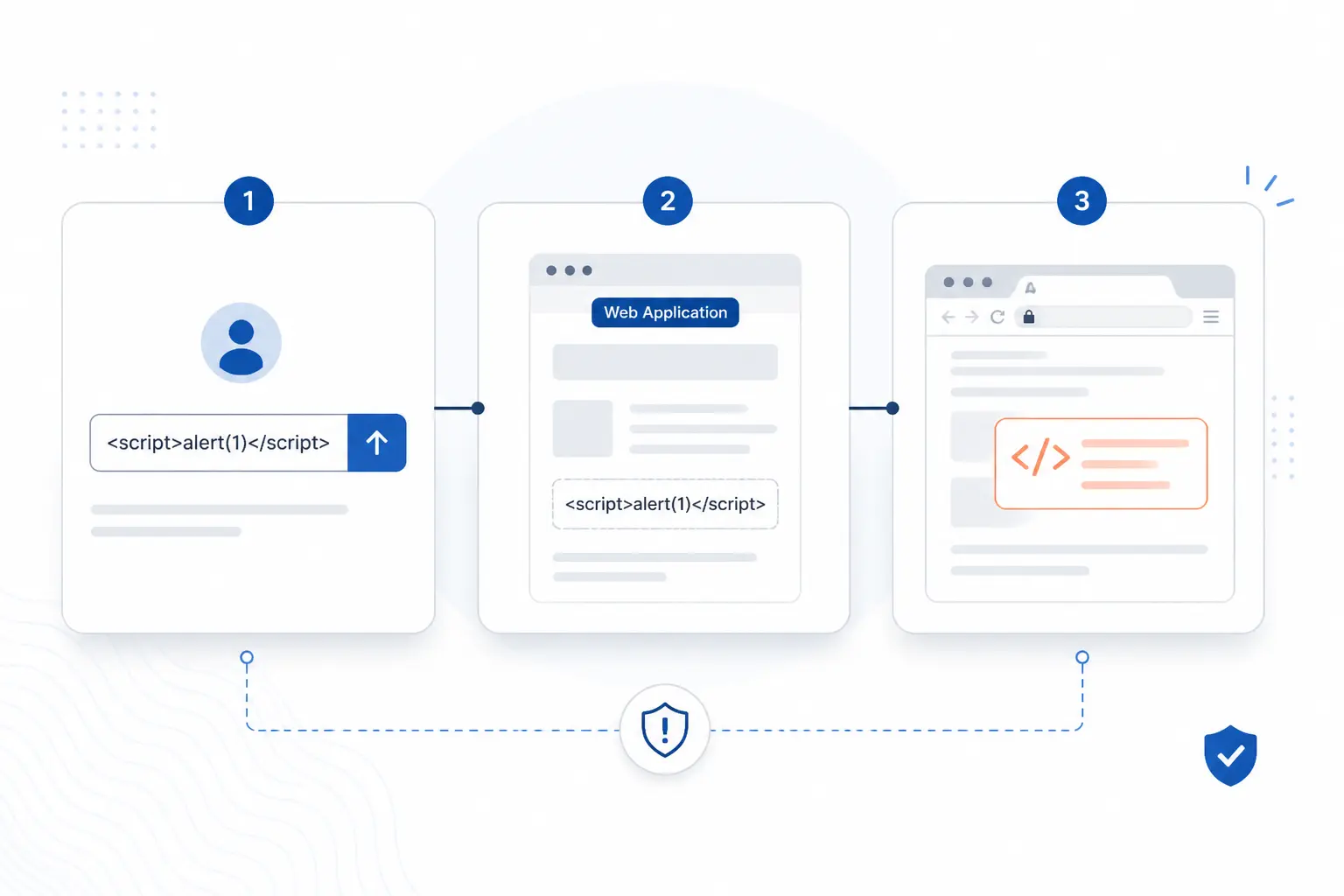
XSS works in three steps. First, untrusted data gets into the application. Next, the application places that data into HTML or the DOM in an unsafe way. Finally, the browser treats the result as code from the trusted site, not as plain text from an outsider.
Untrusted Data Enters a Web Application
An XSS attack starts when an application accepts data that should be treated as text, not executable content. That data can come from a search box, a contact form, a profile field, a URL parameter, a URL fragment, or even a message passed between browser windows. If the system assumes the data is harmless just because it arrived through a normal feature, trouble is already brewing.
A simple example makes this concrete. Imagine a search page that reads a query from the URL and prints “Results for [query]” at the top. If the page drops that query into the response without the right protection, an attacker can swap normal text for markup or script-friendly payloads.
Server Responses or DOM Updates Place It Into the Page
The vulnerability becomes real when the application writes untrusted data into the page in a context the browser can parse. That might be visible HTML, an attribute value, a script block, inline event handler code, or a DOM API that parses HTML strings. The fix is not one-size-fits-all, because safe handling depends on context, which is why security guidance stresses contextual output encoding.
Client-side code can create the same bug without the server doing anything obviously wrong. If JavaScript reads `location.search`, `location.hash`, or another attacker-controlled value and then pushes it into the page with a risky API, the site can still fall over. We have seen teams validate input on the backend, then undo that good work with one careless DOM update on the frontend.
The Browser Treats It as Code From a Trusted Site
Once malicious content lands in an executable spot, the browser usually gives it the same trust as the page that delivered it. That is the nasty part. The code runs with the site’s origin, can interact with the page, and can make requests that look like normal user activity. In the common attack pattern described in the same weakness entry, hostile client-side code can disclose private data such as session cookies or perform actions on the victim’s behalf.
This is why XSS is more than a popup prank. Even when developers think, “it only affects the browser,” the browser is exactly where sessions, forms, account actions, and user trust live.
Common XSS Variants and Where They Appear
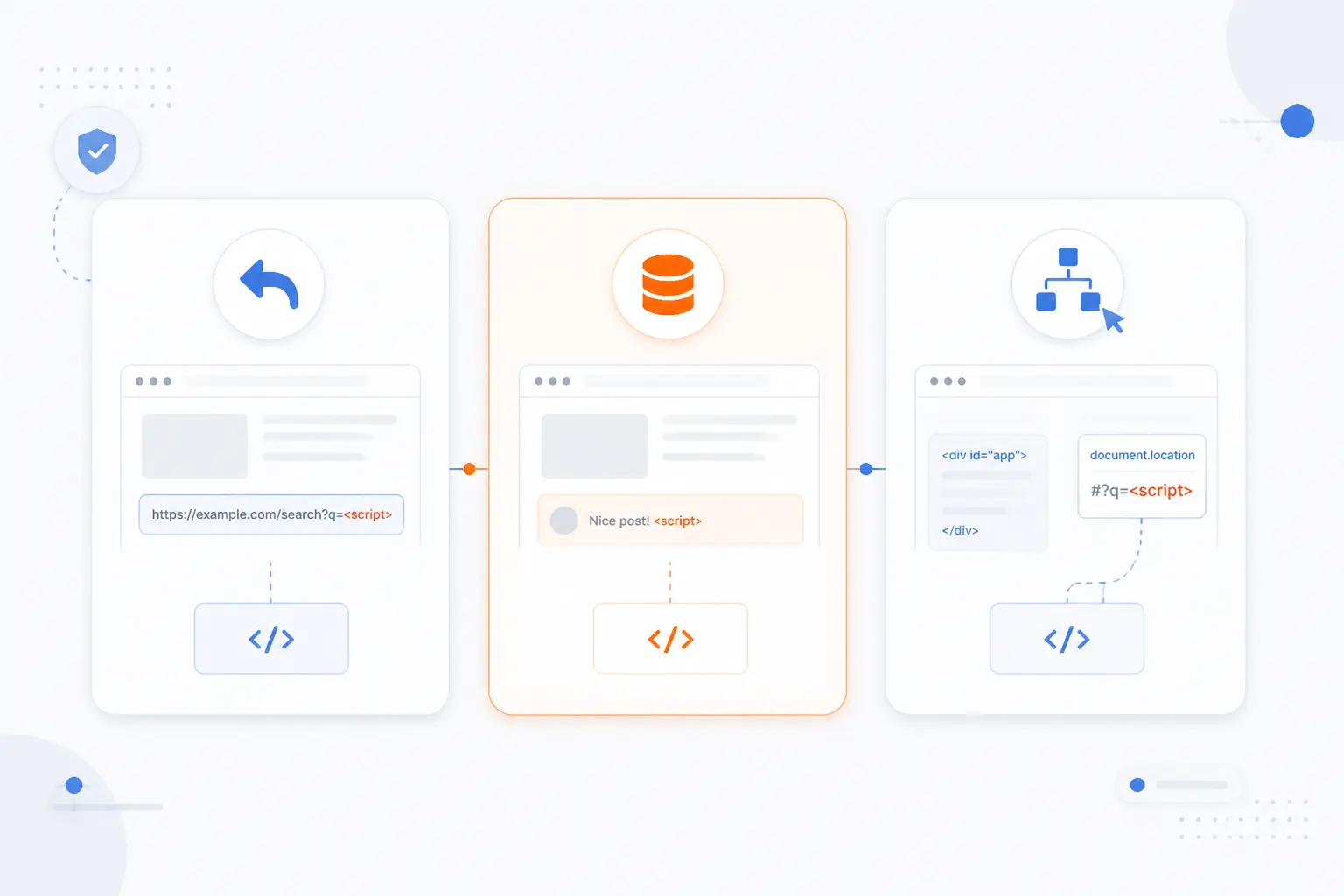
Security teams usually group XSS into three forms: reflected, stored, and DOM-based. The split is useful because each form has a different delivery path and cleanup plan, which lines up with three common forms described in established guidance. If you know which form you are looking at, debugging gets much faster.
| Variant | Where it starts | Typical place it appears |
|---|---|---|
| Reflected | Request data | Search pages, error messages, login flows |
| Stored | Saved user content | Comments, profiles, forums, admin panels |
| DOM-based | Client-side JavaScript | Single-page apps, widgets, dynamic UI code |
Reflected XSS in URLs Search Results and Error Messages
Reflected XSS happens when request data is immediately echoed back into the page. The payload is not saved for later. Instead, it rides along in a malicious link, form submission, or crafted request, and it fires when the target page reflects that value into HTML or script-sensitive output.
This is why search pages and error pages are classic trouble spots. They often repeat user-supplied text to be helpful. If that “helpful” output lands in the wrong context, the browser may execute it instead of displaying it.
Stored XSS in Comments Profiles and Forums
Stored XSS is more dangerous because the payload is saved by the application and served to other users later. A bad comment, profile bio, product review, or forum post can keep firing until someone removes it or fixes the rendering path. From our point of view, this is the variant that most clearly turns one careless render into a platform-wide problem.
A famous example was the MySpace Samy worm, which spread through profile content and reportedly reached 1,000,000+ users in less than 20 hours. That case is old, but the lesson still bites. If user content is stored and then rendered as active code, the blast radius grows with every page view.
DOM-Based XSS in Client-Side JavaScript
DOM-based XSS happens when browser-side JavaScript turns attacker-controlled data into executable page content. The server may return a perfectly normal page. The bug appears later, when frontend code reads a hostile value and feeds it into a risky sink such as `innerHTML`, `outerHTML`, or `document.write`.
That is why modern frontend code deserves the same scrutiny as server templates. Browsers and docs now warn that setting HTML from strings is unsafe, and the `innerHTML` reference notes that this pattern is a security risk unless the content is properly sanitized and controlled. If we had to pick one habit to retire first, casual `innerHTML` use would be near the top of the list.
What an Attacker Can Do After the Injection
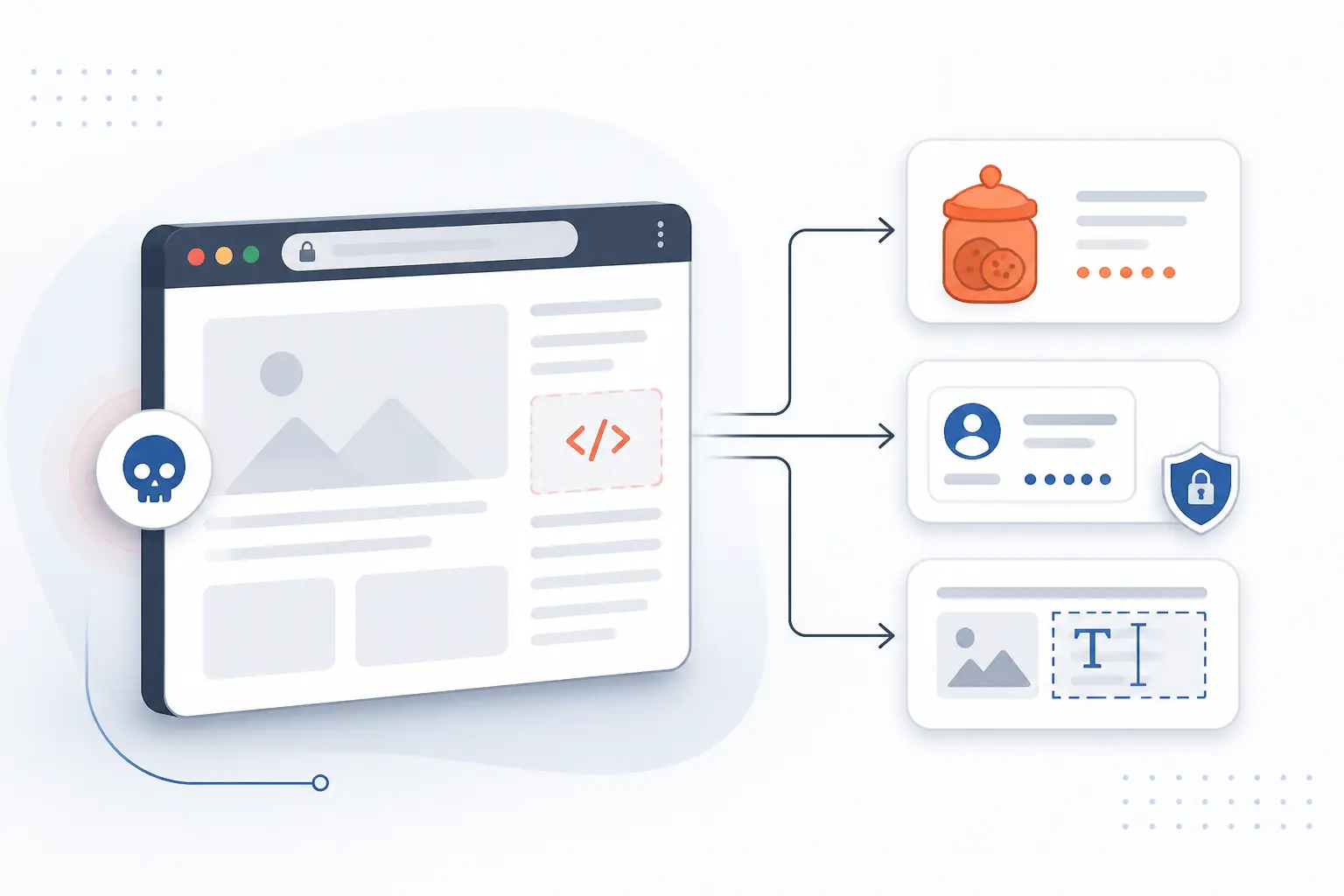
After the injection lands, the attacker can often do anything the page is allowed to do in that user’s browser. The exact impact depends on the site, the user’s privileges, and which browser defenses are already in place. Still, the pattern is predictable. XSS usually targets data theft, account abuse, or on-page manipulation.
Steal Cookies Session Data and Credentials
XSS can steal data that the page can reach, including form entries, page content, tokens in storage, and some cookies. Developers sometimes assume the `Secure` cookie flag solves this, but Secure is not enough without HttpOnly because JavaScript can still read cookies that are not marked `HttpOnly`. That one detail often separates a nuisance bug from a session takeover.
Even with `HttpOnly` enabled, the story does not end. Malicious code can still read what the user types into the page, scrape data the server already rendered, or submit login and payment forms to an attacker-controlled endpoint.
Impersonate Users and Trigger Actions
Injected code can act as the user while the user is logged in. It can click hidden buttons, submit forms, change account settings, send messages, or issue background requests from the victim’s session. If the victim is an administrator, the attacker may get an admin’s effective power without ever knowing the password.
That is why we rarely judge XSS by the payload alone. A bland comment field on a public site looks harmless until an admin opens the moderation view and the same payload suddenly has much broader reach.
Rewrite Pages Redirect Visitors and Plant Malicious Features
XSS can fully change what a user sees and trusts on a page. Attackers can rewrite prices, swap payment destinations, inject fake login prompts, redirect visitors, load keyloggers, or add browser-side skimmers that silently collect sensitive fields. When users see your branding and your URL bar, they assume the page is speaking for you.
That is the business risk in plain terms. A few injected lines can turn a trusted page into a convincing fraud surface, and the victim may never realize the site itself was the delivery vehicle.
How to Reduce Cross Site Scripting Risk
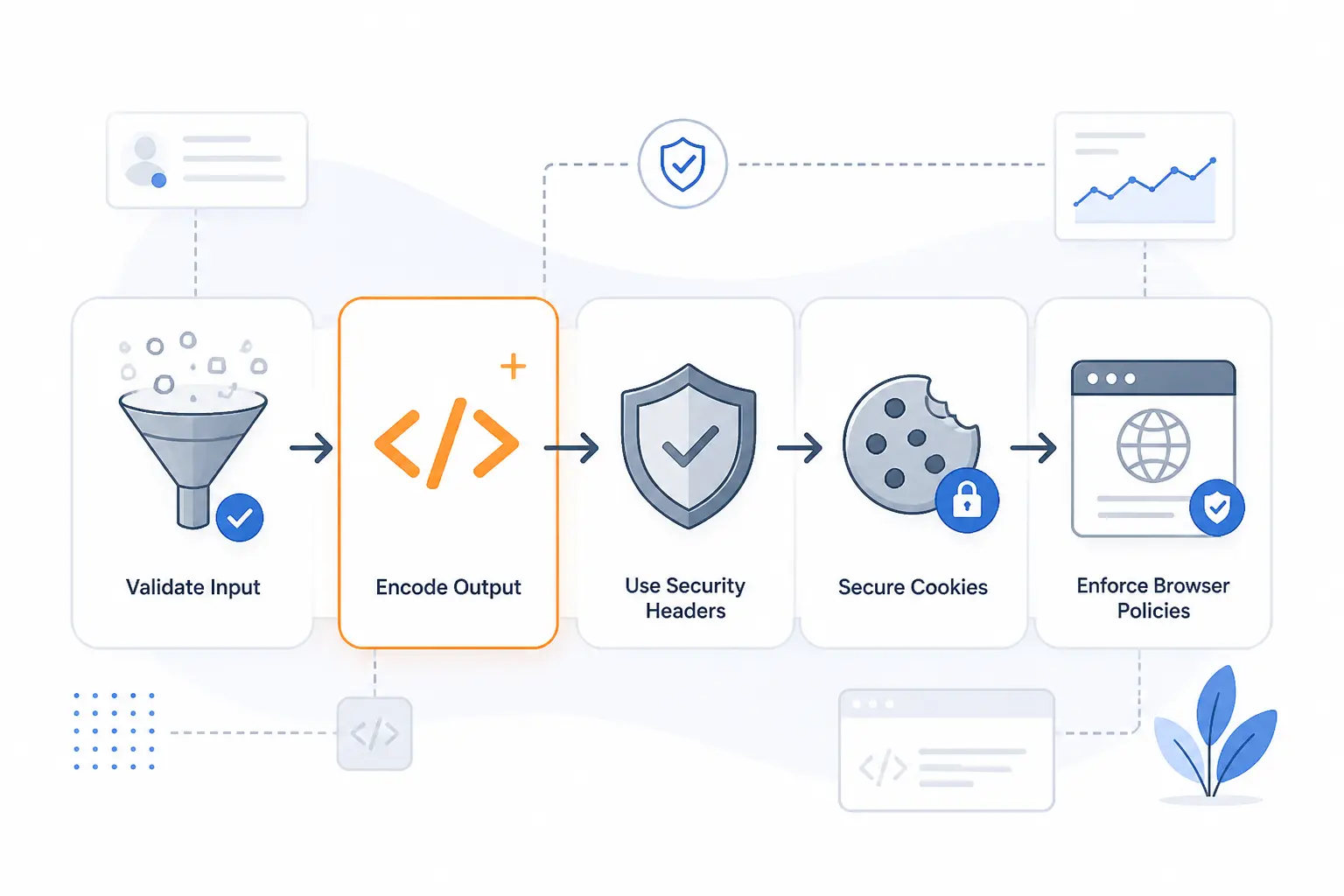
You reduce XSS risk by layering defenses, not by betting on one magic filter. Good input validation helps. Context-aware output encoding does the heavy lifting. Sanitization, safer templates, cookie settings, and browser policies then close the gaps that developers inevitably miss.
Validate Input and Encode Output by Context
Start by validating what the application accepts, then encode what it outputs for the exact place it will appear. Validation answers, “Should this value exist at all?” Encoding answers, “How do we display it safely here?” Those are different jobs, and mixing them up is where many teams stumble.
The context piece matters because HTML text, HTML attributes, URLs, CSS, and JavaScript all have different parsing rules. A value safe for a text node may be dangerous inside an event handler or script block. We usually tell developers to stop thinking in terms of “escaped once” and start thinking in terms of “encoded for this destination.”
Sanitize Allowed HTML Instead of Trusting Blacklists
If your feature genuinely needs to accept HTML, use an allowlist sanitizer instead of a blacklist. Rich text editors, comments with formatting, and CMS fields are common examples. In those cases, the goal is not “allow everything except bad stuff.” The goal is “allow only a narrow set of safe elements and attributes.”
That is where a library such as DOMPurify sanitize() earns its keep. It is built for sanitizing HTML, and its own documentation warns that post-processing sanitized markup can undo the protection. We agree with that warning. If you sanitize content and then let another layer rewrite it into a new context, you may be right back where you started.
Use Cookie Controls Template Safety and Browser Defenses
Cookie settings, safe templates, and browser policies are the backup lines that keep one missed bug from becoming a full compromise. Set session cookies with `HttpOnly`, use `Secure` over HTTPS, and choose an appropriate `SameSite` mode. Those settings will not prevent every XSS bug, but they do limit what hostile browser code can steal or replay.
A strict browser policy also helps contain mistakes. For many applications, a strict Content Security Policy can block unexpected script execution paths and give you reporting hooks while you tighten the rules. It is not a substitute for fixing the bug, but it is solid defense in depth.
Framework defaults are worth protecting, too. Many templating systems escape output by default, while escape hatches like dangerouslySetInnerHTML push the trust decision back onto the developer. That is fine when the data is truly trusted and sanitized. It is a foot-gun when teams use it just to “make the HTML work.”
FAQ About Cross Site Scripting
These are the quick answers we give most often. The short version is that XSS is a browser execution problem caused by unsafe handling of untrusted content. The practical fix is to treat user input as data all the way through the stack unless you have a tightly controlled reason not to.
What Is an XSS Attack With a Simple Example?
An XSS attack is when a website displays attacker-controlled content as executable code instead of plain text. A simple example is a search page that prints the search term back into the page without safe encoding. If an attacker replaces normal text with a script-friendly payload, the visitor’s browser may run it under the site’s identity.
What Is XSS and How Do Developers Prevent It?
XSS is a bug that lets untrusted content run in a trusted page. Developers prevent it by validating input, encoding output for the right context, sanitizing any allowed HTML, and avoiding risky DOM APIs for raw strings. Strong cookie settings, safe templates, and CSP add extra protection when code slips through.
What Are the Three Types of Cross Site Scripting?
The three common types are reflected, stored, and DOM-based. Reflected XSS comes back in the immediate response, stored XSS is saved and shown later, and DOM-based XSS happens in client-side JavaScript after the page loads. The fix starts with identifying which path the untrusted data followed.
How 1Byte Supports Safer Websites and Hosting
Safer sites start with sane foundations, and that is where we at 1Byte fit in. We cannot claim that hosting alone “solves” XSS, because it does not. What we can say is that domain control, HTTPS, managed site workflows, and the right infrastructure choices make it easier to deploy the controls that matter and keep them consistent.
| 1Byte service area | Best fit | Practical connection to XSS defense |
|---|---|---|
| Domain registration and SSL certificates | New launches | Establishes domain control and HTTPS so cookies and admin traffic are protected in transit |
| WordPress hosting and shared hosting | Content sites and smaller teams | Keeps publishing workflows organized so updates, plugins, comments, and admin access are easier to manage |
| Cloud hosting and cloud servers | Custom web apps | Gives teams room to apply headers, isolate services, stage fixes, and grow security reviews with the app |
Secure New Launches With Domain Registration and SSL Certificates
A new website is safer when it starts with a controlled domain and HTTPS from day one. Domain registration helps you establish ownership and consistency, while SSL certificates make sure browser traffic is encrypted in transit. That does not stop XSS by itself, but it does support safer cookie handling and reduces the chance that login or session data is exposed on the wire.
Support WordPress Hosting and Shared Hosting With Easier Site Management
WordPress hosting and shared hosting matter because many XSS issues show up in everyday content workflows. Comments, plugin output, custom snippets, theme changes, and admin panels are all common places where unsafe rendering can creep in. In practical terms, a simpler hosting setup makes it easier for teams to keep their CMS, extensions, and publishing habits under control instead of improvising around them.
Scale Web Applications on Cloud Hosting and Cloud Servers
Custom apps need infrastructure that can grow with security work, not fight it. Cloud hosting and cloud servers are useful when teams want room for staging, security headers, application isolation, and controlled rollout of frontend changes that affect rendering. As an AWS Partner, 1Byte is positioned around the kind of cloud environment many teams use when they are moving from a simple site to a more security-aware web application stack.







Conclusion
Cross site scripting is, at heart, a trust mistake. The application treats attacker-controlled content as if it were safe, and the browser obeys. Once you see that pattern, the fixes become much clearer: validate input, encode output by context, sanitize only when HTML is truly allowed, and add browser and cookie defenses so one bug does not become a full takeover.
If you are reviewing your own site, the next smart step is simple. Pick one user-controlled field, trace where it is rendered, and ask yourself one blunt question: does the browser see text here, or code?